administration
173 Topics
Create App Launch URLS
On Remote Desktop Services (RD Web Client), it would be nice to be able to launch an app from a url, something like this: 1. User types in, for example: https://example.domain.com/RDWeb/webclient/app/[App Identifier] into their URL bar. 2. Regular log in page as usual prompts the user to sign in 3. Once successfully logged in, the app launches automatically Why this would be useful in our case: We use Cloudflare Access as our company dashboard so we can put all of our services in one place, cloud and on-prem. A lot of utilities aren't displayed on the dashboard and are hidden behind a "Remote Desktop" tile, making useful apps seem like they're not there for users. This would eliminate unnecessary tickets to IT and save time across the board. So far RD Web Client has worked great, this is just something I feel could make it better.
AVD Forced log off by user
My suggestion for a feature request is to add a logoff/force-logoff option in both the web client and AVD client at a minimum. Right now, if a user logs into a host and they hit a black screen or any other type of error they are stuck to that host until the session is force logged off by an admin or they hit the logoff timeout that an admin sets. This would save frustration and productivity loss for a user that would have to wait for an admin to help. This is especially needed for companies that support around the clock teams.
Add Capacity Reservation Group Support to Azure Virtual Desktop VM Creation Wizard
I would like to request support for assigning Azure Capacity Reservation Groups during Azure Virtual Desktop (AVD) session host creation. I recently deployed a GPU-enabled AVD environment for AI and machine learning workloads where GPU resources are extremely scarce and often unavailable for on-demand provisioning. To guarantee capacity, we were required to create a Capacity Reservation Group prior to deployment. Currently, there is a significant workflow gap between standard Azure VM creation and AVD session host deployment. Standard Azure VM deployment allows a VM to be assigned to a Capacity Reservation Group during creation. The Azure Virtual Desktop host pool creation wizard does not expose this option. Administrators are forced to either create the VM outside of the AVD workflow using the Capacity Reservation interface and manually register it to the host pool afterward, or deploy through the AVD wizard and associate the VM with a Capacity Reservation Group later. This creates several challenges. Additional Quota Requirements Capacity Reservations consume quota before a VM is deployed. Because the AVD wizard cannot deploy directly into a reservation, administrators may need additional quota approvals to support both the reservation and deployment workflow. In environments where quota increases require support requests, this can introduce delays of several days. Resource Scarcity and Timing Issues GPU-enabled SKUs frequently have limited regional availability. Administrators must wait for both quota availability and capacity availability multiple times throughout the deployment process. This significantly increases deployment complexity and delays project delivery. Inconsistent Management Experience Creating the VM through the Capacity Reservation workflow bypasses several AVD deployment conveniences, such as Microsoft Intune enrollment and other AVD-specific configuration settings available through the host pool deployment wizard. Administrators are forced to perform additional manual configuration after deployment. Operational Overhead Manual host registration, Entra ID joining, Intune enrollment, and post-deployment configuration introduce unnecessary complexity and increase the likelihood of deployment errors. Suggested Enhancement Add a Capacity Reservation Group selection option directly within the Azure Virtual Desktop session host deployment workflow, similar to the standard Azure VM deployment experience. This would allow administrators to: Deploy AVD session hosts directly into reserved capacity. Utilize existing AVD provisioning features, including Intune enrollment and Entra ID integration. Reduce quota management complexity. Minimize deployment delays for high-demand GPU workloads. Provide a more consistent and streamlined Azure deployment experience. This issue became particularly impactful when deploying NV-series GPU session hosts, where both regional capacity and quota approvals were constrained and deployment timelines were significantly extended. As AI, machine learning, and GPU-intensive workloads continue to grow, this capability would significantly improve the deployment experience for organizations leveraging Azure Virtual Desktop for these use cases.35Views0likes0Comments
AVD Federation with external identities
Spent months figuring out why federated SSO breaks for external users accessing Azure Virtual Desktop. Turns out Azure AD ignores custom federation when the user's domain is verified elsewhere—forces B2B routing, kills Windows SSO. Built a workaround using proxy domains and a federation hub. Curious—how are others solving this? Or just telling customers SSO isn't possible? I can't find any roadmap agenda.39Views0likes0Comments
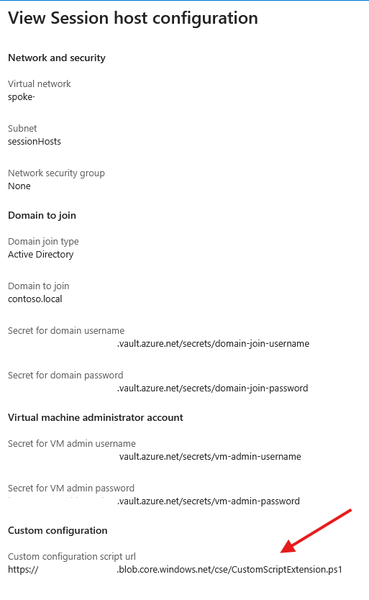
More security around using Custom Script Extensions and Session Host Configuration
We are currently implementing and testing the new Session Host Configuration and Session Host Management features. We rely on Custom Script Extensions to implement some functionality immediately to the newly deployed Session Hosts instead of waiting for GPOs or other to take effect. We don't add these changes to the golden images. Currently the Custom Script Extensions functionality definable in the Session Host Configuration only allows to define a script URL. What is the intended mechanism of authentication for this solution? Currently it seems that its only possible to use an anonymous access level Blob. Defining a token within the script URL is not great due to the fact that the URL is viewable in plain text via the Azure Portal. Neither of those will satisfy. Key vault references are used when defining credentials for domain join and local admin accounts for the Session Hosts. Would it be possible to have key vault references for CSE Storage Account Name/Key or SAS token or the possibility to define a Managed Identity instead. These can be defined when deploying the CSEs manually. Please guide me as to what the best solution would be to this topic. Many thanks in advance.
Add Search to Remote Desktop client for Windows
As an Azure Administrator responsible for managing extensive cloud infrastructure, I rely heavily on this client to access multiple Azure Virtual Desktop (AVD) environments. My current responsibilities involve managing a large and growing pool of AVDs, each providing access to a specific environment (e.g., development, staging, production, or customer-specific resources). Currently, I have no easy or efficient way to look up the relevant AVD within the client interface. The lack of a search bar forces me to manually scroll through long lists of connection icons and names whenever I need to switch contexts. This process is time-consuming, prone to error, and significantly hinders my productivity, especially during time-sensitive administrative tasks or troubleshooting efforts. Implementing a simple, functional search bar would drastically improve the user experience for administrators like myself by providing immediate access to the required virtual desktop connection.41Views0likes0CommentsUpdate 'Update-AzWvdSessionHost' cmdlet
Today via the PowerShell cmdlet 'Update-AzWvdSessionHost', an administrator can assign a user to a session host without the user being assigned to the applicationgroup. This can cause some confusion to administrators if they are able to perform this task as the user will not be able to see the host in the Windows App. The suggestion would be to either put in a check which denies the assignment if the user is not associated with the applicationgroup directly or indirectly via group association. Or, update the cmdlet to also add an assignment to the application group by adding a required parameter which would assign the user to the application group. It's a small tweak but it may help with the overall stability of the Desktop.Virtualization PowerShell stack. Thanks!72Views0likes0CommentsFslogix. Add a command line to release the profile.
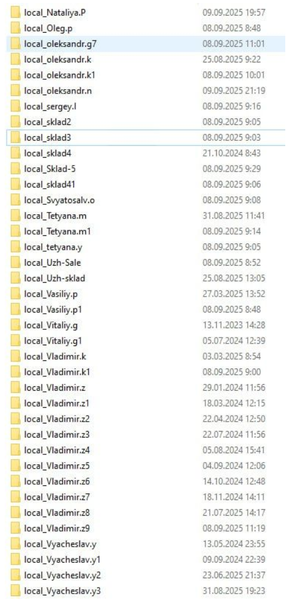
Hello. Add a command line with arguments to be able to release frozen folders in FSlogix. If you don't want to fix the problem, let me automate it myself. In large RDS installations, constant freezes and further duplication of local_%username% folders cause problems.85Views1like0Comments
I would like AVD to support in-place upgrades
I'm using Windows 11 multi-session (23H2) with an AVD. I'm disappointed that in-place upgrade to 24H2 is not supported. It's nonsense that the only way to upgrade to 24H2 or 25H2 is to create a new environment from the Marketplace. No one wants to spend a lot of time creating an environment every year. Please support in-place upgrades.179Views2likes2Comments