administration
553 Topics
Support Live Session Migration for Windows 11 Enterprise Multi-Session AVD Hosts
Description Azure Virtual Desktop administrators regularly encounter maintenance scenarios where a Windows 11 Enterprise Multi-Session session host must be removed from service to apply urgent patches, investigate platform issues, replace a host, or perform emergency maintenance. The current approach requires placing the session host into drain mode and waiting for active user sessions to disconnect or forcing user logoff, which can disrupt productivity and user experience. It would be valuable if Azure Virtual Desktop supported live migration of active user sessions between Windows 11 Enterprise Multi-Session hosts within the same host pool, similar to the way virtual machine live migration minimises downtime during infrastructure maintenance. This capability would allow administrators to move active sessions from one session host to another without requiring user disconnection or application interruption. This feature would provide significant operational benefits, including: Reduced user disruption during planned and emergency maintenance. Faster remediation of unhealthy or degraded session hosts. Improved patching and update operations. Reduced dependency on large maintenance windows. Improved service availability for business-critical AVD environments. Better support for future hot patching and rolling maintenance scenarios. While Windows 11 Enterprise Multi-Session differs significantly from Windows Server and traditional VM live migration technologies, the ability to seamlessly relocate active user sessions between healthy hosts in a host pool would be a major enhancement for enterprise Azure Virtual Desktop deployments operating at scale.201Views6likes1Comment
More security around using Custom Script Extensions and Session Host Configuration
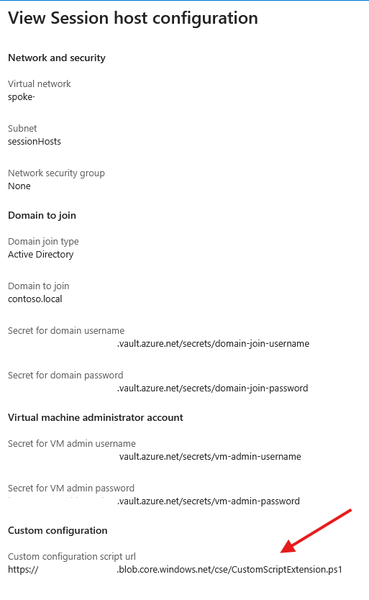
We are currently implementing and testing the new Session Host Configuration and Session Host Management features. We rely on Custom Script Extensions to implement some functionality immediately to the newly deployed Session Hosts instead of waiting for GPOs or other to take effect. We don't add these changes to the golden images. Currently the Custom Script Extensions functionality definable in the Session Host Configuration only allows to define a script URL. What is the intended mechanism of authentication for this solution? Currently it seems that its only possible to use an anonymous access level Blob. Defining a token within the script URL is not great due to the fact that the URL is viewable in plain text via the Azure Portal. Neither of those will satisfy. Key vault references are used when defining credentials for domain join and local admin accounts for the Session Hosts. Would it be possible to have key vault references for CSE Storage Account Name/Key or SAS token or the possibility to define a Managed Identity instead. These can be defined when deploying the CSEs manually. Please guide me as to what the best solution would be to this topic. Many thanks in advance.