administration
553 Topics
Azure Virtual Desktop for Guest User / B2b Identity
All of our external customers have their own AAD / Entra ID and wish to not manage multiple identities. As we present our applications via AVD, it requires them to have a separate identity in our tenant currently. AVD should support guest accounts from another tenant to be able to sign in. Currently, per the documentation and per the ticket I just worked with Microsoft support: Azure Virtual Desktop doesn't support external identities, including guest accounts or business-to-business (B2B) identities. Whether you're serving internal commercial purposes or external users with Azure Virtual Desktop, you'll need to create and manage identities for those users yourself. Please continue development to allow guest accounts that have been invited into a tenant to sign in to AVD machines. Thanks!2.9KViews31likes10Comments
Enable Screen Capture Protection via Host Pool settings
Dear product group, a feature that is key for security departments when using AVD / WVD is Screen Capture Protection. It would be super helpful to be able to enable / disabled the feature from within the Host Pool properties for the increased administrative experience. Thank you!1.8KViews18likes1CommentOffice 365 Message Attribution
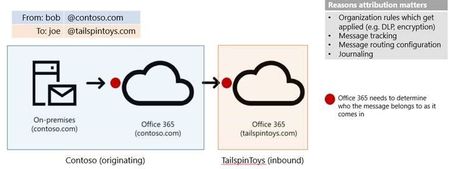
When a message arrives at Office 365, one of the first things we need to do is figure out which organization it belongs to. At first, this sounds simple – just look at the recipient, right? Well, it is more complicated than that, because of Hybrid and complex routing scenarios.113KViews16likes15Comments