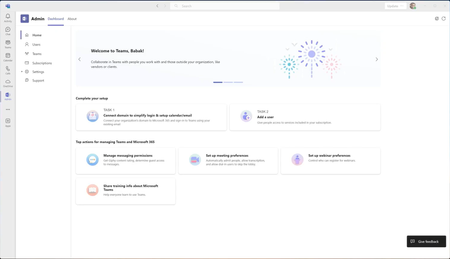
admin app
4 TopicsDepreciation of Custom Controls in favor of External MFA
Deprecation of Custom controls Custom controls are being deprecated in favor of External MFA. Existing configurations keep working during the transition, but you should begin migration planning now. Custom controls retire September 30, 2026, and reach end of life in May 2027. When will you see this change? Custom controls will be retired on September 30, 2026, and the service will reach end of life in May 2027. Who will be affected by this change? This update affects organizations currently using Custom controls to integrate third-party MFA providers with Conditional Access. How will this affect your organization? Organizations relying on Custom controls will need to transition to External MFA to maintain support and continue using third-party MFA solutions within Microsoft Entra ID. Moving to External MFA also enables more consistent Conditional Access enforcement and improved integration with Microsoft Entra security capabilities. What do you need to do to prepare? Organizations should: Review existing Custom controls integrations Evaluate External MFA migration requirements Test Conditional Access policies and user experiences before migration Begin migration planning ahead of the retirement date Read more in the External MFA General Availability announcement and migration guidance.457Views0likes0CommentsCreate a healthy Teams environment for your VSB using the Admin app
Welcome to the Teams Admin app The Teams Admin app is built especially for very small business administrators. It brings top administrator tasks, controls, learning material, and support options into one place within Teams. This allows you to complete admin tasks quickly and easily without having to juggle multiple windows and lose your flow within Teams. The app comes pre-installed and pre-pinned for very small business admins who have fewer than 25 users. If you have a larger organization and want to use the Admin app you can install it from the Teams app store. We just released a new home page experience earlier this week which bubbles up top actions that you need to take to set up a healthy Teams environment for your business. The admin app allows you to connect your existing domain and email to Teams, manage your users (including resetting passwords), manage licenses, and adjust top Teams settings for your tenant without leaving your Teams flow. We're continuing to improve the Admin app and appreciate your feedback. Please give the app a try and let us know what you think! Learn more about the Admin app.
Exchange Trusted sender
Hi everyone, so our organization is using a third party software that has its own SMTP built in. however, that software lets us enter a from email, so we entered : mailto:email@ourdomain.com however, when that software sends emails, to our organization's users, the picture from that email is hidden and the user has to manually download it in outlook, and we would like the picture automatically downloaded. here are the option I tried so far. 1: allowed the public IP of the external SMTP. 2: used the PowerShell cmdlet: Set-MailboxJunkEmailConfiguration "user name" -TrustedSendersAndDomains @{Add="email@ourorganization.com"} This does not work since Microsoft does not allow trust sender our own domain. but when I manually enter the mailto:email@ourdomain.com, in the outlook safe senders, the picture is automatically downloaded, but this solution is not convenience because I need everyone to have it. GPO is not an option for us. 3: Set the spam confidence level (SCL) to '-1' in exchange The only thing I found so far, is to Import-ContactList of the email to all users, since by default Microsoft trusts contacts. if anyone has a better suggestion, I would gladly take it : we use exchange online Thank you !1.3KViews0likes0CommentsWhen I launch the Skype for Business Showing Offline All time
office 365 Skype for Business Developer Dear Team When i login on Skype for business basic 2016 on client showing offline all times and there is not given any tab (option) to change it so how do fix this issue and i also attached a screen-short.794Views0likes0Comments