adaptive cloud
78 TopicsIntroducing Azure Local: cloud infrastructure for distributed locations enabled by Azure Arc
Today at Microsoft Ignite 2024 we're introducing Azure Local, cloud-connected infrastructure that can be deployed at your physical locations and under your operational control. With Azure Local, you can run the foundational Azure compute, networking, storage, and application services locally on hardware from your preferred vendor, providing flexibility to meet your requirements and budget.92KViews24likes27CommentsEvolving Stretch Clustering for Azure Local
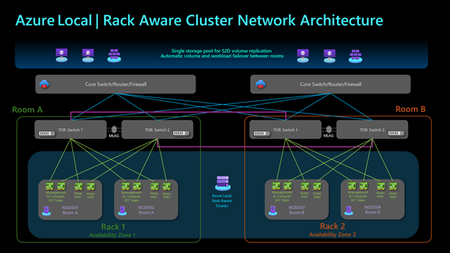
Stretched clusters in Azure Local, version 22H2 (formerly Azure Stack HCI, version 22H2) entail a specific technical implementation of storage replication that spans a cluster across two sites. Azure Local, version 23H2 has evolved from a cloud-connected operating system to an Arc-enabled solution with Arc Resource Bridge, Arc VM, and AKS enabled by Azure Arc. Azure Local, version 23H2 expands the requirements for multi-site scenarios beyond the OS layer, while Stretched clusters do not encompass the entire solution stack. Based on customer feedback, the new Azure Local release will replace the Stretched clusters defined in version 22H2 with new high availability and disaster recovery options. For Short Distance Rack Aware Cluster is a new cluster option which spans two separate racks or rooms within the same Layer-2 network at a single location, such as a manufacturing plant or a campus. Each rack functions as a local availability zone across layers from OS to Arc management including Arc VMs and AKS enabled by Azure Arc, providing fault isolation and workload placement within the cluster. The solution is configured with one storage pool to reduce additional storage replication and enhance storage efficiency. This solution delivers the same Azure deployment and management experience as a standard cluster. This setup is suitable for edge locations and can scale up to 8 nodes, with 4 nodes in each rack. Rack Aware Cluster is currently in private preview and is slated to public preview and general release in 2025. For Long Distance Azure Site Recovery can be used to replicate on-premises Azure Local virtual machines into Azure and protect business-critical workloads. This allows Azure cloud to serve as a disaster recovery site, enabling critical VMs to be failed over to Azure in case of a local cluster disaster, and then failed back to the on-premises cluster when it becomes operational again. If you cannot fail over certain workloads to cloud and require long distance of disaster recovery, like in two different cities, you can leverage Hyper-V Replica to replicate Arc VMs to the secondary site. Those VMs will become Hyper-V VMs on the secondary site, they will become Arc VMs once they fail back to the original cluster on the first site. Additional Options beyond Azure Local If the above solutions in Azure Local do not cover your needs, you can fully customize your solution with Windows Server 2025 which introduces several advanced hybrid cloud capabilities designed to enhance operational flexibility and connectivity across various environments. Additionally, it offers various replication technologies like Hyper-V Replica, Storage Replica and external SAN replication that enable the development of tailored datacenter disaster recovery solutions. Learn more from the Windows Server 2025 now generally available, with advanced security, improved performance, and cloud agility - Microsoft Windows Server Blog What to do with existing Stretched clusters on version 22H2 Stretched clusters and Storage Replica are not supported in Azure Local, version 23H2 and beyond. However, version 22H2 stretched clusters can stay in supported state in version 23H2 by performing the first step of operating system upgrade as shown in the following diagram to 23H2 OS. The second step of the solution upgrade to Azure Local is not applicable to stretched clusters. This provides extra time to assess the most suitable future solution for your needs. Please refer to the About Azure Local upgrade to version 23H2 - Azure Local | Microsoft Learn for more information on the 23H2 upgrade. Refer the blog on Upgrade from Azure Stack HCI, version 22H2 to Azure Local | Microsoft Community Hub. Conclusion We are excited to be bringing Rack Aware Clusters and Azure Site Recovery to Azure Local. These high availability and disaster recovery options allow customers to address various scenarios with a modern cloud experience and simplified management.16KViews16likes0Comments
Simplified access to Hotpatching enabled by Azure Arc for Windows Server 2025
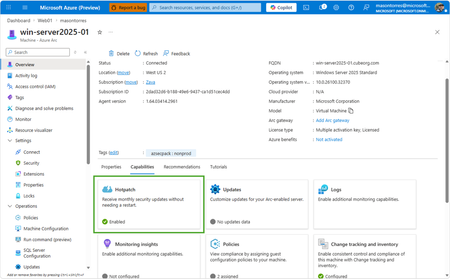
With Windows Server 2025, we introduced hotpatch enabled by Azure Arc, delivering security updates to Windows Server across hybrid and multicloud environments – minimizing downtime (no reboot), accelerating protection, and unifying patch management. We know that keeping your servers updated with the latest patches is one of the critical tasks that IT teams perform day-to-day. We want to make it simpler to install the latest operating system (OS) updates without rebooting machines after every installation. The resounding feedback we have received from you underscored the criticality of this feature in the lifecycle management and security of your infrastructure. We are now taking it one step further to reduce the friction to deploying these critical updates: hotpatch enabled by Azure Arc is now available at no additional cost for Windows Server 2025. Which machines are eligible for this offer? To use hotpatch for Windows Servers running on-premises or in multicloud environments, you must be using Windows Server 2025 Standard or Datacenter, and your server must be connected to Azure Arc. With this announcement, enabling and usage of the hotpatching service is available at no additional charge. Please take note that there are no charges for customers running on Azure IaaS, or Azure Local, wherein hotpatching is available as part of the functionality of Windows Server Datacenter: Azure Edition. This feature is already included both with Windows Server 2022 Datacenter: Azure Edition and Windows Server 2025 Datacenter: Azure Edition. How do I manage hotpatches enabled by Azure Arc for Windows Server 2025? If your Windows Server 2025 machines aren't already connected to Azure Arc, install the Azure Connected Machine agent — it takes just a few minutes per server and supports at-scale rollout via Group Policy, service principal, or Terraform. Once connected, enable Hotpatch from the Azure portal, Azure PowerShell, Azure CLI, or the REST API — just confirm Virtualization-based security (VBS is enabled) first. From there, use Azure Update Manager to schedule and monitor rollouts at scale. For instructions on how to enable hotpatch for Azure Arc-enabled machines using group policy or scripts, learn more here: https://aka.ms/ws-hotpatch For patch orchestration at scale, you can use Azure Update Manager to deliver hotpatches enabled by Azure Arc for Windows server 2025 machines. This enables greater uptime with fewer reboots and faster deployment of updates with easy patch orchestration. Alternatively, you can use APIs or other management tools to manage hotpatches. Centralized management of hotpatch updates across hybrid and multicloud environments enabled by Azure Arc Once your machines are connected to Azure Arc, you can also use the cloud-native services from Azure to manage your windows machines running on-prem. Azure Arc enables you to standardize security and governance across a wide range of resources so you can easily organize, govern and secure Windows, Linux, SQL servers, and Kubernetes clusters running across data centers, edge, and multi-cloud environments – using Azure services such as Azure Policy, Azure Monitor, Microsoft Defender and more. At no additional cost for machines attached to Azure Arc Basic inventory across on-prem and multi-cloud Tag your resources, organize them into resource groups, subscriptions, and management groups, and query at scale with Azure Resource Graph to unify your environments. Infra as Code (Bicep, Terraform) Infra as code for provisioning and management of resources. VM Self Service Perform lifecycle management such as (create, resize, update and delete) and power cycle operations such as (start, stop, and restart on VMware vCenter and System Center Virtual Machine Manager Virtual Machines. Hotpatch for Windows Server 2025 NEW Windows Server hot patching enables you to apply security updates without rebooting, keeping systems secure while maintaining continuous uptime. VM Management Administrate your servers anywhere using SSH for Azure Arc, Run Command, and Custom Script Extension. Mgmt. Services included for no additional costs with Windows Server Software Assurance or Extended Security Updates Azure Update Manager Provides a unified, centralized service to monitor, orchestrate, and automate patching across Azure, on‑prem, and multi‑cloud environments ensuring security, compliance, and minimal downtime at scale. Azure Machine Configuration (Policy) Policy‑driven auditing and enforcement of OS and application settings as code across Azure and hybrid machines—ensuring consistent, compliant state at scale. Including compliance policies like CIS Benchmark and WinRE Change Tracking & Inventory Real‑time visibility into configuration changes and system state across your fleet enabling faster troubleshooting, improved security, and continuous compliance at scale. VM insights from Azure Monitor Delivers a unified, pre‑built observability experience that provides real‑time performance, health, and dependency visibility across VMs—enabling faster troubleshooting, optimization, and capacity planning at scale. Windows Admin Center Unified, browser‑based management plane to securely manage Windows servers, VMs, and hybrid infrastructure from anywhere—simplifying operations and improving efficiency at scale. Best Practices Assessment Continuously evaluation your server configurations against Microsoft-recommended standards to proactively identify risks and provide actionable remediation guidance—improving security, performance, and operational health at scale. Frequently Asked Questions What are hotpatch updates? Hotpatch updates are monthly security updates that take effect without requiring you to restart the device. They contain a full set of security updates equivalent to the standard updates released the same day. What is the hotpatch update cycle? All eligible Windows Server 2025 machines enrolled in hotpatch are offered up to 8 monthly hotpatch updates in a calendar year in a quarterly cycle: Baseline month: In January, April, July, and October, devices install the monthly cumulative security update and must restart for the update to take effect. This update includes the latest security fixes, cumulative new features, and enhancements since the last baseline. Subsequent two months: Devices receive hotpatch updates, which only include security updates and don't require a restart for the update to take effect. These devices will catch up on features and enhancements with the next cumulative baseline month (quarterly). Will billing be stopped for existing enrolled machines? Yes, as of 15 th May 2026 all billing for hotpatch has been stopped for all existing machines enrolled in hotpatch. What action do we need to take if we have machines enrolled in hotpatch already? There is no additional action needed for machines that are currently enrolled in hotpatch. These machines will remain enrolled in hotpatch and receive hotpatch updates when available. I want all my Windows Server 2025 machines to get hotpatches. How do I do it? If you have Windows Server 2025 machines on-premises or on cloud (other than Azure) then you can enable hotpatch on them. To do so, ensure these machines have Virtualization Based Security enabled and are connected to Azure Arc and then you can use Azure Arc portal, Azure Update manager or APIs to enable hotpatch. Learn more: https://aka.ms/ws-hotpatch Is anything changing for Hotpatching on Azure? Hotpatch continues to be available on Azure for your Windows Server 2022 and Windows Server 2025 VMs when using Azure Edition. There is no fee associated with Hotpatching on Azure. Learn more here. Is there a community forum for Arc? Yes, you can join the Azure Arc Monthly Forum here: aka.ms/ArcServerForumSignup4.9KViews10likes5CommentsAnnouncing General Availability: Windows Server Management enabled by Azure Arc
Windows Server Management enabled by Azure Arc offers customers with Windows Server licenses that have active Software Assurances or Windows Server licenses that are active subscription licenses the following key benefits: Azure Update Manager Azure Change Tracking and Inventory Azure Machine Configuration Windows Admin Center in Azure for Arc Remote Support Network HUD Best Practices Assessment Azure Site Recovery (Configuration Only) Upon attestation, customers receive access to the following at no additional cost beyond associated networking, compute, storage, and log ingestion charges. These same capabilities are also available for customers enrolled in Windows Server 2025 Pay as you Go licensing enabled by Azure Arc. Learn more at Windows Server Management enabled by Azure Arc - Azure Arc | Microsoft Learn or watch Video: Free Azure Services for Non-Azure Windows Servers Covered by SA Powered by Azure Arc! To get started, connect your servers to Azure Arc, attest for these benefits, and deploy management services as you modernize to Azure's AI-enabled set of server management capabilities across your hybrid, multi-cloud, and edge infrastructure!20KViews10likes10CommentsMicrosoft 365 Local is Generally Available
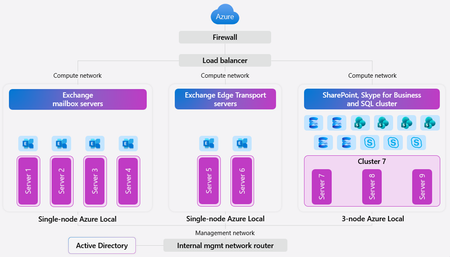
In today’s digital landscape, organizations and governments are prioritizing data sovereignty to comply with local regulations, protect sensitive information, and safeguard national security. This growing demand for robust jurisdictional controls makes the Microsoft Sovereign Cloud offering especially compelling, providing flexibility and assurance for complex requirements. For those with the most stringent needs, Azure Local enables data and workloads to remain within jurisdictional borders, supporting mission-critical workloads and now expanding to include Microsoft’s productivity solutions—so customers can securely collaborate and communicate within a sovereign private cloud environment. Today, we’re excited to announce the general availability of Microsoft 365 Local. Microsoft 365 Local is a deployment framework for enabling core collaboration and communication tools—including Exchange Server, SharePoint Server, and Skype for Business Server—on Azure Local. Built on a validated reference architecture using Azure Local Premier Solutions , it provides compatibility and support for sovereign deployments. Partner-led services provide guidance on sizing and configuration, ensuring a full-stack deployment including best practices for networking and security. Managing infrastructure across a wide range of workloads is simplified with Azure as your control plane, offering cloud-consistent, at-scale management capabilities. In the Azure portal, you get full visibility into your Microsoft 365 Local deployment across the servers and clusters. All hosts and virtual machines (VMs) are Arc-enabled out of the box, providing built-in visibility into connectivity, health, updates, and security alerts and recommendations. Microsoft 365 Local leverages Azure Local’s best-in-class sovereign and security controls, including Network Security Groups managed with Software Defined Networking enabled by Azure Arc, to isolate networks and secure access to infrastructure and workloads. Azure Local also uses a secure by default strategy by applying a security baseline of over 300 settings on both the host infrastructure and the VMs running the productivity workloads. These security baselines incorporate best practices for network security, identity management, privileged access, data protection, and more—helping organizations maintain compliance and reduce risk. Customers who want to take advantage of Azure as the control plane for Microsoft 365 Local can now benefit from a seamless cloud-based infrastructure management experience, including Azure services like Azure Monitor and Microsoft Defender for Cloud—available today with Microsoft 365 Local connected to Azure. For organizations with the most stringent jurisdictional requirements that need to operate Microsoft 365 Local in a fully disconnected environment, support for Azure Local disconnected operations will be available in early 2026. To learn more about Microsoft 365 Local, visit https://aka.ms/M365LocalDocs. If you’d like to connect with an authorized partner for consultation and deployment support, reach out to your Microsoft account team or visit https://aka.ms/M365LocalSignup.22KViews9likes6CommentsAnnouncing Public Preview: Simplified Machine Provisioning for Azure Local
Deploying infrastructure at the edge has always been challenging. Whether it’s retail stores, factories, branch offices, or remote sites, getting servers racked, configured, and ready for workloads often require skilled IT staff on-site. That process is slow, expensive, and error-prone, especially when deployments need to happen at scale. To address this, we’re introducing Public Preview of Simplified Machine Provisioning for Azure Local - a new way to provision Azure Local hardware with minimal onsite interaction, while maintaining centralized control through Azure. This new approach enables customers to provision hardware by racking, powering on, and letting Azure do the rest. New Machine Provisioning Simplified machine provisioning shifts configuration to Azure, reducing the need for technical expertise on-site. Instead of manually configuring each server locally, IT teams can now: Define provisioning configuration centrally in Azure Securely complete provisioning remotely with minimal steps Automate provisioning workflows using ARM templates and ensure consistency across sites Built on Open Standards Simplified machine provisioning on Azure Local is based on the FIDO Device Onboarding (FDO) specification, an industry-standard approach for securely onboarding devices at scale. FDO enables: Secure device identity and ownership transfer protecting machines with zero trust supply chain security A consistent onboarding model across device classes, this foundation can extend beyond servers to broader edge scenarios. Centralized Site-Based Configuration in Azure Arc The new machine provisioning flow uses Azure Arc Site, allowing customers to define configuration once and apply it consistently across multiple machines. In Azure Arc, a site represents a physical business location (store/factory/campus) and the set of resources associated with it. It enables targeted operations and configuration at a per‑site level (or across many sites) for consistent management at scale. With site-based configuration, customers can: Create and manage machine provisioning settings centrally in the Azure portal Define networking and environment configuration at the site level Reuse the same configuration as new machines are added Minimal Onsite Interaction Simplified provisioning is designed to minimize onsite effort. The on-site staff only rack and power on the hardware and insert the prepared USB. No deep infrastructure or Azure expertise required. After exporting the ownership voucher and sharing it with IT, the remaining provisioning is completed remotely by IT teams through Azure. The prepared USB is created using a first‑party Microsoft USB Preparation Tool that comes with the maintenance environment* package available through the Azure portal, enabling consistent, repeatable creation of bootable installation media. *Maintenance environment - a lightweight bootstrap OS that connects the machine to Azure, installs required Azure Arc extensions, and then downloads and installs the Azure Local operating system. End-to-End visibility into Deployment Customers get visibility into deployment progress which helps in quickly identifying where a deployment is in the process and respond faster when issues arise. They can look into the status using Provisioning experience in Azure portal or using Configurator app. Seamless Transition to Cluster Creation and Workloads Once provisioning is complete, machines created through this flow are ready for Azure Local cluster creation. Customers can proceed with cluster setup and workload deployment. How it works? At a high level, this simpler way of machine provisioning looks like this: Minimal onsite setup Prepare a USB drive using machine provisioning software Insert the prepared USB drive & boot the machine Share the machine ownership voucher with IT team. Provision remotely Create an Azure Arc site Configure networking, subscription, and deployment settings Download provisioning artifacts from the Azure portal Deploy Azure Local cluster using existing flows in Azure Arc. Once provisioning is complete, the environment is ready for cluster creation and workload deployment on Azure Local. Status and progress are visible in both the Azure portal, and the Configurator app. IT teams can monitor, troubleshoot, and complete provisioning remotely. Available Now in Public Preview This new experience empowers organizations to deploy Azure Local infrastructure faster, more consistently, and at scale, while minimizing on-site complexity. We invite customers and partners to explore the preview and help us shape the future of edge infrastructure deployment. Try it at https://aka.ms/provision/tryit. Refer documentation for more details.3.2KViews8likes4CommentsAzure Local expands to sovereign-scale infrastructure with disaggregated deployments
As organizations accelerate digital transformation across datacenters, sovereign environments, and edge locations, infrastructure architectures must evolve to meet new operational and regulatory demands. The first feature update of Azure Local in CY 2026 (version 2604) marks a significant step forward—expanding Azure Local as a platform for sovereign private cloud infrastructure, introducing larger scale, disaggregated deployment architectures, expanded storage ecosystem partnerships, and simplified identity capabilities that unlock entirely new infrastructure scenarios from edge locations to enterprise-scale environments. This release is focused on enabling: Sovereign private cloud deployments at scale from single node up to multi-rack infrastructure Infrastructure modernization through SAN reuse and disaggregated architectures Simplified edge deployment without Microsoft Active Directory dependencies Faster lifecycle operations across deployment and update workflows Introducing disaggregated larger scale deployments using SAN storage Azure Local now supports a disaggregated infrastructure architecture, allowing customers to deploy compute and storage resources independently—while continuing to benefit from an Azure-consistent management and operational experience. This enables organizations to scale infrastructure more flexibly separating compute and storage to align with workload demands and long-term growth. This architecture enables: Independent scaling of compute nodes and storage infrastructure SAN‑only and hybrid storage architectures for Azure Local infrastructure and workloads Fibre Channel (FC) connectivity support beginning with 2604 (iSCSI coming soon) With disaggregated deployments and SAN storage, Azure Local clusters can now scale from a single node at the edge to multi-rack environments spanning beyond 16 nodes and up to thousands of nodes, addressing growing demand for large-scale deployments across sovereign, government, defense, and regulated environments. This unlocks new class of Azure -consistent infrastructure deployments at sovereign scale. This unlocks a new class of Azure-consistent infrastructure deployments at sovereign scale. This new capability is generally available with the release of Azure Local 2604. General Availability of SAN Support for Azure Local Support for attaching SAN storage to Azure Local was introduced as public preview back in November 2025. Today this brownfield expansion capability is generally available and allows external SAN devices to be introduced into already deployed Azure Local instances via Fibre Channel (FC)—supporting virtual machines, Kubernetes environments, and Azure Virtual Desktop workloads without requiring disruptive infrastructure changes or full system refresh. Azure Local instances now support the coexistence of Storage Spaces Direct volumes and external SAN volumes. Support for SAN-attached deployments allows organizations to: Reuse existing enterprise SAN investments Modernize infrastructure without replacing existing storage estates Manage rising disk costs associated with hyperconverged architectures Enable workload scenarios that depend on massive storage requirements These innovative capabilities supporting disaggregated deployments and SAN storage are supported by a strong ecosystem of hardware partners. DataON, Dell Technologies, Everpure, HPE, Hitachi Vantara, Lenovo and NetApp are working with Microsoft to deliver configurations, giving customers more flexibility in how they design and scale their infrastructure. General Availability of Local Identity with Azure Key Vault While disaggregated architectures primarily target sovereign and centralized datacenter deployments, Azure Local 2604 also introduces a major advancement for distributed and edge scenarios. With the General Availability of Local Identity with Key Vault, Azure Local can now be provisioned without infrastructure dependencies on Microsoft Active Directory, enabling simplified deployment in disconnected, air-gapped, and regulated environments. This simplifies deployment and adoption, by removing the need for extra hardware running domain controllers and removing the complexity of firewall configurations when installing in isolated network environments. Azure Local 2604 adds support for deploying rack-aware clusters using Local Identity with Azure Key Vault. This combines reduced requirements with the high availability that customers demand across manufacturing, energy, and other industries. This capability removes one of the key barriers to deploying Azure-consistent infrastructure in sovereign and edge environments. Pricing Changes Pricing for multi-rack and sovereign-scale deployments is being introduced as part of this release. Customers should connect with their Microsoft account team to learn more about pricing, configuration options, and early access programs as these offerings continue to actively evolve. Getting started Release 2604 is available for both existing and new Azure Local instances. Review the release note for Azure Local 2604 release here Learn more about disaggregated deployments here Learn more about SAN attach here Learn more about Local Identity with Azure Key Vault here. Learn more about hardware configurations that support disaggregated deployments using the solutions catalog or learn directly from our partners: o DataON: “DataON Premier Solutions for Azure Local provide a premium Azure Local experience that includes deployment, integration, training, and white glove service & support. Our goal is to not only get you up and running quickly but also to help your team to be confident in managing Azure Local.” o Dell Technologies: “Coming Soon, Dell Private Cloud–Microsoft enables a modern disaggregated architecture, simplifying operations across Dell PowerEdge compute, Dell PowerStore storage, and Azure Local.” “Available now, Dell PowerStore delivers high-performance, scalable, and resilient storage for Azure Local, with support for Dell Private Cloud coming soon to make it easier to streamline operations for storage, compute, and your Azure Local license.” o Everpure: “Azure Local now supports external storage with Everpure FlashArray, offering Azure Local customers unprecedented levels of scale, performance and efficiency with the added benefit of seamless hybrid cloud integration with Everpure Cloud in Azure.” o Hitachi Vantara: “Hitachi Vantara VSP and VSP One Block, fully validated to meet Microsoft's Azure Local storage requirements, deliver enterprise SAN reliability for Azure Local.” o HPE: “HPE ProLiant Compute Premier Solutions for Azure Local enable customers to gain full control over data residency, and accelerate innovation with industry-leading performance, security, and management automation.” “HPE Alletra Storage MP B10000 integrated with Azure Local delivers a unified, Azure managed experience with the simplicity of Azure Local plus the advanced data services of a modern enterprise storage platform.” o Lenovo: “Lenovo is expanding its Azure Local portfolio to support disaggregated infrastructure designs that deliver greater choice across compute and storage. The ThinkAgile Disaggregated Solution for Microsoft Azure Local with new compute-only configurations on ThinkAgile MX Series enables customers to integrate ThinkSystem DM, DS, and DG Series storage arrays or bring their own Azure Local validated third party SAN arrays into new or existing Azure Local environments, allowing fully disaggregated, independent scaling using enterprise class Lenovo solutions for sovereign private cloud deployments and emerging AI workloads.” o NetApp: “With Azure Local, NetApp delivers support across NetApp® AFF, ASA, and FAS systems.” Thank you! This first feature release of 2026 is packed with innovation for Azure Local, and we can’t wait for you to try it and share feedback. We are committed to listening to your feedback and delivering the next wave of capabilities in a continuously evolving world. Thank you to all our customers who trust Azure Local to run their business—and to our engineering partners for the incredible collaboration in building solutions together.5KViews7likes0CommentsCloud infrastructure for disconnected environments enabled by Azure Arc
Organizations in highly regulated industries such as government, defense, financial services, healthcare, and energy often operate under strict security and compliance requirements and across distributed locations, some with limited or no connectivity to public cloud. Leveraging advanced capabilities, including AI, in the face of this complexity can be time-consuming and resource intensive. Azure Local, enabled by Azure Arc, offers simplicity. Azure Local’s distributed infrastructure extends cloud services and security across distributed locations, including customer-owned on-premises environments. Through Azure Arc, customers benefit from a single management experience and full operational control that is consistent from cloud to edge. Available in preview to pre-qualified customers, Azure Local with disconnected operations extends these capabilities even further – enabling organizations to deploy, manage, and operate cloud-native infrastructure and services in completely disconnected or air-gapped networks. What is disconnected operations? Disconnected operations is an add-on capability of Azure Local, delivered as a virtual appliance, that enables the deployment and lifecycle management of your Azure Local infrastructure and Arc-enabled services, without any dependency on a continuous cloud connection. Key Benefits Consistent Azure Experience: You can operate your disconnected environment using the same tools you already know - Azure Portal, Azure CLI and ARM Templates extended through a local control plane. Built-in Azure Services: Through Azure Arc, you can deploy, update, and manage Azure services such as Azure Local VMs, Azure Kubernetes Service (AKS), etc. Data Residency and Control: You can govern and keep data within your organization's physical and legal jurisdiction to meet data residency, operational autonomy, and technological isolation requirements. Key Use Cases Azure Local with disconnected operations unlocks a range of impactful use cases for regulated industries: Government and Defense: Running sensitive government workloads and classified data more securely in air-gapped and tactical environments with familiar Azure management and operations. Manufacturing: Deploying and managing mission-critical applications like industrial process automation and control systems for real-time optimizations in more highly secure environments with zero connectivity. Financial Services: Enhanced protection of sensitive financial data with real time data analytics and decision making, while ensuring compliance with strict regulations in isolated networks. Healthcare: Running critical workloads with a need for real-time processing, storing and managing sensitive patient data with the increased levels of privacy and security in disconnected environments Energy: Operating critical infrastructure in isolated environments, such as electrical production and distribution facilities, oil rigs, or remote pipelines. Here is an example of how disconnected operations for Azure Local can provide mission critical emergency response and recovery efforts by providing essential services when critical infrastructure and networks are unavailable. Core Features and capabilities Simplified Deployment and Management Download and deploy the disconnected operations virtual appliance on Azure Local Premier Solutions through a streamlined user interface. Create and manage Azure Local instances using the local control plane, with the same tooling experience as Azure. Offline Updates The monthly update package includes all the essential components: the appliance, Azure Local software, AKS, and Arc-enabled service agents. You can update and manage the entire Azure Local instance using the local control plane without an internet connection. Monitoring Integration You can monitor your Azure Local instances and VMs using external monitoring solutions like SCOM by installing custom management packs and monitor AKS Clusters through 3 rd party open-source solutions like Prometheus and Grafana. Run Mission-Critical Workloads – Anytime, Anywhere Azure Local VMs You can run VMs with flexible sizing, support for custom VM images, and high availability through storage replication and automatic failover – all managed through the local Azure interface. AI & Containers with AKS You can use disconnected AI containers with Azure Kubernetes Service (AKS) on Azure Local to deploy and manage AI applications in disconnected scenarios where data residency and operational autonomy is required. AKS enables the deployment and management of containerized applications such as AI agents and models, deep learning frameworks, and related tools, which can be leveraged for inferencing, fine-tuning, and training in isolated networks. AKS also automates resource scaling, allowing for the dynamic addition and removal of container instances to more efficiently utilize hardware resources, including GPUs, which are critical for AI workloads. This provides consistent Azure experience in managing Kubernetes clusters and AI workloads with the same tooling and processes in connected environments. Get Started: Resources and Next Steps Microsoft is excited to announce the upcoming preview of Disconnected Operations for Azure Local in Q3 ‘CY25 for both Commercial and Government Cloud customers. To Learn more, please visit Disconnected operations for Azure Local overview (preview) - Azure Local Ready to participate? Get Qualified! or contact your Microsoft account team. Please also check out this session at Microsoft Build https://build.microsoft.com/en-US/sessions/BRK195 by Mark Russinovich, one of the most influential minds in cloud computing. His insights into the latest Azure innovations, the future of cloud architecture and computing, is a must-watch event!4.1KViews7likes3CommentsExtending Azure's AI Platform with an adaptive cloud approach
Authored by Derek Bogardus and Sanjana Mohan, Azure Edge AI Product Management Ignite 2024 is here, and nothing is more top of mind for customers than the potential to transform their businesses with AI wherever they operate. Today, we are excited to announce the preview of two new Arc-enabled services that extend the power of Azure’s AI platform to on-premises and edge environments. Sign up to join the previews here! An adaptive cloud approach to AI The goal of Azure’s adaptive cloud approach is to extend just enough Azure to customers’ distributed environments. For many of these customers, valuable data is generated and stored locally, outside of the hyperscale cloud, whether due to regulation, latency, business continuity, or simply the large volume of data being generated in real time. AI inferencing can only occur where the data exists. So, while the cloud has become the environment of choice for training models, we see a tremendous need to extend inferencing services beyond the cloud to enable complete cloud-to-edge AI scenarios. Search on-premises data with generative AI Over the past couple of years, generative AI has come to the forefront of AI innovation. Language models give any user the ability to interact with large, complex data sets in natural language. Public tools like ChatGPT are great for queries about general knowledge, but they can’t answer questions about private enterprise data on which they were not trained. Retrieval Augmented Generation, or "RAG", helps address this need by augmenting language models with private data. Cloud services like Azure AI Search and Azure AI Foundry simplify how customers can use RAG to ground language models in their enterprise data. Today, we are announcing the preview of a new service that brings generative AI and RAG to your data at the edge. Within minutes, customers can deploy an Arc extension that contains everything needed to start asking questions about their on-premises data, including: Popular small and large language models running locally with support for both CPU and GPU hardware A turnkey data ingestion and RAG pipeline that keeps all data completely local, with RBAC controls to prevent unauthorized access An out-of-the-box prompt engineering and evaluation tool to find the best settings for a particular dataset Azure-consistent APIs to integrate into business applications, as well as a pre-packaged UI to get started quickly This service is available now in gated private preview for customers running Azure Local infrastructure, and we plan to make it available on other Arc-enabled infrastructure platforms in the near future. Sign up here! Deploy curated open-source AI models via Azure Arc Another great thing about Azure’s AI platform is that it provides a catalog of curated AI models that are ready to deploy and provide consistent inferencing endpoints that can be integrated directly into customer applications. This not only makes deployment easy, but customers can also be confident that the models are secure and validated These same needs exist on the edge as well, which is why we are now making a set of curated models deployable directly from the Azure Portal. These models have been selected, packaged, and tested specifically for edge deployments, and are currently available on Azure Local infrastructure. Phi-3.5 Mini (3.8 billion parameter language model) Mistral 7B (7.3 billion parameter language model) MMDetection YOLO (object detection) OpenAI Whisper Large (speech to text) Google T5 Base (translation) Models can be deployed from a familiar Azure Portal wizard to an Arc AKS cluster running on premises. All available models today can be run on just a CPU. Phi-3.5 and Mistral 7B also have GPU versions available for better performance. Once complete, the deployment can be managed directly in Azure ML Studio, and an inferencing endpoint is available on your local network. Wrap up Sign up now to join either of the previews at the link below or stop by and visit us in person in the Azure Arc and Azure Local Expert Meet Up station in the Azure Infrastructure neighborhood at Ignite. We’re excited to get these new capabilities into our customers’ hands and hear from you how it’s going. Sign up to join the previews here6KViews7likes2CommentsEmbed intelligence into physical systems with smaller form factor infrastructure (preview)
Written by Cosmos Darwin, Azure Edge PM, and Michael MacKenzie, VP of Digital Operations AI is transforming how we work, but so far it's mostly lived on your screen: agents and models assisting with information work. How can that intelligence take on physical work, too? Jobs that happen out in the world, like transporting goods, inspecting equipment, manufacturing products, and serving retail customers. This is already possible today, but developing autonomous robots remains highly complex and specialized. The real breakthrough will come when using AI in physical work is as simple and ubiquitous as it is on a screen. To get there, we need to go beyond software agents and embed intelligence directly into physical systems. Today at Microsoft Build 2026, we're announcing several new capabilities to help organizations everywhere get started. We're extending AI-ready Azure-managed infrastructure to smaller form factor hardware, bringing Foundry Local to it for running local AI agents and models, and adding support for Azure Kubernetes Service and Azure IoT Operations. Demo: a simple robot that thinks for itself Applied in combination, these capabilities can be surprisingly powerful. For Microsoft Build this week, we wanted to show you just how easy this can be. We put together a basic agentic robot using nothing but open-source AI models, commercial off-the-shelf sensors and robot hardware, and the new Azure previews we're announcing today. It's a playful example, but it illustrates what’s possible – check it out: Lightweight deployments on smaller form factor hardware (preview) First, we're extending Azure-based provisioning and management to smaller hardware form factors, using a lightweight, performance-oriented architecture built for AI workloads. Unlike hyperconverged and disaggregated deployments, this doesn’t rely on virtualization, and instead runs Linux (initially Azure Linux) directly on bare metal to host containers. You can choose whichever runtime tools you prefer, like Docker, open source k3s, or fully managed Azure Kubernetes Service. Each deployment is provisioned and managed from the cloud using a new type of resource called Provisioned Machine that looks and behaves a lot like an Azure VM – for example, you can see it in the Azure portal and govern access with Microsoft Entra ID. Over the coming months, we’ll be rolling out more features like update management, metrics, security configuration, and natively configurable child resources for network interfaces and disks. Screenshot of the new Provisioned Machine resource type in Azure portal. Provisioned Machines support lifecycle operations centrally from the Azure portal and APIs. Effectively, you can treat physical machines like cloud resources, removing the need for separate on-site IT tools. This makes it much more practical to scale across many distributed locations. For an organization like Chevron, whose operations span field sites around the world, that’s significant: "Chevron has a growing fleet of industrial edge devices that collect data in the field and increasingly perform local AI processing. Technologies like Azure Local on smaller form factors can help us manage these systems centrally and in a more automated way – reducing complexity compared to the customized OS environments and tools we use today." — Ed Moore, OT Strategist and Distinguished Engineer, Chevron Run agents and models locally with Foundry Local (preview) To embed intelligence into physical systems, Foundry Local is now available as a lightweight container image for Linux infrastructure. Foundry Local provides a consistent way to deploy and run agents and models, including an inference server that runs alongside your app container and exposes an OpenAI-compatible REST endpoint. It also offers a trusted source for the latest open-source models with an extensive online catalog. Although it integrates closely with Microsoft Foundry, at run time everything stays local: there's no round-trip to the cloud. Data stays on the machine, responses start instantly with zero network latency, and inferences continue even without connectivity. There are no per-token costs, either. Optimized for edge and industrial form factors, the new Foundry Local preview automatically detects and uses available accelerators like GPUs (and soon NPUs), lining up the full stack for you, from kernel drivers to user-mode libraries. For example, in our demo above, Foundry Local taps an Nvidia RTX 2000E GPU to deliver snappy inferences in real time. Diagram of the lightweight Linux architecture with container-based Azure services. More popular Azure services In addition to Foundry Local, these popular Azure services are validated too: Azure Kubernetes Service (AKS), the fully-managed enterprise-grade Kubernetes service, now runs directly on bare metal with small form factor deployments – no virtualization layer required. It's the same AKS already available in the cloud and on servers. Once deployed, the cluster looks and works exactly like AKS anywhere else – with Azure-based RBAC, networking, upgrades, monitoring, and even integrations like AKS Fleet Manager – so the controls and tooling you rely on in the cloud extend all the way to the industrial edge. Learn more and join the AKS preview Azure IoT Operations provides a unified data and control plane for physical assets at the edge. It includes a variety of connectors and an industrial-grade MQTT broker where local agents and logic can run – even with intermittent connectivity – to shape operational data into AI-ready forms, act on it autonomously, and connect into broader cloud analytics and AI systems. It provides a no-code graphical interface to configure data flows and contextualize data before sending it to destinations like Microsoft Fabric for Real-Time Intelligence, and allows you to send messages back to the physical machines it’s connected to. It's already generally available, and as seen in our demo above, it now works on small form factor deployments too. Learn more about Azure IoT Operations Choose the hardware that fits your requirements We're delighted to partner with leading makers of edge and industrial computers so you can deploy Azure-managed infrastructure on smaller form factor hardware that’s available to buy today – straight from your preferred vendor or distributor, with no special customization required. We’re partnering with leading makers of AI-ready edge and industrial computers. The most compact and affordable options are the ASUS NUC 14 Pro and 15 Pro. At barely 4 inches square and under 2 pounds, they pack the latest Intel® Core™ Ultra processors into a remarkably trim package, well suited to space-constrained scenarios like retail. Learn more about NUC 15 Pro “With ASUS NUC 14 Pro and 15 Pro, organizations have a powerful yet compact platform for innovation at the edge. When paired with Azure Local, these devices make it easy to deploy, manage, and scale AI workloads at the edge – unlocking real-time intelligence for retail stores and manufacturing environments while maintaining seamless integration with the cloud.” – (ASUS) KuoWei Chao, General Manager of ASUS NUC Business Unit For more flexibility, the industrial-grade Lenovo ThinkEdge SE100 offers expandable storage and networking, plus an optional Nvidia RTX A1000 (8GB) or 2000E (16GB) GPU to accelerate demanding edge AI inferencing. Learn more about ThinkEdge SE100 For the toughest operational and regulatory constraints, the OnLogic Helix 521 offers a fan-less design with no moving parts. Designed, assembled, and supported entirely in the USA, it takes the uncertainty out of meeting stringent supply-chain requirements. Learn more about the Hx521 Get started today We're excited to bring AI-ready infrastructure to where physical work happens, and we genuinely had a lot of fun making the agentic robot demo above. Now it's your turn. Small form factor deployments are available in public preview today, starting in the East US region. There is no charge during the preview. Once your hardware is ready, the Azure-based provisioning experience gets most previewers up and running in about an hour. Instructions to get started are on Microsoft Learn, and if you’d like to engage directly with our team, get in touch here. (If you need to evaluate before committing to hardware, you can spin it up on a virtual machine, though it’s not quite the same as real hardware.) Whether you're bringing intelligence to a fleet of machines, standing up inference next to your data, or building something we haven't even imagined yet, we can't wait to see what you create! - Cosmos & Mike on behalf of our global team in Redmond, Mountain View, Pittsburgh, and Bengaluru1.9KViews6likes1Comment