adaptive cards
35 Topics
Image inside adaptive not centered when posting in teams
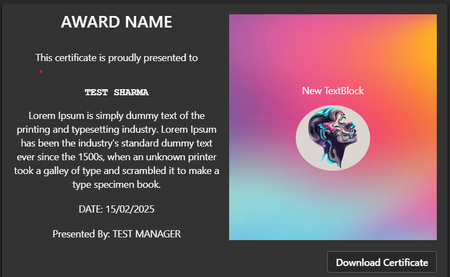
Hi team, I'm trying to post an adaptive card to teams via power automate. Below is the preview of adaptive card in adaptive card designer where it works as expected: Below is what I see in teams after it is posted: As you can see the image is left aligned for some reason while the text block remained intact. The strange thing is this has been functioning as expected until last week. Even existing cards posted to teams has been broken. Below is the card json: { "type": "AdaptiveCard", "$schema": "https://adaptivecards.io/schemas/adaptive-card.json", "version": "1.5", "minHeight": "300px", "verticalContentAlignment": "Top", "body": [ { "type": "ColumnSet", "horizontalAlignment": "Center", "columns": [ { "type": "Column", "width": "stretch", "items": [ { "type": "TextBlock", "text": "AWARD NAME", "wrap": true, "horizontalAlignment": "Center", "maxLines": 3, "style": "heading", "fontType": "Default", "size": "ExtraLarge", "weight": "Bolder", "color": "Default", "isSubtle": false }, { "type": "Container", "items": [ { "type": "TextBlock", "text": "This certificate is proudly presented to", "wrap": true } ], "horizontalAlignment": "Center", "minHeight": "60px", "verticalContentAlignment": "Center" }, { "type": "TextBlock", "text": "TEST SHARMA", "wrap": true, "horizontalAlignment": "Center", "style": "default", "fontType": "Monospace", "weight": "Bolder" }, { "type": "TextBlock", "text": "Lorem Ipsum is simply dummy text of the printing and typesetting industry. Lorem Ipsum has been the industry's standard dummy text ever since the 1500s, when an unknown printer took a galley of type and scrambled it to make a type specimen book.", "wrap": true }, { "type": "TextBlock", "text": "DATE: 15/02/2025", "wrap": true, "spacing": "Medium" }, { "type": "TextBlock", "text": "Presented By: TEST MANAGER", "wrap": true, "spacing": "Medium", "horizontalAlignment": "Center" } ], "horizontalAlignment": "Center" }, { "type": "Column", "width": "stretch", "backgroundImage": { "url": "https://media.istockphoto.com/id/1185382671/vector/abstract-blurred-colorful-background.jpg?s=612x612&w=0&k=20&c=3YwJa7lCw-cQ-hviINULUokL9lYU4RuGjMP_E_0N8E4=", "horizontalAlignment": "Center" }, "horizontalAlignment": "Center", "verticalContentAlignment": "Center", "rtl": false, "items": [ { "type": "TextBlock", "text": "New TextBlock", "wrap": true }, { "type": "Image", "url": "https://w0.peakpx.com/wallpaper/419/208/HD-wallpaper-face-art-abstract-face-painting-profile.jpg", "style": "Person", "size": "Large", "horizontalAlignment": "Center", "altText": "test", "targetWidth": "AtLeast:Standard" } ], "height": "stretch" } ], "spacing": "None", "minHeight": "300px" }, { "type": "ActionSet", "actions": [ { "type": "Action.OpenUrl", "title": "Download Certificate", "url": "https://neudesic.sharepoint.com/:b:/s/neudev/EWDLSQoUHQJGkM-LwPJgwhkB-qVs8nk06027geBe22MUEA?e=WzscF0", "tooltip": "Download" } ], "horizontalAlignment": "Right", "spacing": "Medium" } ], "msTeams": { "width": "full" } }905Views0likes9Comments
Adaptive cards aren't rendering on Teams sent from Webhook
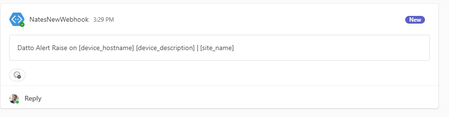
I'm trying to make an AdaptiveCard that will show some information about an outage. This JSON looks great on adaptivecards.io/designer, but everything inside the 'body' isn't rendered in Teams. Here is an image of what appears when I try to call the webhook. And here's what it looks like on adaptivecards.io { "text": "Datto Alert Raise on [device_hostname] [device_description] | [site_name]", "fallbackText": "Datto Alert Resolve on [device_hostname] [device_description] | [site_name]", "$schema": "http://adaptivecards.io/schemas/adaptive-card.json", "type": "AdaptiveCard", "version": "1.5", "body": [ { "type": "TextBlock", "size": "default", "weight": "default", "color": "default", "text": "Datto" }, { "type": "TextBlock", "text": "New Datto RMM alert", "wrap": true }, { "type": "TextBlock", "text": "New alert on [device_hostname] [device_description] | [site_name]", "wrap": true, "size": "Medium", "weight": "Bolder" }, { "type": "TextBlock", "text": "IP address: [device_ip] | Last user: [lastuser]", "wrap": true, "color": "Dark" }, { "type": "FactSet", "facts": [ { "title": "Category:", "value": "[alert_category]" }, { "title": "Description:", "value": "[alert_message]" } ] } ], "actions": [ { "type": "Action.OpenUrl", "title": "New UI View Device", "url": "https://[platform]rmm.centrastage.net/device/[device_id]/[device_hostname]" }, { "type": "Action.OpenUrl", "title": "Old UI View Device", "url": "https://zinfandel.centrastage.net/csm/device/summary/[device_id]" }, { "type": "Action.OpenUrl", "title": "New UI View Alert", "url": "https://[platform]rmm.centrastage.net/alert/[alert_uid]" }, { "type": "Action.OpenUrl", "title": "New UI Web Remote", "url": "https://[platform].centrastage.net/csm/remote/rto/[device_id]" }, { "type": "Action.OpenUrl", "title": "New UI View Site", "url": "https://[platform]rmm.centrastage.net/site/[site_id]" } ] }Solved1.1KViews0likes7CommentsAdaptive card 'Toggle visibility' function stopped working in the New MS Teams
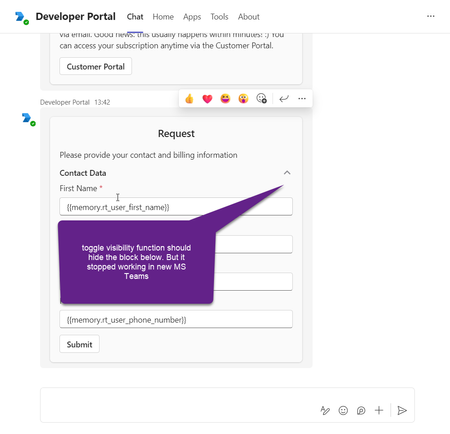
Toggle visibility function in adaptive cards stopped working in the new version of MS Teams. The issue is not reproducible in the older version of MS Teams. It can be reproduced in developer portal with the following card structure example: { "type": "AdaptiveCard", "$schema": "http://adaptivecards.io/schemas/adaptive-card.json", "version": "1.4", "body": [ { "type": "Container", "items": [ { "type": "TextBlock", "text": "Request", "size": "Large", "wrap": true, "weight": "Bolder", "spacing": "Small", "horizontalAlignment": "Center" }, { "type": "TextBlock", "text": "Please provide your contact information", "wrap": true, "spacing": "Medium" }, { "type": "Container", "items": [ { "type": "ColumnSet", "columns": [ { "type": "Column", "width": "stretch", "items": [ { "type": "TextBlock", "text": "Contact Data", "wrap": true, "style": "default", "fontType": "Default", "size": "Medium", "weight": "Bolder" } ] }, { "type": "Column", "width": "20px", "items": [ { "type": "Image", "url": "https://adaptivecards.io/content/up.png", "id": "chevronUp1" }, { "type": "Image", "url": "https://adaptivecards.io/content/down.png", "id": "chevronDown1", "isVisible": false } ], "selectAction": { "type": "Action.ToggleVisibility", "targetElements": [ "contactData", "chevronDown1", "chevronUp1" ] } } ] }, { "type": "Container", "items": [ { "type": "Input.Text", "id": "rt_user_first_name", "errorMessage": "Please input contact person first name", "label": "First Name", "spacing": "Small", "value": "{{memory.rt_user_first_name}}", "isRequired": true }, { "type": "Input.Text", "label": "Last Name", "id": "rt_user_last_name", "errorMessage": "Please input contact person last name", "spacing": "Small", "value": "{{memory.rt_user_last_name}}", "isRequired": true }, { "spacing": "Small", "regex": "^[a-zA-Z0-9._-]+@[a-zA-Z0-9.-]+\\.[a-zA-Z]{2,4}$", "isRequired": true, "value": "{{memory.rt_user_email}}", "placeholder": "email address removed for privacy reasons", "label": "Email", "type": "Input.Text", "id": "rt_user_email", "errorMessage": "Please provide the contact person email" }, { "spacing": "Small", "regex": "^[+][0-9]{10,12}$", "maxLength": 13, "value": "{{memory.rt_user_phone_number}}", "placeholder": "+1", "label": "Phone Number", "type": "Input.Text", "id": "rt_user_phone_number", "errorMessage": "Asking you to kindly enter the phone number in the international format, starting with +, then the country code, operator code and your local number." } ], "id": "contactData", "spacing": "Small" } ] } ] }, { "type": "Container", "items": [ { "type": "ActionSet", "actions": [ { "type": "Action.Submit", "title": "Submit" } ] } ] } ] }2KViews3likes7Comments
[Adaptive cards] Background color changed with the new Teams
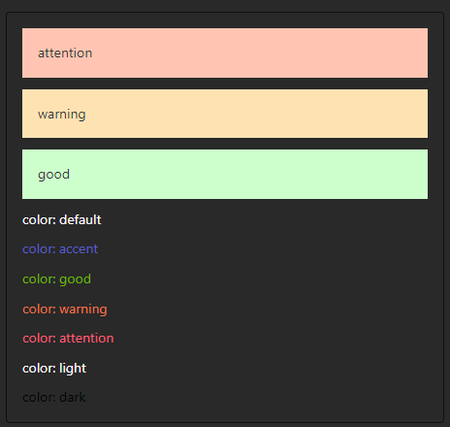
Hello, Since the new Teams update, rendering of the background color on adaptive cards are different. Attention (red) and Warning (orange) are looking too much alike using both Light and Dark theme. I'm using colored containers as card header, so it makes reading them confusing. Old Teams version : 1.7.00.7956 New Teams version : 24102.2223.2870.9480 Thank you.5.8KViews0likes2CommentsIs there any way to add an Add-in or Adaptive Card to the Posts Tab in a Teams Channel?
Is there any way to insert a custom app or Adaptive Card to the right side of the Posts tab? I am searching for a way to extend the Conversation (chat) User Interface in MS Teams by adding contextual custom information in a panel to the right of the chat stream. I understand I could have a Bot in the chat that posts an adaptive card in the chat stream, but that will flow off the top of the screen when a few more users post messages to the channel. The screen real estate I want to use is the right-most area of the Posts tab ; currently Teams has a "Open channel details" button in the upper right corner of the Posts tab. That button opens a panel that displays info about the channel. That is exactly where I want to insert my customer UI elements. Research to date suggests the answer is no, neither the Posts tab nor the Files tab can be extended with customer Add-ins. Please comment with your insight. Thanks!693Views0likes1CommentAdaptive Card to send message to the end user by command / Bot Framework SDK - JavaScript - node.js
For MS Teams chatbot, by adaptive cards, I want the bot to send text message to the client when the client chooses the respective command. What İs want is opposite of Action.Submit - I want user to receive message when the button is clicked. I try to optimize Action.OpenUrl and Action.Submit but results weren't satisfying.1KViews0likes3Comments
Adaptive card do not render image on Teams Desktop
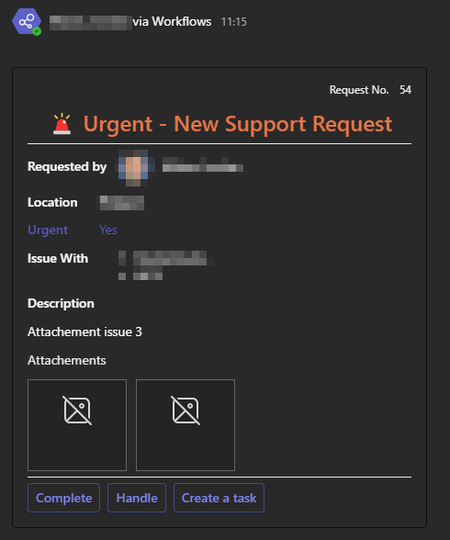
Hello Community, We are facing a challenge with the image rendering in our Adaptive cards only in the Teams Desktop application. All is working fine with the Teams on the Web, and when we test it in the https://adaptivecards.io/designer/ The images are stored in our SharePoint. Will this be the problem ? See bellow our json adaptive card, and some screenshots { "$schema": "http://adaptivecards.io/schemas/adaptive-card.json", "version": "1.3", "type": "AdaptiveCard", "body": [ { "type": "Container", "items": [ { "type": "ColumnSet", "columns": [ { "type": "Column", "width": "stretch", "items": [ { "type": "TextBlock", "text": "Request No. ", "wrap": true, "size": "Small", "isSubtle": true, "horizontalAlignment": "Right" } ], "backgroundImage": { "horizontalAlignment": "Right" }, "horizontalAlignment": "Right" }, { "type": "Column", "width": "auto", "items": [ { "type": "TextBlock", "text": "44", "wrap": true, "size": "Small", "isSubtle": true, "horizontalAlignment": "Right" } ], "horizontalAlignment": "Right" } ], "horizontalAlignment": "Right" }, { "type": "ColumnSet", "columns": [ { "type": "Column", "width": "stretch", "items": [ { "type": "TextBlock", "wrap": true, "text": " Urgent - New Support Request", "horizontalAlignment": "Center", "size": "ExtraLarge", "weight": "Bolder", "color": "Warning", "spacing": "None", "height": "stretch" } ] } ] } ] }, { "type": "Container", "items": [ { "type": "ColumnSet", "columns": [ { "type": "Column", "width": "auto", "items": [ { "type": "TextBlock", "text": "Requested by ", "wrap": true, "weight": "Bolder" } ], "verticalContentAlignment": "Center" }, { "type": "Column", "width": "auto", "items": [ { "type": "Image", "size": "Small", "style": "Person", "url": "data:image/png;base64" } ] }, { "type": "Column", "width": "stretch", "items": [ { "type": "TextBlock", "text": " Doe, John", "wrap": true } ], "verticalContentAlignment": "Center" } ] }, { "type": "ColumnSet", "columns": [ { "type": "Column", "width": "auto", "items": [ { "type": "TextBlock", "text": "Location", "wrap": true, "weight": "Bolder" }, { "type": "TextBlock", "text": "Urgent", "wrap": true, "weight": "Bolder", "color": "Accent" }, { "type": "TextBlock", "text": "Issue With", "wrap": true, "weight": "Bolder" } ] }, { "type": "Column", "width": "stretch", "items": [ { "type": "TextBlock", "text": "France", "wrap": true, "weight": "Bolder" }, { "type": "TextBlock", "text": "Yes", "wrap": true, "color": "Accent" }, { "type": "TextBlock", "text": "Office", "wrap": true } ] } ] }, { "type": "ColumnSet", "columns": [ { "type": "Column", "width": "auto", "items": [ { "type": "TextBlock", "text": "Description", "wrap": true, "weight": "Bolder" }, { "type": "TextBlock", "text": "This is my error please help me", "wrap": true } ] } ] } ], "separator": true }, { "type": "Container", "items": [ { "type": "ColumnSet", "columns": [ { "type": "Column", "width": "stretch", "items": [ { "type": "TextBlock", "text": "Attachements", "wrap": true, "isSubtle": true }, { "type": "ImageSet", "imageSize": "Large", "images": [ { "type": "Image", "url": "SharePointURL", "selectAction": { "type": "Action.OpenUrl", "url": "SharePointURL" } }, { "type": "Image", "url": "SharePointURL", "selectAction": { "type": "Action.OpenUrl", "url": "SharePointURL" } } ] } ] } ] } ] }, { "type": "ActionSet", "horizontalAlignment": "Left", "actions": [ { "type": "Action.ShowCard", "title": "Complete", "card": { "type": "AdaptiveCard", "body": [ { "type": "TextBlock", "text": "What was the error?", "wrap": true }, { "type": "Input.Text", "isMultiline": true, "id": "error" }, { "type": "TextBlock", "text": "What was the solution?", "wrap": true }, { "type": "Input.Text", "isMultiline": true, "id": "solution" } ], "actions": [ { "type": "Action.Submit", "title": "Send", "id": "send", "associatedInputs": "auto", "data": { "action": "complete", "request": "44", "link": "Link to the SharePoint List", "issuewith": "Office" } } ], "verticalContentAlignment": "Top" }, "id": "complete" }, { "type": "Action.Submit", "title": "Handle", "id": "handle", "data": { "action": "handle", "request": "44", "link": "Link to the SharePoint List", "issuewith": "Office" } }, { "type": "Action.Submit", "title": "Create a task", "id": "task", "associatedInputs": "auto", "data": { "action": "task", "request": "44", "link": "Link to the SharePoint List", "issuewith": "Office" } } ], "height": "stretch", "separator": true } ] } Thank you for you help.4.5KViews2likes10Comments
Incoming Webhook duplicated message
Hello! We're using Teams Incoming Webhook to send notifications to a channel when a ticket is opened in our workflow management tool and we're facing a strange behavior when posting to the webhook through Java's HttpClient (java.net.http). Every time we send a notification, it arrives "duplicated". The first one arrives as expected and the card is filled with all the data needed. The second one arrives approximately one minute after the first one and there's almost no data in this second card. In our implementation we have a serverless function (AWS Lambda) that handles the step of ticket opening process. After opening the ticket successfully, the notification is sent to Teams via the webhook. According to our logs, the HTTP request that sends the notification is made only once, as expected. So, we're initially considering that there's nothing wrong with the HttpClient. Note: when we post to the webhook using Postman or curl, everything works fine and the notification arrives with no duplication. So, I ask: is there any way to debug the webhook? Thanks!928Views0likes1Comment
Cloudinary images are not loading in adaptive card
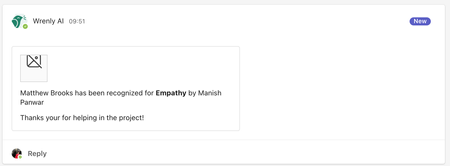
I am rendering a adaptive card with an image, but the image is broken, this is the image url - "https://res.cloudinary.com/incognito-apps-inc/image/upload/v1667519906/recognize/fallon_url7lx.webp" this is the code { "type": "Image", "url": "${image}", "size": "Medium", "isVisible": "${image != null}" },Solved887Views0likes4Comments
Forward adaptive card
Hello, I am trying to forward an adaptive card from one chat to another in MS teams app. I was looking for the power automate javascript SDK to integrate in my JS code, the available resources in the website is not very useful. Is there any other place where I can refer and accomplish this? Link I referred https://learn.microsoft.com/en-us/troubleshoot/power-platform/power-automate/flow-embed-sdk1.4KViews0likes2Comments