active directory federation services
15 Topics
OpenID service stopped working after installing ADFS on windows server
Hello to everyone, We have a developer server and we use it to test various scenarios. I created a service with OpenIDDict and .Net6, everything was working fine and the url https://auth.myserver.local/.well-known/openid-configuration, served with IIS, was working correctly. Now our customer asked a SSO with ADFS service, so we tried to implement it. So I followed this guide: https://docs.microsoft.com/en-us/aspnet/core/security/authentication/ws-federation?view=aspnetcore-6.0 I installed the ADFS service on my local server (the same server we use for IIS test websites) and I was able to sign in with my AD credentials. Then I noticed: If I go to the main page of my service (https://auth.myserver.local) the service still works great, but if I try to reach https://auth.myserver.local/.well-known/openid-configuration I receive a 503 error - service unavailable (if I test it on local machine or in a production machine it works great, that's why I think it's my server problem). I've made some research in IIS logs but I cannot find requests on that url anymore, It seems something is getting the request before IIS. I tried to stop the ADFS service with no success. Anyone experienced something similar? My server is Windows Server 2019. Thanks.1.8KViews0likes0Comments
Redundancy for ADFS servers using on-premise & Azure instance of ADFS through Azure traffic manager.
Azure Traffic Manager is able to detect only the health of WAP server and not back end ADFS server. As a result, Traffic Manager is redirecting clients to a healthy WAP server with faulty ADFS back end server. Seeking guidance here to fix the health probe on Azure Traffic Manger. Seamless failover expected by using Azure traffic manager, but unfortunately, we have issue verifying the health of backend ADFS servers.688Views0likes0Comments
AD FS - Banned IP question
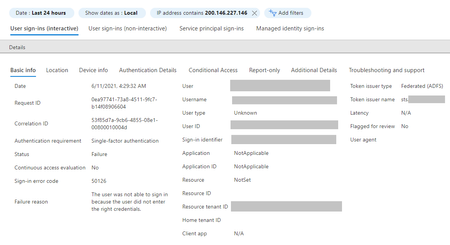
Azure Active Directory Connect Health | AD FS services question here. I've added some malicious IPs to AD FS Banned IP list, but still my Azure AD Sign in's log registers connection attempts from these IPs with error code 50126 (The user was not able to sign in because the user did not enter the right credentials). That is the same error code as before adding the IP to Banned IP list. Is this normal ? We use AD FS for authenticating to O365/AzureAD. Also use AD FS health for monitoring and securing purposes. I would like to block malicious IPs from accessing ADFS and even attempting to authenticate. I thought I could use AD FS - Banned IP, but maybe that is not the case? Another strange detail about this is that the login attempts from malicious IPs seen in Azure AD is not registered in ADFS/Security logs in event viewer on ADFS server. Appreciate any feedback.. BR-Ruslan1KViews0likes0Comments
Multiple federated accounts cannot login to Outlook Desktop
Environment: AD FS on-prem Exchange Online Hybrid Client: Domain bound Windows 10 Office 2016 On client machine, user is setup with his mailbox in Outlook. User also requires to add additional mailbox in their Outlook. When we try to add another account, it does not prompt for credentials and adds the account in Outlook right away. This is happening because user is logged into machine with his AD account and AD FS uses those credentials and skips the authentication window even if we are trying to setup a new account. How can this situation be handled and user can be allowed to setup another account in their Outlook?2.6KViews0likes6Comments
How to connect ADFS with OAuth 2.0 protocol
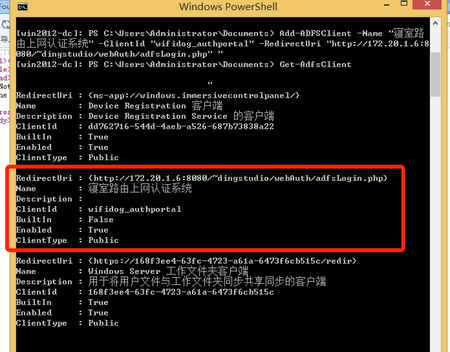
Current environment information Server OS Version: Windows Server 2012 R2 ADFS was installed. I can not create an OAuth 2.0 authentication request after ADFS client added. I use this url:(This domain is for internal network access only, because firewall is running to filter tcp 80/443 port by china telecom government security policy limit) https://adfs.dingplace.com/adfs/oauth2/authorize?client_id=wifidog_authportal&response_type=code&redirect_uri=http%3A%2F%2F172.20.1.6%3A8080%2F~dingstudio%2FwebAuth%2FadfsLogin.php&scope=openid&state= to request authentication, but ADFS redirect my request to an error page and take some error description. How can make the ADFS work correctly, and where is ADFS' s resource application program interface ? Before ADFS, my single sign on solution is CAS or myself auth server. I want a solution to help me.2KViews1like0Comments
need to clean up Federated domain
Hi Members, Good day, We have a federated domain in Azure. -> eg. fed.dom.lo.com the AD Connect was set up and it had synchronized all the users in our on-prem domain controller to the Azure. Assume we had 20k users in the specific OU, which was set for the sync. Now, the change that came in would want us to sync users which have a specific attribute set. ie, departmentName = xyz and not all. My doubts are as below, 1.What would happen to the existing users in Azure federated domain, would there be a clean up automatically done? ex, users synced are 20k, but users with attribute are just 3k. 2.How would we do a clean up on Azure domain? 3. Could we delete all the users on Azure domain and add the inbound sync rule to have the limited users show up again? or any better way to achieve this. Thank you V1.9KViews0likes1CommentMigration from AD FS 2012 to 2019 Prerequisites
Hi Community! We currently have AD FS 2012 R2 for hybrid identity management for our Office 365 users. And we are planning to migrate it to AD FS 2019. I am looking for the prerequisite but I cannot see a Microsoft document for 2019. I can only find for 2016. Hope someone can help me with this 🙂Solved18KViews0likes1CommentADFS Dedicated Server
Can other Windows Server Roles be installed on a machine which has ADFS installed? I'm trying to find any article which regards to conflicts or best practices on installing ADFS Federation Server with other Windows Server Roles installed but I cannot find any article or docs from MS websites. Thanks for sharing.944Views0likes1CommentMigrate upgraded ADFS farm from WID to SQL
Hi, We have a few ADFS farms that have been upgraded/migrated from ADFS v3 to ADFS v4 in the past. We now want to migrated the WID database to SQL Always-On. There are numerous articles describing the migration from WID to SQL, but they all only mention AdfsConfiguration.mdf, but in an upgraded farm you also have a AdfsConfigurationV3.mdf (and its respective ldf). Can we ignore the V3 files or do we need to migrate them to? Please advise! Kind regards, Enrico Klein2.6KViews0likes1Comment