xdr
128 TopicsOnboarding MDE with Defender for Cloud (Problem)
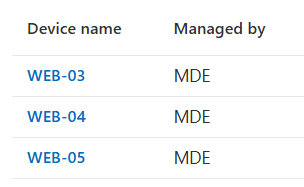
Hello Community, In our Customer i have a strange problem. We onboarded with Azure Arc server and activate a Defender for Cloud servises only for Endpoint protection. Some of this device onboarded into Microsoft Defender portale, but not appears as a device, infact i don't have opportunity to put them into a group to apply policy. I have check sensor of Azure Arc and all works fine (device are in Azure Arc, are in the defender portal and see them on Intune (managed by MDE)). From Intune portal From Defender portal But in difference from other device into entra ID exists only the enterprise application and not device I show the example of device that works correctly (the same onboarding method) Is there anyone who has or has had this problem? Thanks and Regards, Guido146Views0likes2CommentsMonthly news - January 2026
Microsoft Defender Monthly news - January 2026 Edition This is our monthly "What's new" blog post, summarizing product updates and various new assets we released over the past month across our Defender products. In this edition, we are looking at all the goodness from December 2025. Defender for Cloud has its own Monthly News post, have a look at their blog space. 🚀 New Virtual Ninja Show episode: Advancements in Attack Disruption Vulnerability Remediation Agent in Microsoft Intune Microsoft Defender (Public Preview) The following advanced hunting schema tables are now available for preview: The CampaignInfo table contains contains information about email campaigns identified by Microsoft Defender for Office 365 The FileMaliciousContentInfo table contains information about files that were processed by Microsoft Defender for Office 365 in SharePoint Online, OneDrive, and Microsoft Teams General Availability of the Phishing Triage Agent: this agent autonomously analyzes user‑reported phishing emails to determine whether they’re true threats or false positives, dramatically reducing manual triage workload. It continuously learns from analyst feedback and provides clear, natural‑language explanations for every verdict, giving SOC teams both speed and transparency. We're excited to share it is now generally available and, very soon, will expand to also triage cloud and identity alerts! Learn more on our docs. Public Preview of Dynamic Threat Detection Agent: Announced at Ignite, this always‑on agent hunts for unseen threats by continuously correlating telemetry and creating new, context‑aware detections on the fly—closing gaps traditional rules can’t see. We're excited to share it is now in Public Preview! Learn more on our docs. Public Preview of Threat Hunting Agent: Announced at Ignite, this agent gives every analyst the power to investigate like an expert by turning natural‑language questions into guided, real‑time hunts that surface hidden patterns, reveal meaningful pivots, and eliminate the need to write complex queries. We're excited to share it is now in Public Preview! Learn more on our docs. General Availability of the Threat Intelligence Briefing Agent: this agent delivers daily, tailored intelligence briefings directly in Microsoft Defender—automatically synthesizing Microsoft’s global threat insights with your organization’s context to surface prioritized risks, clear recommendations, and relevant assets so teams can shift from reactive research to proactive defense in minutes. We're excited to share it is now generally available! Learn more on our docs. (General Availability) The hunting graph in advanced hunting is now generally available. It also now has two new predefined threat scenarios that you can use to render your hunts as interactive graphs. (General Availability) Advanced hunting now supports custom functions that use tabular parameters. With tabular parameters, you can pass entire tables as inputs. This approach lets you build more modular, reusable, and expressive logic across your hunting queries. Learn more Microsoft Defender for Endpoint (Public Preview) Triage collection: Use triage collection to prioritize incidents and hunt threats with the Sentinel Model Context Protocol (MCP) server. Microsoft Defender for Identity New ADWS LDAP search activity is now available in the 'IdentityQueryEvents' table in Advanced Hunting. This can provides visibility into directory queries performed through ADWS, helping customers track these operations and create custom detection based on this data. (Public Preview) New properties for 'sensorCandidate' resource type in Graph-API. Learn more here. Microsoft Defender for Cloud Apps Integration of Defender for Cloud Apps permissions with Microsoft Defender XDR Unified RBAC is now available worldwide. For more information, see Map Microsoft Defender for Cloud Apps permissions to the Microsoft Defender XDR Unified RBAC permissions. To activate the Defender for Cloud Apps workload, see Activate Microsoft Defender XDR Unified RBAC. (Public Preview) The Defender for Cloud Apps app governance unused app insights feature helps administrators identify and manage unused Microsoft 365-connected OAuth apps, enforce policy-based governance, and use advanced hunting queries for better security. This feature is now available for most commercial cloud customers. For more information, see Secure apps with app hygiene features.526Views2likes1CommentTurn Complexity into Clarity: Introducing the New UEBA Behaviors Layer in Microsoft Sentinel
Security teams today face an overwhelming challenge: every data point is now a potential security signal, and SOCs are drowning in fragmented, high-volume logs from countless sources - firewalls, cloud platforms, identity systems, and more. Analysts spend precious time translating between schemas, manually correlating events, and piecing together timelines across disparate data sources. For custom detections, it’s no different. What if you could transform this noisy complexity into clear, actionable security intelligence? Today, we're thrilled to announce the release of the UEBA Behaviors layer - a breakthrough AI-based UEBA capability in Microsoft Sentinel that fundamentally changes how SOC teams understand and respond to security events. The Behaviors layer translates low-level, noisy telemetry into human-readable behavioral insights that answer the critical question: "Who did what to whom, and why does it matter?" Instead of sifting through thousands of raw CloudTrail events or firewall logs, you get enriched, normalized behaviors - each one mapped to MITRE ATT&CK tactics and techniques, tagged with entity roles, and presented with a clear, natural-language explanation. All behaviors are aggregated and sequenced within a time window or specific trigger, to give you the security story that resides in the logs. What Makes the Behaviors Layer Different? Unlike alerts - which signal potential threats - or anomalies - which flag unusual activity - behaviors are neutral, descriptive observations. They don't decide if something is malicious; they simply describe meaningful actions in a consistent, security-focused way. The Behaviors layer bridges the gap between alerts (work items for the SOC, indicating a breach) and raw logs, providing an abstraction layer that makes sense of what happened without requiring deep familiarity with every log source. While existing UEBA capabilities provide insights and anomalies for a specific event (raw log), behaviors turn clusters of related events – based on time windows or triggers – into security data. The technology behind it: Generative AI powers the Behaviors layer to create and scale the insights it provides. AI is used to develop behavior logic, map entities, perform MITRE mapping, and ensure explainability - all while maintaining quality guardrails. Each behavior is mapped back to raw logs, so you can always trace which events contributed to it. Real-World Impact: We've been working closely with enterprise customers during private preview, and their feedback speaks volumes about the transformative potential of the Behaviors layer: "We're constantly exploring innovative ways to detect anomalous behavior for our detection engineering and incident enrichment. Behaviors adds a powerful new layer that also covers third-party data sources in a multi-cloud environment - seamlessly integrable and packed with rich insights, including MITRE mapping and detailed context for deeper correlation and context-driven investigation." (Glueckkanja) "Microsoft's new AI-powered extension for UEBA enhances behavioral capabilities for PaloAlto logs. By intelligently aggregating and sequencing low-level security events, it elevates them into high-fidelity 'behaviors' - powerful, actionable signals. This enhanced behavioral intelligence significantly can improve your security operations. During investigations, these behaviors are immediately pointing to unusual or suspicious activities and providing a rich, contextual understanding of an entity's actions. They serve as a stable starting point for the analysts, instead of sifting through millions of logs." (BlueVoyant) How It Works: Aggregation and Sequencing The Behaviors layer operates using two powerful patterns: Aggregation Behaviors detect volume-based patterns. For example: "User accessed 50+ AWS resources in 1 hour." These are invaluable for spotting unusual activity levels and turning high-volume logs into actionable security insights. Sequencing Behaviors detect multi-step patterns that surface complex chains invisible in individual events. For example: "Access key created → used from new IP → privileged API calls." This helps you spot sophisticated tactics and procedures across sources. Once enabled, behaviors are aggregated and sequenced based on time windows and triggers tailored to each logic. When the time window closes or a pattern is identified, the behavior log is created immediately - providing near real-time availability. The behaviors are stored as records in Log Analytics. This means each behavior record contributes to your data volume and will be billed according to your Sentinel/Log Analytics data ingestion rates. Use Cases: Empowering Every SOC Persona The new Behaviors layer in Microsoft Sentinel enhances the daily workflows of SOC analysts, threat hunters, and detection engineers by providing a unified, contextual view of security activity across diverse data sources. SOC analysts can now investigate incidents faster by querying behaviors tied to the entities involved in an incident. For example, instead of reviewing 20 separate AWS API calls, a single behavior like “Suspicious mass secret access via AWS IAM” provides immediate clarity and context, with or without filtering on specific MITRE ATT&CK mapping. Simply use the following query (choose the entity you’re investigating): let targetTechniques = dynamic ("Password Guessing (T1110.001)"); // to filter on MITRE ATT&CK let behaviorInfoFiltered = BehaviorInfo | where TimeGenerated > ago(1d) | where AttackTechniques has_any (targetTechniques) | project BehaviorId, AttackTechniques; BehaviorEntities | where TimeGenerated > ago(1d) | where AccountUpn == ("user@domain.com") | join kind=inner (behaviorInfoFiltered) on BehaviorId Threat hunters benefit from the ability to proactively search for behaviors mapped to MITRE tactics or specific patterns, uncovering stealthy activity such as credential enumeration or lateral movement without complex queries. Another use case, is looking for specific entities that move across the MITRE ATT&CK chain within a specific time window, for example: let behaviorInfo = BehaviorInfo | where TimeGenerated > ago(12h) | where Categories has "Persistance" or Categories has "Discovery" // Replace with actual tactics | project BehaviorId, Categories, Title, TimeGenerated; BehaviorEntities | where TimeGenerated > ago(12h) | extend EntityName = coalesce(AccountUpn, DeviceName, CloudResourceId) // Replace with actual entity types | join kind=inner (behaviorInfo) on BehaviorId | summarize BehaviorTypes = make_set(Title), AffectedEntities = dcount(EntityName) by bin(TimeGenerated, 5m) | where AffectedEntities > 5 Detection engineers can build simpler, more explainable rules using normalized, high-fidelity behaviors as building blocks. This enables faster deployment of detections and more reliable automation triggers, such as correlating a new AWS access key creation with privilege escalation within a defined time window. Another example is joining the rarest behaviors with other signals that include the organization’s highest value assets: BehaviorInfo | where TimeGenerated > ago(5d) | summarize Occurrences = dcount(behaviorId), FirstSeen = min(TimeGenerated), LastSeen = max(TimeGenerated) by Title | order by Occurrences asc Supported Data Sources & Coverage This release focuses on most common non-Microsoft data sources that traditionally lack easy behavioral context in Sentinel. Coverage of more behaviors will expand over time - both within each data source and across new sources. Initial supported sources include: CommonSecurityLog - Specific vendors and logs: o Cyber Ark Vault o Palo Alto Threats AWS CloudTrail - Coverage for several AWS services like EC2, IAM, S3, EKS, Secrets Manager (common AWS management activities) GCPAuditLogs Once enabled, two new tables (BehaviorInfo and BehaviorEntities) will populate in your Log Analytics workspace. You can query these tables in Advanced Hunting, use them in detection rules, or view them alongside incidents - just like any other Sentinel data. If you already benefit from Defender behaviors (such as Microsoft Defender for Cloud Apps), the same query will show results for all sources. Ready to Experience the Power of Behaviors? The future of security operations is here. Don't wait to modernize your SOC workflows. Enable the Behaviors layer in Microsoft Sentinel today and start transforming raw telemetry into clear, contextual insights that accelerate detection, investigation, and response. Get started now: Understand pre-requisites, limitations, pricing, and use of AI in Documentation. Navigate to your Sentinel workspace settings, enable the Behaviors layer (a new tab under the UEBA settings) and connect the data sources. This is currently supported for a single workspace per tenant (best chosen by the ingestion of the supported data sources). Once enabled, explore the BehaviorInfo and BehaviorEntities tables in Advanced Hunting. If you already benefit from behaviors in XDR, querying the tables will show results from both XDR and UEBA. Start building detection rules, hunting queries, and automation workflows using the behaviors as building blocks. Share your feedback to help us improve and expand coverage.1.5KViews6likes0CommentsMonthly news - December 2025
Microsoft Defender Monthly news - December 2025 Edition This is our monthly "What's new" blog post, summarizing product updates and various new assets we released over the past month across our Defender products. In this edition, we are looking at all the goodness from November 2025. Defender for Cloud has its own Monthly News post, have a look at their blog space. 😎 Microsoft Ignite 2025 - now on-demand! 🚀 New Virtual Ninja Show episode: Advancements in Attack Disruption Vulnerability Remediation Agent in Microsoft Intune Microsoft Defender Ignite 2025: What's new in Microsoft Defender? This blog summarizes our big announcements we made at Ignite. (Public Preview) Defender XDR now includes the predictive shielding capability, which uses predictive analytics and real-time insights to dynamically infer risk, anticipate attacker progression, and harden your environment before threats materialize. Learn more about predictive shielding. Security Copilot for SOC: bringing agentic AI to every defender. This blog post gives a great overview of the various agents supporting SOC teams. Account correlation links related accounts and corresponding insights to provide identity-level visibility and insights to the SOC. Coordinated response allows Defenders to take action comprehensively across connected accounts, accelerating response and minimizing the potential for lateral movement. Enhancing visibility into your identity fabric with Microsoft Defender. This blog describes new enhancements to the identity security experience within Defender that will help enrich your security team’s visibility and understanding into your unique identity fabric. (Public Preview) The IdentityAccountInfo table in advanced hunting is now available for preview. This table contains information about account information from various sources, including Microsoft Entra ID. It also includes information and link to the identity that owns the account. Microsoft Sentinel customers using the Defender portal, or the Azure portal with the Microsoft Sentinel Defender XDR data connector, now also benefit from Microsoft Threat Intelligence alerts that highlight activity from nation-state actors, major ransomware campaigns, and fraudulent operations. For more information, see Incidents and alerts in the Microsoft Defender portal. (Public Preview) New Entity Behavior Analytics (UEBA) experiences in the Defender portal! Microsoft Sentinel introduces new UEBA experiences in the Defender portal, bringing behavioral insights directly into key analyst workflows. These enhancements help analysts prioritize investigations and apply UEBA context more effectively. Learn more on our docs. (Public Preview) A new Restrict pod access response action is now available when investigating container threats in the Defender portal. This response action blocks sensitive interfaces that allow lateral movement and privilege escalation. (Public Preview) Threat analytics now has an Indicators tab that provides a list of all indicators of compromise (IOCs) associated with a threat. Microsoft researchers update these IOCs in real time as they find new evidence related to the threat. This information helps your security operations center (SOC) and threat intelligence analysts with remediation and proactive hunting. Learn more. In addition the overview section of threat analytics now includes additional details about a threat, such as alias, origin, and related intelligence, providing you with more insights on what the threat is and how it might impact your organization. Microsoft Defender for Identity (Public Preview) In addition to the GA release of scoping by Active Directory domains a few months ago, you can now scope by Organizational Units (OUs) as part of XDR User Role-Based Access Control. This enhancement provides even more granular control over which entities and resources are included in security analysis. For more information, see Configure scoped access for Microsoft Defender for Identity. (Public Preview). New security posture assessment: Change password for on-prem account with potentially leaked credentials. The new security posture assessment lists users whose valid credentials have been leaked. For more information, see: Change password for on-prem account with potentially leaked credentials. Defender for Identity is slowly rolling out automatic Windows event auditing for sensors v3.x, streamlining deployment by applying required auditing settings to new sensors and fixing misconfigurations on existing ones. As it becomes available, you will be able to enable automatic Windows event-auditing in the Advanced settings section in the Defender portal, or using the Graph API. Identity Inventory enhancements: Accounts tab, manual account linking and unlinking, and expanded remediation actions are now available. Learn more in our docs. Microsoft Defender for Cloud Apps (Public Preview) Defender for Cloud Apps automatically discovers AI agents created in Microsoft Copilot Studio and Azure AI Foundry, collects audit logs, continuously monitors for suspicious activity, and integrates detections and alerts into the XDR Incidents and Alerts experience with a dedicated Agent entity. For more information, see Protect your AI agents. Microsoft Defender for Endpoint Ignite 2025: Microsoft Defender now prevents threats on endpoints during an attack. This year at Microsoft Ignite, Microsoft Defender is announcing exciting innovations for endpoint protection that help security teams deploy faster, gain more visibility, and proactively block attackers during active attacks. (Public Preview) Defender for Endpoint now includes the GPO hardening and Safeboot hardening response actions. These actions are part of the predictive shielding feature, which anticipates and mitigates potential threats before they materialize. (Public Preview) Custom data collection enables organizations to expand and customize telemetry collection beyond default configurations to support specialized threat hunting and security monitoring needs. (Public Preview) Native root detection support for Microsoft Defender on Android. This enables proactive detection of rooted devices without requiring Intune policies, ensuring stronger security and validating that Defender is running on an uncompromised device, ensuring more reliable telemetry that is not vulnerable to attacker manipulation. (Public Preview) The new Defender deployment tool is a lightweight, self-updating application that streamlines onboarding devices to the Defender endpoint security solution. The tool takes care of prerequisites, automates migrations from older solutions, and removes the need for complex onboarding scripts, separate downloads, and manual installations. It currently supports Windows and Linux devices. Defender deployment tool: for Windows devices for Linux devices (Public Preview) Defender endpoint security solution for Windows 7 SP1 and Windows Server 2008 R2 SP1. A Defender for endpoint security solution is now available for legacy Windows 7 SP1 and Windows Server 2008 R2 SP1 devices. The solution provides advanced protection capabilities and improved functionality for these devices compared to other solutions. The new solution is available using the new Defender deployment tool. Microsoft Defender Vulnerability Management (Public Preview) The Vulnerability Management section in the Microsoft Defender portal is now located under Exposure management. This change is part of the vulnerability management integration to Microsoft Security Exposure Management, which significantly expands the scope and capabilities of the platform. Learn more. (General Availability) Microsoft Secure Score now includes new recommendations to help organizations proactively prevent common endpoint attack techniques. Require LDAP client signing and Require LDAP server signing - help ensure integrity of directory requests so attackers can't tamper with or manipulate group memberships or permissions in transit. Encrypt LDAP client traffic - prevents exposure of credentials and sensitive user information by enforcing encrypted communication instead of clear-text LDAP. Enforce LDAP channel binding - prevents man-in-the-middle relay attacks by ensuring the authentication is cryptographically tied to the TLS session. If the TLS channel changes, the bind fails, stopping credential replay. (General Availability) These Microsoft Secure Score recommendations are now generally available: Block web shell creation on servers Block use of copied or impersonated system tools Block rebooting a machine in Safe Mode Microsoft Defender for Office 365 Microsoft Ignite 2025: Transforming Phishing Response with Agentic Innovation. This blog post summarizes the following announcements: General Availability of the Security Copilot Phishing Triage Agent Agentic Email Grading System in Microsoft Defender Cisco and VIPRE Security Group join the Microsoft Defender ICES ecosystem. A separate blog explains these best practices in more detail and outline three other routing techniques commonly used across ICES vendors. Blog series: Best practices from the Microsoft Community Microsoft Defender for Office 365: Fine-Tuning: This blog covers our top recommendations for fine-tuning Microsoft Defender for Office 365 configuration from hundreds of deployments and recovery engagements, by Microsoft MVP Joe Stocker. You may be right after all! Disputing Submission Responses in Microsoft Defender for Office 365: Microsoft MVP Mona Ghadiri spotlights a new place AI has been inserted into a workflow to make it better… a feature that elevates the transparency and responsiveness of threat management: the ability to dispute a submission response directly within Microsoft Defender for Office 365. Blog post: Strengthening calendar security through enhanced remediation.3.5KViews0likes0CommentsMicrosoft Defender for Cloud Customer Newsletter
What's new in Defender for Cloud? Now in public preview, DCSPM (Defender for Cloud Security Posture Management) extends its capabilities to cover serverless workloads in both Azure and AWS, like Azure Web Apps and AWS Lambda. For more information, see our public documentation. Defender for Cloud’s integration with Endor Labs is now GA Focus on exploitable open-source vulnerabilities across the application lifecycle with Defender for Cloud and Endor Lab integration. This feature is now generally available! For more details, please refer to this documentation. Blogs of the month In December, our team published the following blog posts: Defender for AI Alerts Demystifying AI Security Posture Management Breaking down security silos: Defender for Cloud expands into the Defender portal Part 3: Unified Security Intelligence – Orchestrating Gen AI Threat Detection with Microsoft Sentinel Defender for Cloud in the field Watch the latest Defender for Cloud in the Field YouTube episode here: Malware Automated Remediation New Secure score in Defender for Cloud GitHub Community Check out Module 27 in the Defender for Cloud lab on GitHub. This module covers gating mechanisms to enforce security policies and prevent deployment of insecure container images. Click here for MDC Github lab module 27 Customer journeys Discover how other organizations successfully use Microsoft Defender for Cloud to protect their cloud workloads. This month we are featuring Ford Motor Company. Ford Motor Company, an American multinational automobile manufacturer, and its innovative and evolving technology footprint and infrastructure needed equally sophisticated security. With Defender and other Microsoft products like Purview, Sentinel and Entra, Ford was able to modernize and deploy end-to-end protection, with Zero-trust architecture, and reduce vulnerabilities across the enterprise. Additionally, Ford’s SOC continues to respond with speed and precision with the help of Defender XDR. Join our community! JANUARY 20 (8:00 AM- 9:00 AM PT) What's new in Microsoft Defender CSPM We offer several customer connection programs within our private communities. By signing up, you can help us shape our products through activities such as reviewing product roadmaps, participating in co-design, previewing features, and staying up-to-date with announcements. Sign up at aka.ms/JoinCCP. We greatly value your input on the types of content that enhance your understanding of our security products. Your insights are crucial in guiding the development of our future public content. We aim to deliver material that not only educates but also resonates with your daily security challenges. Whether it’s through in-depth live webinars, real-world case studies, comprehensive best practice guides through blogs, or the latest product updates, we want to ensure our content meets your needs. Please submit your feedback on which of these formats do you find most beneficial and are there any specific topics you’re interested in https://aka.ms/PublicContentFeedback. Note: If you want to stay current with Defender for Cloud and receive updates in your inbox, please consider subscribing to our monthly newsletter: https://aka.ms/MDCNewsSubscribe524Views0likes2Comments
Custom detection rules get a boost—explore what’s new in Microsoft Defender
Co-author - Jeremy Tan In today's rapidly evolving cybersecurity landscape, staying ahead of threats is crucial. Microsoft Defender's custom detection rules offer a powerful way to proactively monitor and respond to security threats. These user-defined rules can be configured to run at regular intervals to detect security threats—generating alerts and triggering response actions when threats are detected. If you are a Microsoft Sentinel user and have connected your Sentinel workspace to Microsoft Defender, you are probably more familiar with analytics rules in Microsoft Sentinel and are looking to explore the capabilities and benefits of custom detections. Understanding and leveraging custom detection rules can significantly enhance your organization's security posture. This blog will delve into the benefits of custom detections and showcase scenarios that highlight their capabilities, helping you make the most of this robust feature. We are excited to release these brand-new enhancements that are now available in public preview. What’s new in custom detections? The improvements in custom detections aim to enhance their functionality and usability, making it easier to manage and respond to security threats effectively. Unified user defined detection list: Manage all your user-defined detections from Microsoft Defender XDR and Microsoft Sentinel in one place. Filtering capabilities for every column. Search freely using rule title or rule ID. View the new workspace ID column (filterable) for multi-workspace organizations that onboarded multiple workspaces to the unified SOC platform. Manage all detections from MTO portal across all your tenants. Show details pane for every rule (whether custom detection or analytics rule). Perform the following actions on rules: Turn on/off Delete Edit Run (only for custom detections) Open rule’s page (only for custom detections) Migrate eligible scheduled custom detections to near real-time custom detections with one click using the new migration tool. Dynamic alert titles and descriptions: Dynamically craft your alert’s title and description using the results of your query to make them accurate and indicative. Advanced entity mapping: Link a wide range of entity types to your alerts. Enrich alerts with custom details: Surface details to display in the alert side panel. Support Sentinel-only data: Custom detections support Microsoft Sentinel data only without dependency on Microsoft Defender XDR data. Flexible and high frequency support for Sentinel data: Custom detections support high and flexible frequency for Microsoft Sentinel data. The benefits of custom detections Let’s examine some of the key benefits of custom detections: Query data from Defender XDR and Sentinel seamlessly: You can create custom detection rules that query data from both Microsoft Sentinel and Defender XDR tables seamlessly, without the need of sending Defender XDR data to Sentinel. Cost efficiency: Save on ingestion costs if you don’t need to retain Microsoft Defender XDR data in analytics tier for more than 30 days but have detection use cases involving both Defender XDR and Sentinel data. Detect threats immediately and remove dependency on quick ingestion: near real time (NRT) custom detections monitor events as they stream, while standard custom detections evaluate both the event ingestion time and the time the event was generated. Unlimited NRT detections: NRT custom detections are unlimited, you can create as many as you need. Since they are based on a streaming technology, they are not generating any load on the system. Native remediation actions: You can configure custom detection rule to automatically take actions on devices, files, users, or emails that are returned by the query when your detection query is correlating Defender XDR and Microsoft Sentinel data, or Defender XDR data only. Entity mapping: Entities are automatically mapped to the alert for all XDR tables. Out of the box alert de-duplication: To reduce alert fatigue when alert generated with the same impacted entities, custom details, title and description - they will merge to the same alert (keeping all raw events linked to the single alert). With this capability you don’t need to worry about duplicated alerts – we take care of it for you. Built-in functions: You can leverage built-in enrichment functions when you build your custom detection queries, such as FileProfile(), SeenBy(), DeviceFromIP() and AssignedIPAddresses(). Extended lookback period: Custom detections have a long lookback period of up to 30 days for rules that run once a day, ideal for historical trending detections. Common scenarios To truly understand the power and versatility of custom detection rules in Microsoft Defender, it's essential to see them in action. In this section, we'll explore several common use cases that demonstrate how these new capabilities can be leveraged to enhance your organization's security posture. These scenarios highlight the benefits of the capabilities, providing you with actionable insights to implement in your own environment. Use Case – detecting potential malicious activity In this use case, we aim to detect potential malicious activity by monitoring logon attempts from different IP addresses. We will implement a custom detection rule that: Monitors successful logon by a user from one IP address and a failed logon attempt from a different IP address (may indicate a malicious attempt at password guessing with a known account). Enriches alerts with user's information from Microsoft Defender for Identity’s IdentityInfo table, including Job title, Department, Manager’s name, and assigned roles. If the user has been found in the 'Terminated Employees’ watchlist, indicating that the user has been notified for termination or marked as terminated, reflect this in the alert name and description. Runs once a day with a lookback period of 30 days, avoiding duplicate alerts on subsequent intervals. Let’s walk through the creation of the custom detection rule and examine the outcome. 1. Here is the sample KQL query we will run in advanced hunting page to create the custom detection. let logonDiff = 10m; let Terminated_Watchlist = _GetWatchlist("TerminatedEmployees") | project tolower(SearchKey);// Get the TerminiatedEmploees Watchlist let aadFunc = (tableName:string) { table(tableName) | where ResultType == "0" | where AppDisplayName !in ("Office 365 Exchange Online", "Skype for Business Online") // To remove false-positives, add more Apps to this array | extend SuccessIPv6Block = strcat(split(IPAddress, ":")[0], ":", split(IPAddress, ":")[1], ":", split(IPAddress, ":")[2], ":", split(IPAddress, ":")[3]) | extend SuccessIPv4Block = strcat(split(IPAddress, ".")[0], ".", split(IPAddress, ".")[1]) | project SuccessLogonTime = TimeGenerated, UserPrincipalName, SuccessIPAddress = IPAddress, SuccessLocation = Location, AppDisplayName, SuccessIPBlock = iff(IPAddress contains ":", strcat(split(IPAddress, ":")[0], ":", split(IPAddress, ":")[1]), strcat(split(IPAddress, ".")[0], ".", split(IPAddress, ".")[1])), Type | join kind= inner ( table(tableName) | where ResultType !in ("0", "50140") | where ResultDescription !~ "Other" | where AppDisplayName !in ("Office 365 Exchange Online", "Skype for Business Online") | project FailedLogonTime = TimeGenerated, UserPrincipalName, FailedIPAddress = IPAddress, FailedLocation = Location, AppDisplayName, ResultType, ResultDescription, Type ) on UserPrincipalName, AppDisplayName | where SuccessLogonTime < FailedLogonTime and FailedLogonTime - SuccessLogonTime <= logonDiff and FailedIPAddress !startswith SuccessIPBlock // Compare the success and failed logon time | summarize FailedLogonTime = max(FailedLogonTime), SuccessLogonTime = max(SuccessLogonTime) by UserPrincipalName, SuccessIPAddress, SuccessLocation, AppDisplayName, FailedIPAddress, FailedLocation, ResultType, ResultDescription, Type | extend Timestamp = SuccessLogonTime | extend UserInTerminatedWatchlist = iif(UserPrincipalName in (Terminated_Watchlist), 'True', 'False') // Check if the impacted user is found in the Watchlist | extend AlertName = iif(UserInTerminatedWatchlist == 'True', "Successful logon by a 'Terminated Employees Watchlist' user from one IP and a failed logon attempt from a different IP","Successful logon from IP and failure from a different IP") // This is the define the dynamic alert value | extend AlertDescription = iif(UserInTerminatedWatchlist == 'True', "A Successful logon by a 'Terminated Employees Watchlist' user onto an Azure App from one IP and within 10 mins failed to logon to the same App via a different IP (may indicate a malicious attempt at password guessing with known account). ","A user account successfully logs onto an Azure App from one IP and within 10 mins failed to logon to the same App via a different IP (may indicate a malicious attempt at password guessing with known account).") // This is to define the dynamic alert description | extend UserPrincipalName = tolower(UserPrincipalName)}; let aadSignin = aadFunc("SigninLogs"); let aadNonInt = aadFunc("AADNonInteractiveUserSignInLogs"); union isfuzzy=true aadSignin, aadNonInt | extend Name = tostring(split(UserPrincipalName,'@',0)[0]), UPNSuffix = tostring(split(UserPrincipalName,'@',1)[0]) | join kind=leftouter ( IdentityInfo // Correlate with IdentityInfo table | summarize arg_max (TimeGenerated,AccountObjectId, Department, JobTitle, Manager, AssignedRoles, ReportId, IsAccountEnabled) by AccountUpn | extend UserPrincipalName=tolower(AccountUpn) ) on UserPrincipalName 2. On the top right corner of the advance hunting page, select ‘create custom detection’ under Manage rules. 3. Populate the relevant rule’s information. 4. Specify alert title and description by referencing the AlertName and AlertDescription fields defined in the query, as we will dynamically craft the alert title and description, depending on whether the impacted user is found in the 'Terminated Employees’ watchlist. 5. In the entity mapping section, you will find some entity mappings that we have pre-populated for you, which would save you some time and effort. You can update or add the mappings as you wish. 6. Let’s add some additional mappings. In this example, I will add IP entities under Related Evidence. 7. In the Custom details section, I will add the following key-value pairs to surface additional information of the impact user in the alert. 8. On the Automated actions page, because we are correlating Sentinel data with Defender XDR table (IdentityInfo), you have the option to select first-party remediation actions, which is ‘Mark user as compromised’ in our case. 9. Review the configuration of the rule and click Submit. 10. Now, let’s examine how the incident/alert would look. Below is a sample incident triggered. 11. Select the alert and you will find the custom details on the right pane, surfacing additional information such as Job title, Department, Manager’s name and Assigned roles that we configured. 12. The impacted user from the above incident was not found in the 'Terminated Employees’ watchlist. Now, let’s examine how the incident/alert would look when the impacted user is found in the watchlist. 13. In my environment, I have configured the watchlist and will be using ‘MeganB’ for simulation. 14. Notice how the alert title and description is different from the one generated earlier, to reflect user found in the watchlist. 15. The rule will run once a day with a look back period of 30 days. However, custom detection will not create duplicate alerts if the same impacted entities are found in the subsequent runs. Instead, you will find the Last activity time being updated and more events showing up in the result table of the alert page. Conclusion Custom detection rules in Microsoft Defender offer a powerful and flexible way to enhance your organization's security posture. By leveraging these user-defined rules, you can proactively monitor and respond to security threats, generating detailed and actionable alerts. The recent enhancements—such as unified detection lists, dynamic alert titles, and advanced entity mapping—further improve the functionality and usability of custom detections. Ready to enhance your threat detection capabilities? Start exploring and implementing custom detection rules in Microsoft Defender today to safeguard your digital assets and maintain a strong security posture. Useful links Overview of custom detections in Microsoft Defender XDR - Microsoft Defender XDR | Microsoft Learn Create and manage custom detection rules in Microsoft Defender XDR - Microsoft Defender XDR | Microsoft Learn4.4KViews0likes3Comments
Host Microsoft Defender data locally in the United Arab Emirates
We are pleased to announce that local data residency support in the UAE is now generally available for Microsoft Defender for Endpoint and Microsoft Defender for Identity. This announcement reinforces our ongoing commitment to delivering secure, compliant services aligned with local data sovereignty requirements. Customers can now confidently onboard to Defender for Endpoint and Defender for Identity in the UAE, knowing that this Defender data will remain at rest within the UAE data boundary. This allows customers to meet their regulatory obligations and maintain control over their data. For more details on the Defender data storage and privacy policies, refer to Microsoft Defender for Endpoint data storage and privacy and Microsoft Defender for Identity data security and privacy. Note: Defender for Endpoint and Defender for Identity may potentially use other Microsoft services (i.e. Microsoft Intune for security settings management). Each Microsoft service is governed by its own data storage and privacy policies and may have varying regional availability. For more information, refer to our Online Product Terms. In addition to the UAE, Defender data residency capabilities are available in the United States, the European Union, the United Kingdom, Australia, Switzerland and India (see our recent announcement for local data hosting in India). Customers with Existing deployments for Defender for Endpoint and/or Defender for Identity Existing customers can check their deployment geo within the portal by going to Settings -> Microsoft Defender XDR-> Account; and see where the service is storing your data at rest. For example, in the image below, the service location for the Defender XDR tenant is UAE. ation information If you would like to update your service location, please reach out to Customer Service and Support for a tenant reset. Support can be accessed by clicking on the “?” icon in the top right corner of the portal when signed in as an Admin (see image below). If you are a Microsoft Unified support customer, please reach out to your Customer Success Account Manager for assistance with the migration process. More information: Ready to go local? Read our documentation for more information on how to get started. Microsoft Defender XDR data center location Not yet a customer? Take Defender XDR for a spin via a 90-day trial for Office 365 E5 or Defender for Endpoint via a 90-day trial for Defender for Endpoint Check out the Defender for Endpoint website to learn more about our industry leading Endpoint protection platform Check out the Defender for Identity website to learn how to keep your organization safe against rising identity threats887Views1like2CommentsBreaking down security silos: Microsoft Defender for Cloud Expands into the Defender Portal
Picture this: You’re managing security across Azure, AWS, and GCP. Alerts are coming from every direction, dashboards are scattered and your team spends more time switching portals than mitigating threats. Sound familiar? That’s the reality for many organizations today. Now imagine a different world—where visibility, control and response converge into one unified experience, where posture management, vulnerability insights and incident response live side by side. That world is no longer a dream: Microsoft Defender for Cloud (MDC) is now integrated into Defender XDR in public preview. The expansion of MDC into the Defender portal isn’t just a facelift. It’s a strategic leap forward toward a Cloud-Native Application Protection Platform (CNAPP) that scales with your business. With Microsoft Defender for Cloud’s deep integration into the unified portal, we eliminate security silos and bring a modern, streamlined experience that is more intuitive and purpose-built for today’s security teams, while delivering a single pane of glass for hybrid and multi-cloud security. Here’s what makes this release a game-changer: Unified dashboard See everything with a single pane of glass—security posture, coverage, trends—across Azure, AWS and GCP. No more blind spots. Risk-based recommendations Prioritize by exploitability and business impact. Focus on what matters most, not just noise. Attack path analysis across all Defenders Visualize potential breach paths and cut them off before attackers can exploit them. Unified cloud assets inventory A consolidated view of assets, health data and onboarding state—so you know exactly where you stand. Cloud scopes & unified RBAC Create boundaries between teams, ensure each persona has access to the right level of data in the Defender portal. The enhanced in-portal experience includes all familiar Defender for Cloud capabilities and adds powerful new cloud-native workflows — now accessible directly within the Defender portal. Over time, additional features will be rolled out so that security teams can rely on a single pane of glass for all their pre- and post-breach operations. Unified cloud security dashboard A brand-new “Cloud Security→ Overview” page in Defender portal gives you a central place to assess your cloud posture across all connected clouds and environments (Azure, AWS, GCP, on-prem and onboarded environments such as Azure DevOps, Github, Gitlab, DockerHub, Jfrog). The unified dashboard displays the new Cloud Security Score, Threat Detection alerts and Defender coverage statistics. Amongst the high-level metrics, you can find the number of assessed resources, count of active recommendations, security alerts and more, giving you at-a-glance insight into your environment’s health. From here, you can drill into individual areas: Security posture, Exposure Management bringing visibility over Recommendations and Vulnerability Management, a unified asset inventory, workload specific insights and historical security posture data going back up to 6 months. Cloud Assets Inventory The cloud asset inventory view provides a unified, contextual inventory of all resources you have connected to Defender for Cloud — across cloud environments or on-premises. Assets are categorized by workload type, criticality, Defender coverage status, with integrated health data, risk signals, associated exposure management data, recommendations and related attack paths. Resources with unresolved security recommendations or alerts are clearly flagged — helping you quickly prioritize on risky or non-compliant assets. While you will get a complete list of cloud assets under "All assets", the rest of the tabs show you the complete view into each workload, with detailed and specific insights on each workload (VMs, Data, Containers, AI, API, DevOps, Identity and Serverless). Posture & Risk Management: From Secure Score to risk-based recommendations The traditional posture-management and CSPM capabilities of Defender for Cloud expand into the Defender portal under “Exposure Management.” A key upgrade is the new Cloud Secure Score — a risk-based model that factors in asset criticality and risk factors (e.g. internet exposure, data sensitivity) to give a more accurate, prioritized view of cloud security posture. The score ranges from 0 to 100, where 100 means perfect posture. It aggregates across all assets, weighting each asset by its criticality and the risk of its open recommendations. You can view the Cloud Secure Score overall, by subscription, cloud environment or workload type. This allows security teams to quickly understand which parts of their estate require urgent attention, and track posture improvements over time. Defender for Cloud continues to generate security recommendations based on assessments against built-in (or custom) security standards. When you have the Defender CSPM plan enabled in the Defender portal, these recommendations are surfaced with risk-based prioritization, where recommendations are tied to high-risk or critical assets show up first — helping you remediate what matters most. Each recommendation shows risk level, number of attack paths, MITRE ATT&CK tactics and techniques. For each recommendation you will see the remediation steps, attack map and the initiatives it contributes to - such as the Cloud Secure score. Continued remediation — across all subscriptions and environments — is the path toward a hardened cloud estate. Proactive Attack Surface Management: Attack path analysis A powerful addition is the "Attack paths" overview, which helps you visualize potential paths attackers could use — from external exposure zones to your most critical business assets to infiltrate your environment and access sensitive data. Defender’s algorithm models your network, resource interactions, vulnerabilities and external exposures to surface realistic, exploitable attack paths, rather than generic threat scenarios, while putting focus on the top targets, entry points and choke points involved in attack paths. The Attack Paths page organizes findings by risk level and correlates data across all Defender solutions, allowing users to rapidly detect high-impact attack paths and focus remediation on the most vulnerable assets. For some workloads, for example container-based or runtime workloads, additional prerequisites may apply (e.g. enabling agentless scanning or relevant Defender plans) to get full visualization. Governance, Visibility and Access: Cloud Scopes and Unified RBAC The expansion into the Defender portal doesn’t just bring new dashboards — it also brings unified access and governance using a single identity and RBAC model for the Defender solutions. Now you can manage cloud security permissions alongside identity, device and app permissions. Cloud Scopes ensure that teams with appropriate roles within the defined permission groups (e.g. Security operations, Security posture) can access the assets and features they need, scoped to specific subscriptions and environments. This unified scope system simplifies operations, reduces privilege sprawl and enforces consistent governance across cloud environments and across security domains. The expansion of Defender for Cloud into the Defender portal is more than a consolidation—it’s a strategic shift toward a truly integrated security ecosystem. Cloud security is no longer an isolated discipline. It is intertwined with exposure management, threat detection, identity protection and organizational governance. To conclude, this new experience empowers security teams to: Understand cloud risk in full context Prioritize remediation that reduces real-world threats Investigate attacks holistically across cloud and non-cloud systems Govern access and configurations with greater consistency Predict and prevent attack paths before they happen In this new era, cloud security becomes a continuous, intelligent and unified journey. The Defender portal is now the command center for that journey—one where insights, context and action converge to help organizations secure the present while anticipating the future. Ready to Explore? Defender for Cloud in the Defender portal Integration FAQ Enable Preview Features Azure portal vs Defender portal feature comparison What’s New in Defender for Cloud1.3KViews2likes0CommentsIgnite 2025: What's new in Microsoft Defender?
This Ignite we are focused on giving security teams the edge they need to meet adversaries head on in the era of AI. The modern Security Operations Center (SOC) is undergoing a fundamental transformation, placing AI at the forefront of innovation - not just as an added feature, but as a driving force at every layer of the stack. While much attention is rightly focused on the development of security agents, we fundamentally believe that AI must also evolve the very foundation of our security solutions. This means building solutions that more effectively uncover novel threats, act dynamically to defend the organization during attacks, and reduce the workload for the security team. As organizations adopt AI at an unprecedented speed, we also want to make sure they can do so securely. To meet these security needs of the AI era, we are excited to announce a series of innovations that will help organizations shift to an autonomous defense and an agentic SOC. New agents to help scale and accelerate security operations Evolving Microsoft Defender’s autonomous defense capabilities for better protection Secure your low-code and pro-code AI agents with Microsoft Defender Today, we are taking the first step in shifting security operations from static controls to autonomous defense and from manual toil to agentic operations. But we have an ambitious vision to augment and evolve these AI capabilities and agents across the entire SOC lifecycle and are excited to share some of that vision, as shown in the below graphic, with you at Microsoft Ignite. The Agentic SOC: Scaling expertise and accelerating defense We are excited to introduce four new Security Copilot agents in Microsoft Defender that bring autonomous intelligence across different stages of the SOC lifecycle. These agents combine context, reasoning, and complex workflows to help defenders anticipate attacks sooner, detect smarter, and investigate faster than ever before. Phishing Triage Agent: In March 2025, we introduced the Phishing Triage Agent, built to autonomously handle user-submitted phishing reports at scale. The agent reviews and classifies incoming alerts, resolves false positives and escalates only the malicious cases that require human expertise. Early data shows that analysts working with the agent caught up to 6.5x more malicious emails compared to professional graders. Today, we’re excited to announce that the agent’s triage capabilities will soon extend beyond phishing to cover identity and cloud alerts. Secondly, we are also improving our phish admin reporting process with a new agentic email grading system. It replaces a manual review process with advanced large language models and agentic workflows to deliver rapid, transparent verdicts and clear explanations to customers for every reported email. Learn more about the agentic email grading system. Threat Hunting Agent – this agent reimagines the investigation process. Instead of requiring analysts to master complex query languages or sift through mountains of data, the Threat Hunting Agent enables natural language investigations with contextual insight. Analysts can vibe with the agent by asking questions in plain English, receive direct answers, and be guided through comprehensive hunting sessions. This levels up the current NL2KQL experience by enabling analysts to explore patterns, pivot intuitively and uncover hidden signals in real time for a fluid, context-aware experience. This not only accelerates investigations but makes advanced threat hunting accessible to every member of the SOC, regardless of experience level. Dynamic Threat Detection Agent – One of the hardest challenges in detection engineering is finding and fixing false negatives. The Dynamic Threat Detection Agent proactively hunts for false negatives and blind spots that traditional alerting might miss. When a critical incident happens, Copilot will kick off an automated hunt to uncover undetected threats—like unusual residual activity around a sensitive identity. This agent turns ‘probably fine’ into proven secure—hunting the quiet persistence that slips past alerts and closing the gap before it becomes tomorrow’s breach. Threat Intelligence (TI) Briefing Agent – Now native in the Defender portal. Generate tailored, AI‑authored threat briefings in minutes—synthesizing global intel with your environment’s context—without leaving the incident pane. Figure 1. The Threat Hunting Agent showing insights on an incident that contained a high risk binary To make the agents easily accessible and help security teams get started more quickly, we are excited to announce that Security Copilot will be available to all Microsoft 365 E5 customers. Rollout starts today for existing Security Copilot customers with Microsoft 365 E5 and will continue in the upcoming months for all Microsoft 365 E5 customers. Customers will receive 30-day advanced notification before activation. Learn more. Autonomous Defense at Platform Scale Threat actors are automating everything. Ransomware campaigns can encrypt an entire environment in under an hour. Adversaries evade detection and pivot across identities, endpoints, and cloud resources faster than human teams can triage alerts. Traditional SOC models—built on manual workflows and fragmented tools—simply can’t keep pace. Every second of delay gives attackers an advantage. Microsoft Defender now counters that speed by delivering autonomous defense at scale. Defender shifts security from reactive firefighting to proactive protection, embedding AI into the foundation of our protection solutions for instant detection, disruption, and containment—before threats escalate. In 2023, we introduced automatic attack disruption, which autonomously stops attacks in progress—like ransomware or business email compromise—with policy-bound actions that isolate endpoints, disable compromised accounts, and block malicious IPs at machine speed. Today, we’re taking the next step. New capabilities show how AI and agentic technology are transforming security to better protect customers: Unleash automatic attack disruption across your SIEM data: We are expanding the disruption capabilities of Microsoft Defender to some of the most critical data sources customer connect via Microsoft Sentinel including AWS, Proofpoint and Okta. This enables real-time detection and automatic containment of threats like phishing and identity compromise on top of your log data, fundamentally turning your SIEM into a threat protection solution. While these capabilities leverage the power of our platform, Defender is not a requirement for customers to realize this value in Microsoft Sentinel. Figure 2. Attack disruption initiated on an AWS attack Predictive shielding – This brand-new automatic attack disruption capability activates immediately after an attack is first contained. Our first of its kind capability combines graph insights, AI, and threat intelligence to predict potential attack paths for where the adversary might go next. It then applies just-in-time hardening techniques that proactively block the attacker from pivoting. Some of the hardening tactics that will automatically be applied by Microsoft Defender include disabling SafeBoot and enforcing Group Policy Objects, putting a hard stop to the attacker’s movements and ability to execute common techniques for compromise. Learn more about predictive shielding and other endpoint security news. Protect your low-code and pro-code AI agents Generative AI and agents are rapidly transforming how we work, but these powerful new tools also introduce new risks. And with the democratization of agent creation across pro-code, low-code, and no-code building platforms, building agents is now accessible to everyone, many without extensive developer or security knowledge. To help security teams better manage these risks we are excited to announce that we are extending the capabilities and experiences in Microsoft Defender to the protection of agents. From agent security posture management, to attack path analysis, and threat protection for Copilot Studio, Azure Foundry, and agents built and connected via the Microsoft Agent 365 SDK. Learn more about how Microsoft Defender can help protect your agents against threats like prompt injections and more. There is so much more innovation we are introducing in Microsoft Defender today, including expanded endpoint security coverage for legacy systems, improvements to how you can investigate identity-centric threats, and we are bringing cloud security posture management into the Defender portal. Check out the other Defender news blogs for more details. Join us in San Francisco, November 17–21, or online, November 18–20, for deep dives and practical labs to help you maximize your Microsoft Defender investments and to get more from the Microsoft capabilities you already use. Featured sessions: Microsoft Defender: Building the agentic SOC with guest Allie Mellen Blueprint for building the SOC of the future Empowering the SOC: Security Copilot and the rise of agentic defense Identity Under Siege: Modern ITDR from Microsoft AI vs AI: Protect email and collaboration tools with Microsoft Defender AI-powered defense for cloud workloads Endpoint security in the AI era: What's new in Defender11KViews2likes0CommentsMicrosoft Defender for Cloud Customer Newsletter
What's new in Defender for Cloud? Defender for Cloud integrates into the Defender portal as part of the broader Microsoft Security ecosystem, now in public preview. This integration, while adding posture management insight, eliminates silos natively to allow security teams to see and act on threats across all cloud, hybrid, and code environments from one place. For more information, see our public documentation. Discover Azure AI Foundry agents in your environment The Defender Cloud Security Posture Management (CSPM) plan secures generative AI applications and now, in public preview, AI agents throughout its entire lifecycle. Discover AI agent workloads and identify details of your organization’s AI Bill of Materials (BOM). Details like vulnerabilities, misconfigurations and potential attack paths help protect your environment. Plus, Defender for Cloud monitors for any suspicious or harmful actions initiated by the agent. Blogs of the month Unlocking Business Value: Microsoft’s Dual Approach to AI for Security and Security for AI Fast-Start Checklist for Microsoft Defender CSPM: From Enablement to Best Practices Announcing Microsoft cloud security benchmark v2 (public preview) Microsoft Defender for Cloud Innovations at Ignite 2025 Defender for AI services: Threat protection and AI red team workshop Defender for Cloud in the field Revisit the Cloud Detection Response experience here.. Visit our YouTube page: here GitHub Community Check out the Microsoft Defender for Cloud Enterprise Onboarding Guide. It has been updated to include the latest network requirements. This guide describes the actions an organization must take to successfully onboard to MDC at scale. Customer journeys Discover how other organizations successfully use Microsoft Defender for Cloud to protect their cloud workloads. This month we are featuring Icertis. Icertis, a global leader in contract intelligence, launched AI applications using Azure OpenAI in Foundry Models that help customers extract clauses, assess risk, and automate contract workflows. Because contracts contain highly sensitive business rules and arrangements, their deployment of Vera, their own generative AI technology that includes Copilot agents and analytics for tailored contract intelligence, introduced challenges like enforcing and maintaining compliance and security challenges like prompt injections, jailbreak attacks and hallucinations. Microsoft Defender for Cloud’s comprehensive AI posture visibility with risk reduction recommendations and threat protection for AI applications with contextual evidence helped preserve their generative AI applications. Icertis can monitor OpenAI deployments, detect malicious prompts and enforce security policies as their first line of defense against AI-related threats. Join our community! Join our experts in the upcoming webinars to learn what we are doing to secure your workloads running in Azure and other clouds. Check out our upcoming webinars this month! DECEMBER 4 (8:00 AM- 9:00 AM PT) Microsoft Defender for Cloud | Unlocking New Capabilities in Defender for Storage DECEMBER 10 (9:00 AM - 10:00 AM PT) Microsoft Defender for Cloud | Expose Less, Protect More with Microsoft Security Exposure Management DECEMBER 11 (8:00 AM - 9:00 AM PT) Microsoft Defender for Cloud | Modernizing Cloud Security with Next‑Generation Microsoft Defender for Cloud We offer several customer connection programs within our private communities. By signing up, you can help us shape our products through activities such as reviewing product roadmaps, participating in co-design, previewing features, and staying up-to-date with announcements. Sign up at aka.ms/JoinCCP. We greatly value your input on the types of content that enhance your understanding of our security products. Your insights are crucial in guiding the development of our future public content. We aim to deliver material that not only educates but also resonates with your daily security challenges. Whether it’s through in-depth live webinars, real-world case studies, comprehensive best practice guides through blogs, or the latest product updates, we want to ensure our content meets your needs. Please submit your feedback on which of these formats do you find most beneficial and are there any specific topics you’re interested in https://aka.ms/PublicContentFeedback. Note: If you want to stay current with Defender for Cloud and receive updates in your inbox, please consider subscribing to our monthly newsletter: https://aka.ms/MDCNewsSubscribe