windows update
15 Topics
Windows Update fails with “Something went wrong – Undoing changes” unless installed via ISO
Hi everyone, I'm facing a strange issue with Windows Update on my laptop and I wanted to know if anyone else experienced something similar. Problem: When I install updates through Windows Update, the update downloads normally and during restart it goes up to 100%, but then I get the message: Something went wrong. Undoing changes. After that, Windows rolls back the update. Observation: Interestingly, updates that start directly from the “You're there” stage sometimes install correctly. Policy change I made: Previously Windows would automatically download and install updates and frequently ask for restarts. Because of that behavior, I changed the policy to manual download and install so updates would not start installing automatically. Thermal precaution I tried: Since my laptop has a faulty CPU fan, I also limited the maximum CPU state to 99% in Power Options to prevent aggressive turbo boosting and reduce potential thermal throttling during the update process. Another important observation: If I install the same update using a Windows ISO (in-place upgrade / repair install), the update installs successfully and does not fail at 100%. Possible hardware issue: My laptop currently has: A broken battery A faulty CPU fan So I'm wondering if the update process might be failing due to power or thermal issues during the installation phase. System info: OS: Windows 11 Pro Insider Preview Channel: Release Preview Current build: 26200.7840 Update that fails: KB5077241 (Build 26200.7922) Questions: Can hardware issues like a damaged battery or faulty CPU fan cause Windows Update installation failures? Why would updates succeed when installing from an ISO but fail through Windows Update? Which logs should I check to identify the exact cause? (CBS.log, WindowsUpdate.log, etc.) Any suggestions, troubleshooting steps, or similar experiences would be appreciated. Thanks!161Views0likes4Comments
Windows Insider Program Issue
I was exploring the Windows Insider Program settings and noticed a channel called Canary. Out of curiosity, I switched to the Canary channel, which prompted an update. After completing the update and restarting my PC, I noticed some things seemed off, and certain features weren’t functioning properly. When I tried to switch back to the Dev or Beta channels, I realized I wasn’t allowed to change channels from Canary. I’d appreciate your help in resolving this issue without resetting my PC.134Views0likes1Comment
Windows Boots to Black screen, NO Desktop, taskbar, start ,menu
Starting yesterday after a cumulative update installed in windows update, I started having an issue where I couldn't access zip files because the instant I would click or right click on one it would crash explorer and cause it to restart. I could open them by starting 7zip or winrar manually but oddly enough if I tried opening them as admin to extract to a protected directory it would again crash explorer and cause it to restart Yesterday I attempted fixing it with sfc /scannow which did find and fix some errors but did nothing to fix the problem I was chasing, so I gave up and put it off to the next day. The update is the only notable change I could think of to attribute the problem to so today I tried to use system restore to roll back the changes and that failed, twice, and on the second time when windows rebooted, it went to a black screen, with the dialog box open saying that the restore had failed, but nothing else ever started. Thinking it had perhaps started in safe mode, I used ctrl/alt/delete to log out and restarted from there, only to return to the same black screen. So now using ctrl/alt/delete to gain access to the taskmanager is the only way I'm able to get an instance of explorer to open so I can open a browser etc. and is the only way I'm able to use the computer at all now. I tried once more to run the sfc /scannow command but it found nothing. I don't know how to start the settings app manually, if it's even able to start at all, to be able to know what build I'm on or what the update number was that started this, so I'm afraid I'm not really able to provide much to go on in that regard. All I know for sure is i must get this rig back into some kind of usable form in order to comb through it and pull out all the things that must be backed up if a OS reinstall is my only way forward, so any help to get my desktop environment back would be a HUGE help and greatly appreciated.289Views0likes2Comments
Windows Update Failing
Hello, So I was updating Windows to Windows 11 Insider Preview 10.0.26120.461 (ge_release), however when I finish downloading and try to install, it fails with the error code 0x80070032. Not sure if anyone else has ran into this issue, and if you have, how did you resolve it? I cant update due to this issue. Please let me know. Thanks!1KViews0likes4CommentsAggiornamenti Windows update non funzionanti
Buongiorno e da settembre che la mia copia di valutazione di windows 11 pro insider preview Build 23560.ni_prerselease.230929-1513, ha smesso di fare aggiornamenti . HO lanciato tutti questo comandi con CMD amministratore: net stop bits net stop wuauserv net stop cryptsvc ren %systemroot%\System32\Catroot2 oldcatroot2 net start cryptsvc del /f /q %windir%\WindowsUpdate.log del /f /s /q %windir%\SoftwareDistribution\*.* %windir%\system32\regsvr32.exe /s %windir%\system32\quartz.dll REG DELETE "HKLM\SOFTWARE\Microsoft\Windows\CurrentVersion\WindowsUpdate" /v AccountDomainSid /f REG DELETE "HKLM\SOFTWARE\Microsoft\Windows\CurrentVersion\WindowsUpdate" /v PingID /f REG DELETE "HKLM\SOFTWARE\Microsoft\Windows\CurrentVersion\WindowsUpdate" /v SusClientId /f net start bits net start wuauserv wuauclt /resetauthorization /detectnow , ma nulla da fare gli aggiornamenti non funzionano .289Views0likes0Comments
windows update error 0x80070002 (And a little vandalism)
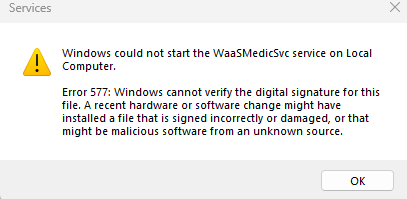
Hi i have windows 11 build 22621.232 I have an update on windows update that named "kb5016632", when try to install it i get 0x80070002. I went through several steps but it didn't work: Detach all hdd drives except os disk. Use "reset windows update tool" and reset everything like compnent, software des.. and etc. I have 20 GB free space and don't have any connection issue. ....... I also made a mistake. i use windows update troubleshooter and got this error "waasmedicsvc" then going to services and find waasmedicsvc service and find this error at the front of it " cold to read description. error code 2"And I decided to fix it, of course I ruined it more. I had a backup from build 22598.200 And I copied some system files from it. I copied this folders and files after owned the Owner then reset the permissions after copy them from my backup. "C:\Windows\WaaS" "C:\Windows\WinSxS\amd64_microsoft-windows-waasmedic.resources_31bf3856ad364e35_10.0.22621.1_en-us_3d5d68e7e077d764" "C:\Windows\WinSxS\amd64_microsoft-windows-waasmedic_31bf3856ad364e35_10.0.22621.1_none_94e9973331d890c7" NOW the waasmedic service wont start and i get this error: Who Can Help me?Solved2KViews0likes3Comments
Facing Blue Screen Error VIDEO_DXG_KRNL
The laptop is crashing and I receive a blue/green screen error which states code VIDEO_DXG_KRNL error (Happens mostly when left idle). I have checked and updated all the Intel, NVIDIA and Dell drivers. Still no resolution. The usage is nominal and mostly on Chrome. CPU and GPU temp is in range most of the time. I assumed the problem to be with the last build update (22592). So tried updating the build to Win11 IP 10.0.22622.290 (ni_release) but its installation gets stuck at 25% and it is resolved by a hard reboot to get it back to the last successful build. The windows update is paused at the moment. I would be very grateful for any help received. Thanks Event Viewer logs have been attached Specs: Dell G3 3500 | Intel i7-10750H | 64-bit | RAM 16.0 GB |891Views0likes0Comments
I dont get any updates for Windows 10 anymore.
I joined the Windows Insider program on 2021.01.10. Everything was OK until last summer, when the Windows 11 Insider Preview came out. My laptop does not meet the system requirements for Windows 11, so I declined the update every time. Then, after a few months, the update to Windows 11 option disappeared. Since then, I haven't gotten any regular updates for Windows 10, even though I left the insider program on the website. The only option is to do a clean installation of Windows?Solved1.1KViews1like2CommentsWindows update stuck on "download Pending"
Currently on "Windows 11 Insider Preview 22523.1000 (rs_prerelease)" DEV version I have manually updated to the above version to this to see if it resolved the issue I described below Last official update is from June 2021 when I was patched to version "Windows 11 Insider Preview 10.0.22000.51 (co_release)" since the issue started, I have tried: 1) turning on "download updates over metered connections" 2) deleting the files in the "SoftwareDistribution" folder 3) deleting the files in the Catroot2 folder when I do the manual updates, it will recognize that it happend and then make available the next release when ready but still stuck on download pending. I have other pending downloads, Stack Package, 5 intel updates and a .NET update for November 4) running, multiple times, the Windows Updating troubleshooting tool which seems to imply there was an issue found but doesn't make it clear it fixed anything3.7KViews0likes0Comments