vscode
6 TopicsUnlocking AI-Driven Data Access: Azure Database for MySQL Support via the Azure MCP Server
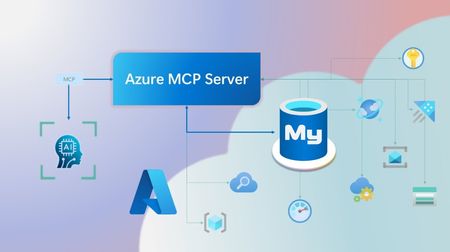
Step into a new era of data-driven intelligence with the fusion of Azure MCP Server and Azure Database for MySQL, where your MySQL data is no longer just stored, but instantly conversational, intelligent and action-ready. By harnessing the open-standard Model Context Protocol (MCP), your AI agents can now query, analyze and automate in natural language, accessing tables, surfacing insights and acting on your MySQL-driven business logic as easily as chatting with a colleague. It’s like giving your data a voice and your applications a brain, all within Azure’s trusted cloud platform. We are excited to announce that we have added support for Azure Database for MySQL in Azure MCP Server. The Azure MCP Server leverages the Model Context Protocol (MCP) to allow AI agents to seamlessly interact with various Azure services to perform context-aware operations such as querying databases and managing cloud resources. Building on this foundation, the Azure MCP Server now offers a set of tools that AI agents and apps can invoke to interact with Azure Database for MySQL - enabling them to list and query databases, retrieve schema details of tables, and access server configurations and parameters. These capabilities are delivered through the same standardized interface used for other Azure services, making it easier to the adopt the MCP standard for leveraging AI to work with your business data and operations across the Azure ecosystem. Before we delve into these new tools and explore how to get started with them, let’s take a moment to refresh our understanding of MCP and the Azure MCP Server - what they are, how they work, and why they matter. MCP architecture and key components The Model Context Protocol (MCP) is an emerging open protocol designed to integrate AI models with external data sources and services in a scalable, standardized, and secure manner. MCP dictates a client-server architecture with four key components: MCP Host, MCP Client, MCP Server and external data sources, services and APIs that provide the data context required to enhance AI models. To explain briefly, an MCP Host (AI apps and agents) includes an MCP client component that connects to one or more MCP Servers. These servers are lightweight programs that securely interface with external data sources, services and APIs and exposes them to MCP clients in the form of standardized capabilities called tools, resources and prompts. Learn more: MCP Documentation What is Azure MCP Server? Azure offers a multitude of cloud services that help developers build robust applications and AI solutions to address business needs. The Azure MCP Server aims to expose these powerful services for agentic usage, allowing AI systems to perform operations that are context-aware of your Azure resources and your business data within them, while ensuring adherence to the Model Context Protocol. It supports a wide range of Azure services and tools including Azure AI Search, Azure Cosmos DB, Azure Storage, Azure Monitor, Azure CLI and Developer CLI extensions. This means that you can empower AI agents, apps and tools to: Explore your Azure resources, such as listing and retrieving details on your Azure subscriptions, resource groups, services, databases, and tables. Search, query and analyze your data and logs. Execute CLI and Azure Developer CLI commands directly, and more! Learn more: Azure MCP Server GitHub Repository Introducing new Azure MCP Server tools to interact with Azure Database for MySQL The Azure MCP Server now includes the following tools that allow AI agents to interact with Azure Database for MySQL and your valuable business data residing in these servers, in accordance with the MCP standard: Tool Description Example Prompts azmcp_mysql_server_list List all MySQL servers in a subscription & resource group "List MySQL servers in resource group 'prod-rg'." "Show MySQL servers in region 'eastus'." azmcp_mysql_server_config_get Retrieve the configuration of a MySQL server "What is the backup retention period for server 'my-mysql-server'?" "Show storage allocation for server 'my-mysql-server'." azmcp_mysql_server_param_get Retrieve a specific parameter of a MySQL server "Is slow_query_log enabled on server my-mysql-server?" "Get innodb_buffer_pool_size for server my-mysql-server." azmcp_mysql_server_param_set Set a specific parameter of a MySQL server to a specific value "Set max_connections to 500 on server my-mysql-server." "Set wait_timeout to 300 on server my-mysql-server." azmcp_mysql_table_list List all tables in a MySQL database "List tables starting with 'tmp_' in database 'appdb'." "How many tables are in database 'analytics'?" azmcp_mysql_table_schema_get Get the schema of a specific table in a MySQL database "Show indexes for table 'transactions' in database 'billing'." "What is the primary key for table 'users' in database 'auth'?" azmcp_mysql_database_query Executes a SELECT query on a MySQL Database. The query must start with SELECT and cannot contain any destructive SQL operations for security reasons. “How many orders were placed in the last 30 days in the salesdb.orders table?” “Show the number of new users signed up in the last week in appdb.users grouped by day.” These interactions are secured using Microsoft Entra authentication, which enables seamless, identity-based access to Azure Database for MySQL - eliminating the need for password storage and enhancing overall security. How are these new tools in the Azure MCP Server different from the standalone MCP Server for Azure Database for MySQL? We have integrated the key capabilities of the Azure Database for MySQL MCP server into the Azure MCP Server, making it easier to connect your agentic apps not only to Azure Database for MySQL but also to other Azure services through one unified and secure interface! How to get started Installing and running the Azure MCP Server is quick and easy! Use GitHub Copilot in Visual Studio Code to gain meaningful insights from your business data in Azure Database for MySQL. Pre-requisites Install Visual Studio Code. Install GitHub Copilot and GitHub Copilot Chat extensions. An Azure Database for MySQL with Microsoft Entra authentication enabled. Ensure that the MCP Server is installed on a system with network connectivity and credentials to connect to Azure Database for MySQL. Installation and Testing Please use this guide for installation: Azure MCP Server Installation Guide Try the following prompts with your Azure Database for MySQL: Azure Database for MySQL tools for Azure MCP Server Try it out and share your feedback! Start using Azure MCP Server with the MySQL tools today and let our cloud services become your AI agent’s most powerful ally. We’re counting on your feedback - every comment, suggestion, or bug-report helps us build better tools together. Stay tuned: more features and capabilities are on the horizon! Feel free to comment below or write to us with your feedback and queries at AskAzureDBforMySQL@service.microsoft.com.193Views1like0CommentsBuild Smarter with Azure HorizonDB
By: Maxim Lukiyanov, PhD, Principal PM Manager; Abe Omorogbe, Senior Product Manager; Shreya R. Aithal, Product Manager II; Swarathmika Kakivaya, Product Manager II Today, at Microsoft Ignite, we are announcing a new PostgreSQL database service - Azure HorizonDB. You can read the announcement here, and in this blog you can learn more about HorizonDB’s AI features and development tools. Azure HorizonDB is designed for the full spectrum of modern database needs - from quickly building new AI applications, to scaling enterprise workloads to unprecedented levels of performance and availability, to managing your databases efficiently and securely. To help with building new AI applications we are introducing 3 features: DiskANN Advanced Filtering, built-in AI model management, and integration with Microsoft Foundry. To help with database management we are introducing a set of new capabilities in PostgreSQL extension for Visual Studio Code, as well as announcing General Availability of the extension. Let’s dive into AI features first. DiskANN Advanced Filtering We are excited to announce a new enhancement in the Microsoft’s state of the art vector indexing algorithm DiskANN – DiskANN Advanced Filtering. Advanced Filtering addresses a common problem in vector search – combining vector search with filtering. In real-world applications where queries often include constraints like price ranges, ratings, or categories, traditional vector search approaches, such as pgvector’s HNSW, rely on multiple step retrieval and post-filtering, which can make search extremely slow. DiskANN Advanced Filtering solves this by combining filter and search into one operation - while the graph of vectors is traversed during the vector search, each vector is also checked for filter predicate match, ensuring that only the correct vectors are retrieved. Under the hood, it works in a 3-step process: first creating a bitmap of relevant rows using indexes on attributes such as price or rating, then performing a filter-aware graph traversal against the bitmap, and finally, validating and ordering the results for accuracy. This integrated approach delivers dramatically faster and more efficient filtered vector searches. Initial benchmarks show that enabling Advanced Filtering on DiskANN reduces query latency by up to 3x, depending on filter selectivity. AI Model Management Another exciting feature of HorizonDB is AI Model Management. This feature automates Microsoft Foundry model provisioning during database deployment and instantly activates database semantic operators. This eliminates tens of setup and configuration steps and simplifies the development of new AI apps and agents. AI Model Management elevates the experience of using semantic operators within PostgreSQL. When activated, it provisions key models for embedding, semantic ranking and generation via Foundry, installs and configures the azure_ai extension to enable the operators, establishes secure connections, integrates model management, monitoring and cost management within HorizonDB. What would otherwise require significant manual effort and context-switching between Foundry and PostgreSQL for configuration, management, and monitoring is now possible with just a few clicks, all without leaving the PostgreSQL environment. You can also continue to bring your own Foundry models, with a simplified and enhanced process for registering your custom model endpoints in the azure_ai extension. Microsoft Foundry Integration Microsoft Foundry offers a comprehensive technology stack for building AI apps and agents. But building modern agents capable of reasoning, acting, and collaborating is impossible without connection to data. To facilitate that connection, we are excited to announce a new PostgreSQL connector in Microsoft Foundry. The connector is designed using a new standard in data connectivity – Model Context Protocol (MCP). It enables Foundry agents to interact with HorizonDB securely and intelligently, using natural language instead of SQL, and leveraging Microsoft Entra ID to ensure secure connection. In addition to HorizonDB this connector also supports Azure Database for PostgreSQL (ADP). This integration allows Foundry agents to perform tasks like: Exploring database schemas Retrieving records and insights Performing analytical queries Executing vector similarity searches for semantic search use cases All through natural language, without compromising enterprise security or compliance. To get started with Foundry Integration, follow these setup steps to deploy your own HorizonDB (requires participation in Private Preview) or ADP and connect it to Foundry in just a few steps. PostgreSQL extension for VS Code is Generally Available We’re excited to announce that the PostgreSQL extension for Visual Studio Code is now Generally Available. This extension garnered significant popularity within the PostgreSQL community since it’s preview in May’25 reaching more than 200K installs. It is the easiest way to connect to a PostgreSQL database from your favorite editor, manage your databases, and take advantage of built-in AI capabilities without ever leaving VS Code. The extension works with any PostgreSQL whether it's on-premises or in the cloud, and also supports unique features of Azure HorizonDB and Azure Database for PostgreSQL (ADP). One of the key new capabilities is Metrics Intelligence, which uses Copilot and real-time telemetry of HorizonDB or ADP to help you diagnose and fix performance issues in seconds. Instead of digging through logs and query plans, you can open the Performance Dashboard, see a CPU spike, and ask Copilot to investigate. The extension sends a rich prompt that tells Copilot to analyze live metrics, identify the root cause, and propose an actionable fix. For example, Copilot might find a full table scan on a large table, recommend a composite index on the filter columns, create that index, and confirm the query plan now uses it. The result is dramatic: you can investigate and resolve the CPU spike in seconds, with no manual scripting or guesswork, and with no prior PostgreSQL expertise required. The extension also makes it easier to work with graph data. HorizonDB and ADP support open-source graph extension Apache AGE. This turns these services into fully managed graph databases. You can run graph queries against HorizonDB and immediately visualize the results as an interactive graph inside VS Code. This helps you understand relationships in your data faster, whether you’re exploring customer journeys, network topologies, or knowledge graphs - all without switching tools. In Conclusion Azure HorizonDB brings together everything teams need to build, run, and manage modern, AI-powered applications on PostgreSQL. With DiskANN Advanced Filtering, you can deliver low-latency, filtered vector search at scale. With built-in AI Model Management and Microsoft Foundry integration, you can provision models, wire up semantic operators, and connect agents to your data with far fewer steps and far less complexity. And with the PostgreSQL extension for Visual Studio Code, you get an intuitive, AI-assisted experience for performance tuning and graph visualization, right inside the tools you already use. HorizonDB is now available in private preview. If you’re interested in building AI apps and agents on a fully managed, PostgreSQL-compatible service with built-in AI and rich developer tooling, sign-up for Private Preview: https://aka.ms/PreviewHorizonDB.1.1KViews4likes0CommentsSeptember 2025 Recap: Azure Database for PostgreSQL
Hello Azure Community, We are back with another round of updates for Azure Database for PostgreSQL! September is packed with powerful enhancements, from the public preview of PostgreSQL 18 to the general availability of Azure Confidential Computing, plus several new capabilities designed to boost performance, security, and developer experience. Stay tuned as we dive deeper into each of these feature updates. Before we dive into the feature highlights, let’s take a look at PGConf NYC 2025 highlights. PGConf NYC 2025 Highlights Our Postgres team was glad to be part of PGConf NYC 2025! As a Platinum sponsor, Microsoft joined the global PostgreSQL community for three days of sessions covering performance, extensibility, cloud, and AI, highlighted by Claire Giordano’s keynote, “What Microsoft is Building for Postgres—2025 in Review,” along with deep dives from core contributors and engineers. If you missed it, you can catch up here: Keynote slides: What Microsoft is Building for Postgres—2025 in Review by Claire Giordano at PGConf NYC 2025 Day 3 wrap-up: Key takeaways, highlights, and insights from the Azure Database for PostgreSQL team. Feature Highlights Near Zero Downtime scaling for High Availability (HA) enabled servers - Generally Available Azure Confidential Computing for Azure Database for PostgreSQL - Generally Available PostgreSQL 18 on Azure Database for PostgreSQL - Public Preview PostgreSQL Discovery & Assessment in Azure Migrate - Public Preview LlamaIndex Integration with Azure Postgres Latest Minor Versions GitHub Samples: Entra ID Token Refresh for PostgreSQL VS Code Extension for PostgreSQL enhancements Near Zero Downtime scaling for High Availability (HA) enabled servers – Generally Available Scaling compute for high availability (HA) enabled Azure Database for PostgreSQL servers just got faster. With Near Zero Downtime (NZD) scaling, compute changes such as vCore or tier modifications are now complete with minimal interruption, typically under 30 seconds using HA failover which maintains the connection string. The service provisions a new primary and standby instance with the updated configuration, synchronizes them with the existing setup, and performs a quick failover. This significantly reduces downtime compared to traditional scaling (which could take 2–10 minutes), improving overall availability. Visit our documentation for full details on how Near Zero Downtime scaling works. Azure Confidential Computing for Azure Database for PostgreSQL - Generally Available Azure Confidential Computing (ACC) Confidential Virtual Machines (CVMs) are now generally available for Azure Database for PostgreSQL. This capability brings hardware-based protection for data in use, ensuring your most sensitive information remains secure, even while being processed. With CVMs, your PostgreSQL flexible server instance runs inside a Trusted Execution Environment (TEE), a secure, hardware-backed enclave that encrypts memory and isolates it from the host OS, hypervisor, and even Azure operators. This means your data enjoys end-to-end protection: at rest, in transit, and in use. Key Benefits: End-to-End Security: Data protected at rest, in transit, and in use Enhanced Privacy: Blocks unauthorized access during processing Compliance Ready: Meets strict security standards for regulated workloads Confidence in Cloud: Hardware-backed isolation for critical data Discover how Azure Confidential Computing enhances PostgreSQL check out the blog announcement. PostgreSQL 18 on Azure Database for PostgreSQL – Public Preview PostgreSQL 18 is now available in public preview on Azure Database for PostgreSQL, launched the same day as the PostgreSQL community release. PostgreSQL 18 introduces new performance, scalability, and developer productivity improvements. With this preview, you get early access to the latest community release on a fully managed Azure service. By running PostgreSQL 18 on flexible server, you can test application compatibility, explore new SQL and performance features, and prepare for upgrades well before general availability. This preview release gives you the opportunity to validate your workloads, extensions, and development pipelines in a dedicated preview environment while taking advantage of the security, high availability, and management capabilities in Azure. With PostgreSQL 18 in preview, you are among the first to experience the next generation of PostgreSQL on Azure, ensuring your applications are ready to adopt it when it reaches full general availability. To learn more about preview, read https://aka.ms/pg18 PostgreSQL Discovery & Assessment in Azure Migrate – Public Preview The PostgreSQL Discovery & Assessment feature is now available in public preview on Azure Migrate, making it easier to plan your migration journey to Azure. Migrating PostgreSQL workloads can be challenging without clear visibility into your existing environment. This feature solves that problem by delivering deep insights into on-premises PostgreSQL deployments, making migration planning easier and more informed. With this feature, you can discover PostgreSQL instances across your infrastructure, assess migration readiness and identify potential blockers, receive configuration-based SKU recommendations for Azure Database for PostgreSQL, and estimate costs for running your workloads in Azure all in one unified experience. Key Benefits: Comprehensive Visibility: Understand your on-prem PostgreSQL landscape Risk Reduction: Identify blockers before migration Optimized Planning: Get tailored SKU and cost insights Faster Migration: Streamlined assessment for a smooth transition Learn more in our blog: PostgreSQL Discovery and Assessment in Azure Migrate LlamaIndex Integration with Azure Postgres The support for native LlamaIndex integration is now available for Azure Database for PostgreSQL! This enhancement brings seamless connectivity between Azure Database for PostgreSQL and LlamaIndex, allowing developers to leverage Azure PostgreSQL as a secure and high-performance vector store for their AI agents and applications. Specifically, this package adds support for: Microsoft Entra ID (formerly Azure AD) authentication when connecting to your Azure Database for PostgreSQL instances, and, DiskANN indexing algorithm when indexing your (semantic) vectors. This package makes it easy to connect LlamaIndex to your Azure PostgreSQL instances whether you're building intelligent agents, semantic search, or retrieval-augmented generation (RAG) systems. Explore the full guide here: https://aka.ms/azpg-llamaindex Latest Postgres minor versions: 17.6, 16.9, 15.13, 14.18 and 13.21 PostgreSQL minor versions 17.6, 16.9, 15.13, 14.18 and 13.21 are now supported by Azure Database for PostgreSQL. These minor version upgrades are automatically performed as part of the monthly planned maintenance in Azure Database for PostgreSQL. The upgrade automation ensures that your databases are always running the latest optimized versions without requiring manual intervention. This release fixes 3 security vulnerabilities and more than 55 bugs reported over the last several months. PostgreSQL minor versions are backward-compatible, so updates won’t affect your applications. For details about the release, see PostgreSQL community announcement. GitHub Samples: Entra ID Token Refresh for PostgreSQL We have introduced code samples for Entra ID token refresh, built specifically for Azure Database for PostgreSQL. These samples simplify implementing automatic token acquisition and refresh, helping you maintain secure, uninterrupted connectivity without manual intervention. By using these examples, you can keep sessions secure, prevent connection drops from expired tokens, and streamline integration with Azure Identity libraries for PostgreSQL workloads. What’s Included: Ready-to-use code snippets for token acquisition and refresh for Python and .NET Guidance for integrating with Azure Identity libraries Explore the samples repository on https://aka.ms/pg-access-token-refresh and start implementing it today. VS Code Extension for PostgreSQL enhancements A new version for VS Code Extension for PostgreSQL is out! This update introduces a Server Dashboard that provides high-level metadata and real-time performance metrics, along with historical insights for Azure Database for PostgreSQL Flexible Server. You can even use GitHub Copilot Chat to ask performance questions in natural language and receive diagnostic SQL queries in response. Additional enhancements include: A new keybinding for “Run Current Statement” in the Query Editor Support for dragging Object Explorer entities into the editor with properly quoted identifiers Ability to connect to databases via socket file paths Key fixes: Preserves the state of the Explain Analyze toolbar toggle Removes inadvertent logging of sensitive information from extension logs Stabilizes memory usage during long-running dashboard sessions Don’t forget to update to the latest version in the marketplace to take advantage of these enhancements and visit our GitHub repository to learn more about this month’s release. We’d love your feedback! Help us improve the Server Dashboard and other features by sharing your thoughts on GitHub . Azure Postgres Learning Bytes 🎓 Setting up logical replication between two servers This section will walk through setting up logical replication between two Azure Database for PostgreSQL flexible server instances. Logical replication replicates data changes from a source (publisher) server to a target (subscriber) server. Prerequisites PostgreSQL versions supported by logical replication (publisher/subscriber compatible). Network connectivity: subscriber must be able to connect to the publisher (VNet/NSG/firewall rules). A replication role on the publisher (or a role with REPLICATION privilege). Step 1: Configure Server Parameters on both publisher and subscriber: On Publisher: wal_level=logical max_worker_processes=16 max_replication_slots=10 max_wal_senders=10 track_commit_timestamp=on On Subscriber: wal_level=logical max_worker_processes=16 max_replication_slots=10 max_wal_senders=10 track_commit_timestamp=on max_worker_processes = 16 max_sync_workers_per_subscription = 6 autovacuum = OFF (during initial copy) max_wal_size = 64GB checkpoint_timeout = 3600 Step 2: Create Publication (Publisher) and alter role with replication privilege ALTER ROLE <replication_user> WITH REPLICATION; CREATE PUBLICATION pub FOR ALL TABLES; Step 3: Create Subscription (Subscriber) CREATE SUBSCRIPTION <subscription-name> CONNECTION 'host=<publisher_host> dbname=<db> user=<user> password=<pwd>' PUBLICATION <publication-name>;</publication-name></pwd></user></db></publisher_host></subscription-name> Step 4: Monitor Publisher: This shows active processes on the publisher, including replication workers. SELECT application_name, wait_event_type, wait_event, query, backend_type FROM pg_stat_activity WHERE state = 'active'; Subscriber: The ‘pg_stat_progress_copy’ table tracks the progress of the initial data copy for each table. SELECT * FROM pg_stat_progress_copy; To explore more details on how to get started with logical replication, visit our blog on Tuning logical replication for Azure Database for PostgreSQL. Conclusion That’s all for the September 2025 feature highlights! We remain committed to making Azure Database for PostgreSQL more powerful and secure with every release. Stay up to date on the latest enhancements by visiting our Azure Database for PostgreSQL blog updates link. Your feedback matters and helps us shape the future of PostgreSQL on Azure. If you have suggestions, ideas, or questions, we’d love to hear from you: https://aka.ms/pgfeedback. We look forward to sharing even more exciting capabilities in the coming months. Stay tuned!610Views4likes0CommentsJune 2025 Recap: Azure Database for PostgreSQL
Hello Azure Community, We have introduced a range of exciting new features and updates to Azure Database for PostgreSQL in June. From general availability of PG 17 to public preview of the SSD v2 storage tier for High Availability, there have been some significant feature announcements across multiple areas in the last month. Stay tuned as we dive deeper into each of these feature updates. Before that, let’s look at POSETTE 2025 highlights. POSETTE 2025 Highlights We hosted POSETTE: An Event for Postgres 2025 in June! This year marked our 4th annual event featuring 45 speakers and a total of 42 talks. PostgreSQL developers, contributors, and community members came together to share insights on topics covering everything from AI-powered applications to deep dives into PostgreSQL internals. If you missed it, you can catch up by watching the POSETTE livestream sessions. If this conference sounds interesting to you and want to be part of it next year, don’t forget to subscribe to POSETTE news. Feature Highlights General Availability of PostgreSQL 17 with 'In-Place' upgrade support General Availability of Online Migration Migration service support for PostgreSQL 17 Public Preview of SSD v2 High Availability New Region: Indonesia Central VS Code Extension for PostgreSQL enhancements Enhanced role management Ansible collection released for latest REST API version General Availability of PostgreSQL 17 with 'In-Place' upgrade support PostgreSQL 17 is now generally available on Azure Database for PostgreSQL flexible server, bringing key community innovations to your workloads. You’ll see faster vacuum operations, richer JSON processing, smarter query planning (including better join ordering and parallel execution), dynamic logical replication controls, and enhanced security & audit-logging features—backed by Azure’s five-year support policy. You can easily upgrade to PostgreSQL 17 using the in-place major version upgrade feature available through the Azure portal and CLI, without changing server endpoints or reconfiguring applications. The process includes built-in validations and rollback safety to help ensure a smooth and reliable upgrade experience. For more details, read the PostgreSQL 17 release announcement blog. General Availability of Online Migration We're excited to announce that Online Migration is now generally available for the Migration service for Azure Database for PostgreSQL! Online migration minimizes downtime by keeping your source database operational during the migration process, with continuous data synchronization until cut over. This is particularly beneficial for mission-critical applications that require minimal downtime during migration. This milestone brings production-ready online migration capabilities supporting various source environments including on-premises PostgreSQL, Azure VMs, Amazon RDS, Amazon Aurora, and Google Cloud SQL. For detailed information about the capabilities and how to get started, visit our Migration service documentation. Migration service support for PostgreSQL 17 Building on our PostgreSQL 17 general availability announcement, the Migration service for Azure Database for PostgreSQL now fully supports PostgreSQL 17. This means you can seamlessly migrate your existing PostgreSQL instances from various source platforms to Azure Database for PostgreSQL flexible server running PostgreSQL 17. With this support, organizations can take advantage of the latest PostgreSQL 17 features and performance improvements while leveraging our online migration capabilities for minimal downtime transitions. The migration service maintains full compatibility with PostgreSQL 17's enhanced security features, improved query planning, and other community innovations. Public Preview of SSD v2 High Availability We’re excited to announce the public preview High availability (HA) support for the Premium SSD v2 storage tier in Azure Database for PostgreSQL flexible server. This support allows you to enable Zone-Redundant HA using Premium SSD v2 during server deployments. In addition to high availability on SSDv2 you now get improved resiliency and 10 second failover times when using Premium SSD v2 with zone-redundant HA, helping customers build resilient, high-performance PostgreSQL applications with minimal overhead. This feature is particularly well-suited for mission-critical workloads, including those in financial services, real-time analytics, retail, and multi-tenant SaaS platforms. Key Benefits of Premium SSD v2: Flexible disk sizing: Scale from 32 GiB to 64 TiB in 1-GiB increments Fast failovers: Planned or unplanned failovers typically around 10 seconds Independent performance configuration: Achieve up to 80,000 IOPS and 1,200 Mbps throughput without resizing your disk. Baseline performance: Free throughput of 125 MB/s and 3,000 IOPS for disks up to 399 GiB, and 500 MB/s and 12,000 IOPS for disks 400 GiB and above at no additional cost. For more details, please refer to the Premium SSD v2 HA blog. New Region: Indonesia Central New region rollout! Azure Database for PostgreSQL flexible server is now available in Indonesia Central, giving customers in and around the region lower latency and data residency options. This continues our mission to bring Azure PostgreSQL closer to where you build and run your apps. For the full list of regions visit: Azure Database for PostgreSQL Regions. VS Code Extension for PostgreSQL enhancements The brand-new VS code extension for PostgreSQL launched in mid-May and has already garnered over 122K installs from the Visual Studio Marketplace! And the kickoff blog about this new IDE for PostgreSQL in VS Code has had over 150K views. This extension makes it easier for developers to seamlessly interact with PostgreSQL databases. We have been committed to make this experience better and have introduced several enhancements to improve reliability and compatibility updates. You can now have better control over service restarts and process terminations on supported operating systems. Additionally, we have added support for parsing additional connection-string formats in the “Create Connection” flow, making it more flexible and user-friendly. We also resolved Entra token-fetching failures for newly created accounts, ensuring a smoother onboarding experience. On the feature front, you can now leverage Entra Security Groups and guest accounts across multiple tenants when establishing new connections, streamlining permission management in complex Entra environments. Don’t forget to update to the latest version in the marketplace to take advantage of these enhancements and visit our GitHub repository to learn more about this month’s release. If you learn best by video, these 2 videos are a great way to learn more about this new VS Code extension: POSETTE 2025: Introducing Microsoft’s VS Code Extension for PostgreSQL Demo of using VS code extension for PostgreSQL Enhanced role management With the introduction of PostgreSQL 16, a strict role hierarchy structure has been implemented. As a result, GRANT statements that were functional in PostgreSQL 11-15 may no longer work in PostgreSQL 16. We have improved the administrative flexibility and addressed this limitation in Azure Database for PostgreSQL flexible server across all PostgreSQL versions. Members of ‘azure_pg_admin’ can now manage, and access objects owned by any role that is non-restricted, giving control and permission over user-defined roles. To learn more about this improvement, please refer to our documentation on roles. Ansible collection released for latest REST API version A new version of Ansible collection for Azure Database for PostgreSQL flexible server is now released. Version 3.6.0 now includes the latest GA REST API features. This update introduces several enhancements, such as support for virtual endpoints, on-demand backups, system-assigned identity, storage auto-grow, and seamless switchover of read replicas to a new site (Read Replicas - Switchover), among many other improvements. To get started with using please visit flexible server Ansible collection link. Azure Postgres Learning Bytes 🎓 Using PostgreSQL VS code extension with agent mode The VS Code extension for PostgreSQL has been trending amongst the developer community. In this month's Learning Bytes section, we want to share how to enable the extension and use GitHub Copilot to create a database in Agent Mode, add dummy data, and visualize it using the Agent Mode and VS Code extension. Step 1: Download the VS code Extension for PostgreSQL Step 2: Check GitHub Copilot and Agent mode is enabled Go to File -> Preferences -> Settings (Ctrl + ,). Search and enable "chat.agent.enabled" and "pgsql copilot.enable". Reload VS Code to apply changes. Step 3: Connect to Azure Database for PostgreSQL Use the extension to enter instance details and establish a connection. Create and view schemas under Databases -> Schemas. Step 4: Visualize and Populate Data Right-click the database to visualize schemas. Ask the agent to insert dummy data or run queries. Conclusion That's all for the June 2025 feature updates! We are dedicated to continuously improve Azure Database for PostgreSQL with every release. Stay updated with the latest updates to our features by following this link. Your feedback is important and helps us continue to improve. If you have any suggestions, ideas, or questions, we’d love to hear from you. Share your thoughts here: aka.ms/pgfeedback We look forward to bringing you even more exciting updates throughout the year, stay tuned!878Views3likes0CommentsNew Generative AI Features in Azure Database for PostgreSQL
by: Maxim Lukiyanov, PhD, Principal PM Manager This week at Microsoft Build conference, we're excited to unveil a suite of new Generative AI capabilities in Azure Database for PostgreSQL flexible server. These features unlock a new class of applications powered by an intelligent database layer, expanding the horizons of what application developers can achieve. In this post, we’ll give you a brief overview of these announcements. Data is the fuel of AI. Looking back, the intelligence of Large Language Models (LLMs) can be reframed as intelligence that emerged from the vast data they were trained on. The LLMs just happened to be this technological leap necessary to extract that knowledge, but the knowledge itself was hidden in the data all along. In modern AI applications, the Retrieval-Augmented Generation (RAG) pattern applies this same principle to real-time data. RAG extracts relevant facts from data on the fly to augment an LLM’s knowledge. At Microsoft, we believe this principle will continue to transform technology. Every bit of data will be squeezed dry of every bit of knowledge it holds. And there’s no better place to find the most critical and up-to-date data than in databases. Today, we're excited to announce the next steps on our journey to make databases smarter – so they can help you capture the full potential of your data. Fast and accurate vector search with DiskANN First, we’re announcing the General Availability of DiskANN vector indexing in Azure Database for PostgreSQL. Vector search is at the heart of the RAG pattern, and it continues to be a cornerstone technology for the new generation of AI Agents - giving it contextual awareness and access to fresh knowledge hidden in data. DiskANN brings years of state-of-the-art innovation in vector indexing from Microsoft Research directly to our customers. This release introduces supports for vectors up to 16,000 dimensions — far surpassing the 2,000-dimension limit of the standard pgvector extension in PostgreSQL. This enables the development of highly accurate applications using high-dimensional embeddings. We’ve also accelerated index creation with enhanced memory management, parallel index building, and other optimizations – delivering up to 3x faster index builds while reducing disk I/O. Additionally, we're excited to announce the Public Preview of Product Quantization – a cutting-edge vector compression technique that delivers exceptional compression while maintaining high accuracy. DiskANN Product Quantization enables efficient storage of large vector volumes, making it ideal for production workloads where both performance and cost matter. With Product Quantization enabled, DiskANN offers up to 10x faster performance and 4x cost savings compared to pgvector HNSW. You can learn more about DiskANN in a dedicated blog post. Semantic operators in the database Next, we’re announcing the Public Preview of Semantic Operators in Azure Database for PostgreSQL – bringing a new intelligence layer to relational algebra, integrated directly into the SQL query engine. While vector search is foundational to the Generative AI (GenAI) apps and agents, it only scratches the surface of what’s possible. Semantic relationships between elements of the enterprise data are not visible to the vector search. This knowledge exists within the data but is lost at the lowest level of the stack – vector search – and this loss propagates upward, limiting the agent’s ability to reason about the data. This is where new Semantic Operators come in. Semantic Operators leverage LLMs to add semantic understanding of operational data. Today, we’re introducing four operators: generate() – a versatile generation operator capable of ChatGPT-style responses. is_true() – a semantic filtering operator that evaluates filter conditions and joins in natural language. extract() – a knowledge extraction operator that extracts hidden semantic relationships and other knowledge from your data, bringing a new level of intelligence to your GenAI apps and agents. rank() - a highly accurate semantic ranking operator, offering two types of state-of-the-art re-ranking models: Cohere Rank-v3.5 or OpenAI gpt-4.1 models from Azure AI Foundry Model Catalog. You can learn more about Semantic Operators in a dedicated blog post. Graph database and GraphRAG knowledge graph support Finally, we’re announcing the General Availability of GraphRAG support and the General Availability of the Apache AGE extension in Azure Database for PostgreSQL. Apache AGE extension on Azure Database for PostgreSQL offers a cost-effective, managed graph database service powered by PostgreSQL engine – and serves as the foundation for building GraphRAG applications. The semantic relationships in the data once extracted can be stored in various ways within the database. While relational tables with referential integrity can represent some relationships, this approach is suboptimal for knowledge graphs. Semantic relationships are dynamic; many aren’t known ahead of time and can’t be effectively modeled by a fixed schema. Graph databases provide a much more flexible structure, enabling knowledge graphs to be expressed naturally. Apache AGE supports openCypher, the emerging standard for querying graph data. OpenCypher offers an expressive, intuitive language well-suited for knowledge graph queries. We believe that combining semantic operators with graph support in Azure Database for PostgreSQL creates a compelling data platform for the next generation of AI agents — capable of effectively extracting, storing, and retrieving semantic relationships in your data. You can learn more about graph support in a separate blog post. Resources to help you get started We’re also happy to announce availability of the new resources and tools for application developers: Model Context Protocol (MCP) is an emerging open protocol designed to integrate AI models with external data sources and services. We have integrated MCP server for Azure Database for PostgreSQL into the Azure MCP Server, making it easy to connect your agentic apps not only to Azure Database for PostgreSQL, but to other Azure services as well through one unified interface. To learn more, refer to this blog post. New Solution Accelerator which showcases all of the capabilities we have announced today working together in one solution solving real world problems of ecommerce retail reimagined for agentic era. New PostgreSQL extension for VSCode for application developers and database administrators alike, bringing new generation of query editing and Copilot experiences to the world of PostgreSQL. And read about New enterprise features making Azure Database for PostgreSQL faster and more secure in the accompanying post. Begin your journey Generative AI innovation continues its advancement, bringing new opportunities every month. We’re excited for what is to come and look forward to sharing this journey of discovery with our customers. With today’s announcements - DiskANN vector indexing, Semantic Operators, and GraphRAG - Azure Database for PostgreSQL is ready to help you explore new boundaries of what’s possible. We invite you to begin your Generative AI journey today by exploring our new Solution Accelerator.1.9KViews3likes0CommentsHow to debug inline Python code in Azure Data Explorer
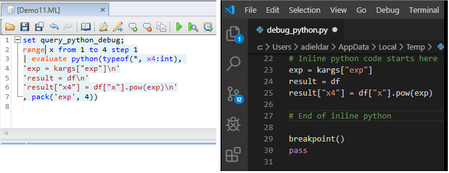
Azure Data Explorer supports running Python code embedded in Kusto query language using the python() plugin. The python() plugin capability extends Kusto query language native functionalities with the huge archive of OSS Python packages, enabling running advanced algorithms, such as ML, AI and Time Series Analysis as part of the query. To improve and streamline this workflow, Azure Data Explorer supports integration between Kusto Explorer or Web UI clients and VS Code for authoring and debugging KQL inline Python code.4.8KViews1like0Comments