VPN Gateway
41 TopicsAzure Networking 2025: Powering cloud innovation and AI at global scale
In 2025, Azure’s networking platform proved itself as the invisible engine driving the cloud’s most transformative innovations. Consider the construction of Microsoft’s new Fairwater AI datacenter in Wisconsin – a 315-acre campus housing hundreds of thousands of GPUs. To operate as one giant AI supercomputer, Fairwater required a single flat, ultra-fast network interconnecting every GPU. Azure’s networking team delivered: the facility’s network fabric links GPUs at 800 Gbps speeds in a non-blocking architecture, enabling 10× the performance of the world’s fastest supercomputer. This feat showcases how fundamental networking is to cloud innovation. Whether it’s uniting massive AI clusters or connecting millions of everyday users, Azure’s globally distributed network is the foundation upon which new breakthroughs are built. In 2025, the surge of AI workloads, data-driven applications, and hybrid cloud adoption put unprecedented demands on this foundation. We responded with bold network investments and innovations. Each new networking feature delivered in 2025, from smarter routing to faster gateways, was not just a technical upgrade but an innovation enabling customers to achieve more. Recapping the year’s major releases across Azure Networking services and key highlights how AI both drive and benefit from these advancements. Unprecedented connectivity for a hybrid and AI era Hybrid connectivity at scale: Azure’s network enhancements in 2025 focused on making global and hybrid connectivity faster, simpler, and ready for the next wave of AI-driven traffic. For enterprises extending on-premises infrastructure to Azure, Azure ExpressRoute private connectivity saw a major leap in capacity: Microsoft announced support for 400 Gbps ExpressRoute Direct ports (available in 2026) to meet the needs of AI supercomputing and massive data volumes. These high-speed ports – which can be aggregated into multi-terabit links – ensure that even the largest enterprises or HPC clusters can transfer data to Azure with dedicated, low-latency links. In parallel, Azure VPN Gateway performance reached new highs, with a generally available upgrade that delivers up to 20 Gbps aggregate throughput per gateway and 5 Gbps per individual tunnel. This is a 3× increase over previous limits, enabling branch offices and remote sites to connect to Azure even more seamlessly without bandwidth bottlenecks. Together, the ExpressRoute and VPN improvements give customers a spectrum of high-performance options for hybrid networking – from offices and datacenters to the cloud – supporting scenarios like large-scale data migrations, resilient multi-site architectures, and hybrid AI processing. Simplified global networking: Azure Virtual WAN (vWAN) continued to mature as the one-stop solution for managing global connectivity. Virtual WAN introduced forced tunneling for Secure Virtual Hubs (now in preview), which allows organizations to route all Internet-bound traffic from branch offices or virtual networks back to a central hub for inspection. This capability simplifies the implementation of a “backhaul to hub” security model – for example, forcing branches to use a central firewall or security appliance – without complex user-defined routing. Empowering multicloud and NVA integration: Azure recognizes that enterprise networks are diverse. Azure Route Server improvements enhanced interoperability with customer equipment and third-party network virtual appliances (NVAs). Notably, Azure Route Server now supports up to 500 virtual network connections (spokes) per route server, a significant scale boost that enables larger hub-and-spoke topologies and simplified Border Gateway Protocol (BGP) route exchange even in very large environments. This helps customers using SD-WAN appliances or custom firewalls in Azure to seamlessly learn routes from hundreds of VNet spokes – maintaining central routing control without manual configuration. Additionally, Azure Route Server introduced a preview of hub routing preference, giving admins the ability to influence BGP route selection (for example, preferring ExpressRoute over a VPN path, or vice versa). This fine-grained control means hybrid networks can be tuned for optimal performance and cost. Resilience and reliability by design Azure’s growth has been underpinned by making the network “resilient by default.” We shipped tools to help validate and improve network resiliency. ExpressRoute Resiliency Insights was released for general availability – delivering an intelligent assessment of an enterprise’s ExpressRoute setup. This feature evaluates how well your ExpressRoute circuits and gateways are architected for high availability (for example, using dual circuits in diverse locations, zone-redundant gateways, etc.) and assigns a resiliency index score as a percentage. It will highlight suboptimal configurations – such as routes advertised on only one circuit, or a gateway that isn’t zone-redundant – and provide recommendations for improvement. Moreover, Resiliency Insights includes a failover simulation tool that can test circuit redundancy by mimicking failures, so you can verify that your connections will survive real-world incidents. By proactively monitoring and testing resilience, Azure is helping customers achieve “always-on” connectivity even in the face of fiber cuts, hardware faults, or other disruptions. Security, governance, and trust in the network As enterprises entrust more core business to Azure, the platform’s networking services advanced on security and governance – helping customers achieve Zero Trust networks and high compliance with minimal complexity. Azure DNS now offers DNS Security Policies with Threat Intelligence feeds (GA). This capability allows organizations to protect their DNS queries from known malicious domains by leveraging continuously updated threat intel. For example, if a known phishing domain or C2 (command-and-control) hostname appears in DNS queries from your environment, Azure DNS can automatically block or redirect those requests. Because DNS is often the first line of detection for malware and phishing activities, this built-in filtering provides a powerful layer of defense that’s fully managed by Azure. It’s essentially a cloud-delivered DNS firewall using Microsoft’s vast threat intelligence – enabling all Azure customers to benefit from enterprise-grade security without deploying additional appliances. Network traffic governance was another focus. The introduction of forced tunneling in Azure Virtual WAN hubs (preview) shared above is a prime example where networking meets security compliance. Optimizing cloud-native and edge networks We previewed DNS intelligent traffic control features – such as filtering DNS queries to prevent data exfiltration and applying flexible recursion policies – which complement the DNS Security offering in safeguarding name resolution. Meanwhile, for load balancing across regions, Azure Traffic Manager’s behind-the-scenes upgrades (as noted earlier) improved reliability, and it’s evolving to integrate with modern container-based apps and edge scenarios. AI-powered networking: Both enabling and enabled by AI We are infusing AI into networking to make management and troubleshooting more intelligent. Networking functionality in Azure Copilot accelerates tasks like never before: it outlines the best practices instantly and troubleshooting that once required combing through docs and logs can be conversational. It effectively democratizes networking expertise, helping even smaller IT teams manage sophisticated networks by leveraging AI recommendations. The future of cloud networking in an AI world As we close out 2025, one message is clear: networking is strategic. The network is no longer a static utility – it is the adaptive circulatory system of the cloud, determining how far and fast customers can go. By delivering higher speeds, greater reliability, tighter security, and easier management, Azure Networking has empowered businesses to connect everything to anything, anywhere – securely and at scale. These advances unlock new scenarios: global supply chains running in real-time over a trusted network, multi-player AR/VR and gaming experiences delivered without lag, and AI models trained across continents. Looking ahead, AI-powered networking will become the norm. The convergence of AI and network tech means we will see more self-optimizing networks that can heal, defend, and tune themselves with minimal human intervention.626Views3likes0Comments
Networking out Private VNET in AZURE with a third party app such as payment gateway?
I need to do networking so that my VNET in Azure connects to third party applications such as payment gateways or messaging apps which are in Public internet. Please let me know the options and why we should prefer one over the other?655Views0likes1Comment
Spoke-Hub-Hub Traffic with VPN Gateway BGP and Firewall Issue
Hello, I’m facing a situation where I’m trying to have Azure Firewall Inspection on the VPN Gateway VNET-VNET Connectivity. It seems to work if I go from SpokeA-HubAFirewall-HubAVPN—HubBVPN-SpokeB but if I try to go from SpokeA-HubAFirewall-HubAVPN-HubBVM or Inbound Resolver it fails to route correctly according to Connectivity Troubleshooter it stops at HubAVPN with Local Error: RouteMissing but then reaches destination health so makes me believe it’s getting there but not following the route I want it to take which might be causing routing issues. What Am I missing here? This connectivity was working before introducing the Azure Firewall for Inspection with the UDR. Is what I’m trying to accomplish not possible? I’ve tried different types of UDR rules on the Gateway Subnet, and this is my most recent configuration. The reason I’m trying to accomplish this is because I’m seeing a similar error in our Hub-Spoke Hybrid environment and I’m trying to replicate the issue. Current Configuration 2x Hubs with Spoke networks attached so example Hub-Spoke-A Configuration: Hub-A Contains following subnets and Resources VPN Gateway - GateWaySubnet Azure Firewall - AzureFirewallSubnet Inbound Private Resolver - PrivateResolverSubnet Virtual Machine – VM Subnet Gateway Subnet has an attached UDR with the following routes Propagation - True Prefix Destination – Hub-B Next Hop Type – Virtual Appliance Next Hope IP – Hub-A Firewall Prefix Destination – Spoke-B Next Hop Type – Virtual Appliance Next Hope IP – Hub-A Firewall Hub-Spoke-B Configuration: Hub-B Contains following subnets and Resources VPN Gateway - GateWaySubnet Azure Firewall - AzureFirewallSubnet Inbound Private Resolver - PrivateResolverSubnet Virtual Machine – VM Subnet Gateway Subnet has an attached UDR with the following Routes Propagation - True Prefix Destination – Hub-A Next Hop Type – Virtual Appliance Next Hope IP – Hub-B Firewall Prefix Destination – Spoke-A Next Hop Type – Virtual Appliance Next Hope IP – Hub-B Firewall Spoke Subnets has an attached UDR with the following Routes Propagation - True Prefix Destination – 0.0.0.0/0 Next Hop Type – Virtual Appliance Next Hope IP – HubA/HubB Firewall (Depending on what hub its peered to) VPN Gateways HA VNET-VNET with BGP Enabled. I can see that it knows the routes and like I said this was working prior introducing the UDRs for force traffic through the azure firewall.129Views0likes2Comments
Can only remote into azure vm from DC
Hi all, I have set up a site to site connection from on prem to azure and I can remote in via the main dc on prem but not any other server or ping from any other server to the azure. Why can I only remote into the azure VM from the server that has Routing and remote access? Any ideas on how I can fix this?787Views0likes2Comments
Route-metrics in Azure P2S VPN
We have the following setup in our environment: Azure VPN Gateway S2S-VPN between gateway and our on-premise datacentre. P2S-VPN between gateway and clients. This P2S VPN is configured with AAD-authentication and the VPN profile is assigned to a client via Intune and XML-configuration. I have attached a stripped down version of our .xml with information that is not sensitive. (azurevpn.xml). It's in the zipped file. This setup is working overall fine, we add some routes to direct the traffic to the right place. We also have a management-VPN deployed that some of our employees use to get access to our network equipment and other administrative devices. This is a Cisco Anyconnect VPN. When connected to both this VPN-profile and the AzureVPN it let's them traverse both the management-net and the "customer"-net and let's them query DNS in both nets. The Anyconnect-VPN just as the AzureVPN has routes assigned to it, which when connected, one of the routes gets assigned a metric of 35. When then the P2S-VPN is connected it assigns the metric 311 on the same route. 311 seems to be the "default" metric on the routes specified in our .xml. This causes the issues in our case and we need to assign a metric lower then 35 to the P2S-route. Is there any way to assign a metric to a route that we push with the .xml? According to the Microsoft Docs here https://docs.microsoft.com/en-us/azure/vpn-gateway/vpn-profile-intune which links to this Docs https://docs.microsoft.com/en-us/windows/client-management/mdm/vpnv2-csp says you are able to do this. However if we try to add for example "<metric>25</metric> to the xml this gets ignored on the client. I have attached a section of the AzureVpnCxn.log which is stripped of sensitive information where this can be seen. Please advice1.7KViews0likes1CommentPlease clarify for required certificates for P2S connection in Azure
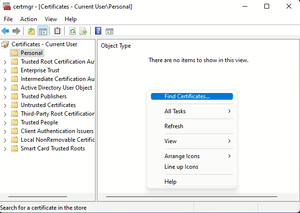
Hi, For Point-to-Site connection in Azure, certificates of Windows are exported. Depending on Windows system, I have seen different situation in certmgr.msc as below 1st Windows system 2nd Windows system 3rd Windows system Please let me know Which certificates we need to export at certmgr.msc? If we need to export Personal certificate, what I need to do, if no certificates are showing or another certificates (like Adobe) are showing at Personal? Please clarify with additional required information. We’ll be thankful for your assistance. With Regards NndnG563Views0likes1CommentAzure Networking Portfolio Consolidation
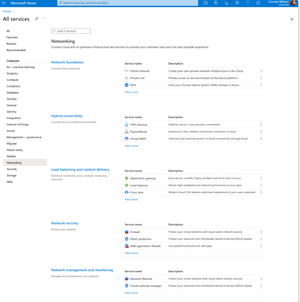
Overview Over the past decade, Azure Networking has expanded rapidly, bringing incredible tools and capabilities to help customers build, connect, and secure their cloud infrastructure. But we've also heard strong feedback: with over 40 different products, it hasn't always been easy to navigate and find the right solution. The complexity often led to confusion, slower onboarding, and missed capabilities. That's why we're excited to introduce a more focused, streamlined, and intuitive experience across Azure.com, the Azure portal, and our documentation pivoting around four core networking scenarios: Network foundations: Network foundations provide the core connectivity for your resources, using Virtual Network, Private Link, and DNS to build the foundation for your Azure network. Try it with this link: Network foundations Hybrid connectivity: Hybrid connectivity securely connects on-premises, private, and public cloud environments, enabling seamless integration, global availability, and end-to-end visibility, presenting major opportunities as organizations advance their cloud transformation. Try it with this link: Hybrid connectivity Load balancing and content delivery: Load balancing and content delivery helps you choose the right option to ensure your applications are fast, reliable, and tailored to your business needs. Try it with this link: Load balancing and content delivery Network security: Securing your environment is just as essential as building and connecting it. The Network Security hub brings together Azure Firewall, DDoS Protection, and Web Application Firewall (WAF) to provide a centralized, unified approach to cloud protection. With unified controls, it helps you manage security more efficiently and strengthen your security posture. Try it with this link: Network security This new structure makes it easier to discover the right networking services and get started with just a few clicks so you can focus more on building, and less on searching. What you’ll notice: Clearer starting points: Azure Networking is now organized around four core scenarios and twelve essential services, reflecting the most common customer needs. Additional services are presented within the context of these scenarios, helping you stay focused and find the right solution without feeling overwhelmed. Simplified choices: We’ve merged overlapping or closely related services to reduce redundancy. That means fewer, more meaningful options that are easier to evaluate and act on. Sunsetting outdated services: To reduce clutter and improve clarity, we’re sunsetting underused offerings such as white-label CDN services and China CDN. These capabilities have been rolled into newer, more robust services, so you can focus on what’s current and supported. What this means for you Faster decision-making: With clearer guidance and fewer overlapping products, it's easier to discover what you need and move forward confidently. More productive sales conversations: With this simplified approach, you’ll get more focused recommendations and less confusion among sellers. Better product experience: This update makes the Azure Networking portfolio more cohesive and consistent, helping you get started quickly, stay aligned with best practices, and unlock more value from day one. The portfolio consolidation initiative is a strategic effort to simplify and enhance the Azure Networking portfolio, ensuring better alignment with customer needs and industry best practices. By focusing on top-line services, combining related products, and retiring outdated offerings, Azure Networking aims to provide a more cohesive and efficient product experience. Azure.com Before: Our original Solution page on Azure.com was disorganized and static, displaying a small portion of services in no discernable order. After: The revised solution page is now dynamic, allowing customers to click deeper into each networking and network security category, displaying the top line services, simplifying the customer experience. Azure Portal Before: With over 40 networking services available, we know it can feel overwhelming to figure out what’s right for you and where to get started. After: To make it easier, we've introduced four streamlined networking hubs each built around a specific scenario to help you quickly identify the services that match your needs. Each offers an overview to set the stage, key services to help you get started, guidance to support decision-making, and a streamlined left-hand navigation for easy access to all services and features. Documentation For documentation, we looked at our current assets as well as created new assets that aligned with the changes in the portal experience. Like Azure.com, we found the old experiences were disorganized and not well aligned. We updated our assets to focus on our top-line networking services, and to call out the pillars. Our belief is these changes will allow our customers to more easily find the relevant and important information they need for their Azure infrastructure. Azure Network Hub Before the updates, we had a hub page organized around different categories and not well laid out. In the updated hub page, we provided relevant links for top-line services within all of the Azure networking scenarios, as well as a section linking to each scenario's hub page. Scenario Hub pages We added scenario hub pages for each of the scenarios. This provides our customers with a central hub for information about the top-line services for each scenario and how to get started. Also, we included common scenarios and use cases for each scenario, along with references for deeper learning across the Azure Architecture Center, Well Architected Framework, and Cloud Adoption Framework libraries. Scenario Overview articles We created new overview articles for each scenario. These articles were designed to provide customers with an introduction to the services included in each scenario, guidance on choosing the right solutions, and an introduction to the new portal experience. Here's the Load balancing and content delivery overview: Documentation links Azure Networking hub page: Azure networking documentation | Microsoft Learn Scenario Hub pages: Azure load balancing and content delivery | Microsoft Learn Azure network foundation documentation | Microsoft Learn Azure hybrid connectivity documentation | Microsoft Learn Azure network security documentation | Microsoft Learn Scenario Overview pages What is load balancing and content delivery? | Microsoft Learn Azure Network Foundation Services Overview | Microsoft Learn What is hybrid connectivity? | Microsoft Learn What is Azure network security? | Microsoft Lea Improving user experience is a journey and in coming months we plan to do more on this. Watch out for more blogs over the next few months for further improvements.3KViews4likes0CommentsNetwork Redundancy Between AVS, On-Premises, and Virtual Networks in a Multi-Region Design
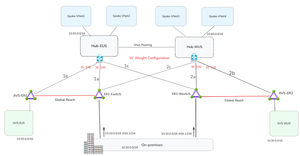
By Mays_Algebary shruthi_nair Establishing redundant network connectivity is vital to ensuring the availability, reliability, and performance of workloads operating in hybrid and cloud environments. Proper planning and implementation of network redundancy are key to achieving high availability and sustaining operational continuity. This article focuses on network redundancy in multi-region architecture. For details on single-region design, refer to this blog. The diagram below illustrates a common network design pattern for multi-region deployments, using either a Hub-and-Spoke or Azure Virtual WAN (vWAN) topology, and serves as the baseline for establishing redundant connectivity throughout this article. In each region, the Hub or Virtual Hub (VHub) extends Azure connectivity to Azure VMware Solution (AVS) via an ExpressRoute circuit. The regional Hub/VHub is connected to on-premises environments by cross-connecting (bowtie) both local and remote ExpressRoute circuits, ensuring redundancy. The concept of weight, used to influence traffic routing preferences, will be discussed in the next section. The diagram below illustrates the traffic flow when both circuits are up and running. Design Considerations If a region loses its local ExpressRoute connection, AVS in that region will lose connectivity to the on-premises environment. However, VNets will still retain connectivity to on-premises via the remote region’s ExpressRoute circuit. The solutions discussed in this article aim to ensure redundancy for both AVS and VNets. Looking at the diagram above, you might wonder: why do we need to set weights at all, and why do the AVS-ER connections (1b/2b) use the same weight as the primary on-premises connections (1a/2a)? Weight is used to influence routing decisions and ensure optimal traffic flow. In this scenario, both ExpressRoute circuits, ER1-EastUS and ER2-WestUS, advertise the same prefixes to the Azure ExpressRoute gateway. As a result, traffic from the VNet to on-premises would be ECMPed across both circuits. To avoid suboptimal routing and ensure that traffic from the VNets prefers the local ExpressRoute circuit, a higher weight is assigned to the local path. It’s also critical that the ExpressRoute gateway connection to on-premises (1a/2a) and to AVS (1b/2b), is assigned the same weight. Otherwise, traffic from the VNet to AVS will follow a less efficient route as AVS routes are also learned over ER1-EastUS via Global Reach. For instance, VNets in EastUS will connect to AVS EUS through ER1-EastUS circuit via Global Reach (as shown by the blue dotted line), instead of using the direct local path (orange line). This suboptimal routing is illustrated in the below diagram. Now let us see what solutions we can have to achieve redundant connectivity. The following solutions will apply to both Hub-and-Spoke and vWAN topology unless noted otherwise. Note: The diagrams in the upcoming solutions will focus only on illustrating the failover traffic flow. Solution1: Network Redundancy via ExpressRoute in Different Peering Location In the solution, deploy an additional ExpressRoute circuit in a different peering location within the same metro area (e.g., ER2–PeeringLocation2), and enable Global Reach between this new circuit and the existing AVS ExpressRoute (e.g., AVS-ER1). If you intend to use this second circuit as a failover path, apply prepends to the on-premises prefixes advertised over it. Alternatively, if you want to use it as an active-active redundant path, do not prepend routes, in this case, both AVS and Azure VNets will ECMP to distribute traffic across both circuits (e.g., ER1–EastUS and ER–PeeringLocation2) when both are available. Note: Compared to the Standard Topology, this design removes both the ExpressRoute cross-connect (bowtie) and weight settings. When adding a second circuit in the same metro, there's no benefit in keeping them, otherwise traffic from the Azure VNet will prefer the local AVS circuit (AVS-ER1/AVS-ER2) to reach on-premises due to the higher weight, as on-premises routes are also learned over AVS circuit (AVS-ER1/AVS-ER2) via Global Reach. Also, when connecting the new circuit (e.g., ER–Peering Location2), remove all weight settings across the connections. Traffic will follow the optimal path based on BGP prepending on the new circuit, or load-balance (ECMP) if no prepend is applied. Note: Use public ASN to prepend the on-premises prefix as AVS circuit (e.g., AVS-ER) will strip the private ASN toward AVS. Solution Insights Ideal for mission-critical applications, providing predictable throughput and bandwidth for backup. It could be cost prohibitive depending on the bandwidth of the second circuit. Solution2: Network Redundancy via ExpressRoute Direct In this solution, ExpressRoute Direct is used to provision multiple circuits from a single port pair in each region, for example, ER2-WestUS and ER4-WestUS are created from the same port pair. This allows you to dedicate one circuit for local traffic and another for failover to a remote region. To ensure optimal routing, prepend the on-premises prefixes using public ASN on the newly created circuit (e.g., ER3-EastUS and ER4-WestUS). Remove all weight settings across the connections; traffic will follow the optimal path based on BGP prepending on the new circuit. For instance, if ER1-EastUS becomes unavailable, traffic from AVS and VNets in the EastUS region will automatically route through ER4-WestUS circuit, ensuring continuity. Note: Compared to the Standard Topology, this design connects the newly created ExpressRoute circuits (e.g., ER3-EastUS/ER4-WestUS) to the remote region of ExpressRoute gateway (black dotted lines) instead of having the bowtie to the primary circuits (e.g., ER1-EastUS/ER2-WestUS). Solution Insights Easy to implement if you have ExpressRoute Direct. ExpressRoute Direct supports over- provisioning where you can create logical ExpressRoute circuits on top of your existing ExpressRoute Direct resource of 10-Gbps or 100-Gbps up to the subscribed Bandwidth of 20 Gbps or 200 Gbps. For example, you can create two 10-Gbps ExpressRoute circuits within a single 10-Gbps ExpressRoute Direct resource (port pair). Ideal for mission-critical applications, providing predictable throughput and bandwidth for backup. Solution3: Network Redundancy via ExpressRoute Metro Metro ExpressRoute is a new configuration that enables dual-homed connectivity to two different peering locations within the same city. This setup enhances resiliency by allowing traffic to continue flowing even if one peering location goes down, using the same circuit. Solution Insights Higher Resiliency: Provides increased reliability with a single circuit. Limited regional availability: Currently available in select regions, with more being added over time. Cost-effective: Offers redundancy without significantly increasing costs. Solution4: Deploy VPN as a Backup to ExpressRoute This solution mirrors solution 1 for a single region but extends it to multiple regions. In this approach, a VPN serves as the backup path for each region in the event of an ExpressRoute failure. In a Hub-and-Spoke topology, a backup path to and from AVS can be established by deploying Azure Route Server (ARS) in the hub VNet. ARS enables seamless transit routing between ExpressRoute and the VPN gateway. In vWAN topology, ARS is not required; the vHub's built-in routing service automatically provides transitive routing between the VPN gateway and ExpressRoute. In this design, you should not cross-connect ExpressRoute circuits (e.g., ER1-EastUS and ER2-WestUS) to the ExpressRoute gateways in the Hub VNets (e.g., Hub-EUS or Hub-WUS). Doing so will lead to routing issues, where the Hub VNet only programs the on-premises routes learned via ExpressRoute. For instance, in the EastUS region, if the primary circuit (ER1-EastUS) goes down, Hub-EUS will receive on-premises routes from both the VPN tunnel and the remote ER2-WestUS circuit. However, it will prefer and program only the ExpressRoute-learned routes from ER2-WestUS circuit. Since ExpressRoute gateways do not support route transitivity between circuits, AVS connected via AVS-ER will not receive the on-premises prefixes, resulting in routing failures. Note: In vWAN topology, to ensure optimal route convergence when failing back to ExpressRoute, you should prepend the prefixes advertised from on-premises over the VPN. Without route prepending, VNets may continue to use the VPN as the primary path to on-premises. If prepend is not an option, you can trigger the failover manually by bouncing the VPN tunnel. Solution Insights Cost-effective and straightforward to deploy. Increased Latency: The VPN tunnel over the internet adds latency due to encryption overhead. Bandwidth Considerations: Multiple VPN tunnels might be needed to achieve bandwidth comparable to a high-capacity ExpressRoute circuit (e.g., over 1G). For details on VPN gateway SKU and tunnel throughput, refer to this link. As you can't cross connect ExpressRoute circuits, VNets will utilize the VPN for failover instead of leveraging remote region ExpressRoute circuit. Solution5: Network Redundancy-Multiple On-Premises (split-prefix) In many scenarios, customers advertise the same prefix from multiple on-premises locations to Azure. However, if the customer can split prefixes across different on-premises sites, it simplifies the implementation of failover strategy using existing ExpressRoute circuits. In this design, each on-premises advertises region-specific prefixes (e.g., 10.10.0.0/16 for EastUS and 10.70.0.0/16 for WestUS), along with a common supernet (e.g., 10.0.0.0/8). Under normal conditions, AVS and VNets in each region use longest prefix match to route traffic efficiently to the appropriate on-premises location. For instance, if ER1-EastUS becomes unavailable, AVS and VNets in EastUS will automatically fail over to ER2-WestUS, routing traffic via the supernet prefix to maintain connectivity. Solution Insights Cost-effective: no additional deployment, using existing ExpressRoute circuits. Advertising specific prefixes over each region might need additional planning. Ideal for mission-critical applications, providing predictable throughput and bandwidth for backup. Solution6: Prioritize Network Redundancy for One Region Over Another If you're operating under budget constraints and can prioritize one region (such as hosting critical workloads in a single location) and want to continue using your existing ExpressRoute setup, this solution could be an ideal fit. In this design, assume AVS in EastUS (AVS-EUS) hosts the critical workloads. To ensure high availability, AVS-ER1 is configured with Global Reach connections to both the local ExpressRoute circuit (ER1-EastUS) and the remote circuit (ER2-WestUS). Make sure to prepend the on-premises prefixes advertised to ER2-WestUS using public ASN to ensure optimal routing (no ECMP) from AVS-EUS over both circuits (ER1-EastUS and ER2-WestUS). On the other hand, AVS in WestUS (AVS-WUS) is connected via Global Reach only to its local region ExpressRoute circuit (ER2-WestUS). If that circuit becomes unavailable, you can establish an on-demand Global Reach connection to ER1-EastUS, either manually or through automation (e.g., a triggered script). This approach introduces temporary downtime until the Global Reach link is established. You might be thinking, why not set up Global Reach between the AVS-WUS circuit and remote region circuits (like connecting AVS-ER2 to ER1-EastUS), just like we did for AVS-EUS? Because it would lead to suboptimal routing. Due to AS path prepending on ER2-WestUS, if both ER1-EastUS and ER2-WestUS are linked to AVS-ER2, traffic would favor the remote ER1-EastUS circuit since it presents a shorter AS path. As a result, traffic would bypass the local ER2-WestUS circuit, causing inefficient routing. That is why for AVS-WUS, it's better to use on-demand Global Reach to ER1-EastUS as a backup path, enabled manually or via automation, only when ER2-WestUS becomes unavailable. Note: VNets will failover via local AVS circuit. E.g., HUB-EUS will route to on-prem through AVS-ER1 and ER2-WestUS via Global Reach Secondary (purple line). Solution Insights Cost-effective Workloads hosted in AVS within the non-critical region will experience downtime if the local region ExpressRoute circuit becomes unavailable, until the on-demand Global Reach connection is established. Conclusion Each solution has its own advantages and considerations, such as cost-effectiveness, ease of implementation, and increased resiliency. By carefully planning and implementing these solutions, organizations can ensure operational continuity and optimal traffic routing in multi-region deployments.2.7KViews6likes0Comments