Updates
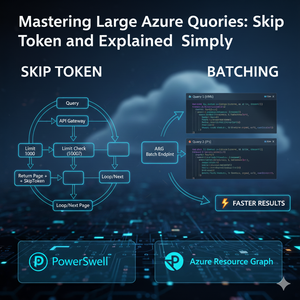
764 TopicsMastering Azure Queries: Skip Token and Batching for Scale
Let's be honest. As a cloud engineer or DevOps professional managing a large Azure environment, running even a simple resource inventory query can feel like drinking from a firehose. You hit API limits, face slow performance, and struggle to get the complete picture of your estate—all because the data volume is overwhelming. But it doesn't have to be this way! This blog is your practical, hands-on guide to mastering two essential techniques for handling massive data volumes in Azure: using PowerShell and Azure Resource Graph (ARG): Skip Token (for full data retrieval) and Batching (for blazing-fast performance). 📋 TABLE OF CONTENTS 🚀 GETTING STARTED │ ├─ Prerequisites: PowerShell 7+ & Az.ResourceGraph Module └─ Introduction: Why Standard Queries Fail at Scale 📖 CORE CONCEPTS │ ├─ 📑 Skip Token: The Data Completeness Tool │ ├─ What is a Skip Token? │ ├─ The Bookmark Analogy │ ├─ PowerShell Implementation │ └─ 💻 Code Example: Pagination Loop │ └─ ⚡ Batching: The Performance Booster ├─ What is Batching? ├─ Performance Benefits ├─ Batching vs. Pagination ├─ Parallel Processing in PowerShell └─ 💻 Code Example: Concurrent Queries 🔍 DEEP DIVE │ ├─ Skip Token: Generic vs. Azure-Specific └─ Azure Resource Graph (ARG) at Scale ├─ ARG Overview ├─ Why ARG Needs These Techniques └─ 💻 Combined Example: Skip Token + Batching ✅ BEST PRACTICES │ ├─ When to Use Each Technique └─ Quick Reference Guide 📚 RESOURCES └─ Official Documentation & References Prerequisites Component Requirement / Details Command / Reference PowerShell Version The batching examples use ForEach-Object -Parallel, which requires PowerShell 7.0 or later. Check version: $PSVersionTable.PSVersion Install PowerShell 7+: Install PowerShell on Windows, Linux, and macOS Azure PowerShell Module Az.ResourceGraph module must be installed. Install module: Install-Module -Name Az.ResourceGraph -Scope CurrentUser Introduction: Why Standard Queries Don't Work at Scale When you query a service designed for big environments, like Azure Resource Graph, you face two limits: Result Limits (Pagination): APIs won't send you millions of records at once. They cap the result size (often 1,000 items) and stop. Efficiency Limits (Throttling): Sending a huge number of individual requests is slow and can cause the API to temporarily block you (throttling). Skip Token helps you solve the first limit by making sure you retrieve all results. Batching solves the second by grouping your requests to improve performance. Understanding Skip Token: The Continuation Pointer What is a Skip Token? A Skip Token (or continuation token) is a unique string value returned by an Azure API when a query result exceeds the maximum limit for a single response. Think of the Skip Token as a “bookmark” that tells Azure where your last page ended — so you can pick up exactly where you left off in the next API call. Instead of getting cut off after 1,000 records, the API gives you the first 1,000 results plus the Skip Token. You use this token in the next request to get the next page of data. This process is called pagination. Skip Token in Practice with PowerShell To get the complete dataset, you must use a loop that repeatedly calls the API, providing the token each time until the token is no longer returned. PowerShell Example: Using Skip Token to Loop Pages # Define the query $Query = "Resources | project name, type, location" $PageSize = 1000 $AllResults = @() $SkipToken = $null # Initialize the token Write-Host "Starting ARG query..." do { Write-Host "Fetching next page. (Token check: $($SkipToken -ne $null))" # 1. Execute the query, using the -SkipToken parameter $ResultPage = Search-AzGraph -Query $Query -First $PageSize -SkipToken $SkipToken # 2. Add the current page results to the main array $AllResults += $ResultPage # 3. Get the token for the next page, if it exists $SkipToken = $ResultPage.SkipToken Write-Host " -> Items in this page: $($ResultPage.Count). Total retrieved: $($AllResults.Count)" } while ($SkipToken -ne $null) # Loop as long as a Skip Token is returned Write-Host "Query finished. Total resources found: $($AllResults.Count)" This do-while loop is the reliable way to ensure you retrieve every item in a large result set. Understanding Batching: Grouping Requests What is Batching? Batching means taking several independent requests and combining them into a single API call. Instead of making N separate network requests for N pieces of data, you make one request containing all N sub-requests. Batching is primarily used for performance. It improves efficiency by: Reducing Overhead: Fewer separate network connections are needed. Lowering Throttling Risk: Fewer overall API calls are made, which helps you stay under rate limits. Feature Batching Pagination (Skip Token) Goal Improve efficiency/speed. Retrieve all data completely. Input Multiple different queries. Single query, continuing from a marker. Result One response with results for all grouped queries. Partial results with a token for the next step. Note: While Azure Resource Graph's REST API supports batch requests, the PowerShell Search-AzGraph cmdlet does not expose a -Batch parameter. Instead, we achieve batching by using PowerShell's ForEach-Object -Parallel (PowerShell 7+) to run multiple queries simultaneously. Batching in Practice with PowerShell Using parallel processing in PowerShell, you can efficiently execute multiple distinct Kusto queries targeting different scopes (like subscriptions) simultaneously. Method 5 Subscriptions 20 Subscriptions Sequential ~50 seconds ~200 seconds Parallel (ThrottleLimit 5) ~15 seconds ~45 seconds PowerShell Example: Running Multiple Queries in Parallel # Define multiple queries to run together $BatchQueries = @( @{ Query = "Resources | where type =~ 'Microsoft.Compute/virtualMachines'" Subscriptions = @("SUB_A") # Query 1 Scope }, @{ Query = "Resources | where type =~ 'Microsoft.Network/publicIPAddresses'" Subscriptions = @("SUB_B", "SUB_C") # Query 2 Scope } ) Write-Host "Executing batch of $($BatchQueries.Count) queries in parallel..." # Execute queries in parallel (true batching) $BatchResults = $BatchQueries | ForEach-Object -Parallel { $QueryConfig = $_ $Query = $QueryConfig.Query $Subs = $QueryConfig.Subscriptions Write-Host "[Batch Worker] Starting query: $($Query.Substring(0, [Math]::Min(50, $Query.Length)))..." -ForegroundColor Cyan $QueryResults = @() # Process each subscription in this query's scope foreach ($SubId in $Subs) { $SkipToken = $null do { $Params = @{ Query = $Query Subscription = $SubId First = 1000 } if ($SkipToken) { $Params['SkipToken'] = $SkipToken } $Result = Search-AzGraph @Params if ($Result) { $QueryResults += $Result } $SkipToken = $Result.SkipToken } while ($SkipToken) } Write-Host " [Batch Worker] ✅ Query completed - Retrieved $($QueryResults.Count) resources" -ForegroundColor Green # Return results with metadata [PSCustomObject]@{ Query = $Query Subscriptions = $Subs Data = $QueryResults Count = $QueryResults.Count } } -ThrottleLimit 5 Write-Host "`nBatch complete. Reviewing results..." # The results are returned in the same order as the input array $VMCount = $BatchResults[0].Data.Count $IPCount = $BatchResults[1].Data.Count Write-Host "Query 1 (VMs) returned: $VMCount results." Write-Host "Query 2 (IPs) returned: $IPCount results." # Optional: Display detailed results Write-Host "`n--- Detailed Results ---" for ($i = 0; $i -lt $BatchResults.Count; $i++) { $Result = $BatchResults[$i] Write-Host "`nQuery $($i + 1):" Write-Host " Query: $($Result.Query)" Write-Host " Subscriptions: $($Result.Subscriptions -join ', ')" Write-Host " Total Resources: $($Result.Count)" if ($Result.Data.Count -gt 0) { Write-Host " Sample (first 3):" $Result.Data | Select-Object -First 3 | Format-Table -AutoSize } } Azure Resource Graph (ARG) and Scale Azure Resource Graph (ARG) is a service built for querying resource properties quickly across a large number of Azure subscriptions using the Kusto Query Language (KQL). Because ARG is designed for large scale, it fully supports Skip Token and Batching: Skip Token: ARG automatically generates and returns the token when a query exceeds its result limit (e.g., 1,000 records). Batching: ARG's REST API provides a batch endpoint for sending up to ten queries in a single request. In PowerShell, we achieve similar performance benefits using ForEach-Object -Parallel to process multiple queries concurrently. Combined Example: Batching and Skip Token Together This script shows how to use Batching to start a query across multiple subscriptions and then use Skip Token within the loop to ensure every subscription's data is fully retrieved. $SubscriptionIDs = @("SUB_A") $KQLQuery = "Resources | project id, name, type, subscriptionId" Write-Host "Starting BATCHED query across $($SubscriptionIDs.Count) subscription(s)..." Write-Host "Using parallel processing for true batching...`n" # Process subscriptions in parallel (batching) $AllResults = $SubscriptionIDs | ForEach-Object -Parallel { $SubId = $_ $Query = $using:KQLQuery $SubResults = @() Write-Host "[Batch Worker] Processing Subscription: $SubId" -ForegroundColor Cyan $SkipToken = $null $PageCount = 0 do { $PageCount++ # Build parameters $Params = @{ Query = $Query Subscription = $SubId First = 1000 } if ($SkipToken) { $Params['SkipToken'] = $SkipToken } # Execute query $Result = Search-AzGraph @Params if ($Result) { $SubResults += $Result Write-Host " [Batch Worker] Sub: $SubId - Page $PageCount - Retrieved $($Result.Count) resources" -ForegroundColor Yellow } $SkipToken = $Result.SkipToken } while ($SkipToken) Write-Host " [Batch Worker] ✅ Completed $SubId - Total: $($SubResults.Count) resources" -ForegroundColor Green # Return results from this subscription $SubResults } -ThrottleLimit 5 # Process up to 5 subscriptions simultaneously Write-Host "`n--- Batch Processing Finished ---" Write-Host "Final total resource count: $($AllResults.Count)" # Optional: Display sample results if ($AllResults.Count -gt 0) { Write-Host "`nFirst 5 resources:" $AllResults | Select-Object -First 5 | Format-Table -AutoSize } Technique Use When... Common Mistake Actionable Advice Skip Token You must retrieve all data items, expecting more than 1,000 results. Forgetting to check for the token; you only get partial data. Always use a do-while loop to guarantee you get the complete set. Batching You need to run several separate queries (max 10 in ARG) efficiently. Putting too many queries in the batch, causing the request to fail. Group up to 10 logical queries or subscriptions into one fast request. By combining Skip Token for data completeness and Batching for efficiency, you can confidently query massive Azure estates without hitting limits or missing data. These two techniques — when used together — turn Azure Resource Graph from a “good tool” into a scalable discovery engine for your entire cloud footprint. Summary: Skip Token and Batching in Azure Resource Graph Goal: Efficiently query massive Azure environments using PowerShell and Azure Resource Graph (ARG). 1. Skip Token (The Data Completeness Tool) Concept What it Does Why it Matters PowerShell Use Skip Token A marker returned by Azure APIs when results hit the 1,000-item limit. It points to the next page of data. Ensures you retrieve all records, avoiding incomplete data (pagination). Use a do-while loop with the -SkipToken parameter in Search-AzGraph until the token is no longer returned. 2. Batching (The Performance Booster) Concept What it Does Why it Matters PowerShell Use Batching Processes multiple independent queries simultaneously using parallel execution. Drastically improves query speed by reducing overall execution time and helps avoid API throttling. Use ForEach-Object -Parallel (PowerShell 7+) with -ThrottleLimit to control concurrent queries. For PowerShell 5.1, use Start-Job with background jobs. 3. Best Practice: Combine Them For maximum efficiency, combine Batching and Skip Token. Use batching to run queries across multiple subscriptions simultaneously and use the Skip Token logic within the loop to ensure every single subscription's data is fully paginated and retrieved. Result: Fast, complete, and reliable data collection across your large Azure estate. AI/ML Use Cases Powered by ARG Optimizations: Machine Learning Pipelines: Cost forecasting and capacity planning models require historical resource data—SkipToken pagination enables efficient extraction of millions of records for training without hitting API limits. Scenario: Cost forecasting models predict next month's Azure spend by analyzing historical resource usage. For example, training a model to forecast VM costs requires pulling 12 months of resource data (CPU usage, memory, SKU changes) across all subscriptions. SkipToken pagination enables extracting millions of these records efficiently without hitting API limits—a single query might return 500K+ VM records that need to be fed into Azure ML for training. Anomaly Detection: Security teams use Azure ML to monitor suspicious configurations—parallel queries across subscriptions enable real-time threat detection with low latency. Scenario: Security teams deploy models to catch unusual activity, like someone suddenly creating 50 VMs in an unusual region or changing network security rules at 3 AM. Parallel queries across all subscriptions let these detections systems scan your entire Azure environment in seconds rather than minutes, enabling real-time alerts when threats emerge. RAG Systems: Converting resource metadata to embeddings for semantic search requires processing entire inventories—pagination and batching become mandatory for handling large-scale embedding generation. Scenario: Imagine asking "Which SQL databases are using premium storage but have low IOPS?" A RAG system converts all your Azure resources into searchable embeddings (vector representations), then uses AI to understand your question and find relevant resources semantically. Building this requires processing your entire Azure inventory—potentially lots of resources—where pagination and batching become mandatory to generate embeddings without overwhelming the OpenAI API. References: Azure Resource Graph documentation Search-AzGraph PowerShell reference391Views1like2CommentsBlack Forest Labs FLUX.2 Visual Intelligence for Enterprise Creative now on Microsoft Foundry
Black Forest Labs’ (BFL) FLUX.2 is now available on Microsoft Foundry. Building on FLUX1.1 [pro] and FLUX.1 Kontext [pro], we’re excited to introduce FLUX.2 [pro] which continues to push the frontier for visual intelligence. FLUX.2 [pro] delivers state-of-the-art quality with pre-optimized settings, matching the best closed models for prompt adherence and visual fidelity while generating faster at lower cost. Prompt: "Cinematic film still of a woman walking alone through a narrow Madrid street at night, warm street lamps, cool blue shadows, light rain reflecting on cobblestones, moody and atmospheric, shallow depth of field, natural skin texture, subtle film grain and introspective mood" This prompt shines because it taps into FLUX.2 [pro]'s cinematic‑lighting engine, letting the model fuse warm street‑lamp glow and cool shadows into a visually striking, film‑grade composition. What’s game-changing about FLUX.2 [pro]? FLUX.2 is designed for real-world creative workflows where consistency, accuracy, and iteration speed determine whether AI generation can replace traditional production pipelines. The model understands lighting, perspective, materials, and spatial relationships. It maintains characters and products consistent across up to 10 reference images simultaneously. It adheres to brand constraints like exact hex colors and legible text. The result: production-ready assets with fewer touchups and stronger brand fidelity. What’s New: Production‑grade quality up to 4MP: High‑fidelity, coherent scenes with realistic lighting, spatial logic, and fine detail suitable for product photography and commercial use cases. Multi‑reference consistency: Reference up to 10 images simultaneously with the best character, product, and style consistency available today. Generate dozens of brand-compliant assets where identity stays perfectly aligned shot to shot. Brand‑accurate results: Exact hex‑color matching, reliable typography, and structured controls (JSON, pose guidance) mean fewer manual fixes and stronger brand compliance. Strong prompt fidelity for complex directions: Improved adherence to complex, structured instructions including multi-part prompts, compositional constraints, and JSON-based controls. 32K token context supports long, detailed workflows with exact positioning specifications, physics-aware lighting, and precise compositional requirements in a single prompt. Optimized inference: FLUX.2 [pro] delivers state-of-the-art quality with pre-optimized inference settings, generating faster at lower cost than competing closed models. FLUX.2 transforms creative production economics by enabling workflows that weren't possible with earlier systems. Teams ship complete campaigns in days instead of weeks, with fewer manual touchups and stronger brand fidelity at scale. This performance stems from FLUX.2's unified architecture, which combines generation and editing in a single latent flow matching model. How it Works FLUX.2 combines image generation and editing in a single latent flow matching architecture, coupling a Mistral‑3 24B vision‑language model (VLM) with a rectified flow transformer. The VLM brings real‑world knowledge and contextual understanding, while the flow transformer models spatial relationships, material properties, and compositional logic that earlier architectures struggled to render. FLUX.2’s architecture unifies visual generation and editing, fuses language‑grounded understanding with flow‑based spatial modeling, and delivers production‑ready, brand‑safe images with predictable control especially when you need consistent identity, exact colors, and legible typography at high resolution. Technical details can be found in the FLUX.2 VAE blog post. Top enterprise scenarios & patterns to try with FLUX.2 [pro] The addition of FLUX.2 [pro] is the next step in the evolution for delivering faster, richer, and more controllable generation unlocking a new wave of creative potential for enterprises. Bring FLUX.2 [pro] into your workflow and transform your creative pipeline from concept to production by trying out these patterns: Enterprise scenarios Patterns to try E‑commerce hero shots Start with a small set of references (product front, material/texture, logo). Prompt for a studio hero shot on a white seamless background, three‑quarter view, softbox key + subtle rim light. Include exact hex for brand accents and specify logo placement. Output at 4MP. Product variants at scale Reuse the hero references; ask for specific colorway, angle, and background variants (e.g., “Create {COLOR} variant, {ANGLE} view, {BG} background”). Keep brand hex and logo position constant across variants. Campaign consistency (character/product identity) Provide 5–10 reference images for the character/product (faces, outfits, mood boards). Request the same identity across scenes with consistent lighting/style (e.g., cinematic warm daylight) and defined environments (e.g., urban rooftop). Marketing templates & localization Define a template (e.g., 3‑column grid: left image, right text). Set headline/body sizes (e.g., 24pt/14pt), contrast ≥ 4.5:1, and brand font. Swap localized copy per locale while keeping layout and spacing consistent. Best practices to get to production readiness with Microsoft Foundry FLUX.2 [pro] brings state-of-the-art image quality to your fingertips. In Microsoft Foundry, you can turn those capabilities into predictable, governed outcomes by standardizing templates, managing references, enforcing brand rules, and controlling spend. These practices below leverage FLUX.2 [pro]’s visual intelligence and turn them into repeatable recipes, auditable artifacts, and cost‑controlled processes within a governed Foundry pipeline. Best Practice What to do Foundry tip Approved templates Create 3–5 templates (e.g., hero shot, variant gallery, packaging, social card) with sections for Composition (camera, lighting, environment), Brand (hex colors, logo placement), Typography (font, sizes, contrast), and Output (resolution, format). Store templates in Foundry as approved artifacts; version them and restrict edits via RBAC. Versioned reference sets Keep 3–10 references per subject (product: front/side/texture; talent: face/outfit/mood) and link them to templates. Save references in governed Foundry storage; reference IDs travel with the job metadata. Resolution staging Use a three‑stage plan: Concept (1–2MP) → Review (2–3MP) → Final (4MP). Leverage FLUX.1 [pro] and FLUX1.1 Kontext [pro] before the Final stage for fast iteration and cost control Enforce stage‑based quotas and cap max resolution per job; require approval to move to 4MP. Automated QA & approvals Run post‑generation checks for color match, text legibility, and safe‑area compliance; gate final renders behind a review step. Use Foundry workflows to require sign‑off at the Review stage before Final stage. Telemetry & feedback Track latency, success rate, usage, and cost per render; collect reviewer notes and refine templates. Dashboards in Foundry: monitor job health, cost, and template performance. Foundry Models continues to grow with cutting-edge additions to meet every enterprise need—including models from Black Forest Labs, OpenAI, and more. From models like GPT‑image‑1, FLUX.2 [pro], and Sora 2, Microsoft Foundry has become the place where creators push the boundaries of what’s possible. Watch how Foundry transforms creative workflows with this demo: Customer Stories As seen at Ignite 2025, real‑world customers like Sinyi Realty have already demonstrated the efficiency of Black Forest Lab’s models on Microsoft Foundry by choosing FLUX.1 Kontext [pro] for its superior performance and selective editing. For their new 'Clear All' feature, they preferred a model that preserves the original room structure and simply removes clutter, rather than generating a new space from scratch, saving time and money. Read the story to learn more. “We wanted to stay in the same workspace rather than having to maintain different platforms,” explains TeWei Hsieh, who works in data engineering and data architecture. “By keeping FLUX Kontext model in Foundry, our data scientists and data engineers can work in the same environment.” As customers like Sinyi Realty have already shown, BFL FLUX models raise the bar for speed, precision, and operational efficiency. With FLUX.2 now on Microsoft Foundry, organizations can bring that same competitive edge directly into their own production pipelines. FLUX.2 [pro] Pricing Foundry Models are fully hosted and managed on Azure. FLUX.2 [pro] is available through pay-as-you-go and on Global Standard deployment type with the following pricing: Generated image: The first generated megapixel (MP) is charged $0.03. Each subsequent megapixel is charged $0.015. Reference image(s): We charge $0.015 for each megapixel. Important Notes: For pricing, resolution is always rounded up to the next megapixel, separately for each reference image and for the generated image. 1 megapixel is counted as 1024x1024 pixels For multiple reference images, each reference image is counted as 1 megapixel Images exceeding 4 megapixels are resized to 4 megapixels Reference the Foundry Models pricing page for pricing. Build Trustworthy AI Solutions Black Forest Labs models in Foundry Models are delivered under the Microsoft Product Terms, giving you enterprise-grade security and compliance out of the box. Each FLUX endpoint offers Content Safety controls and guardrails. Runtime protections include built-in content-safety filters, role-based access control, virtual-network isolation, and automatic Azure Monitor logging. Governance signals stream directly into Azure Policy, Purview, and Microsoft Sentinel, giving security and compliance teams real-time visibility. Together, Microsoft's capabilities let you create with more confidence, knowing that privacy, security, and safety are woven into every Black Forest Labs deployment from day one. Getting Started with FLUX.2 in Microsoft Foundry If you don’t have an Azure subscription, you can sign up for an Azure account here. Search for the model name in the model catalog in Foundry under “Build.” FLUX.2-pro Open the model card in the model catalog. Click on deploy to obtain the inference API and key. View your deployment under Build > Models. You should land on the deployment page that shows you the API and key in less than a minute. You can try out your prompts in the playground. You can use the API and key with various clients. Learn More ▶️ RSVP for the next Model Monday LIVE on YouTube or On-Demand 👩💻 Explore FLUX.2 Documentation on Microsoft Learn 👋 Continue the conversation on Discord552Views0likes0CommentsSearch Less, Build More: Inner Sourcing with GitHub Copilot and ADO MCP Server
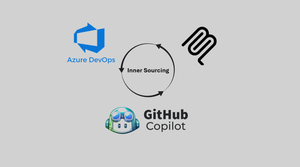
Developers burn cycles context‑switching: opening five repos to find a logging example, searching a wiki for a data masking rule, scrolling chat history for the latest pipeline pattern. Organisations that I speak to are often on the path of transformational platform engineering projects but always have the fear or doubt of "what if my engineers don't use these resources". While projects like Backstage still play a pivotal role in inner sourcing and discoverability I also empathise with developers who would argue "How would I even know in the first place, which modules have or haven't been created for reuse". In this blog we explore how we can ensure organisational standards and developer satisfaction without any heavy lifting on either side, no custom model training, no rewriting or relocating of repositories and no stagnant local data. Using GitHub Copilot + Azure DevOps MCP server (with the free `code_search` extension) we turn the IDE into an organizational knowledge interface. Instead of guessing or re‑implementing, engineers can start scaffolding projects or solving issues as they would normally (hopefully using Copilot) and without extra prompting. GitHub Copilot can lean into organisational standards and ensure recommendations are made with code snippets directly generated from existing examples. What Is the Azure DevOps MCP Server + code_search Extension? MCP (Model Context Protocol) is an open standard that lets agents (like GitHub Copilot) pull in structured, on-demand context from external systems. MCP servers contain natural language explanations of the tools that the agent can utilise allowing dynamic decision making of when to implement certain toolsets over others. The Azure DevOps MCP Server is the ADO Product Team's implementation of that standard. It exposes your ADO environment in a way Copilot can consume. Out of the box it gives you access to: Projects – list and navigate across projects in your organization. Repositories – browse repos, branches, and files. Work items – surface user stories, bugs, or acceptance criteria. Wiki's – pull policies, standards, and documentation. This means Copilot can ground its answers in live ADO content, instead of hallucinating or relying only on what’s in the current editor window. The ADO server runs locally from your own machine to ensure that all sensitive project information remains within your secure network boundary. This also means that existing permissions on ADO objects such as Projects or Repositories are respected. Wiki search tooling available out of the box with ADO MCP server is very useful however if I am honest I have seen these wiki's go unused with documentation being stored elsewhere either inside the repository or in a project management tool. This means any tool that needs to implement code requires the ability to accurately search the code stored in the repositories themself. That is where the code_search extension enablement in ADO is so important. Most organisations have this enabled already however it is worth noting that this pre-requisite is the real unlock of cross-repo search. This allows for Copilot to: Query for symbols, snippets, or keywords across all repos. Retrieve usage examples from code, not just docs. Locate standards (like logging wrappers or retry policies) wherever they live. Back every recommendation with specific source lines. In short: MCP connects Copilot to Azure DevOps. code_search makes that connection powerful by turning it into a discovery engine. What is the relevance of Copilot Instructions? One of the less obvious but most powerful features of GitHub Copilot is its ability to follow instructions files. Copilot automatically looks for these files and uses them as a “playbook” for how it should behave. There are different types of instructions you can provide: Organisational instructions – apply across your entire workspace, regardless of which repo you’re in. Repo-specific instructions – scoped to a particular repository, useful when one project has unique standards or patterns. Personal instructions – smaller overrides layered on top of global rules when a local exception applies. (Stored in .github/copilot-instructions.md) In this solution, I’m using a single personal instructions file. It tells Copilot: When to search (e.g., always query repos and wikis before answering a standards question). Where to look (Azure DevOps repos, wikis, and with code_search, the code itself). How to answer (responses must cite the repo/file/line or wiki page; if no source is found, say so). How to resolve conflicts (prefer dated wiki entries over older README fragments). As a small example, a section of a Copilot instruction file could look like this: # GitHub Copilot Instructions for Azure DevOps MCP Integration This project uses Azure DevOps with MCP server integration to provide organizational context awareness. Always check to see if the Azure DevOps MCP server has a tool relevant to the user's request. ## Core Principles ### 1. Azure DevOps Integration - **Always prioritize Azure DevOps MCP tools** when users ask about: - Work items, stories, bugs, tasks - Pull requests and code reviews - Build pipelines and deployments - Repository operations and branch management - Wiki pages and documentation - Test plans and test cases - Project and team information ### 2. Organizational Context Awareness - Before suggesting solutions, **check existing organizational patterns** by: - Searching code across repositories for similar implementations - Referencing established coding standards and frameworks - Looking for existing shared libraries and utilities - Checking architectural decision records (ADRs) in wikis ### 3. Cross-Repository Intelligence - When providing code suggestions: - **Search for existing patterns** in other repositories first - **Reference shared libraries** and common utilities - **Maintain consistency** with organizational standards - **Suggest reusable components** when appropriate ## Tool Usage Guidelines ### Work Items and Project Management When users mention bugs, features, tasks, or project planning: ``` ✅ Use: wit_my_work_items, wit_create_work_item, wit_update_work_item ✅ Use: wit_list_backlogs, wit_get_work_items_for_iteration ✅ Use: work_list_team_iterations, core_list_projects The result... To test this I created 3 ADO Projects each with between 1-2 repositories. The repositories were light with only ReadMe's inside containing descriptions of the "repo" and some code snippets examples for usage. I have then created a brand-new workspace with no context apart from a Copilot instructions document (which could be part of a repo scaffold or organisation wide) which tells Copilot to search code and the wikis across all ADO projects in my demo environment. It returns guidance and standards from all available repo's and starts to use it to formulate its response. In the screenshot I have highlighted some key parts with red boxes. The first being a section of the readme that Copilot has identified in its response, that part also highlighted within CoPilot chat response. I have highlighted the rather generic prompt I used to get this response at the bottom of that window too. Above I have highlighted Copilot using the MCP server tooling searching through projects, repo's and code. Finally the largest box highlights the instructions given to Copilot on how to search and how easily these could be optimised or changed depending on the requirements and organisational coding standards. How did I implement this? Implementation is actually incredibly simple. As mentioned I created multiple projects and repositories within my ADO Organisation in order to test cross-project & cross-repo discovery. I then did the following: Enable code_search - in your Azure DevOps organization (Marketplace → install extension). Login to Azure - Use the AZ CLI to authenticate to Azure with "az login". Create vscode/mcp.json file - Snippet is provided below, the organisation name should be changed to your organisations name. Start and enable your MCP server - In the mcp.json file you should see a "Start" button. Using the snippet below you will be prompted to add your organisation name. Ensure your Copilot agent has access to the server under "tools" too. View this setup guide for full setup instructions (azure-devops-mcp/docs/GETTINGSTARTED.md at main · microsoft/azure-devops-mcp) Create a Copilot Instructions file - with a search-first directive. I have inserted the full version used in this demo at the bottom of the article. Experiment with Prompts – Start generic (“How do we secure APIs?”). Review the output and tools used and then tailor your instructions. Considerations While this is a great approach I do still have some considerations when going to production. Latency - Using MCP tooling on every request will add some latency to developer requests. We can look at optimizing usage through copilot instructions to better identify when Copilot should or shouldn't use the ADO MCP server. Complex Projects and Repositories - While I have demonstrated cross project and cross repository retrieval my demo environment does not truly simulate an enterprise ADO environment. Performance should be tested and closely monitored as organisational complexity increases. Public Preview - The ADO MCP server is moving quickly but is currently still public preview. We have demonstrated in this article how quickly we can make our Azure DevOps content discoverable. While their are considerations moving forward this showcases a direction towards agentic inner sourcing. Feel free to comment below how you think this approach could be extended or augmented for other use cases! Resources MCP Server Config (/.vscode/mcp.json) { "inputs": [ { "id": "ado_org", "type": "promptString", "description": "Azure DevOps organization name (e.g. 'contoso')" } ], "servers": { "ado": { "type": "stdio", "command": "npx", "args": ["-y", "@azure-devops/mcp", "${input:ado_org}"] } } } Copilot Instructions (/.github/copilot-instructions.md) # GitHub Copilot Instructions for Azure DevOps MCP Integration This project uses Azure DevOps with MCP server integration to provide organizational context awareness. Always check to see if the Azure DevOps MCP server has a tool relevant to the user's request. ## Core Principles ### 1. Azure DevOps Integration - **Always prioritize Azure DevOps MCP tools** when users ask about: - Work items, stories, bugs, tasks - Pull requests and code reviews - Build pipelines and deployments - Repository operations and branch management - Wiki pages and documentation - Test plans and test cases - Project and team information ### 2. Organizational Context Awareness - Before suggesting solutions, **check existing organizational patterns** by: - Searching code across repositories for similar implementations - Referencing established coding standards and frameworks - Looking for existing shared libraries and utilities - Checking architectural decision records (ADRs) in wikis ### 3. Cross-Repository Intelligence - When providing code suggestions: - **Search for existing patterns** in other repositories first - **Reference shared libraries** and common utilities - **Maintain consistency** with organizational standards - **Suggest reusable components** when appropriate ## Tool Usage Guidelines ### Work Items and Project Management When users mention bugs, features, tasks, or project planning: ``` ✅ Use: wit_my_work_items, wit_create_work_item, wit_update_work_item ✅ Use: wit_list_backlogs, wit_get_work_items_for_iteration ✅ Use: work_list_team_iterations, core_list_projects ``` ### Code and Repository Operations When users ask about code, branches, or pull requests: ``` ✅ Use: repo_list_repos_by_project, repo_list_pull_requests_by_repo ✅ Use: repo_list_branches_by_repo, repo_search_commits ✅ Use: search_code for finding patterns across repositories ``` ### Documentation and Knowledge Sharing When users need documentation or want to create/update docs: ``` ✅ Use: wiki_list_wikis, wiki_get_page_content, wiki_create_or_update_page ✅ Use: search_wiki for finding existing documentation ``` ### Build and Deployment When users ask about builds, deployments, or CI/CD: ``` ✅ Use: pipelines_get_builds, pipelines_get_build_definitions ✅ Use: pipelines_run_pipeline, pipelines_get_build_status ``` ## Response Patterns ### 1. Discovery First Before providing solutions, always discover organizational context: ``` "Let me first check what patterns exist in your organization..." → Search code, check repositories, review existing work items ``` ### 2. Reference Organizational Standards When suggesting code or approaches: ``` "Based on patterns I found in your [RepositoryName] repository..." "Following your organization's standard approach seen in..." "This aligns with the pattern established in [TeamName]'s implementation..." ``` ### 3. Actionable Integration Always offer to create or update Azure DevOps artifacts: ``` "I can create a work item for this enhancement..." "Should I update the wiki page with this new pattern?" "Let me link this to the current iteration..." ``` ## Specific Scenarios ### New Feature Development 1. **Search existing repositories** for similar features 2. **Check architectural patterns** and shared libraries 3. **Review related work items** and planning documents 4. **Suggest implementation** based on organizational standards 5. **Offer to create work items** and documentation ### Bug Investigation 1. **Search for similar issues** across repositories and work items 2. **Check related builds** and recent changes 3. **Review test results** and failure patterns 4. **Provide solution** based on organizational practices 5. **Offer to create/update** bug work items and documentation ### Code Review and Standards 1. **Compare against organizational patterns** found in other repositories 2. **Reference coding standards** from wiki documentation 3. **Suggest improvements** based on established practices 4. **Check for reusable components** that could be leveraged ### Documentation Requests 1. **Search existing wikis** for related content 2. **Check for ADRs** and technical documentation 3. **Reference patterns** from similar projects 4. **Offer to create/update** wiki pages with findings ## Error Handling If Azure DevOps MCP tools are not available or fail: 1. **Inform the user** about the limitation 2. **Provide alternative approaches** using available information 3. **Suggest manual steps** for Azure DevOps integration 4. **Offer to help** with configuration if needed ## Best Practices ### Always Do: - ✅ Search organizational context before suggesting solutions - ✅ Reference existing patterns and standards - ✅ Offer to create/update Azure DevOps artifacts - ✅ Maintain consistency with organizational practices - ✅ Provide actionable next steps ### Never Do: - ❌ Suggest solutions without checking organizational context - ❌ Ignore existing patterns and implementations - ❌ Provide generic advice when specific organizational context is available - ❌ Forget to offer Azure DevOps integration opportunities --- **Remember: The goal is to provide intelligent, context-aware assistance that leverages the full organizational knowledge base available through Azure DevOps while maintaining development efficiency and consistency.**1.2KViews1like3CommentsIndustry-Wide Certificate Changes Impacting Azure App Service Certificates
Executive Summary In early 2026, industry-wide changes mandated by browser applications and the CA/B Forum will affect both how TLS certificates are issued as well as their validity period. The CA/B Forum is a vendor body that establishes standards for securing websites and online communications through SSL/TLS certificates. Azure App Service is aligning with these standards for both App Service Managed Certificates (ASMC, free, DigiCert-issued) and App Service Certificates (ASC, paid, GoDaddy-issued). Most customers will experience no disruption. Action is required only if you pin certificates or use them for client authentication (mTLS). Who Should Read This? App Service administrators Security and compliance teams Anyone responsible for certificate management or application security Quick Reference: What’s Changing & What To Do Topic ASMC (Managed, free) ASC (GoDaddy, paid) Required Action New Cert Chain New chain (no action unless pinned) New chain (no action unless pinned) Remove certificate pinning Client Auth EKU Not supported (no action unless cert is used for mTLS) Not supported (no action unless cert is used for mTLS) Transition from mTLS Validity No change (already compliant) Two overlapping certs issued for the full year None (automated) If you do not pin certificates or use them for mTLS, no action is required. Timeline of Key Dates Date Change Action Required Mid-Jan 2026 and after ASMC migrates to new chain ASMC stops supporting client auth EKU Remove certificate pinning if used Transition to alternative authentication if the certificate is used for mTLS Mar 2026 and after ASC validity shortened ASC migrates to new chain ASC stops supporting client auth EKU Remove certificate pinning if used Transition to alternative authentication if the certificate is used for mTLS Actions Checklist For All Users Review your use of App Service certificates. If you do not pin these certificates and do not use them for mTLS, no action is required. If You Pin Certificates (ASMC or ASC) Remove all certificate or chain pinning before their respective key change dates to avoid service disruption. See Best Practices: Certificate Pinning. If You Use Certificates for Client Authentication (mTLS) Switch to an alternative authentication method before their respective key change dates to avoid service disruption, as client authentication EKU will no longer be supported for these certificates. See Sunsetting the client authentication EKU from DigiCert public TLS certificates. See Set Up TLS Mutual Authentication - Azure App Service Details & Rationale Why Are These Changes Happening? These updates are required by major browser programs (e.g., Chrome) and apply to all public CAs. They are designed to enhance security and compliance across the industry. Azure App Service is automating updates to minimize customer impact. What’s Changing? New Certificate Chain Certificates will be issued from a new chain to maintain browser trust. Impact: Remove any certificate pinning to avoid disruption. Removal of Client Authentication EKU Newly issued certificates will not support client authentication EKU. This change aligns with Google Chrome’s root program requirements to enhance security. Impact: If you use these certificates for mTLS, transition to an alternate authentication method. Shortening of Certificate Validity Certificate validity is now limited to a maximum of 200 days. Impact: ASMC is already compliant; ASC will automatically issue two overlapping certificates to cover one year. No billing impact. Frequently Asked Questions (FAQs) Will I lose coverage due to shorter validity? No. For App Service Certificate, App Service will issue two certificates to span the full year you purchased. Is this unique to DigiCert and GoDaddy? No. This is an industry-wide change. Do these changes impact certificates from other CAs? Yes. These changes are an industry-wide change. We recommend you reach out to your certificates’ CA for more information. Do I need to act today? If you do not pin or use these certs for mTLS, no action is required. Glossary ASMC: App Service Managed Certificate (free, DigiCert-issued) ASC: App Service Certificate (paid, GoDaddy-issued) EKU: Extended Key Usage mTLS: Mutual TLS (client certificate authentication) CA/B Forum: Certification Authority/Browser Forum Additional Resources Changes to the Managed TLS Feature Set Up TLS Mutual Authentication Azure App Service Best Practices – Certificate pinning DigiCert Root and Intermediate CA Certificate Updates 2023 Sunsetting the client authentication EKU from DigiCert public TLS certificates Feedback & Support If you have questions or need help, please visit our official support channels or the Microsoft Q&A, where our team and the community can assist you.453Views1like0CommentsAnnouncing new hybrid deployment options for Azure Virtual Desktop
Today, we’re excited to announce the limited preview of Azure Virtual Desktop for hybrid environments, a new platform for bringing the power of cloud-native desktop virtualization to on-premises infrastructure.17KViews10likes28CommentsIntroducing the Data-Bound Reference Layer in Azure Maps Visual for Power BI
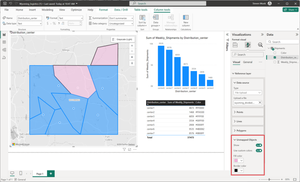
The Data-Bound Reference Layer in Azure Maps for Power BI elevates map-based reporting by allowing users to visually explore, understand, and act on their data. This feature enables new possibilities for data analysts, business leaders, and decision-makers reliant on spatial insights.2.1KViews1like8CommentsSecurity Review for Microsoft Edge version 143
We have reviewed the new settings in Microsoft Edge version 143 and determined that there are no additional security settings that require enforcement. The Microsoft Edge version 139 security baseline continues to be our recommended configuration which can be downloaded from the Microsoft Security Compliance Toolkit. Microsoft Edge version 143 introduced 3 new Computer and User settings; we have included a spreadsheet listing the new settings to make it easier for you to find. As a friendly reminder, all available settings for Microsoft Edge are documented here, and all available settings for Microsoft Edge Update are documented here. Please continue to give us feedback through the Security Baselines Discussion site or this post.Important Changes to App Service Managed Certificates: Is Your Certificate Affected?
Overview As part of an upcoming industry-wide change, DigiCert, the Certificate Authority (CA) for Azure App Service Managed Certificates (ASMC), is required to migrate to a new validation platform to meet multi-perspective issuance corroboration (MPIC) requirements. While most certificates will not be impacted by this change, certain site configurations and setups may prevent certificate issuance or renewal starting July 28, 2025. Update December 8, 2025 We’ve published an update in November about how App Service Managed Certificates can now be supported on sites that block public access. This reverses the limitation introduced in July 2025, as mentioned in this blog. Note: This blog post reflects a point-in-time update and will not be revised. For the latest and most accurate details on App Service Managed Certificates, please refer to official documentation or subsequent updates. Learn more about the November 2025 update here: Follow-Up to ‘Important Changes to App Service Managed Certificates’: November 2025 Update. August 5, 2025 We’ve published a Microsoft Learn documentation titled App Service Managed Certificate (ASMC) changes – July 28, 2025 that contains more in-depth mitigation guidance and a growing FAQ section to support the changes outlined in this blog post. While the blog currently contains the most complete overview, the documentation will soon be updated to reflect all blog content. Going forward, any new information or clarifications will be added to the documentation page, so we recommend bookmarking it for the latest guidance. What Will the Change Look Like? For most customers: No disruption. Certificate issuance and renewals will continue as expected for eligible site configurations. For impacted scenarios: Certificate requests will fail (no certificate issued) starting July 28, 2025, if your site configuration is not supported. Existing certificates will remain valid until their expiration (up to six months after last renewal). Impacted Scenarios You will be affected by this change if any of the following apply to your site configurations: Your site is not publicly accessible: Public accessibility to your app is required. If your app is only accessible privately (e.g., requiring a client certificate for access, disabling public network access, using private endpoints or IP restrictions), you will not be able to create or renew a managed certificate. Other site configurations or setup methods not explicitly listed here that restrict public access, such as firewalls, authentication gateways, or any custom access policies, can also impact eligibility for managed certificate issuance or renewal. Action: Ensure your app is accessible from the public internet. However, if you need to limit access to your app, then you must acquire your own SSL certificate and add it to your site. Your site uses Azure Traffic Manager "nested" or "external" endpoints: Only “Azure Endpoints” on Traffic Manager will be supported for certificate creation and renewal. “Nested endpoints” and “External endpoints” will not be supported. Action: Transition to using "Azure Endpoints". However, if you cannot, then you must obtain a different SSL certificate for your domain and add it to your site. Your site relies on *.trafficmanager.net domain: Certificates for *.trafficmanager.net domains will not be supported for creation or renewal. Action: Add a custom domain to your app and point the custom domain to your *.trafficmanager.net domain. After that, secure the custom domain with a new SSL certificate. If none of the above applies, no further action is required. How to Identify Impacted Resources? To assist with the upcoming changes, you can use Azure Resource Graph (ARG) queries to help identify resources that may be affected under each scenario. Please note that these queries are provided as a starting point and may not capture every configuration. Review your environment for any unique setups or custom configurations. Scenario 1: Sites Not Publicly Accessible This ARG query retrieves a list of sites that either have the public network access property disabled or are configured to use client certificates. It then filters for sites that are using App Service Managed Certificates (ASMC) for their custom hostname SSL bindings. These certificates are the ones that could be affected by the upcoming changes. However, please note that this query does not provide complete coverage, as there may be additional configurations impacting public access to your app that are not included here. Ultimately, this query serves as a helpful guide for users, but a thorough review of your environment is recommended. You can copy this query, paste it into Azure Resource Graph Explorer, and then click "Run query" to view the results for your environment. // ARG Query: Identify App Service sites that commonly restrict public access and use ASMC for custom hostname SSL bindings resources | where type == "microsoft.web/sites" // Extract relevant properties for public access and client certificate settings | extend publicNetworkAccess = tolower(tostring(properties.publicNetworkAccess)), clientCertEnabled = tolower(tostring(properties.clientCertEnabled)) // Filter for sites that either have public network access disabled // or have client certificates enabled (both can restrict public access) | where publicNetworkAccess == "disabled" or clientCertEnabled != "false" // Expand the list of SSL bindings for each site | mv-expand hostNameSslState = properties.hostNameSslStates | extend hostName = tostring(hostNameSslState.name), thumbprint = tostring(hostNameSslState.thumbprint) // Only consider custom domains (exclude default *.azurewebsites.net) and sites with an SSL certificate bound | where tolower(hostName) !endswith "azurewebsites.net" and isnotempty(thumbprint) // Select key site properties for output | project siteName = name, siteId = id, siteResourceGroup = resourceGroup, thumbprint, publicNetworkAccess, clientCertEnabled // Join with certificates to find only those using App Service Managed Certificates (ASMC) // ASMCs are identified by the presence of the "canonicalName" property | join kind=inner ( resources | where type == "microsoft.web/certificates" | extend certThumbprint = tostring(properties.thumbprint), canonicalName = tostring(properties.canonicalName) // Only ASMC uses the "canonicalName" property | where isnotempty(canonicalName) | project certName = name, certId = id, certResourceGroup = tostring(properties.resourceGroup), certExpiration = properties.expirationDate, certThumbprint, canonicalName ) on $left.thumbprint == $right.certThumbprint // Final output: sites with restricted public access and using ASMC for custom hostname SSL bindings | project siteName, siteId, siteResourceGroup, publicNetworkAccess, clientCertEnabled, thumbprint, certName, certId, certResourceGroup, certExpiration, canonicalName Scenario 2: Traffic Manager Endpoint Types For this scenario, please manually review your Traffic Manager profile configurations to ensure only “Azure Endpoints” are in use. We recommend inspecting your Traffic Manager profiles directly in the Azure portal or using relevant APIs to confirm your setup and ensure compliance with the new requirements. Scenario 3: Certificates Issued to *.trafficmanager.net Domains This ARG query helps you identify App Service Managed Certificates (ASMC) that were issued to *.trafficmanager.net domains. In addition, it also checks whether any web apps are currently using those certificates for custom domain SSL bindings. You can copy this query, paste it into Azure Resource Graph Explorer, and then click "Run query" to view the results for your environment. // ARG Query: Identify App Service Managed Certificates (ASMC) issued to *.trafficmanager.net domains // Also checks if any web apps are currently using those certificates for custom domain SSL bindings resources | where type == "microsoft.web/certificates" // Extract the certificate thumbprint and canonicalName (ASMCs have a canonicalName property) | extend certThumbprint = tostring(properties.thumbprint), canonicalName = tostring(properties.canonicalName) // Only ASMC uses the "canonicalName" property // Filter for certificates issued to *.trafficmanager.net domains | where canonicalName endswith "trafficmanager.net" // Select key certificate properties for output | project certName = name, certId = id, certResourceGroup = tostring(properties.resourceGroup), certExpiration = properties.expirationDate, certThumbprint, canonicalName // Join with web apps to see if any are using these certificates for SSL bindings | join kind=leftouter ( resources | where type == "microsoft.web/sites" // Expand the list of SSL bindings for each site | mv-expand hostNameSslState = properties.hostNameSslStates | extend hostName = tostring(hostNameSslState.name), thumbprint = tostring(hostNameSslState.thumbprint) // Only consider bindings for *.trafficmanager.net custom domains with a certificate bound | where tolower(hostName) endswith "trafficmanager.net" and isnotempty(thumbprint) // Select key site properties for output | project siteName = name, siteId = id, siteResourceGroup = resourceGroup, thumbprint ) on $left.certThumbprint == $right.thumbprint // Final output: ASMCs for *.trafficmanager.net domains and any web apps using them | project certName, certId, certResourceGroup, certExpiration, canonicalName, siteName, siteId, siteResourceGroup Ongoing Updates We will continue to update this post with any new queries or important changes as they become available. Be sure to check back for the latest information. Note on Comments We hope this information helps you navigate the upcoming changes. To keep this post clear and focused, comments are closed. If you have questions, need help, or want to share tips or alternative detection methods, please visit our official support channels or the Microsoft Q&A, where our team and the community can assist you.24KViews1like1Comment