tls 1.3
5 Topics
TLS 1.3 in SQL Server 2025: What It Really Changes for Security
Why TLS 1.3 matters TLS (Transport Layer Security) is the protocol that encrypts traffic between clients and servers. For many years, most SQL Server environments have relied on TLS 1.2, which dates back to 2008. TLS 1.3, finalized in 2018, is a significant evolution. It brings three main benefits: Better performance With fewer roundtrips and faster negotiation, secure connections are established much more quickly in practice Stronger security Old and weak algorithms are removed (RC4, SHA1, MD5, DES, 3DES…) Perfect Forward Secrecy (PFS) is mandatory. Even if a private key is compromised later, past sessions remain protected Simpler cipher suites: less configuration complexity, fewer chances to misconfigure Easier compliance Recommended by NIST Strongly encouraged by PCIDSS 4.0 Fewer exceptions to justify during audits What SQL Server 2025 adds SQL Server 2022 introduced TLS 1.3 through the new TDS 8.0 (Tabular Data Stream) protocol. And SQL Server 2025 makes it broadly usable across the SQL Server ecosystem, this is not limited to client connections only. Components that can use TLS 1.3 Client connections (ODBC, OLE DB, .NET) SQL Server Agent bcp utility sqlcmd utility Always On Availability Groups Always On Failover Cluster Instances Log Shipping Transactional replication Merge replication Peer-to-peer replication Snapshot replication Linked Servers PolyBase SQL Writer Service Prerequisites Valid certificates on all endpoints Selfsigned certificates are acceptable for testing In production, use certificates from a trusted CA or an internal PKI Updated drivers ODBC Driver 18+ for SQL Server OLE DB Driver 19+ for SQL Server Microsoft.Data.SqlClient 5.0+ Older drivers will either fall back to older TLS versions or fail to connect SQL Server configuration You can enforce encryption on all connections (Force Encryption) You can configure TDS 8.0 as the minimum protocol version (Force Strict Encryption) How Copilot can help I'm setting up log shipping between two SQL Server 2025 instances with TLS 1.3 enabled. What certificate requirements should I verify ? The MSSQL extension with GitHub Copilot can assist you when planning and rolling out TLS 1.3. Auditing the current state Analyze my current SQL Server encryption configuration. What TLS version are my connections using ? Are there any connections using deprecated protocols ? Copilot can generate and explain the queries that inspect the relevant DMVs and interpret the results. Generating configuration scripts Generate a script to configure SQL Server 2025 to require TLS 1.3 for all incoming connections, including the certificate configuration steps. Diagnosing compatibility issues My application fails to connect after enabling TDS 8.0. The error mentions "SSL Provider". What should I check and how do I fix it ? Reviewing linked servers Review my linked server configurations and identify which onesmight have issues with TLS 1.3 requirements. Documenting the changes Generate documentation for our security team explainingthe TLS configuration changes we're implementing for PCI-DSS compliance. It is possible that the AI generated content is incorrect. You remain responsible for reviewing, validating, and approving it before any use. Do not rely on this output without thorough human verification. Not intended for production use. Things to watch out for Linked Servers to legacy systems You may have linked servers that point to: Older SQL Server versions (2016 and earlier) ODBC sources that do not support TLS 1.2/1.3 Thirdparty servers with outdated TLS stacks If you enforce TLS 1.3 everywhere, these connections can fail. Possible approaches: Upgrade the remote systems Use temporary exceptions (not recommended longterm in production) Introduce a proxy or gateway that can handle protocol translation Replication to older versions Transactional or merge replication to subscribers running SQL Server 2019 or earlier may require mixed configurations. Legacy applications Applications using: .NET Framework with older System.Data.SqlClient versions Old ODBC/OLE DB drivers Thirdparty tools that are not updated may need to be upgraded or reconfigured before you enforce TLS 1.3. Suggested deployment strategy These steps are indicative; adapt them to your environment and change management process. Phase 1: Audit Inventory all inbound and outbound connections Identify client types and driver versions Document linked servers and replication paths Phase 2: Testing Enable TLS 1.3 in a staging or preproduction environment Test all critical applications and administrative tools Identify and resolve compatibility issues Phase 3: Progressive rollout Enable TLS 1.3 as an option without forcing it Monitor which connections still negotiate older TLS versions Once all key systems are compatible, enforce TLS 1.3 References TDS 8.0 - SQL Server Configure TLS 1.3 on SQL Server 2022 and later - SQL Server Encrypt Connections by Importing a Certificate - SQL Server Database Engine: Breaking Changes - SQL Server 2025 Certificate Requirements for SQL Server - SQL Server
Event ID 36871 error keeps logging in a repeating pattern
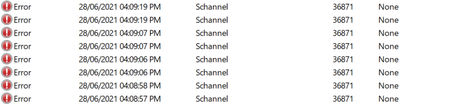
Hello, I accidentally came across the following error in Event Viewer: "A fatal error occurred while creating a TLS client credential. The internal error state is 10013." Source: Schannel Event ID: 36871 Process ID points to LSASS I filtered out the results to only reveal errors of the same source (Schannel), and the earliest record registered was nearly a month ago. However the first time it logged multiple entries during a single session and then never showed up again for about a month. The first entries also had a partially different message "The certificate received from the remote server was issued by an untrusted certificate authority. Because of this, none of the data contained in the certificate can be validated. The TLS connection request has failed. The attached data contains the server certificate." and a different event ID: 36882 More than 20 days later, the current error ID 36871 logged a single entry once and didn't show up again until a couple of days ago. Over the past two days it has been logging too many times (typically 8 entries per hour) and it repeats precisely in the same pattern. Today I'm starting to notice it's logging even more entries compared to yesterday, but also in a consistent pattern. I tried looking online for an explanation and a solution but everything I found was way beyond my limited technical understanding. All I could grasp (potentially) that it has to do with establishing secure connections with the server (I don't know which server are they talking about), with some pages mentioning something about .NET framework. Please note: I'm having this issue on a personal (unmanaged) laptop running Windows 10 Home (21H1), and typically connected to my home WiFi network. I would really appreciate if someone can help me with the following questions: For an average user (like myself), should I even worry about this error being logged on my laptop? Can I safely ignore it? (considering that I haven't noticed any performance issues or other problems, besides the error itself being logged) I recently installed the latest https://support.microsoft.com/en-us/topic/june-21-2021-kb5003537-cumulative-update-preview-for-net-framework-3-5-and-4-8-for-windows-10-version-2004-windows-server-version-2004-windows-10-version-20h2-and-windows-server-version-20h2-and-windows-version-21h1-49ea0d2c-9328-4b01-a81e-1dc0b8d53548 Could it possibly be the one to blame for this type of error? I also tried checking all the other updates and changes I have done on my computer over the past month, but couldn't really find anything that particularly coincide with the error being logged in that pattern. I tried connecting my laptop to a mobile hotspot around the time when the error logs (according to the timely pattern I spotted). The error didn't log while being connected to that hotspot, but it appeared again shortly after I connected back to WiFi. Could that possibly mean the error has to do with the WiFi connection or my ISP rather than anything on the laptop iteself? Please help Update: I tried connecting my laptop to the same hotspot a bit longer, and after an hour the same error logged, but so far it only generated one entry.21KViews0likes0CommentsTLS 1.3
We are really keen to enable TLS 1.3 on our systems, to simplify management on encryption and ciphers. It's great there are finally some hints this is coming to Windows in the near future. I asked about TLS 1.3 on the "Whats new for IT pros" blog, but was given the following answer by @Joe Lurie Sorry you won't be able to join the AMA. We can't publish steps for TLS 1.3 here, as we purposefully left this out of the blog. When TLS 1.3 is ready for public release - even in preview (now its experimental, not preview) the team responsible for TLS 1.3 will post a blog. Until then, I can't post those steps. Can you PM me instructions on how to enable TLS 1.3? I added the SCHANNEL reg keys and updated my Functions list, but still can't get it to work. In terms of timeframe, should we be thinking fall (autumn) 2020? What about .Net compatibility, will we need version 5? Will it be released at the same time for desktops and servers?2.6KViews0likes2Comments