surface
69 Topics
Microsoft Protection Plans now deliver more coverage
Modern organizations rely on their Surface devices every day, across offices, job sites, classrooms, and hybrid work environments. Microsoft Protection Plans help reduce unexpected repair-related costs in accordance with the plan terms. While every Microsoft Surface device comes with a minimum of 1-year Microsoft's Limited Hardware Warranty 1 , you can protect your investment further with a Microsoft Protection Plan. Microsoft has recently updated its Protection Plans to provide broader coverage and reduce uncertainties in claim boundaries for customers. These enhancements are designed to better reflect how devices are used over time and to reduce uncertainty around repairs and long‑term ownership. 2026 Protection Plan Enhancements Unlimited Mechanical Breakdown Coverage Microsoft Protection Plans now include unlimited mechanical breakdown coverage 2 for the full duration of the plan. Previously, mechanical breakdowns and accidental damage claims were combined under a two‑claim limit. With this change, hardware failures caused by defects in materials or workmanship are no longer subject to a fixed claim count limit. Devices may be repaired or replaced as needed for mechanical issues throughout the coverage term. 3 Accidental Damage Claims Are Now Separate The existing two‑claim limit now applies only to Accidental Damage from Handling (ADH) 4 , such as drops, spills, or cracked screens. By separating accidental damage from mechanical breakdown coverage, customers can more clearly understand how claims are applied and avoid using accidental damage claims for issues related to normal hardware failure. New Battery Degradation Coverage Microsoft Protection Plans 5 now include battery degradation coverage. Customers can file one dedicated battery claim 6 if a device’s battery capacity drops below 70% of its original capacity during the plan term. This marks the first time Protection Plans address battery wear over time, not just battery failures caused by manufacturing defects. Battery eligibility can be validated using tools such as the Surface Diagnostic Toolkit. Battery degradation claims are separate from accidental damage claims, so ADH limits remain unaffected. Together, these updates help organizations extend device life, reduce unexpected repair costs, and plan more confidently for device ownership. Customers can add a Microsoft Protection Plan when purchasing a new device, or within the eligible post-purchase window. 7 To purchase, contact your authorized partner or reseller, or engage the Microsoft Store virtual assistant. [Consumer customers can purchase through the Surface app or your Microsoft account.] These updates apply only to Microsoft Complete and Extended Hardware Service plans purchased on or after the applicable effective date (April 01, 2026) and are not retroactively modified. Coverage, whether for new or existing customers, is determined solely by the relevant Terms & Conditions for the specific plan purchased. To learn more about Microsoft Protection Plans, visit Microsoft Surface Warranty & Protection Plans. To see Warranty and Protection Plan Terms & Conditions, visit Support.microsoft.com. Disclaimers Without prejudice to any legal (statutory) rights to which you may be entitled under your local law, Microsoft Limited Hardware Warranty covers your device for one year from the date of original purchase from Microsoft or an authorized reseller. Restrictions apply. Please refer to Microsoft Limited Hardware Warranty & Agreement. Additional extended coverage for mechanical breakdown and accidental damage from handling is available through the purchase of Microsoft protection plans. If the plan provides additional Mechanical Breakdown coverage, that coverage begins upon expiration of the manufacturer’s original warranty and continues for the remainder of the term shown on the Holder’s Proof of Purchase. Accidental damage from handling begins immediately upon purchase. Restrictions apply, for all Protection Plans, please reference the Terms and Conditions for the limit of liability and the applicable exclusions of the Protection Plan. Subject to plan terms, conditions, and limit of liability. Accidental damage from handling is included in the following plans: Commercial: Complete for Business, Complete for Business Plus, Accidental Damage Protection (EU), Accidental Damage Protection Plus (EU), and Consumer: Microsoft Complete. Extended Hardware Service (EHS) plans provide coverage for mechanical breakdown only and do not include Accidental Damage from Handling or battery degradation coverage. Battery degradation is included in the following plans: Commercial: Complete for Business, Complete for Business Plus, Accidental Damage Protection (EU), Accidental Damage Protection Plus (EU), and Consumer: Microsoft Complete. Extended Hardware Service (EHS) plans provide coverage for mechanical breakdown only and do not include Accidental Damage from Handling or battery degradation coverage. Customers with eligible plans are limited to one (1) battery degradation/replacement claim as set out in plan Terms and Conditions. Availability and timing vary by market and plan type.86Views0likes0CommentsMeeting Control, Now Within Reach: Surface Hub 3 + MAXHUB Universal Console
Modern meeting spaces require flexibility, simplicity, and consistency for IT teams managing collaboration environments. Announced at Microsoft Ignite 2024, center-of-table console support for Surface Hub 3 extends Microsoft Teams Rooms on Windows by enabling certified third-party touch consoles for in-room meeting control. Center-of-Table Console Support Surface Hub 3 now supports Teams Rooms Certified Universal Consoles, introducing an additional option to control meetings beyond the interactive display. This includes the MAXHUB TCP33T Universal Console, a certified hardware solution in this ecosystem. By connecting a touch console directly to Surface Hub 3, users can join meetings, manage controls, and share wired content from their PCs while seated at the table. Benefits of Certified Universal Consoles Teams Rooms Certified Universal Consoles can help provide IT admins with: Microsoft Teams Rooms integration through certified accessories Flexible room design options including front-of-room deployments Consistent user experience across meeting spaces Simplified meeting controls for table-based interaction MAXHUB TCP33T Universal Console Overview The MAXHUB TCP33T is a Teams Rooms Certified Universal Console designed to work with Windows-based touch board devices such as Surface Hub 3. It delivers touchscreen control for Microsoft Teams Rooms meetings and serves as a dedicated entry point for wired content sharing. Common Deployment Scenarios Large conference rooms requiring table-based control Standardized Teams Rooms deployments across buildings Collaborative meetings requiring easy content sharing Requirements Deployments require Surface Hub 3 running Microsoft Teams Rooms on Windows and a Teams Rooms Certified Universal Console such as the MAXHUB TCP33T. Looking Ahead This new Universal Console ecosystem reflects Microsoft's commitment to flexible, scalable collaboration experiences. By pairing Surface Hub 3 with certified accessories like the MAXHUB TCP33T, organizations can design meeting spaces that meet modern collaboration needs. Live Webinar Wednesday the 14th of January... Sign up now! Join us for an exclusive webinar with Microsoft and MAXHUB as we explore how the MAXHUB Universal Console enhances the Microsoft Surface Hub experience. Hear from industry experts and learn how to: ✔ Reduce friction in the room ✔ Streamline collaboration workflows ✔ Centralize meeting controls — without leaving your seat! Featured Speakers: • Frank Buchholz, Director, Product Marketing — Microsoft • Jean Barrett, Technology Solutions Professional — Microsoft • Alan Nicholls, Microsoft Teams Professional — MAXHUB Register for a session and secure your spot👇 January 14 @9AM PST session: Register here January 14 @5PM PST session: Register here Resources Center-of-table console support Teams Rooms app version needed Center-of-table console support announcement during Microsoft Ignite 2024539Views1like0CommentsClose the Year Strong with Surface for Business Deals
As organizations look to maximize their remaining budget and prepare for 2026, now is the moment to modernize device fleets with Surface for Business. These limited-time Surface promotions make it easier to accelerate refresh cycles, strengthen endpoint security, and equip employees with devices that are AI-ready from day one. Surface for Business devices combine productivity-forward design, leading AI capabilities, and Microsoft security at multiple layers. Whether refreshing a subset of users or upgrading entire departments, organizations can close the year with hardware that helps reduce risk, assists in lowering management overhead, and positions teams for the next wave of AI-driven productivity. Secure by Design Surface for Business devices deliver hardware-based protections aligned with Secured-core PC standards. Hardware-based security, advanced firmware protections, and a growing number of memory-safe drivers help reduce exposure across the stack, providing peace of mind that clears the way for AI innovation. AI-Ready With advanced processors including powerful AI chips on supported models, Surface for Business devices are ready to help employees maximize their skills using AI to drive business forward. From a dedicated Copilot key 1 to Foundry on Windows 2 for developing local agents, these devices provide the foundation for people to achieve their best. Learn more about unlocking AI innovation in our new eBook. Ready to Deploy Surface for Business devices support Windows Autopilot 3 , enabling IT teams to deploy devices directly to employees, preconfigured with corporate profiles and security baselines, without imaging or desk-side setup. Combined with centralized management through Microsoft Intune 4 , organizations can reduce deployment time and help keep endpoints consistent from day one. Make the Most of Year-End Purchasing Opportunities Maximize remaining 2025 budget by exploring end-of-year savings on select Surface for Business devices. Work with your preferred reseller to capitalize on year-end spend, or purchase directly through Microsoft Store in the US 5 to take advantage of available offers that make modernizing your device fleet easier as you prepare for 2026. Resellers can help organizations align device selection, deployment plans, and support needs while optimizing budget utilization. Businesses purchasing through Microsoft Store benefit from fast, free shipping and a 60-day return window on most physical products. 6 Across both channels, Surface for Business offers provide a cost-effective path to refresh devices now rather than deferring upgrades—helping IT leaders complete their roadmap, meet procurement targets, and deliver new value to end users before the new year. Find a reseller [https://www.microsoft.com/surface/business/where-to-buy-microsoft-surface Buy from Microsoft Store US [https://www.microsoft.com/en-us/store/collections/surface-deals-bundles] References Feature availability varies by device and market. See Key Support for details. Some capabilities may require additional subscriptions not included with Windows or Surface devices. Windows Autopilot device preparation depends on specific capabilities available in Windows client and Microsoft Entra ID. It also requires a mobile device management (MDM) service such as Microsoft Intune. These capabilities can be obtained through various editions and subscription programs. Additional licenses required, not included with Surface. Offers and promotions vary by market. Terms apply. Microsoft Store only ships to certain countries; see Shipping options, costs, and delivery times - Microsoft Support for details.562Views1like0CommentsImproved address management in service orders on Surface Portals
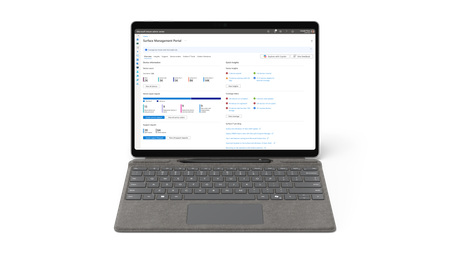
We’ve introduced an important usability improvement to the address selection experience in the service order workflow on both Surface Management Portal and Surface Support Portal. When raising a service order, users can add both the billing and shipping addresses and save them for future use. Previously, all saved addresses were stored together and appeared in both dropdown menus. This caused confusion and made it difficult for users to select the correct one. To improve this experience, we’ve separated saved addresses by type. Shipping addresses now appear only in the Shipping Address dropdown, and billing addresses appear only in the Billing Address dropdown. As part of this update, all previously saved addresses have been moved to the Shipping Address section. Users can now save billing addresses separately as they create new orders. This change makes the selection process simpler, clearer, and more intuitive, allowing users to easily select the right address. To learn more about the Surface Management Portal and Surface Support Portal, see the following Microsoft Learn articles: Surface portals overview Surface Support Portal overview Surface Management Portal overview Assign admin roles for Surface Portals264Views0likes2CommentsEndpoints and AI strategy: Lessons of the Microsoft Work Trend Index 2025
AI adoption is accelerating, and PCs are now key to delivering fast, secure, and seamless AI experiences. Surface Copilot+ PCs combine local AI processing, cloud connectivity, and enterprise-grade security—making endpoints central to every AI strategy.807Views1like0CommentsHelping to enable secure, connected work: Surface with built-in 5G on the Verizon network
Surface for Business devices with built-in 5G, powered by Verizon, deliver secure, reliable connectivity and AI-optimized performance to enable seamless productivity anywhere without dependence on Wi-Fi.609Views0likes0CommentsDoes Surface Diagnostic Toolkit fail to recognize my Surface because of its Insider OS version?
My Surface Pro 9 Surface "SMF Core Driver" does not load. In troubleshooting it, I discovered Surface Diagnostic Toolkit does not recognize my hardware as a Surface device, and the downloadable driver package will not install for the same reason. Is any of this a consequence of my having the current Insider Release Preview OS?188Views0likes2Comments
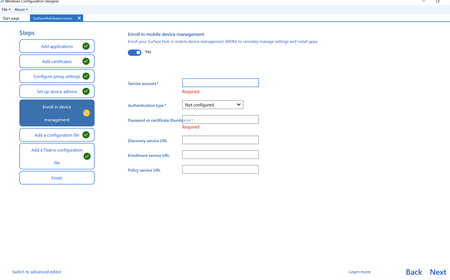
Provisioning does not add to MDM - Surface hub
When using the Windows Configuration Designer to create a provisioning package I'm unsure what to add for the MDM devices. Some devices seem to enter the MDM and some don't. Unsure if it's the build on these devices. I've looked for documentation and can't find any for what credentials to use for the following on the Enrol in device management I need to know what to enter for the following fields please. So that I can insure these devices populate into Intune. I don't know why MS make it so hard for this as the setup of the older 2s devices was much easier. Thanks Michael63Views0likes0CommentsSafer Drivers, Stronger Devices
Surface is advancing Windows driver development by adopting Rust, a memory-safe programming language, to improve device security and reliability. Through contributions to the open-source windows-drivers-rs platform, Surface has shipped several Copilot+ PCs with Rust-based drivers, reducing vulnerabilities and enhancing maintainability.2.5KViews7likes0CommentsBoost mobile productivity with Surface Laptop 5G for Business and Surface Copilot+ PCs
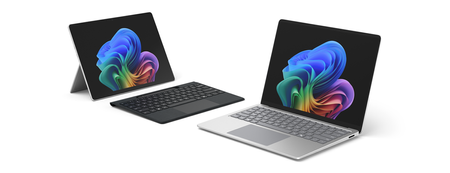
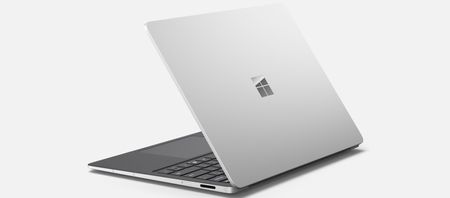
Surface Laptop 5G is here to supercharge mobile productivity. With built-in AI, enterprise-grade 5G, and up to 20 hours of battery life, it’s designed for secure, seamless work—anywhere. We'll explore engineering and design highlights that make these devicines shine. Also available for order starting today, Surface Laptop for Business 13-inch and Surface Pro for Business 12-inch bring the power of Copilot+ PCs to more mobile form factors.1.7KViews1like0Comments