sharepoint online
18333 Topics
Intermittent failures when creating new libraries in modern SharePoint
Hi everyone, I’m seeing an issue in our modern SharePoint Online site collection where creating new document libraries has started failing. This site has worked normally for years, but over the past week, most library creation attempts haven't worked. 1) The page briefly flashes or glitches during the creation process. and 2) A non‑ending spinning wheel when I hit "create" or 3) Creation attempts return “Something's not right.” error page. The failures happen across all subsites, in multiple browsers, and I’m a Site Collection Administrator. No permission changes were made recently. Has anyone seen similar intermittent library creation failures in a modern site collection, or know what might cause this kind of inconsistent behavior? Any guidance would be appreciated. Thanks! Meagan21Views0likes0Comments
Automated upload competing with users who have a file open in Co-authoring mode
This behavior began approximately mid-December. An automated process uploading/overwriting a file located in SharePoint online was constantly receiving errors when executing. We ran through several scenarios for troubleshooting but in the end, we had found that a user would open the file and leave it open in the background through the working day. This behavior produced some co-authoring lock on the file where people could get in and work on the file at the same time but locked out the automated process that would upload a new version of the file regularly. We fixed the behavior after consulting with the people who were referencing the file, they were gathering data from it and were not updating it in any way. So, we broke the permission inheritance for this file and set it up to be read-only for all users but the process that was uploading the file. This allowed the people to reference the file and undid the locking behavior that we had observed. Now, before the middle of December, this locking mechanism didn't exist. Users could have the file open in edit mode and our automated process to update the file was able to upload and overwrite at the same time without issues. Has anyone else observed this behavior within the last few months? We didn't open up a ticket with Microsoft to get an official answer if something new was perhaps implemented and we're curious if anyone has opened a ticket regarding this behavior. Also, I briefly look through the message center and couldn't find any changes in there that seemed to be related to this change by their titles. The error that was seen from the automated process was: The remote server returned an error: (423) Locked. Any input appreciated - I am definitely curious to hear if others are observing this as well.8Views0likes0Comments
PromotedState does not update anymore
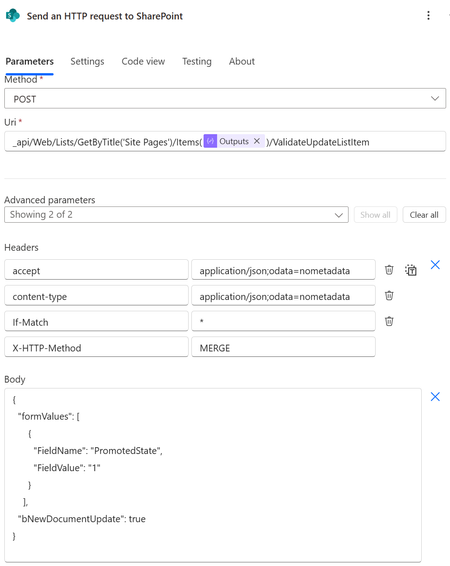
I wish to update the promoted status to 0 (page), 1 (unpublished news) or 3 (published news). I was always doing this via SharePoints column formatting. See .json column formatting below. This worked perfectly fine until about this week. Now it doesn't seem to work anymore. Now I tried updating the PromotedState also via PowerAutomate. This also doesn't seem to work... How should I now change the PromotedState. Does someone have any clue how I can update the PromotedState or why the column formatting way of wokring, suddently doesn't work anymore? The json code for column formatting. { "$schema": "https://developer.microsoft.com/json-schemas/sp/v2/column-formatting.schema.json", "elmType": "div", "style": { "flex-wrap": "nowrap", "display": "flex", "flex-direction": "row" }, "children": [ { "elmType": "div", "txtContent": "=if(@currentField == 0 ,'0 : Page' , if(@currentField == 1, '1 : News (Unpublished)' , if(@currentField == 2 , '2 : News','') ) )", "style": { "box-sizing": "border-box", "padding": "4px 8px 5px 8px", "display": "flex", "border-radius": "16px", "align-items": "center", "overflow": "hidden", "margin": "4px 4px 4px 4px", "border": "1px solid" }, "attributes": { "class": "=if(@currentField == 0 ,'ms-fontColor-themePrimary ms-borderColor-themePrimary ms-bgColor-white' , if(@currentField == 1, 'ms-fontColor-themePrimary ms-borderColor-themePrimary ms-bgColor-themeLighter' , if(@currentField == 2 , 'ms-fontColor-white ms-borderColor-themePrimary ms-bgColor-themePrimary','') ) )" } }, { "elmType": "div", "style": { "font-size": "18px", "cursor": "pointer", "padding": "10px", "border-radius": "50%" }, "attributes": { "iconName": "MoreVertical", "class": "ms-fontColor-themePrimary ms-bgColor-themeLighter--hover" }, "customCardProps": { "openOnEvent": "click", "directionalHint": "rightCenter", "isBeakVisible": true, "formatter": { "elmType": "div", "style": { "display": "flex", "flex-direction": "column", "align-items": "flex-start" }, "children": [ { "elmType": "div", "txtContent": "Change to Page (0)", "style": { "padding": "10px 20px 10px 20px", "cursor": "pointer", "width": "200px" }, "attributes": { "class": "ms-bgColor-themeLighter--hover" }, "customRowAction": { "action": "setValue", "actionInput": { "PromotedState": "0" } } }, { "elmType": "div", "txtContent": "Change to unpublished news (1)", "style": { "padding": "10px 20px 10px 20px", "cursor": "pointer", "width": "200px" }, "attributes": { "class": "ms-bgColor-themeLighter--hover" }, "customRowAction": { "action": "setValue", "actionInput": { "PromotedState": "1" } } }, { "elmType": "div", "txtContent": "Change to published news (2)", "style": { "padding": "10px 20px 10px 20px", "cursor": "pointer", "width": "200px" }, "attributes": { "class": "ms-bgColor-themeLighter--hover" }, "customRowAction": { "action": "setValue", "actionInput": { "PromotedState": "2" } } } ] } } } ] } The HTTP SharePoint call to update the PromotedStatus.10Views0likes0Comments
Issue: Date picker / calendar icon disappeared from Page Details pane
Hi everyone, I am reaching out to see if anyone else is experiencing a recent issue with the Date field in SharePoint Online. Since yesterday (January 15th), the calendar icon / date picker has disappeared from the Page Details pane when editing properties for News pages. Here are the details of the issue: The Problem: When clicking on a Date column in the Page Details pane, the calendar selector no longer pops up. Manual Entry: It is still possible to type the date manually, but the visual interface is gone. Comparison: Interestingly, the date picker works perfectly fine when using "Edit in grid view" in the Site Pages library. The issue seems specific to the side property pane (Details pane). Browsers tested: I have reproduced the issue on both Microsoft Edge and Google Chrome (latest versions), even after clearing the cache. Is this a known bug following a recent update, or is there a new UI setting I might have missed? Has anyone seen a similar report in the M365 Service Health dashboard? Thanks in advance for your help!65Views0likes2Comments
Microsoft 365 Purview Logs not showing Export List Events
We recently conducted an audit on our system - as we are part of a regulated industry - and had to clarify exactly which user events are captured in the Unified Audit Log. We did the usual confirmations and provided evidence of events where users add, update, delete items in SharePoint Lists and Libraries, however, we were asked specifically if events for exporting List Items to CSV or Excel were captured in the Log. We performed the usual test and waited for the events to appear in Purview, but to our suprise, there was nothing in the Log to indicate a user exporting to CSV or Excel. Can anyone confirm whether Export to CSV or Excel from a SharePoint List should be captured and is reportable in the Audit Log? This seems to be a massive oversight if these events are not auditable?54Views0likes1CommentHow to restore a single file deleted 6 months ago - using M365 Backup?
My friend's company uses Sharepoint Online, but relevant folders are synced to their OneDrive so they manage everything in File Explorer. I have Microsoft 365 Backup enabled on their Sharepoint site. This company has all the parent folders in "Site Contents". These folders include Sales, HR, Clients, etc. I need to restore a single file out of Sales but it appears I need to restore the entire site first, sync the Sales folder from the site ending in /R0 to my OneDrive, then copy/paste from my File Explorer. Yes, I am a NOOB in Sharepoint. What's the right way to grab this file? And if it's ditching M365 Backup, then that's what I'll do, but I still need to get this file.32Views0likes1Comment
Sharepoint site's customized column become 'Read-Only'
We have a SharePoint Intranet that has been in active use for 14+ months. I have a customized column Expiration Date for News Expiry. Recently, all custom columns added to Site Pages (Page Details) or News pages have become read-only immediately after clicking Save. Key points: - Issue occurs for ALL column types (Date, Date & Time, Text, etc.) - Fields are editable for the first time. - As soon as Save is clicked and page or news came to draft status and the field become read-only. - Happens for both Draft and Published pages. - Editing in Site Pages library Grid view still works. - This behavior started recently without any configuration changes. Has anyone else experienced this?24Views0likes1CommentHow can I rename a library in SharePoint?
Due to some testing with a failing copy flow, I have discovered that I need to rename a few libraries to get the flow to work properly with the requirements my clients have settled on. Is it possible to rename a library? I also need to edit the Web Address in List Information.35KViews0likes6Comments
Restrict shareing files in a document library to members of that document library
Hi, I have a site with multiple document libraries, lets call them Accounts, Managers and General. Each document library has removed inheritance and the Members and Visitors groups removed and a security group added with edit permission. e.g. SP_Managers group Is there a way for me to be able to restrict sharing links to files to only users that already have access to the document library? i.e. someone in the Managers library can only share a link with others with access to that document library. In my current case, if someone in the managers library (who is a member of the SP_Managers security group to get access) shares a file with a general user (not in the security group), that general user can not only access the shared document but, can now see the Managers Document library listed in SharePoint (Not any content) which I don't want to happen. Another option may be to make it so the top level folder isn't visible to non members even if a file is shared (I don't know if that is possible either) but the restricting of sharing would be a better soloution. Thanks for any advice Ian56Views0likes4Comments