siem
578 TopicsUnlocking value with Microsoft Sentinel data lake
As security telemetry explodes and AI‑driven defense becomes the norm, it is critical to centralize and retain massive volumes of data for deep analysis and long‑term insights. Security teams are fundamentally rethinking how they manage, analyze, and act on security data. The Microsoft Sentinel data lake is a game changer for modern security operations, providing the foundation for agentic defense, deeper insights, and graph‑based enrichment. Security teams can centralize signals, simplify data management, and run advanced analytics, without compromising costs or performance. Across industries, organizations are using the Sentinel data lake to unify distributed data, search across years of telemetry, correlate sophisticated threats using graph-powered analytics, and operationalize agentic workflows at scale, turning raw security data into actionable intelligence. In this blog we will highlight some of the ways Sentinel data lake is transforming modern security operations. Unified, cost-effective security data foundation The challenge Many organizations tell us they have been forced to make difficult tradeoffs: high ingestion costs meant selectively choosing which logs to keep, often leaving data that might have been critical during an investigation. This selective logging creates blind spots, fragmented visibility, and unnecessary operational complexity across security operations. As a result, CISOs increasingly view selective logging as a material security risk to their organizations. How Sentinel data lake helps The Sentinel data lake removes these constraints by providing a cost‑effective, security‑optimized foundation for centralizing large volumes of security data. With the data lake, security teams can finally retain the breadth of telemetry they need without the financial penalties traditionally associated with long‑term security data retention. Organizations benefit from: A unified security data foundation designed to simplify investigations Long‑term, cost‑effective retention for up to 12 years Flexible querying across high‑volume data sets 6x data compression in storage, enabling significantly lower retention costs at scale Why it matters By unifying data in a purpose-built security data lake, SOC teams gain reliable, comprehensive visibility without the budget limitations that once forced them to choose between cost and completeness. This stronger foundation not only improves day‑to‑day investigations; it unlocks the advanced analytics and AI‑powered capabilities that future proof SOCs for AI driven defense. With full visibility restored, organizations are better equipped to identify emerging threats, respond with confidence, and modernize their security operations on their own terms. Historical security analysis The challenge SOC teams often struggle with short SIEM retention windows that limit how far back investigators can look. Critical logs age out before teams can fully piece together an attack, making root‑cause analysis slow and incomplete. This challenge grows when incidents span long periods, when new threat indicators emerge, or when organizations need to understand how a compromise evolved over time. Without access to historical telemetry, analysts face significant blind spots that weaken both investigations and hunting efforts. How Sentinel data lake helps The Sentinel data lake solves this by enabling organizations to retain and analyze years of security data at a fraction of the cost of traditional SIEM retention. Teams can use KQL and notebooks to run deep, long‑range investigations, perform advanced anomaly detection, and correlate older events that would have been impossible to recover in the analytics tier. Historical data enables retro analysis when new threat intel emerges. SOC teams can instantly look back to validate whether newly discovered indicators, techniques, or threat actors were already present in their environment. Organizations benefit from: Years of cost‑effective retention that extend far beyond traditional SIEM windows Deep forensic investigations using KQL and notebooks over historical data Improved anomaly detection with long‑range patterns and baselines Faster scoping of incidents with access to full historical context Why it matters By unlocking access to years of searchable telemetry, SOC teams are no longer limited by short retention windows or forced to make compromises that weaken security. They can retrace the full scope of an incident, hunt for slow‑moving threats, and quickly respond to new IOCs, powered by the historical context modern attacks demand. This long‑range visibility strengthens both detection and response, giving organizations the confidence and continuity they need to stay ahead of evolving threats. Graph-powered attack-path visibility and entity correlation The challenge Traditional investigations often rely on reviewing logs in isolation, making it difficult to connect identity activity, endpoint behavior, cloud access, and threat intelligence in a meaningful way. As a result, SOC teams find it difficult to trace attack paths, understand lateral movement, and build complete investigative context. Without a unified view of how entities relate to each other, investigations become slow, fragmented, and are prone to missed signals. How Sentinel data lake helps The Sentinel data lake enables powerful graph‑based correlation across identity, asset, activity, and threat intelligence data. Using graph models, analysts can visually explore how entities connect, identify hidden attack paths, pinpoint exposed routes to sensitive assets, and understand the full blast radius of compromised accounts or devices. This graph‑driven context turns complex telemetry into intuitive visuals that dramatically accelerate both pre‑breach context and incident response. Organizations benefit from: Graph‑powered correlation across identity, asset, activity, and threat intelligence data Visualization of attack paths and lateral movement that logs alone cannot expose Context‑rich investigations supported by relationship‑driven insights Greater cross‑domain visibility that strengthens both detection and response Why it matters With graph‑powered context, SOC teams move beyond event‑by‑event analysis and gain a deep understanding of how their environment behaves as a system. This visibility speeds investigations, strengthens posture before attackers strike, and provides analysts with a clear, intuitive way to uncover relationships that traditional log searches simply can’t reveal. Agentic workflows powered by MCP server The challenge SOC teams are under constant pressure from rising alert volumes, repetitive manual investigative steps, and skill gaps that make consistent triage challenging. Even experienced analysts struggle to reason across large, distributed datasets, and junior analysts often lack the experience needed to understand complex threat scenarios. These challenges slow down response and increase the risk of missed signals. How the Sentinel data lake helps The Sentinel data lake, combined with the Model Context Protocol (MCP), enables AI agents to reason over unified, contextual security data using natural‑language prompts. Analysts can ask questions directly: “Does this user have other suspicious activity?” or “What assets are at risk?”, and agents automatically interpret the request, query the data lake, and return actionable insights. These AI‑powered workflows reduce repetitive effort, strengthen investigative consistency, and help teams operate at a higher level of speed and precision. Organizations benefit from: AI‑assisted investigations that reduce manual effort and accelerate triage Agentic workflows powered by MCP to automate multi‑step reasoning over unified data Natural‑language interactions that make complex queries accessible to all analysts Consistent, high‑quality analysis regardless of analyst experience level Why it matters By introducing agentic, AI‑driven workflows, SOC teams can automate time‑consuming tasks, reduce alert fatigue, and empower every analyst, regardless of seniority, to quickly arrive at high‑quality insights. This shift not only accelerates investigations but also frees teams to focus on high‑value, proactive security work. As organizations continue modernizing their SOC, agentic workflows represent a major step forward in bridging the gap between human expertise and scalable, AI‑powered analysis. The future of security operations starts here The Sentinel data lake is becoming the backbone of modern security operations—unifying security data, expanding investigative reach, and enabling graph‑driven, AI‑powered analysis at scale. By centralizing telemetry on a cost‑effective, AI‑ready foundation, and running advanced analytics on that data, security teams can move beyond fragmented insights to correlate threats with clarity and act faster with confidence. These four use cases are just the beginning. Whether you’re strengthening investigations, advancing threat hunting, operationalizing AI, or preparing your SOC for what’s next, the Sentinel data lake provides the scale, intelligence, and flexibility to reduce complexity and stay ahead of evolving threats. Now is the time to accelerate toward a more resilient, adaptive, and future‑ready security posture. Get started with Microsoft Sentinel data lake today8Views0likes0CommentsMcasShadowItReporting / Cloud Discovery in Azure Sentinel
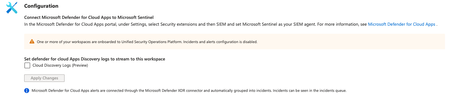
Hi! I´m trying to Query the McasShadowItReporting Table, for Cloud App DISCOVERYs The Table is empty at the moment, the connector is warning me that the Workspace is onboarded to Unified Security Operations Platform So I cant activate it here I cant mange it via https://security.microsoft.com/, too The Documentation ( https://learn.microsoft.com/en-us/defender-cloud-apps/siem-sentinel#integrating-with-microsoft-sentinel ) Leads me to the SIEM Integration, which is configured for (for a while) I wonder if something is misconfigured here and why there is no log ingress / how I can query them34Views0likes1Comment
Clarification on UEBA Behaviors Layer Support for Zscaler and Fortinet Logs
I would like to confirm whether the new UEBA Behaviors Layer in Microsoft Sentinel currently supports generating behavior insights for Zscaler and Fortinet log sources. Based on the documentation, the preview version of the Behaviors Layer only supports specific vendors under CommonSecurityLog (CyberArk Vault and Palo Alto Threats), AWS CloudTrail services, and GCP Audit Logs. Since Zscaler and Fortinet are not listed among the supported vendors, I want to verify: Does the UEBA Behaviors Layer generate behavior records for Zscaler and Fortinet logs, or are these vendors currently unsupported for behavior generation? As logs from Zscaler and Fortinet will also be get ingested in CommonSecurityLog table only.34Views0likes1Comment
Understand New Sentinel Pricing Model with Sentinel Data Lake Tier
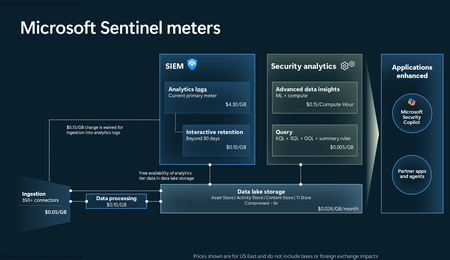
Introduction on Sentinel and its New Pricing Model Microsoft Sentinel is a cloud-native Security Information and Event Management (SIEM) and Security Orchestration, Automation, and Response (SOAR) platform that collects, analyzes, and correlates security data from across your environment to detect threats and automate response. Traditionally, Sentinel stored all ingested data in the Analytics tier (Log Analytics workspace), which is powerful but expensive for high-volume logs. To reduce cost and enable customers to retain all security data without compromise, Microsoft introduced a new dual-tier pricing model consisting of the Analytics tier and the Data Lake tier. The Analytics tier continues to support fast, real-time querying and analytics for core security scenarios, while the new Data Lake tier provides very low-cost storage for long-term retention and high-volume datasets. Customers can now choose where each data type lands—analytics for high-value detections and investigations, and data lake for large or archival types—allowing organizations to significantly lower cost while still retaining all their security data for analytics, compliance, and hunting. Please flow diagram depicts new sentinel pricing model: Now let's understand this new pricing model with below scenarios: Scenario 1A (PAY GO) Scenario 1B (Usage Commitment) Scenario 2 (Data Lake Tier Only) Scenario 1A (PAY GO) Requirement Suppose you need to ingest 10 GB of data per day, and you must retain that data for 2 years. However, you will only frequently use, query, and analyze the data for the first 6 months. Solution To optimize cost, you can ingest the data into the Analytics tier and retain it there for the first 6 months, where active querying and investigation happen. After that period, the remaining 18 months of retention can be shifted to the Data Lake tier, which provides low-cost storage for compliance and auditing needs. But you will be charged separately for data lake tier querying and analytics which depicted as Compute (D) in pricing flow diagram. Pricing Flow / Notes The first 10 GB/day ingested into the Analytics tier is free for 31 days under the Analytics logs plan. All data ingested into the Analytics tier is automatically mirrored to the Data Lake tier at no additional ingestion or retention cost. For the first 6 months, you pay only for Analytics tier ingestion and retention, excluding any free capacity. For the next 18 months, you pay only for Data Lake tier retention, which is significantly cheaper. Azure Pricing Calculator Equivalent Assuming no data is queried or analyzed during the 18-month Data Lake tier retention period: Although the Analytics tier retention is set to 6 months, the first 3 months of retention fall under the free retention limit, so retention charges apply only for the remaining 3 months of the analytics retention window. Azure pricing calculator will adjust accordingly. Scenario 1B (Usage Commitment) Now, suppose you are ingesting 100 GB per day. If you follow the same pay-as-you-go pricing model described above, your estimated cost would be approximately $15,204 per month. However, you can reduce this cost by choosing a Commitment Tier, where Analytics tier ingestion is billed at a discounted rate. Note that the discount applies only to Analytics tier ingestion—it does not apply to Analytics tier retention costs or to any Data Lake tier–related charges. Please refer to the pricing flow and the equivalent pricing calculator results shown below. Monthly cost savings: $15,204 – $11,184 = $4,020 per month Now the question is: What happens if your usage reaches 150 GB per day? Will the additional 50 GB be billed at the Pay-As-You-Go rate? No. The entire 150 GB/day will still be billed at the discounted rate associated with the 100 GB/day commitment tier bucket. Azure Pricing Calculator Equivalent (100 GB/ Day) Azure Pricing Calculator Equivalent (150 GB/ Day) Scenario 2 (Data Lake Tier Only) Requirement Suppose you need to store certain audit or compliance logs amounting to 10 GB per day. These logs are not used for querying, analytics, or investigations on a regular basis, but must be retained for 2 years as per your organization’s compliance or forensic policies. Solution Since these logs are not actively analyzed, you should avoid ingesting them into the Analytics tier, which is more expensive and optimized for active querying. Instead, send them directly to the Data Lake tier, where they can be retained cost-effectively for future audit, compliance, or forensic needs. Pricing Flow Because the data is ingested directly into the Data Lake tier, you pay both ingestion and retention costs there for the entire 2-year period. If, at any point in the future, you need to perform advanced analytics, querying, or search, you will incur additional compute charges, based on actual usage. Even with occasional compute charges, the cost remains significantly lower than storing the same data in the Analytics tier. Realized Savings Scenario Cost per Month Scenario 1: 10 GB/day in Analytics tier $1,520.40 Scenario 2: 10 GB/day directly into Data Lake tier $202.20 (without compute) $257.20 (with sample compute price) Savings with no compute activity: $1,520.40 – $202.20 = $1,318.20 per month Savings with some compute activity (sample value): $1,520.40 – $257.20 = $1,263.20 per month Azure calculator equivalent without compute Azure calculator equivalent with Sample Compute Conclusion The combination of the Analytics tier and the Data Lake tier in Microsoft Sentinel enables organizations to optimize cost based on how their security data is used. High-value logs that require frequent querying, real-time analytics, and investigation can be stored in the Analytics tier, which provides powerful search performance and built-in detection capabilities. At the same time, large-volume or infrequently accessed logs—such as audit, compliance, or long-term retention data—can be directed to the Data Lake tier, which offers dramatically lower storage and ingestion costs. Because all Analytics tier data is automatically mirrored to the Data Lake tier at no extra cost, customers can use the Analytics tier only for the period they actively query data, and rely on the Data Lake tier for the remaining retention. This tiered model allows different scenarios—active investigation, archival storage, compliance retention, or large-scale telemetry ingestion—to be handled at the most cost-effective layer, ultimately delivering substantial savings without sacrificing visibility, retention, or future analytical capabilities.Solved1.6KViews2likes4Comments
Codeless Connect Framework (CCF) Template Help
As the title suggests, I'm trying to finalize the template for a Sentinel Data Connector that utilizes the CCF. Unfortunately, I'm getting hung up on some parameter related issues with the polling config. The API endpoint I need to call utilizes a date range to determine the events to return and then pages within that result set. The issue is around the requirements for that date range and how CCF is processing my config. The API expects an HTTP GET verb and the query string should contain two instances of a parameter called EventDates among other params. For example, a valid query string may look something like: ../path/to/api/myEndpoint?EventDates=2025-08-25T15%3A46%3A36.091Z&EventDates=2025-08-25T16%3A46%3A36.091Z&PageSize=200&PageNumber=1 I've tried a few approaches in the polling config to accomplish this, but none have worked. The current config is as follows and has a bunch of extra stuff and names that aren't recognized by my API endpoint but are there simply to demonstrate different things: "queryParameters": { "EventDates.Array": [ "{_QueryWindowStartTime}", "{_QueryWindowEndTime}" ], "EventDates.Start": "{_QueryWindowStartTime}", "EventDates.End": "{_QueryWindowEndTime}", "EventDates.Same": "{_QueryWindowStartTime}", "EventDates.Same": "{_QueryWindowEndTime}", "Pagination.PageSize": 200 } This yields the following URL / query string: ../path/to/api/myEndpoint?EventDates.Array=%7B_QueryWindowStartTime%7D&EventDates.Array=%7B_QueryWindowEndTime%7D&EventDates.Start=2025-08-25T15%3A46%3A36.091Z&EventDates.End=2025-08-25T16%3A46%3A36.091Z&EventDates.Same=2025-08-25T16%3A46%3A36.091Z&Pagination.PageSize=200 There are few things to note here: The query param that is configured as an array (EventDates.Array) does indeed show up twice in the query string and with distinct values. The issue is, of course, that CCF doesn't seem to do the variable substitution for values nested in an array the way it does for standard string attributes / values. The query params that have distinct names (EventDates.Start and .End) both show up AND both have the actual timestamps substituted properly. Unfortunately, this doesn't match the API expectations since the names differ. The query params that are repeated with the same name (EventDates.Same) only show once and it seems to use the value from which comes last in the config (so last one overwrites the rest). Again, this doesn't meet the requirements of the API since we need both. I also tried a few other things ... Just sticking the query params and placeholders directly in the request.apiEndpoint polling config attribute. No surprise, it doesn't do the variable substitution there. Utilizing queryParametersTemplate instead of queryParameters. https://learn.microsoft.com/en-us/azure/sentinel/data-connector-connection-rules-referenceindicates this is a string parameter that expects a JSON string. I tried this with various approaches to the structure of the JSON. In ALL instances, the values here seemed to be completely ignored. All other examples from Azure-Sentinel repository utilize the POST verb. Perhaps that attribute isn't even interpreted on a GET request??? And because some AI agents suggested it and ... sure, why not??? ... I tried queryParametersTemplate as an actual query string template, so "EventDates={_QueryWindowStartTime}&EventDates={_QueryWindowEndTime}". Just as with previous attempts to use this attribute, it was completely ignored. I'm willing to try anything at this point, so if you have suggestions, I'll give it a shot! Thanks for any input you may have!304Views0likes5CommentsObserved Automation Discrepancies
Hi Team ... I want to know the logic behind the Defender XDR Automation Engine . How it works ? I have observed Defender XDR Automation Engine Behavior contrary to expectations of identical incident and automation handling in both environments, discrepancies were observed. Specifically, incidents with high-severity alerts were automatically closed by Defender XDR's automation engine before reaching their SOC for review, raising concerns among clients and colleagues. Automation rules are clearly logged in the activity log, whereas actions performed by Microsoft Defender XDR are less transparent . A high-severity alert related to a phishing incident was closed by Defender XDR's automation, resulting in the associated incident being closed and removed from SOC review. Wherein the automation was not triggered by our own rules, but by Microsoft's Defender XDR, and sought clarification on the underlying logic.60Views2likes3CommentsUpdate: Changing the Account Name Entity Mapping in Microsoft Sentinel
The upcoming update introduces more consistent and predictable entity data across analytics, incidents, and automation by standardizing how the Account Name property is populated when using UPN‑based mappings in analytic rules. Going forward, Account Name property will consistently contain only the UPN prefix, with new dedicated fields added for the full UPN and UPN suffix. While this improves consistency and enables more granular automation, customers who rely on specific Account Name values in automation rules or Logic App playbooks may need to take action. Timeline Effective date: July 1, 2026. The change will apply automatically - no opt-in is required. Scope of impact Analytics Rules which include mapping of User Principal Name (UPN) to the Account Name entity field, where the resulting alerts are processed by Automation Rules or Logic App Playbooks that reference the AccountName property. What’s changing Currently When an Analytic Rule includes mapping of a full UPN (for example: 'user@domain.com') to the Account Name field, the resulting input value for the Automation Rule or/and Logic App Playbook is inconsistent. In some cases, it contains only the UPN prefix: 'user', and in other cases the full UPN ('user@domain.com'). After July 1, 2026 Account Name property will consistently contain only the UPN prefix The following new fields will be added to the entity object: AccountName (UPN prefix) UPNSuffix UserPrincipalName (full UPN) This change provides an enhanced filtering and automation logic based on these new fields. Example Before Analytics Rule maps: 'user@domain.com' Automation Rule receives: Account Name: 'user' or 'user@domain.com' (inconsistent) After Analytics Rule maps: 'user@domain.com' Automation Rule receives: Account Name: 'user' UPNSuffix: 'domain.com' Logic App Playbook and SecurityAlert table receives: AccountName: 'user' UPNSuffix: 'domain.com' UserPrincipalName: 'user@domain.com' Feature / Location Before After SecurityAlert table Logic App Playbook Entity Why does it matter? If your automation logic relies on exact string comparisons against the full UPN stored in Account Name, those conditions may no longer match after the update. This most commonly affects: Automation Rules using "Equals" condition on Account Name Logic App Playbooks comparing entity field 'accountName' to a full UPN value Call to action Avoid strict equality checks against Account Name Use flexible operators such as: Contains Starts with Leverage the new UPNSuffix field for clearer intent Example update Before - Account name will show as 'user' or 'user@domain.com' After - Account Name will show as 'user' Recommended changes: Account Name Contains/Startswith 'user' UPNSuffix Equals/Startswith/Contains 'domain.com' This approach ensures compatibility both before and after the change takes effect. Where to update Review any filters, conditions, or branching logic that depend on Account Name values. Automation Rules: Use the 'Account name' field Logic App Playbooks: Update conditions referencing the entity: 'accountName' For example: Automation Rule before the change: Automation Rule after the change: Summary A consistency improvement to Account Name mapping is coming on July 1, 2026 The change affects Automation Rules and Logic App Playbooks that rely on UPN to Account Name mappings New UPN related fields provide better structure and control Customers should follow the recommendations above before the effective change date728Views0likes0CommentsWhat’s new in Microsoft Sentinel: February 2026
February brings a set of new innovations to Sentinel that helps you work with security content across your SOC. This month’s updates focus on how security teams ingest, manage, and operationalize content, with new connectors, multi-tenant content distribution capabilities, and an enhanced UEBA Essentials solution to surface high‑risk behavior faster across cloud and identity environments. We’re also introducing new partner-built agentic experiences available through Microsoft Security Store, enabling customers to extend Sentinel with specialized expertise directly inside their existing workflows. Together, these innovations help SOC teams move faster, scale smarter, and unlock deeper security insight without added complexity. Expand your visibility and capabilities with Sentinel content Seamlessly onboard security data with growing out-of-the-box connectors (general availability) Sentinel continues to expand its connector ecosystem, making it easier for security teams to bring together data from across cloud, SaaS, and on-premises‑premises environments so nothing critical slips through the cracks. With broader coverage and faster onboarding, SOCs can unlock unified visibility, stronger analytics, and deeper context across their entire security stack. Customers can now use out-of-the-box connectors and solutions for: o Mimecast Audit Logs o CrowdStrike Falcon Endpoint Protection o Vectra XDR o Palo Alto Networks Cloud NGFW o SocPrime o Proofpoint on Demand (POD) Email Security o Pathlock o MongoDB o Contrast ADR For the full list of connectors, see our documentation. Share your input on what to prioritize next with our App Assure team. Microsoft 365 Copilot data connector (public preview) The Microsoft 365 Copilot connector brings Microsoft 365 Copilot audit logs and activity data into Sentinel, giving security teams visibility into how Microsoft 365 Copilot is being used across their organization. Once ingested, this data can power analytics rules, custom detections, workbooks, automation, and investigations, helping SOC teams quickly spot anomalies, misuse, and policy violations. Customers can also send this data to the Sentinel data lake for advanced scenarios, such as custom graphs and MCP integrations, while benefiting from lower cost ingestion and flexible retention. Learn more here. Transition your Sentinel connectors to the codeless connector framework (CCF) Microsoft is modernizing data connectors by shifting from Azure Function based connectors to the codeless connector framework (CCF). CCF enables partners, customers, and developers to build custom connectors that ingest data into Sentinel with a fully SaaS managed experience, built-in health monitoring, centralized credential management, and enhanced performance. We recommend that customers review their deployed connectors and move to the latest CCF versions to ensure uninterrupted data collection and continued access to the latest Sentinel capabilities. As part of Azure’s modernization of custom data collection, the legacy custom data collection API will be retired in September 2026. Centrally manage and distribute Sentinel content across multiple tenants (public preview) For partners and SOCs managing multiple Sentinel tenants, you can centrally manage and distribute Sentinel content across multiple tenants from the Microsoft Defender portal. With multi-tenant content distribution, you can replicate analytics rules, automation rules, workbooks, and alert tuning rules across tenants instead of rebuilding the same detections, automation, and dashboards in one environment at a time. This helps you onboard new tenants faster, reduce configuration drift, and maintain a consistent security baseline while still keeping local execution in each target tenant under centralized control. Learn more: New content types supported in multi-tenant content distribution Find high-risk anomalous behavior faster with an enhanced UEBA essentials solution (public preview) UEBA Essentials solution now helps SOC teams uncover high‑risk anomalous behavior faster across Azure, AWS, GCP, and Okta. With expanded multi-cloud anomaly detection and new queries powered by the anomalies table, analysts can quickly surface the riskiest activity, establish reliable behavioral baselines, and understand anomalies in context without chasing noisy or disconnected signals. UEBA Essentials aligns activity to MITRE ATT&CK, highlights complex malicious IP patterns, and builds a comprehensive anomaly profile for users in seconds, reducing investigation time while improving signal quality across identity and cloud environments. UEBA Essentials is available directly from the Sentinel content hub, with 30+ prebuilt UEBA queries ready to deploy. Behavior analytics can be enabled automatically from the connectors page as new data sources are added, making it easy to turn deeper insight into immediate action. For more information, see: UEBA Solution Power Boost: Practical Tools for Anomaly Detection Extend Sentinel with partner-built Security Copilot agents in Microsoft Security Store (general availability) You can extend Sentinel with partner-built Security Copilot agents that are discoverable and deployable through Microsoft Security Store in the Defender experience. These AI-powered agents are created by trusted partners specifically to work with Sentinel to deliver packaged expertise for investigation, triage, and response without requiring you to build your own agentic workflows from scratch. These partner-built agents work with Sentinel analytics and incidents to help SOC teams triage faster, investigate deeper, and surface insights that would otherwise take hours of manual effort. For example, these agents can review Sentinel and Defender environments, map attacker activity, or automate forensic analysis and SOC reporting. BlueVoyant’s Watchtower agent helps optimize Sentinel and Defender configurations, AdaQuest’s Data Leak agent accelerates response by surfacing risky data exposure and identity misuse, and Glueckkanja’s Attack Mapping agent automatically maps fragmented entities and attacker behavior into a coherent investigation story. Together, these agents show how the Security Store turns partner innovation into enterprise-ready, Security Copilot-powered capabilities that you can use in your existing SOC workflows. Browse these and more partner-built Security Copilot agents in the Security Store within the Defender portal. At Ignite, we announced the native integration of Security Store within the Defender portal. Read more about the GA announcement here: Microsoft Security Store: Now Generally Available Explore Sentinel experience Enhanced reports in the Threat Intelligence Briefing Agent (general availability) The Threat Intelligence Briefing Agent now applies a structured knowledge graph to Microsoft Defender for Threat Intelligence, enabling it to surface fresher, more relevant threats tailored to a customer’s specific industry and region. Building on this foundation, the agent also features embedded, high‑fidelity Microsoft Threat Intelligence citations, providing authoritative context directly within each insight. With these advancements, security teams gain clearer, more actionable guidance and mitigation steps through context‑rich insights aligned to their environment, helping them focus on what matters most and respond more confidently to emerging threats. Learn more: Microsoft Security Copilot Threat Intelligence Briefing Agent in Microsoft Defender Microsoft Purview Data Security Investigations (DSI) integrated with Sentinel graph (general availability) Sentinel now brings together data‑centric and threat‑centric insights to help teams understand risk faster and respond with more confidence. By combining AI‑powered deep content analysis from Microsoft Purview with activity‑centric graph analytics in Sentinel, security teams can identify sensitive or risky data, see how it was accessed, moved, or exposed, and take action from a single experience. This gives SOC and data security teams a full, contextual view of the potential blast radius, connecting what happened to the data with who accessed it and how, so investigations are faster, clearer, and more actionable. Start using the Microsoft Purview Data Security Investigations (DSI) integration with the Sentinel graph to give your analysts richer context and streamline end‑to‑end data risk investigations. Deadline to migrate the Sentinel experience from Azure to Defender extended to March 2027 To reduce friction and support customers of all sizes, we are extending the sunset date for managing Sentinel in the Azure portal to March 31, 2027. This additional time ensures customers can transition confidently while taking advantage of new capabilities that are becoming available in the Defender portal. Learn more about this decision, why you should start planning your move today, and find helpful resources here: UPDATE: New timeline for transitioning Sentinel experience to Defender portal Events and webinars Stay connected with the latest security innovations and best practices through global conferences and expert‑led sessions that bring the community together to learn, connect, and explore how Microsoft is delivering AI‑driven, end‑to‑end security for the modern enterprise. Join us at RSAC, March 23–26, 2026 at the Moscone Center in San Francisco Register for RSAC and stop by the Microsoft booth to see our latest security innovations in action. Learn how Sentinel SIEM and platform help organizations stay ahead of threats, simplify operations, and protect what matters most. Register today! Microsoft Security Webinars Discover upcoming sessions on Sentinel SIEM & platform, Defender, and more. Sign up today and be part of the conversation that shapes security for everyone. Learn more about upcoming webinars. Additional resources Blogs: UPDATE: New timeline for transitioning Sentinel experience to Defender portal, Accelerate your move to Microsoft Sentinel with AI-powered SIEM migration tool, Automating Microsoft Sentinel: A blog series on enabling Smart Security, The Agentic SOC Era: How Sentinel MCP Enables Autonomous Security Reasoning Documentation: What Is a Security Graph? , SIEM migration tool, Onboarding to Microsoft Sentinel data lake from the Defender portal Stay connected Check back each month for the latest innovations, updates, and events to ensure you’re getting the most out of Sentinel. We’ll see you in the next edition!1.9KViews3likes1CommentSAP & Business-Critical App Security Connectors
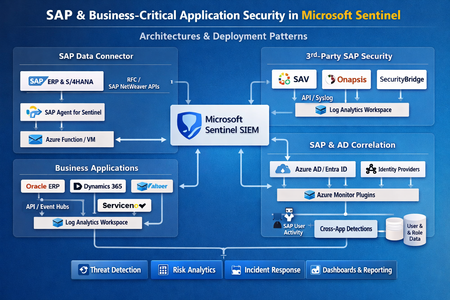
I validated what it takes to make SAP and SAP-adjacent security signals operational in a SOC: reliable ingestion, stable schemas, and detections that survive latency and schema drift. I focus on four integrations into Microsoft Sentinel: SAP Enterprise Threat Detection (ETD) cloud edition (SAPETDAlerts_CL, SAPETDInvestigations_CL), SAP S/4HANA Cloud Public Edition agentless audit ingestion (ABAPAuditLog), Onapsis Defend (Onapsis_Defend_CL), and SecurityBridge (also ABAPAuditLog). Because vendor API specifics for ETD Retrieval API / Audit Retrieval API aren’t publicly detailed in the accessible primary sources I could retrieve, I explicitly label pagination/rate/time-window behaviors as unspecified where appropriate. Connector architectures and deployment patterns For SAP-centric telemetry I separate two planes: First is SAP application telemetry that lands in SAP-native tables, especially ABAPAuditLog, ABAPChangeDocsLog, ABAPUserDetails, and ABAPAuthorizationDetails. These tables are the foundation for ABAP-layer monitoring and are documented with typed columns in Azure Monitor Logs reference. Second is external “security product” telemetry (ETD alerts, Onapsis findings). These land in custom tables (*_CL) and typically require a SOC-owned normalization layer to avoid brittle detections. Within Microsoft’s SAP solution itself, there are two deployment models: agentless and containerized connector agent. The agentless connector uses SAP Cloud Connector and SAP Integration Suite to pull logs, and Microsoft documents it as the recommended approach; the containerized agent is being deprecated and disabled on September 14, 2026. On the “implementation technology” axis, Sentinel integrations generally show up as: - Codeless Connector Framework (CCF) pollers/pushers (SaaS-managed ingestion definitions with DCR support). - Function/Logic App custom pipelines using the Logs Ingestion API when you need custom polling, enrichment, or a vendor endpoint that isn’t modeled in CCF. In my view, ETD and S/4HANA Cloud connectors are “agentless” from the Sentinel side (API credentials only), while Onapsis Defend and SecurityBridge connectors behave like push pipelines because Microsoft requires an Entra app + DCR permissions (typical Logs Ingestion API pattern). Authentication and secrets handling Microsoft documents the required credentials per connector: - ETD cloud connector requires Client Id + Client Secret for ETD Retrieval API (token mechanics unspecified). - S/4HANA Cloud Public Edition connector requires Client Id + Client Secret for Audit Retrieval API (token mechanics unspecified), and Microsoft notes “alternative authentication mechanisms” exist (details in linked repo are unspecified in accessible sources). - Onapsis Defend and SecurityBridge connectors require a Microsoft Entra ID app registration and Azure permission to assign Monitoring Metrics Publisher on DCRs. This maps directly to the Logs Ingestion API guidance, where a service principal is granted DCR access via that role (or the Microsoft.Insights/Telemetry/Write data action). For production, I treat these as “SOC platform secrets”: - Store client secrets/certificates in Key Vault when you own the pipeline (Function/Logic App); rotate on an operational schedule; alert on auth failures and sudden ingestion drops. - For vendor-managed ingestion (Onapsis/SecurityBridge), I still require: documented ownership of the Entra app, explicit RBAC scope for the DCR, and change control for credential rotation because a rotated secret is effectively a data outage. API behaviors and ingestion reliability For ETD Retrieval API and Audit Retrieval API, pagination/rate limits/time windows are unspecified in the accessible vendor documentation I could retrieve. I therefore design ingestion and detections assuming non-ideal API behavior: late-arriving events, cursor/page limitations, and throttling. CCF’s RestApiPoller model supports explicit retry policy, windowing, and multiple paging strategies, so if/when you can obtain vendor API semantics, you can encode them declaratively (rather than writing fragile code). For the SAP solution’s telemetry plane, Microsoft provides strong operational cues: agentless collection flows through Integration Suite, and troubleshooting typically happens in the Integration Suite message log; this is where I validate delivery failures before debugging Sentinel-side parsers. For scheduled detections, I always account for ingestion delay explicitly. Microsoft’s guidance is to widen event lookback by expected delay and then constrain on ingestion_time() to prevent duplicates from overlap. Schema, DCR transformations, and normalization layer Connector attribute comparison Connector Auth method Sentinel tables Default polling Backfill Pagination Rate limits SAP ETD (cloud) Client ID + Secret (ETD Retrieval API) SAPETDAlerts_CL, SAPETDInvestigations_CL unspecified unspecified unspecified unspecified SAP S/4HANA Cloud (agentless) Client ID + Secret (Audit Retrieval API); alt auth referenced ABAPAuditLog unspecified unspecified unspecified unspecified Onapsis Defend Entra app + DCR permission (Monitoring Metrics Publisher) Onapsis_Defend_CL n/a (push pattern) unspecified n/a unspecified SecurityBridge Entra app + DCR permission (Monitoring Metrics Publisher) ABAPAuditLog n/a (push pattern) unspecified n/a unspecified Ingestion-time DCR transformations Sentinel supports ingestion-time transformations through DCRs to filter, enrich, and mask data before it’s stored. Example: I remove low-signal audit noise and mask email identifiers in ABAPAuditLog: source | where isnotempty(TransactionCode) and isnotempty(User) | where TransactionCode !in ("SM21","ST22") // example noise; tune per tenant | extend Email = iif(Email has "@", strcat(substring(Email,0,2),"***@", tostring(split(Email,"@")[1])), Email) Normalization functions Microsoft explicitly recommends using SAP solution functions instead of raw tables because they can change the infrastructure beneath without breaking detections. I follow the same pattern for ETD/Onapsis custom tables: I publish SOC-owned functions as a schema contract. .create-or-alter function with (folder="SOC/SAP") Normalize_ABAPAudit() { ABAPAuditLog | project TimeGenerated, SystemId, ClientId, User, TransactionCode, TerminalIpV6, MessageId, MessageClass, MessageText, AlertSeverityText, UpdatedOn } .create-or-alter function with (folder="SOC/SAP") Normalize_ETDAlerts() { SAPETDAlerts_CL | extend AlertId = tostring(coalesce(column_ifexists("AlertId",""), column_ifexists("id",""))), Severity = tostring(coalesce(column_ifexists("Severity",""), column_ifexists("severity",""))), SapUser = tostring(coalesce(column_ifexists("SAP_User",""), column_ifexists("User",""), column_ifexists("user",""))) | project TimeGenerated, AlertId, Severity, SapUser, * } .create-or-alter function with (folder="SOC/SAP") Normalize_Onapsis() { Onapsis_Defend_CL | extend FindingId = tostring(coalesce(column_ifexists("FindingId",""), column_ifexists("id",""))), Severity = tostring(coalesce(column_ifexists("Severity",""), column_ifexists("severity",""))), SapUser = tostring(coalesce(column_ifexists("SAP_User",""), column_ifexists("user",""))) | project TimeGenerated, FindingId, Severity, SapUser, * } Health/lag monitoring and anti-gap I monitor both connector health and ingestion delay. SentinelHealth is the native health table, and Microsoft provides a health workbook and a schema reference for the fields. let lookback=24h; union isfuzzy=true (ABAPAuditLog | extend T="ABAPAuditLog"), (SAPETDAlerts_CL | extend T="SAPETDAlerts_CL"), (Onapsis_Defend_CL | extend T="Onapsis_Defend_CL") | where TimeGenerated > ago(lookback) | summarize LastEvent=max(TimeGenerated), P95DelaySec=percentile(datetime_diff("second", ingestion_time(), TimeGenerated), 95), Events=count() by T Anti-gap scheduled-rule frame (Microsoft pattern): let ingestion_delay=10m; let rule_lookback=5m; ABAPAuditLog | where TimeGenerated >= ago(ingestion_delay + rule_lookback) | where ingestion_time() > ago(rule_lookback) SOC detections for ABAP privilege abuse, fraud/insider behavior, and audit readiness Privileged ABAP transaction monitoring ABAPAuditLog includes TransactionCode, User, SystemId, and terminal/IP fields, so I start with a curated high-risk tcode set and then add baselines. let PrivTCodes=dynamic(["SU01","PFCG","SM59","RZ10","SM49","SE37","SE16","SE16N"]); Normalize_ABAPAudit() | where TransactionCode in (PrivTCodes) | summarize Actions=count(), Ips=make_set(TerminalIpV6,5) by SystemId, User, TransactionCode, bin(TimeGenerated, 1h) | where Actions >= 3 Fraud/insider scenario: sensitive object change near privileged audit activity ABAPChangeDocsLog exposes ObjectClass, ObjectId, and change types; I correlate sensitive object changes to privileged transactions in a tight window. let w=10m; let Sensitive=dynamic(["BELEG","BPAR","PFCG","IDENTITY"]); ABAPChangeDocsLog | where ObjectClass in (Sensitive) | project ChangeTime=TimeGenerated, SystemId, User=tostring(column_ifexists("User","")), ObjectClass, ObjectId, TypeOfChange=tostring(column_ifexists("ItemTypeOfChange","")) | join kind=innerunique ( Normalize_ABAPAudit() | project AuditTime=TimeGenerated, SystemId, User, TransactionCode ) on SystemId, User | where AuditTime between (ChangeTime-w .. ChangeTime+w) | project ChangeTime, AuditTime, SystemId, User, ObjectClass, ObjectId, TransactionCode, TypeOfChange Audit-ready pipeline: monitoring continuity and configuration touchpoints I treat audit logging itself as a monitored control. A simple SOC-safe control is “volume drop” by system; it’s vendor-agnostic and catches pipeline breaks and deliberate suppression. Normalize_ABAPAudit() | summarize PerHour=count() by SystemId, bin(TimeGenerated, 1h) | summarize Avg=avg(PerHour), Latest=arg_max(TimeGenerated, PerHour) by SystemId | where Latest_PerHour < (Avg * 0.2) Where Onapsis/ETD are present, I increase fidelity by requiring “privileged ABAP activity” plus an external SAP-security product finding (field mappings are tenant-specific; normalize first): let win=1h; Normalize_ABAPAudit() | where TransactionCode in ("SU01","PFCG","SM59","SE16N") | join kind=leftouter (Normalize_Onapsis()) on $left.User == $right.SapUser | where isempty(FindingId) == false and TimeGenerated1 between (TimeGenerated .. TimeGenerated+win) | project TimeGenerated, SystemId, User, TransactionCode, FindingId, OnapsisSeverity=Severity Production validation, troubleshooting, and runbook For acceptance, I validate in this order: table creation, freshness/lag percentiles, connector health state, and cross-check of event counts against the upstream system for the same UTC window (where available). Connector health monitoring is built around SentinelHealth plus the Data collection health workbook. For SAP agentless ingestion, Microsoft states most troubleshooting happens in Integration Suite message logs—this is where I triage authentication/networking failures before tuning KQL. For Onapsis/SecurityBridge-style ingestion, I validate Entra app auth, DCR permission assignment (Monitoring Metrics Publisher), and a minimal ingestion test payload using the Logs Ingestion API tutorial flow. Operational runbook items I treat as non-optional: health alerts on connector failure and freshness drift; scheduled rule anti-gap logic; playbooks that capture evidence bundles (ABAPAuditLog slice + user context from ABAPUserDetails/ABAPAuthorizationDetails); DCR filters to reduce noise and cost; and change control for normalization functions and watchlists. SOC “definition of done” checklist (short): 1) Tables present and steadily ingesting; 2) P95 ingestion delay measured and rules use the anti-gap pattern; 3) SentinelHealth enabled with alerts; 4) SOC-owned normalization functions deployed; 5) at least one privileged-tcode rule + one change-correlation rule + one audit-continuity rule in production. Mermaid ingestion flow:85Views5likes0Comments