requests
178 TopicsHow to Get Database‑Wise Session Details in an Azure SQL Elastic Pool Using T‑SQL
When you run multiple databases inside an Azure SQL Database elastic pool, it’s common to hit questions like: Which database is using the most sessions right now? Are we getting close to the pool’s session limit? Which application(s) are opening connections? Is connection pooling configured correctly? The Azure portal can be helpful, but you don’t always have portal access—and even when you do, you may want a quick, scriptable approach you can run from SSMS / Azure Data Studio / sqlcmd. This post provides copy‑paste T‑SQL queries to: check pool‑level session pressure, list active sessions “by database”, summarize active session counts per database, and capture a connection inventory—and then ties it all back to one of the most common root causes of high session counts: connection pooling behavior in the application. What you should know up front (setting expectations) 1) Elastic pool DMVs give you pool context from inside any pooled database The DMV sys.dm_elastic_pool_resource_stats returns usage for the elastic pool that contains the current database, including concurrent session utilization, and it can be queried from any user database in the same elastic pool. 2) Connection/session DMVs can show pool‑wide connections (with sufficient permissions) Microsoft documentation notes you can use sys.dm_exec_connections to retrieve connection details—and if a database is in an elastic pool and you have sufficient permissions, the view returns the set of connections for all databases in the elastic pool. It also calls out sys.dm_exec_sessions as a companion DMV for session details. If you run the queries below and only see your own session, it typically indicates a permissions scope limitation (the documentation notes this behavior for DMV visibility). Quick “Which query should I run?” guide Are we close to pool session limits? → Query A Which database is busy right now (active work)? → Query B Give me a ranked list of active sessions per database → Query C Which apps/hosts/users are connecting? → Query D Query A — Check elastic pool session pressure (near real‑time) Run this in any user database in the elastic pool: SELECT TOP (60) end_time, avg_cpu_percent, avg_data_io_percent, avg_log_write_percent, max_worker_percent, max_session_percent, used_storage_percent FROM sys.dm_elastic_pool_resource_stats ORDER BY end_time DESC; How to interpret it max_session_percent tells you how close your pool is to its session limit (peak session utilization in the interval). This DMV is intended for real‑time monitoring and troubleshooting and retains data for ~40 minutes. Query B — Active sessions by database (best for “what’s happening right now?”) This query focuses on sessions that are currently executing requests, and attributes them to a database by using the request’s SQL context (DB_NAME(st.dbid)). The st.dbid approach is widely used in troubleshooting patterns to show the execution context database. SELECT DB_NAME(st.dbid) AS database_name, s.session_id, s.login_name, s.host_name, s.program_name, s.client_interface_name, c.net_transport, c.encrypt_option, c.auth_scheme, c.connect_time, s.login_time, r.status AS request_status, r.command, r.start_time, r.cpu_time, r.total_elapsed_time FROM sys.dm_exec_requests AS r JOIN sys.dm_exec_sessions AS s ON r.session_id = s.session_id JOIN sys.dm_exec_connections AS c ON c.session_id = s.session_id CROSS APPLY sys.dm_exec_sql_text(r.sql_handle) AS st WHERE s.is_user_process = 1 AND r.session_id <> @@SPID ORDER BY database_name, r.cpu_time DESC; What customers typically use this for Identify which database has the most active work right now See which client program and host are responsible Spot heavy or long‑running requests using cpu_time and total_elapsed_time Query C — Count active sessions per database (simple ranked view) If you want a quick summary like “DB1 has 18 active sessions; DB2 has 5…” WITH active_pool_sessions AS ( SELECT DB_NAME(st.dbid) AS database_name, r.session_id FROM sys.dm_exec_requests AS r JOIN sys.dm_exec_sessions AS s ON r.session_id = s.session_id CROSS APPLY sys.dm_exec_sql_text(r.sql_handle) AS st WHERE s.is_user_process = 1 ) SELECT database_name, COUNT(*) AS active_sessions FROM active_pool_sessions GROUP BY database_name ORDER BY active_sessions DESC; This is a great “top list” during incidents and uses the same execution context mapping pattern (st.dbid). Query D — Connection inventory (who is connected?) Use this when you suspect connection storms, too many open sessions, or connection pooling issues. SELECT c.session_id, c.net_transport, c.encrypt_option, c.auth_scheme, s.host_name, s.program_name, s.client_interface_name, s.login_name, s.original_login_name, c.connect_time, s.login_time FROM sys.dm_exec_connections AS c JOIN sys.dm_exec_sessions AS s ON c.session_id = s.session_id WHERE s.is_user_process = 1 ORDER BY c.connect_time DESC; Microsoft documentation provides this exact join pattern (connections + sessions) as the baseline way to retrieve connection metadata and notes elastic pool behavior when permissions allow. Connection pooling: the #1 reason session counts spike (and how to fix it) Now that you can see sessions and connections, here’s the most common “why”: connection pooling configuration and behavior in the application. What connection pooling is? Creating a new database connection includes several time‑consuming steps: establishing a physical channel, handshake, parsing the connection string, authenticating, and other checks. To reduce that overhead, ADO.NET uses connection pooling: when your application calls Open(), the pooler tries to reuse an existing physical connection; when your application calls Close()/Dispose, the connection is returned to the pool instead of being physically closed—ready for reuse on the next Open(). Important (and often misunderstood): pooling is client‑side, but it has a very real effect on how many concurrent sessions you consume in an elastic pool. Common pooling pitfalls that cause “too many sessions” 1) Connections are not being returned to the pool (connection leaks) Pooling relies on the application calling Close()/Dispose so the pooler can return the connection to the pool for reuse. If connections aren’t closed properly, the pool can’t reuse them, and your app may keep creating new ones. What it looks like in SQL: Query D shows a growing number of sessions from the same program/host over time. Practical fix: Ensure every DB usage pattern disposes the connection (e.g., using blocks in .NET). (General best practice; the pooling mechanism’s reliance on Close/return is documented.) 2) Pool fragmentation (you accidentally create multiple pools) ADO.NET keeps separate pools for different configurations. Connections are separated into pools by connection string and (when integrated security is used) by Windows identity. Pools can also vary based on transaction enlistment and credential instances. What this means: Small differences in connection strings across services/environments can create multiple pools—each with its own connections—so total sessions can be much higher than expected. What it looks like in SQL: Query D shows many sessions from the same overall application family but with slightly different connection contexts (different apps/services). Practical fix: Keep connection strings consistent across instances where possible (same keywords, same security settings, same app identity strategy). (The “separate pools by configuration” concept is documented.) 3) “Max pool size reached” (client-side pool exhaustion) mistaken for Azure SQL limits A Microsoft Tech Community troubleshooting post shows that if you set a small Max Pool Size, you can hit client-side errors such as: “Timeout expired… prior to obtaining a connection from the pool… all pooled connections were in use and max pool size was reached.” That is not the same as hitting an Azure SQL tier limit—it’s the application waiting because it can’t obtain a connection from its own pool. How to differentiate quickly If you see “max pool size reached” / “timeout obtaining connection from the pool” → client pooling pressure. If max_session_percent in Query A is consistently high → pool-level session pressure. 4) Holding connections open longer than necessary Even with pooling enabled, if your application opens a connection and then holds it while doing non-database work, those connections remain “in use” and can’t return to the pool—causing waits and more concurrent sessions under load. (This follows directly from the documented “Open returns a pooled connection; Close returns it to the pool” behavior.) What it looks like in SQL: Query D shows many sessions from the same application. Query B/C shows many active sessions tied to one database during spikes. Practical fix: Open connections as late as possible; close as early as possible around each DB unit of work. (General best practice derived from pooling mechanics.) A simple customer checklist (quick wins) Confirm every DB call closes/disposes the connection so it can return to the pool. Avoid varying connection strings unnecessarily (prevents pool fragmentation). If you see pool wait errors (“max pool size reached”), treat it as an application pooling signal first. Use the T‑SQL queries above to validate: pool pressure (Query A) busiest databases / active sessions (Query B/C) connection sources (Query D) Wrap‑up With the queries in this post, you can troubleshoot elastic pool session behavior without relying on the Azure portal: Query A: real-time pool session/worker pressure Query B/C: database-wise view of active workload (most actionable during incidents) Query D: connection inventory (great for pooling issues and connection storms) And when session counts spike, don’t overlook the application side: connection pooling behavior (leaks, fragmentation, pool sizing, and holding connections open) is one of the most common drivers.
Use VBA to Autofill a Row until the end of the number of data in another row
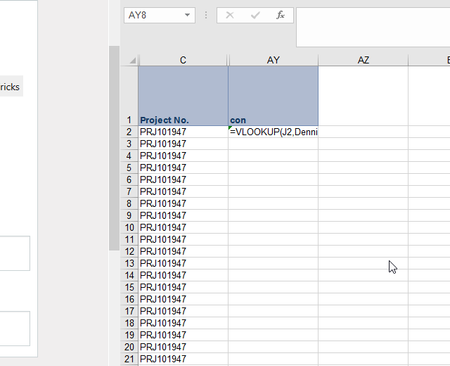
Hello, I need some help with the following problem: The Macro should select the first cell with the vlookup (AY2) and autofill the complete range in the column AY until the last row that contain data in the cell next to it (Column E). Column E is the cell that the vlookup refers to. The situation looks like this: The code that I have so far looks like this: Sheets(3).Select Range("AY2").Select ActiveCell.FormulaR1C1 = "=VLOOKUP(RC[-41],DennisAR!C[-50],1,0)" Selection.AutoFill Destination:=Range("AY2:AY1662") Range("AY2:AY1662").Select The problem with this is, that the number of rows with data always change every week. So I cannot use a static row number of 1662. I am looking for a way to make Destination:=Range("AY:AY1662) dynamic. In fact it has to refer to the number of rows with data in column E. Thank you very much in advance, KaiSolved671KViews1like83Comments
Microsoft will release a UI modification apps built specifically for Windows 10 2004 and later
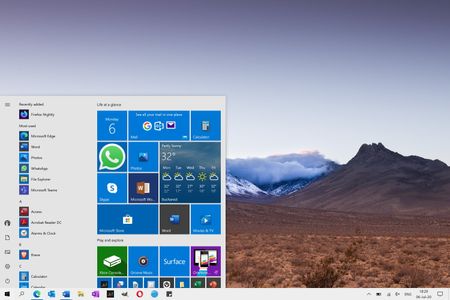
For Windows 11 users, don't like the Windows 11 style Start menu, taskbar, search menu, window switcher, task view, file manager, notification center and operation center, and they don't like the transparent tile in the Windows 10 Start menu. Microsoft decided to launch a personalized UI modification apps for Windows 11 and Windows 10. You can reproduce the Windows 10 style Start menu (Includes options to show more tiles, enable theme-aware tiles, show recently added apps, show most used apps, show suggestions occasionally in start, use start full screen, show recently opened items in jump lists on start or the taskbar and more), taskbar, search menu, context menu, snap assistant, window switcher, task view (timeline), file manager, news and interests, flyout (Includes options to Network, Sound, Clock, Battery, Language switcher and more), notification center and action center. And you can also reproduce the Windows 8.1 style Start screen (Horizontal Scroll Only), Windows 7 style Task View, classic style, right-angled window and so on.634Views0likes0Comments
Extracting non-empty cells from a table based on a value
Hi, There is an Excel table that we use to monitor reading compliance - columns are people names, rows are document codes, and cells are the reading dates. Please find below a simplified version: John Doe Jane Doe John Smith Gandalf THIS-123-V10 02-11-17 05-10-14 IS-456-V10 01-09-17 01-09-17 A-789-V10 27-09-17 TEST-753-V10 02-11-17 05-10-14 I need a quick way to check who has read a specific code and, if possible, on which date. I want a formula where if I put a code, it will detect all cells with a value on the corresponding row and will pull the person's name from the top cell on the same column. I already have a formula where if I put a person's name and a list of documents, if confirms if they have read it or not, but this is different. I need all results, not just from a limited list. Thank you Edit: Forgot to mention - this goes on a separate sheet Edit 2: Office 2010 :)12KViews0likes8Comments
Conditional Formatting based on the date of another column
Hi, I'm trying to conditionally format cells in column A based on their related to cells of the same row in column J. Essentially if the date in column A is before the day in column J I want the cell to go green If the date in column A is after the date in column J I want the cell to go red Is this possible? I cannot find a way to do it.48KViews0likes10Comments
Help with replacing #DIV/0! error with text
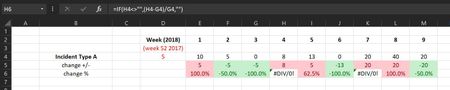
Good morning all I am currently working on a spreadsheet to show trends in relation to various incidents I deal with at work. I am looking to track changes in the number of incidents along with the percentage increase/decrease on a weekly basis but have come across a #DIV/0! error that I cannot solve (self taught newbie to excel). The formula currently used to work out the percentage change from the previous week is =IF(H4<>"",(H4-G4)/G4,"") and I am fully aware that the error is being caused because G4=0. I would like the cell to show some text such as "N/A" instead of the #DIV/0! error but am struggling to find the solution even with the help of Google! I have attached an example of the spreadsheet if that will help. Any assistance is appreciatedSolved17KViews0likes5CommentsAdd tab/page to group on other page
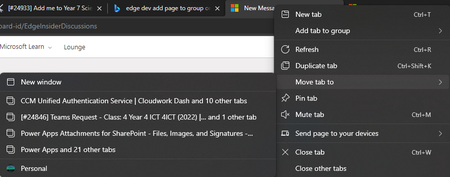
Classification: TABS PRIORITY IN MY OPINION: 5 on a scale from 1 (low) to 10 (high) At the moment, it is great that tabs can be moved to a new window, other windows in profile and other profiles. There is also an option to add tabs to groups. However, this only applies within the current window. It would be ideal to be able to move tabs to another group on a different window (but in the same profile).811Views0likes0CommentsEdge Mobile UI refresh / customisation
I would love to see an updated mobile UI - primarily taking another look at the bottom toolbar/menu as I think the current icons aren't necessarily the best use of space. Specifically, I think the back/forward buttons probably aren't that useful for the majority of users as the same actions can normally be performed via swipe gestures, or (in the case of Android) built in navigation in the OS. These buttons could probably be relocated to the secondary flyout menu. In their place, I think it would be much more useful to have a new tab button, and most importantly a search button - which essentially gives focus to the URL bar. A lot of users frequently request placing the URL bar at the bottom to make it easier to reach, but Brave implements a search button on the bottom bar (see screenshot), and I've found this has completely removed the need for a bottom URL bar. I'm sure countless others will disagree with how I'd personally like my icons set up, which is why, like most things - I think the abilty for users to customise the UI to suit them would be best. We already have this option for the secondary menu, it would be great if the primary UI menu could be customised in the same way.1.3KViews0likes0Comments