provisioning
46 Topics
Introducing the Entra Helpdesk Portal: A Zero-Trust, Dockerized ITSM Interface for Tier 1 Support
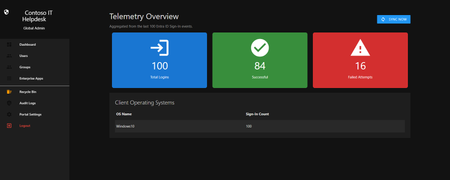
Hello everyone, If you manage identity in Microsoft Entra ID at an enterprise scale, you know the struggle: delegating day-to-day operational tasks (like password resets, session revocations, and MFA management) to Tier 1 and Tier 2 support staff is inherently risky. The native Azure/Entra portal is incredibly powerful, but it’s complex and lacks mandatory ITSM enforcement. Giving a helpdesk technician the "Helpdesk Administrator" role grants them access to a portal where a single misclick can cause a major headache. To solve this, I’ve developed the Entra Helpdesk Portal (Community Edition)—an open-source, containerized application designed to act as an isolated "airlock" between your support team and your Entra ID tenant. Why This Adds Value to Your Tenant Instead of having technicians log into the Azure portal, they log into this clean, Material Design web interface. It leverages a backend Service Principal (using MSAL and the Graph API) to execute commands on their behalf. Strict Zero Trust: Logging in via Microsoft SSO isn’t enough. The app intercepts the token and checks the user’s UPN against a hardcoded ALLOWED_ADMINS whitelist in your Docker environment file. Mandatory ITSM Ticketing: You cannot enforce ticketing in the native Azure Portal. In this app, every write action prompts a modal requiring a valid ticket number (e.g., INC-123456). Local Audit Logging: All actions, along with the actor, timestamp, and ticket number, are written to an immutable local SQLite database (audit.db) inside the container volume. Performance: Heavy Graph API reads are cached in-memory with a Time-To-Live (TTL) and smart invalidation. Searching for users or loading Enterprise Apps takes milliseconds. What Can It Do? Identity Lifecycle: Create users, auto-generate secure 16-character passwords, revoke sign-in sessions, reset passwords, and delete specific MFA methods to force re-registration. Diagnostics: View a user's last 5 sign-in logs, translating Microsoft error codes into plain English. Group Management: Add/remove members to Security and M365 groups. App/SPN Management: Lazy-load raw requiredResourceAccess Graph API payloads to audit app permissions, and instantly rotate client secrets. Universal Restore: Paste the Object ID of any soft-deleted item into the Recycle Bin tab to instantly resurrect it. How Easy Is It to Setup? I wanted this to be universally deployable, so I compiled it as a multi-architecture Docker image (linux/amd64 and linux/arm64). It will run on a massive Windows Server or a simple Raspberry Pi. Setup takes less than 5 minutes: Create an App Registration in Entra ID and grant it the necessary Graph API Application Permissions (e.g., User.ReadWrite.All, AuditLog.Read.All). Create a docker-compose.yml file. Define your feature toggles. You can literally turn off features (like User Deletion) by setting an environment variable to false. version: '3.8' services: helpdesk-portal: image: jahmed22/entra-helpdesk:latest container_name: entra_helpdesk restart: unless-stopped ports: - "8000:8000" environment: # CORE IDENTITY - TENANT_ID=your_tenant_id_here - CLIENT_ID=your_client_id_here - CLIENT_SECRET=your_client_secret_here - BASE_URL=https://entradesk.jahmed.cloud - ALLOWED_ADMINS=email address removed for privacy reasons # CUSTOMIZATION & FEATURE FLAGS - APP_NAME=Entra Help Desk - ENABLE_PASSWORD_RESET=true - ENABLE_MFA_MANAGEMENT=true - ENABLE_USER_DELETION=false - ENABLE_GROUP_MANAGEMENT=true - ENABLE_APP_MANAGEMENT=true volumes: - entra_helpdesk_data:/app/static/uploads - entra_helpdesk_db:/app volumes: entra_helpdesk_data: entra_helpdesk_db: 4.Run docker compose up -d and you are done! I built this to give back to the community and help secure our Tier 1 operations. If you are interested in testing it out in your dev tenants or want to see the full architecture breakdown, you can read the complete documentation on my website here I’d love to hear your thoughts, feedback, or any feature requests you might have!4Views0likes0Comments
Surface Provisioning package
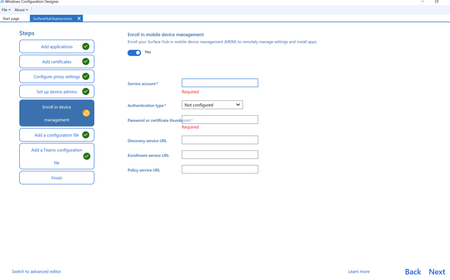
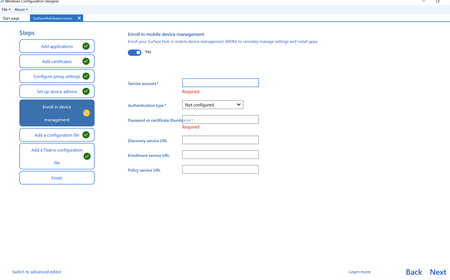
I need some assistance with MDM enrolment for provisioning packages. I can't find what credentials I should be using for building devices and thus after assistance please. When this option for Enrol in mdm is off, some devices have gone into Intune and some haven't. I can't think or see why this is happening. They go into Entra but not Intune. I thought this was a build issue with the devices but i've tried various i.e. upgrading from a Windows 10 teams room to Teams Rooms for Windows 11, and a build media of the New Teams rooms for Windows 11 but still the same issue. I understand i need to complete this Enrol in MDM, so I need some assistance as to what credentials i should be using please. Apologies, if this is a duplicate, for some reason i was certain i had published this yesterday but i can't see this post.83Views0likes0CommentsProvisioning does not add to MDM - Surface hub
When using the Windows Configuration Designer to create a provisioning package I'm unsure what to add for the MDM devices. Some devices seem to enter the MDM and some don't. Unsure if it's the build on these devices. I've looked for documentation and can't find any for what credentials to use for the following on the Enrol in device management I need to know what to enter for the following fields please. So that I can insure these devices populate into Intune. I don't know why MS make it so hard for this as the setup of the older 2s devices was much easier. Thanks Michael63Views0likes0CommentsJoin Merill Fernando and other guests for our Identity and Network Practitioner Webinar Series!
This October, we’re hosting a three-part webinar series led by expert Merill Fernando for Identity and Network Access practitioners. Join us as we journey from high-level strategy to hands-on implementation, unifying identity and network access every step of the way. Each session builds on the last, helping you move from understanding why a unified approach matters to what are the foundations to get started, and finally to how to configure in practice. The goal is to equip you with actionable skills, expert insights, and resources to secure your organization in a unified, Zero Trust way. Register below: Identity and Network Security Practitioner Webinar Series | Microsoft Community Hub70Views1like0Comments
API-driven provisioning field mapping changes resynchronize all users and groups
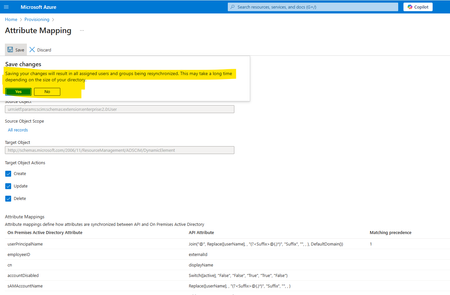
We have configured API-driven provisioning for on-premises Active Directory, along with Azure AD Connect, to synchronize on-premises AD users with Azure Entra ID. As part of the provisioning setup, we have used a separate Organizational Unit (OU) in on-premises AD (designated as the default OU for new users) while configuring API-driven provisioning. We are attempting to make some changes to the API field mapping, specifically the ‘UserPrincipalName’ regular expression (custom domain) and the ‘manager’ field, and saving the configuration. Upon attempting to save, a prompt appears (as highlighted below screenshot), indicating that this action will resynchronize all users and groups. Could you please clarify: Will this resynchronization update any existing users outside the default provisioning Organizational Unit (OU)? Specifically, what does the resynchronization operation update? For instance, will it modify the 'UserPrincipalName' and 'manager' attributes for all users including old users outside of provisioning Organizational Unit (OU)? Screen Shot - While Saving Mapping.Solved298Views0likes2Comments
Cloud-First Attribute Ownership for Synced Users in Entra ID Is Not Supported
📝 Description As an enterprise architect working to modernize identity provisioning, I’ve encountered a major limitation in Microsoft Entra ID’s hybrid identity model. While Microsoft promotes a cloud-first strategy, the current architecture forces reliance on on-premises Active Directory for attribute ownership when users are synced via Entra Connect. Key issues: Directory extension attributes, even when created in the cloud, are read-only for synced users. Custom security attributes are not queryable and cannot be used in dynamic groups or claims. There is no supported mechanism to allow cloud apps (e.g., Workday provisioning) to own or update specific attributes for synced users. Breaking sync to convert users to cloud-only is disruptive and not scalable for large enterprises. This creates a conflict between cloud-first provisioning goals and technical limitations, making it difficult to fully transition away from on-prem AD. ✅ Requested Improvements Attribute-Level Ownership Delegation Allow cloud apps to own and update specific attributes for synced users, even if the user is still managed by AD. Writable Directory Extensions for Synced Users Enable Graph API write access to cloud-created directory extensions for hybrid users. Dynamic Query Support for Custom Security Attributes Make custom security attributes usable in dynamic groups, claims, and app filtering. Clear Guidance and Tooling for Cloud-First Identity Models Provide supported patterns and tools for transitioning identity provisioning and attribute management to the cloud. 🙏 Why This Matters Organizations are actively trying to reduce reliance on legacy infrastructure and embrace cloud-first identity. The current limitations in Entra ID make this transition unnecessarily complex and inconsistent with Microsoft’s cloud-first messaging. ---copiloted response for sure after many days of trying to work a solution that does not create more tech debt...194Views0likes1Comment
Cross-tenant synchronization and resource access
Hello My company is investigating options pertaining to the separation of a splitting a set of users into a separate Entra ID tenant. This is being driven from a political and governance perspective whereby a portion of the organisation is looking to split away from the conglomerate for their cloud identifies only (not the on-premises AD). They effectively want their users and Entra ID identities to be moved to a new Entra ID tenant however still want to maintain access to the source tenant resources and applications for a period of time (potentially ongoing). For the purpose of my questions, assume that: existing on-premises domain is orga.internal existing EntraID tenant is OrgA.onmicrosoft.com new EntraID tenant is OrgB.onmicrosoft.com Ultimately the goal is to migrate user identities, their M365 license and mailbox to OrgB.onmicrosoft.com whilst still enabling them to access the cloud resources attached to OrgA.onmicrosoft.com. Looking at the capabilities of the cross-tenant synchronisation service to sync users from OrgA.onmicrosoft.com to OrgB.onmicrosoft.com, I'm not sure if this will meet my requirements as it will effectively sync the users from OrgA.onmicrosoft.com to OrgB.onmicrosoft.com as B2B guests. Is that correct? If my understanding is correct what we really need to do is: Migrate EntraId identities and mailboxes to OrgB.onmicrosoft.com, removing the OrgA.onmicrosoft.com account in the process Use cross-tenant synchronisation to sync the new OrgB.onmicrosoft.com identities back to OrgA.onmicrosoft.com as B2B guests whereby access to resources is provided to the guest account. If this is correct then is it technically supported to have multiple instances of Entra ID Cloud Sync synchronsing a subset of the orga.internal users to Entra ID OrgB.onmicrosoft.com whilst another instance of the Cloud Sync continues to sync orga.internal users to the existing OrgA.onmicrosoft.com EntraID tenant? I can't seem to find any reference to this architecture in the MS doco. I can see this scenario references in the legacy Cloud Connect doco but not the newer Cloud Sync agent doco. Any advise is appreciated.426Views0likes1Comment
Generating proxyaddresses during user provisioning
Hi All, we have requirement to generate alias email addresses during user provisioning. we tried to use selectunique function in the proxyaddresses generation and mapping to ad proxyaddresses but we are not able to achieve it. can you please help thanks, shashidhar joliholi375Views1like3CommentsAzure AD SCIM Validator is in General Availability (GA) Status
You can now validate the compatibility of your SCIM provisioning endpoint and Azure AD code base using our Azure AD SCIM Validator. This tool can be used by ISVs who want to build SCIM compatible servers either for gallery app or generic app and developers building their line of business SCIM apps. https://learn.microsoft.com/azure/active-directory/app-provisioning/scim-validator-tutorial18KViews2likes57CommentsMigration to Cloud Sync (passwords)
We want to migrate from AAD Connect Sync to Cloud Sync. When provisioning new users we could use temporarily passwords in AAD Connect Sync, through this feature: Set-ADSyncAADCompanyFeature -ForcePasswordChangeOnLogOn $true Is this feature still available in Cloud Sync? If not what is the workaround?458Views1like5Comments