power bi
1239 Topics🚀 FabCon + SQLCon Partner Social Sprint
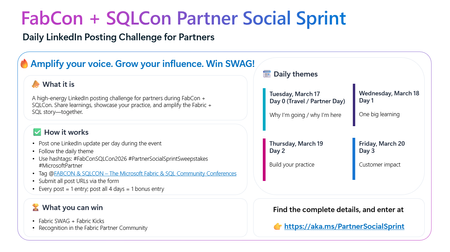
A 4‑Day LinkedIn Challenge for Partners Attending FabCon + SQLCon in Atlanta If you’re joining us in Atlanta this March for FabCon + SQLCon 2026, we’ve got a new way for you to amplify your impact: the Partner Social Sprint — a daily LinkedIn challenge designed to spotlight partner voices, share real‑world insights, and have some fun along the way. Whether you’re presenting, staffing a booth, or attending sessions, this is your chance to tell your story and connect with the global Microsoft Fabric & SQL community. 🔥 What Is the Partner Social Sprint? A 4‑day LinkedIn posting challenge running during FabCon + SQLCon 2026 in Atlanta. Each day has a theme, and every post earns you entries to win exclusive Fabric SWAG, including the fan‑favorite Fabric Kicks. 🗓 Daily Themes (Conference Week) Tuesday, March 17 – Day 0 (Travel / Partner Day) Why I’m going / why I’m here Wednesday, March 18 – Day 1 One big learning Thursday, March 19 – Day 2 Build your practice Friday, March 20 – Day 3 Customer impact ✅ How It Works If you’re a partner attending FabCon + SQLCon in Atlanta: Post once per day on LinkedIn during the event, following the daily theme. Use the hashtags: #FabConSQLCon26 #PartnerSocialSprintSweepstakes #MicrosoftPartner Tag the FabCon & SQLCon – The Microsoft Fabric & SQL Community Conferences LinkedIn page. Submit all your LinkedIn post URLs via the entry form. 👉 Each post = 1 entry, and if you post all 4 days, you’ll get 1 bonus entry. 🏆 What You Can Win Fabric SWAG Fabric Kicks Recognition in the Fabric Partner Community and across our channels 🌐 Who Should Join? Microsoft partners attending FabCon + SQLCon in Atlanta Partner sellers, architects, engineers, and community champions who want to: Share key learnings in real time Highlight their Fabric & SQL practices Showcase customer success and impact 👉 Ready to Sprint With Us? Get all the details and submit your posts here: https://aka.ms/PartnerSocialSprint Let’s light up LinkedIn with the stories, insights, and innovation coming out of FabCon + SQLCon. We can’t wait to see your posts from Atlanta!107Views1like0Comments🚀 This Week on the Fabric Engineering Connection!
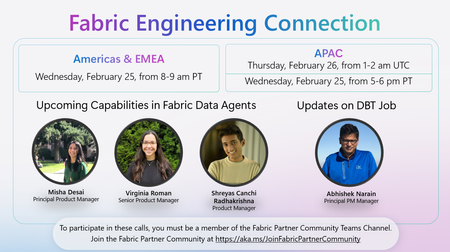
Excited to share what’s ahead for this week’s Fabric Engineering Connection sessions — your weekly opportunity to hear directly from the Microsoft Fabric engineering teams and stay ahead of what’s coming next in the platform. 🎙️ Featured Topics & Speakers: 🔧 Updates on DBT Job Abhishek Narain, Principal PM Manager 🤖 Upcoming Capabilities in Fabric Data Agents Misha Desai, Principal Product Manager Virginia Roman, Senior Product Manager Shreyas Canchi Radhakrishna, Product Manager 🌍 Americas & EMEA 📅 Wednesday, February 25 ⏰ 8:00–9:00 AM PT 🌏 APAC 📅 Thursday, February 26 ⏰ 1:00–2:00 AM UTC (Also available Wednesday, February 25, 5:00–6:00 PM PT) Whether you're deep in deployment, scaling customer workloads, or exploring new Fabric capabilities, these sessions are packed with insights to help you accelerate your practice. 👉 Not yet part of the Fabric Partner Community? Join here: https://lnkd.in/g_PRdfjt Let’s keep learning, building, and shaping the future of Fabric—together. 💡17Views1like0Comments
Organizational Account authentication problem
I have encountered a new authentication problem using an organizational account with Get Data > From Web. The data source is Dynamics 365 CE on-premises (https://ce.xxx.com/api.data/v9.1), authenticating through ADFS with MFA. This has been working without any issues until recently. When I attempt to refresh the query, I get an ADFS pop-up window for username and password, as expected. However, the window then closes without the expected MFA prompt. The "Access Web content" window does say "You are currently signed in," but does not query successfully, instead displaying the error "We couldn't authenticate with the credentials provided. Please try again." The most distinctive symptom, is that clicking the "Sign in as different user" button does not work. It just quickly opens and closes an empty window, instead of the expected ADFS username/password page. In Power BI Desktop everything works. The connection and query are successful, and the "Sign in as different user" button successfully displays both the initial ADFS username/password window and the subsequent MFA dialog. Excel version: Microsoft® Excel® for Microsoft 365 MSO (Version 2512 Build 16.0.19530.20226) 64-bit69Views0likes1Comment✨ FabCon + SQLCon 2026: Partner Know Before You Go Now Live!
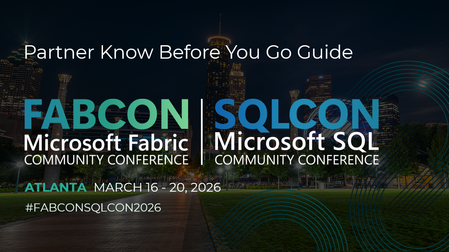
Heading to FabCon + SQLCon 2026 in Atlanta? We’ve put together your full Partner Know Before You Go Guide — everything you need to navigate the week, maximize value, and make the most of all partner‑exclusive opportunities. 🚀 Here’s what you’ll find inside: 📅 Partner Day (Mar 17) — A full day of partner‑only learning, strategy, and networking. - SOLD OUT! 🍻 Partner Happy Hour — Connect with other partners and the Microsoft team. 🎤 AMA with the Fabric Partner Success Team — Bring your biggest questions around Data & AI priorities, partner opportunities, funding, enablement, and certifications. 🤝 1:1 Meetings — Book time with Fabric LT or the Partner Success Team to accelerate your strategy and unlock customer wins. 🎤 Partner Elevator Pitch Search — Submit your 2‑min pitch to be featured live on stage! 🔥 Partner Social Media Sprint — Daily LinkedIn challenge + chances to win Fabric SWAG. 🎓 Certification Spotlight — Get recognized during Arun’s keynote for hitting 100+ Fabric certs. 🎥 Testimonial Videos — Share your Fabric customer stories with global visibility. 📱 Whova Event App — Build your schedule, access slides, network, and join the partner community inside the app. 📘The full KBYG guide is attached below.565Views4likes0CommentsJoin the Fabric Partner Community for this Week's Fabric Engineering Connection Calls
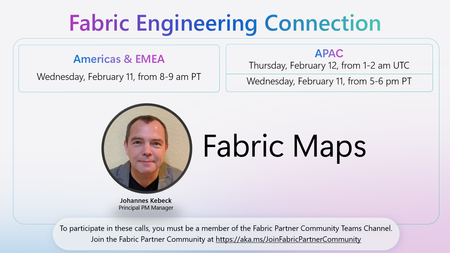
🚀 Excited to share this week’s Fabric Engineering Connection lineup for our Microsoft Fabric partner community! We’ll be joined by Johannes Kebeck, Principal PM Manager, to dive into Fabric Maps — and how partners can bring location intelligence and rich geospatial experiences into their Fabric solutions. 📍 Fabric Engineering Connection – This Week 🌎 Americas & EMEA 📅 Wednesday, February 11 ⏰ 8:00–9:00 am PT 🌏 APAC 📅 Thursday, February 12 ⏰ 1:00–2:00 am UTC (Wednesday, February 11, 5:00–6:00 pm PT) These weekly calls are a chance for partners to: ✅ Hear directly from Fabric engineering ✅ See what’s new and what’s coming ✅ Ask questions and share feedback To participate in these calls, you must be a member of the Fabric Partner Community Teams channel. 👉 Join here: https://aka.ms/JoinFabricPartnerCommunity48Views1like0Comments
Power Query - How Do I Count a Number of Entries Based on Another Column?
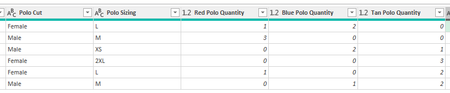
Hello! The title might be a little confusing. Here's the situation. I manage uniforms for my team. I am making a SharePoint list and form that an employee will use to request the uniforms. Then, to give me a digestible table that shows me exactly what I need, I have an Excel Power Query pulling the list in. On the form, instead of having a different entry for each polo in each color, each size, and each cut, I have it separated so that you pick cut, sizing, and color separately. Is there a way to have Power Query pull it to show me, for the screenshot example: Female L Red Polo: 2 Female L Blue Polo: 2 Male M Red Polo: 3 Male M Blue Polo: 1 Male M Tan Polo: 2 So on, and so forth. Is this possible? Thank you!266Views0likes3Comments🎤 Save the Date: AMA with the Microsoft Fabric Leadership Team!
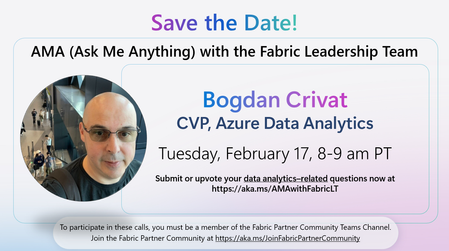
We’re excited to announce an upcoming Ask Me Anything (AMA) session with the Fabric Leadership Team—a unique opportunity for partners to engage directly with the leaders shaping the future of Microsoft Fabric! 🔹 Featured Leader Bogdan Crivat, Corporate Vice President, Azure Data Analytics 🗓️ Date & Time Tuesday, February 17 8:00–9:00 AM PT 💬 Ask Your Questions Have topics you want the leadership team to address? Submit or upvote your data analytics–related questions now: 👉 https://aka.ms/AMAwithFabricLT 👥 Who Can Join? This AMA is exclusive to members of the Fabric Partner Community. If you're not yet a member, join here to participate in future calls: 👉 https://aka.ms/JoinFabricPartnerCommunity85Views2likes0Comments
Help needed with IF and COUNTIFS Formulas
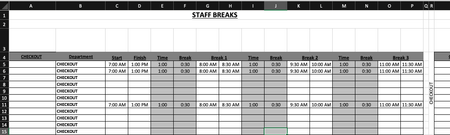
Is anyone able to advise the following formula: =COUNTIFS($B$5:$B$15,$R$4,$C5:$C15,"<=" & V3,$D5:$D15, ">" & V3)-COUNTIFS($B$5:$B$15,"="&$R$4,$G5:$G15,"<=" & V3,$H5:$H15, ">" & V3)-COUNTIFS($B$5:$B$15,"="&$R$4,$K5:$K15,"<=" & V3,$L5:$L15, ">" & V3)-COUNTIFS($B$5:$B$15,"="&$R$4,$O5:$O15,"<=" & V3,$P5:$P15, ">" & V3) Is there a way to simplify this? Is there a way to make this more accurate? Cells in column G & H, I & J, O & P are using the following format: =IF(C6="","",C6+E6) Cells in U4:CC4 are using the following format: =COUNTIFS($B$5:$B$15,$R$4,$C5:$C15,"<=" & U3,$D5:$D15, ">" & U3)-COUNTIFS($B$5:$B$15,"="&$R$4,$G5:$G15,"<=" & U3,$H5:$H15, ">" & U3)-COUNTIFS($B$5:$B$15,"="&$R$4,$K5:$K15,"<=" & U3,$L5:$L15, ">" & U3)-COUNTIFS($B$5:$B$15,"="&$R$4,$O5:$O15,"<=" & U3,$P5:$P15, ">" & U3) Cells in U5:CC15 are using the following format: =IF(U$4>=$T5,1,"") My issue is is when I put in the three break times, the mid break comes out at a shorter time. My other issue is is that when I put in the times in row 5,6and 11, the data is coming up as a combined data in rows 5, 6 and seven on the page two. Just for reference, "page two" is the same spreadsheet. What I need to happen is that I enter in the shift start time and finish time. This then populates through to Break 1, 2 and 3. The Time entry is the time the break starts. ie: 1 hour after start of shift, 1 hour after coming back from break, etc. The break entry is the duration of the break taken. ie: 30 minutes. Once all the info is put in, the relevant "Time Block" on "Page 2" shows a 1. What is happening at the moment is that when I enter all the time data, the time blocks are not populating correctly in accordance to the entry. Basically, If I have numerous people on shiftI need the time blocks to show where I have shortfalls in shift cover and not having too many people on break at the same time. IE: Link to Live Copy: https://www.dropbox.com/scl/fi/eur1j526htu1j8a4d4290/Staff-Breaks.xlsx?rlkey=r4tm9xts4tonofpa2th2cusfw&st=nueyk0d7&dl=0 Any ideas would be greatly appreciated.198Views0likes4CommentsJoin the Fabric Partner Community for this Week's Fabric Engineering Connection calls!
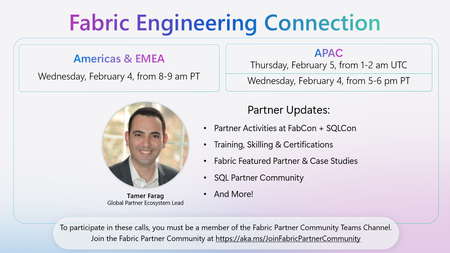
The Fabric partner ecosystem is buzzing right now — and 2026 is already raising the bar. 🚀 On this week's Fabric Engineering Connection call, Tamer Farag will share what’s next for partners across skilling, demos, FabCon + SQLCon Atlanta, and more. Highlights include: 🎓 More skilling momentum (DP‑600/DP‑700 vouchers, new Partner Project Ready workshops, and a new “Chat with your Data in a Day” xIAD workshop). 🔦 Fabric Certification Spotlight: partners who reach 100+ Fabric certifications will be recognized live in Arun’s keynote at FabCon + SQLCon. 🤝 New ways to tell your story and win with customers through Fabric Demo eXperiences, Fabric Featured Partners + case studies, and FabCon experiences (Partner Elevator Pitch Search, 1:1 + executive meetings, testimonial videos, the Partner Social Sprint, and more). If you’re a Microsoft partner investing in Fabric, we’d love for you to join our next Fabric Engineering Connection call: 📅 Americas/EMEA – Wednesday, Feb 4, 8–9 AM PT 📅 APAC – Thursday, Feb 5, 1–2 AM UTC (Wednesday, Feb 4, 5–6 PM PT) To join, you must be a member of the Fabric Partner Community in Teams: https://aka.ms/JoinFabricPartnerCommunity67Views2likes0Comments