postgres
128 TopicsPostgreSQL Buffer Cache Analysis
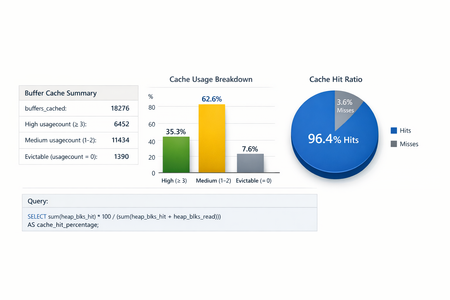
PostgreSQL performance is often dictated not just by query design or indexing strategy, but by how effectively the database leverages memory. At the heart of this memory usage lies shared_buffers—PostgreSQL’s primary buffer cache. Understanding how well this cache is utilized can make the difference between a system that scales smoothly and one that struggles under load. In this post, we’ll walk you through a practical, data-driven approach to analyzing PostgreSQL buffer cache behavior using native statistics and the pg_buffercache extension. The goal is to answer a few critical questions: Is the current shared_buffers configuration sufficient? Are high-value tables and indexes actually being served from memory? Is PostgreSQL spending too much time going to disk when it shouldn’t? By the end, you’ll have a repeatable methodology to assess cache efficiency and make informed tuning decisions. Why Buffer Cache Analysis Matters PostgreSQL relies heavily on its buffer cache to minimize disk I/O. Every time a query needs a data or index page, PostgreSQL first checks whether that page already exists in shared_buffers. If it does, the page is served directly from memory—fast and efficient. If not, PostgreSQL must fetch it from disk (or the OS page cache), which is significantly slower. While metrics like query latency and IOPS can tell you that performance is degraded, buffer cache analysis helps explain why. It allows you to: Validate whether frequently accessed objects stay hot in cache Identify cache pollution caused by large, low-value tables Determine whether increasing shared_buffers would provide real benefits or just waste memory Inspecting Shared Buffers with pg_buffercache The pg_buffercache extension provides a real-time view into PostgreSQL’s shared buffers. Unlike cumulative statistics, it shows what is in memory right now—which relations are cached, how many blocks they occupy, and how frequently those buffers are reused. Enabling the Extension pg_buffercache is not enabled by default and requires superuser privileges: CREATE EXTENSION pg_buffercache; Once enabled, you can directly query the contents of shared buffers across databases, tables, and indexes. Analyzing Cache Distribution Understanding where your shared buffers are being consumed is the first step toward meaningful tuning. Database-Level Cache Distribution This query shows how shared buffers are distributed across databases in the server: SELECT CASE WHEN c.reldatabase IS NULL THEN '' WHEN c.reldatabase = 0 THEN '' ELSE d.datname END AS database, count(*) AS cached_blocks FROM pg_buffercache AS c LEFT JOIN pg_database AS d ON c.reldatabase = d.oid WHERE datname NOT LIKE 'template%' GROUP BY d.datname, c.reldatabase ORDER BY d.datname, c.reldatabase; This is particularly useful in multi-database environments where one workload may be evicting cache pages needed by another. Table and Index-Level Cache Consumption To understand which relations, dominate the cache, the following query breaks buffer usage down by tables and indexes: SELECT c.relname, c.relkind, count(*) FROM pg_database AS a, pg_buffercache AS b, pg_class AS c WHERE c.relfilenode = b.relfilenode AND b.reldatabase = a.oid GROUP BY 1, 2 ORDER BY 3 DESC, 1; This helps answer an important question: Are your most business-critical tables and indexes actually resident in memory, or are they constantly being evicted? If large, rarely used tables consume a disproportionate share of buffers, it may indicate cache churn or the need for workload isolation. Understanding Buffer Usage Count (Hot vs Cold Data) Each buffer in shared memory carries a usage count, which reflects how frequently it has been accessed before eviction. Higher values indicate hotter data. SELECT c.relname, c.relkind, usagecount, count(*) AS buffers FROM pg_database AS a, pg_buffercache AS b, pg_class AS c WHERE c.relfilenode = b.relfilenode AND b.reldatabase = a.oid AND a.datname = current_database() GROUP BY 1, 2, 3 ORDER BY 3 DESC, 1; A healthy system typically shows a meaningful number of buffers with higher usage counts (for example, 4–5), indicating frequently reused data that benefits from caching. Buffer Cache Percentages: Putting Numbers in Context Raw buffer counts are useful, but percentages make interpretation easier. The following query shows: How much of shared_buffers each relation occupies What percentage of the relation itself is cached SELECT c.relname, pg_size_pretty(count(*) * 8192) AS buffered, round(100.0 * count(*) / (SELECT setting FROM pg_settings WHERE name='shared_buffers')::integer, 1) AS buffers_percent, round(100.0 * count(*) * 8192 / pg_relation_size(c.oid), 1) AS percent_of_relation FROM pg_class c JOIN pg_buffercache b ON b.relfilenode = c.relfilenode JOIN pg_database d ON b.reldatabase = d.oid AND d.datname = current_database() GROUP BY c.oid, c.relname ORDER BY 3 DESC LIMIT 10; This view is especially powerful when validating whether performance-critical objects are adequately cached relative to their size. Complementing Cache Views with I/O Statistics While pg_buffercache shows the current state of memory, I/O statistics reveal long-term trends. PostgreSQL exposes these via pg_statio_user_tables and pg_statio_user_indexes. Table Heap Hit Ratios SELECT relname, heap_blks_hit::numeric / (heap_blks_hit + heap_blks_read) AS hit_pct, heap_blks_hit, heap_blks_read FROM pg_catalog.pg_statio_user_tables WHERE (heap_blks_hit + heap_blks_read) > 0 ORDER BY hit_pct; Hit ratios close to 1 indicate that table data is largely served from memory rather than disk. Index Hit Ratios SELECT relname, idx_blks_hit::numeric / (idx_blks_hit + idx_blks_read) AS hit_pct, idx_blks_hit, idx_blks_read FROM pg_catalog.pg_statio_user_tables WHERE (idx_blks_hit + idx_blks_read) > 0 ORDER BY hit_pct; Poor index hit ratios often point to insufficient cache or inefficient query patterns that bypass indexes. Including TOAST and Index Reads For large objects, TOAST activity can significantly impact I/O. This query provides a more holistic view: SELECT *, (heap_blks_read + toast_blks_read + tidx_blks_read) AS total_blocks_read, (heap_blks_hit + toast_blks_hit + tidx_blks_hit) AS total_blocks_hit FROM pg_catalog.pg_statio_user_tables; This helps identify indexes that are frequently read from disk and may benefit from better caching or query rewrites. How to Interpret the Results When reviewing buffer cache and I/O metrics, keep the following guidelines in mind: Validate cache residency of critical objects: If business-critical tables and indexes occupy a meaningful share of shared_buffers, your cache sizing is likely reasonable. Correlate buffer data with hit ratios: High hit ratios in pg_statio_user_tables and pg_statio_user_indexes confirm effective caching. Persistently low ratios may justify increasing shared_buffers. Analyze usage count distribution: A healthy number of buffers with higher usage counts indicates hot data benefiting from cache reuse. Avoid over-tuning: If most buffers have low usage counts but hit ratios remain high, increasing shared_buffers further may not yield measurable gains. Conclusion Buffer cache analysis bridges the gap between theory and reality in PostgreSQL performance tuning. By combining real-time cache inspection with long-term I/O statistics, you gain a clear picture of how memory is actually used—and whether changes to shared_buffers will deliver tangible benefits. Rather than tuning memory blindly, this approach lets you optimize with confidence, grounded in data that reflects your real workload.Bidirectional Replication with pglogical on Azure Database for PostgreSQL - a VNET guide
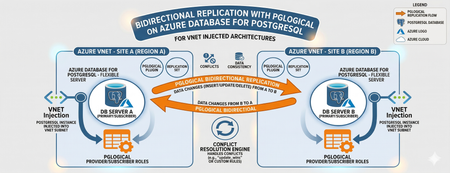
Editor’s Note: This article was written by Raunak Jhawar, a Chief Architect. Paula Berenguel and Guy Bowerman assisted with the final review, formatting and publication. Overview Bidirectional replication is one of the most requested topologies requiring writes in multiple locations, selective sync, geo-distributed active-active, or even accepting eventual consistency. This is a deep technical walkthrough for implementing bidirectional (active‑active) replication on private Azure Database for PostgreSQL Server using pglogical, with a strong emphasis on VNET‑injected architectures. It explains the underlying networking and execution model covering replication worker placement, DNS resolution paths, outbound connectivity, and conflict resolution mechanics to show why true private, server‑to‑server replication is only achievable with VNET injection and not with Private Endpoints. It also analyzes the operational and architectural trade‑offs needed to safely run geo distributed, multi write PostgreSQL workloads in production. This blog post focus on pglogical however, if you are looking for steps to implement it with logical replication or pros and cons of which approach, please refer to my definitive guid to bi-directional replication in Azure Database for PostgreSQL blog post Why this is important? This understanding prevents fundamental architectural mistakes (such as assuming Private Endpoints provide private outbound replication), reduces deployment failures caused by hidden networking constraints, and enables teams to design secure, compliant, low‑RPO active/active or migration architectures that behave predictably under real production conditions. It turns a commonly misunderstood problem into a repeatable, supportable design pattern rather than a trial‑and‑error exercise. Active-Active bidirectional replication between instances Architecture context This scenario targets a multi-region active-active write topology where both nodes are injected into the same Azure VNET (example - peered VNETs on Azure or even peered on-premises), both accept writes. Common use case: Geo distributed OLTP with regional write affinity. Step 1: Azure Infrastructure Prerequisites Both server instances must be deployed with VNET injection. This is a deploy time decision and you cannot migrate a publicly accessible instance (with or without private endpoint) to VNET injection post creation without rebuilding it. Each instance must live in a delegated subnet: Microsoft.DBforPostgreSQL/Servers. The subnet delegation is non-negotiable and prevents you from placing other resource types in the same subnet, so plan your address space accordingly. If nodes are in different VNETs, configure VNET peering before continuing along with private DNS integration. Ensure there are no overlapping address spaces amongst the peered networks. NSG rules must allow port 5432 between the two delegated subnets, both inbound and outbound. You may choose to narrow down the NSG rules to meet your organization requirements and policies to a specific source/target combination allow or deny list. Step 2: Server Parameter Configuration On both nodes, configure the following server parameters via the Azure Portal (Server Parameters blade) or Azure CLI. These cannot be set via ALTER SYSTEM SET commands. wal_level = logical -- This setting enables logical replication, which is required for pglogical to function. max_worker_processes = 16 -- This setting allows for more worker processes, which can help with replication performance. max_replication_slots = 10 -- This setting allows for more replication slots, which are needed for pglogical to manage replication connections. max_wal_senders = 10 -- This setting allows for more WAL sender processes, which are responsible for sending replication data to subscribers. track_commit_timestamp = on -- This setting allows pglogical to track commit timestamps, which can be useful for conflict resolution and monitoring replication lag. shared_preload_libraries = pglogical -- This setting loads the pglogical extension at server startup, which is necessary for it to function properly. azure.extensions = pglogical -- This setting allows the pglogical extension to be used in the Azure Postgres PaaS environment. Both nodes require a restart after shared_preload_libraries and wal_level changes. Note that max_worker_processes is shared across all background workers in the instance. Each pglogical subscription consumes workers. If you are running other extensions, account for their worker consumption here or you will hit startup failures for pglogical workers. Step 3: Extension and Node Initialization Create a dedicated replication user on both nodes. Do not use the admin account for replication. CREATE ROLE replication_user WITH LOGIN REPLICATION PASSWORD 'your_password'; GRANT USAGE ON SCHEMA public TO replication_user; GRANT SELECT ON ALL TABLES IN SCHEMA public TO replication_user; ALTER DEFAULT PRIVILEGES IN SCHEMA public GRANT SELECT ON TABLES TO replication_user; Log into Server A either via a VM in the specified VNET or Azure Bastion Host and run the following which creates the extension, a replication set and policies. CREATE EXTENSION IF NOT EXISTS pglogical; SELECT pglogical.create_node(node_name := 'node_a', dsn := 'host.fqdn-for-server-a port=5432 dbname=preferred-database user=replication_user password=<strong_password>'); -- Define the replication set for Server A, specifying which tables to replicate and the types of operations to include (inserts, updates, deletes). SELECT pglogical.create_replication_set(set_name := 'node_a_set', replicate_insert := true, replicate_update := true, replicate_delete := true, replicate_truncate := false); -- Add sales_aus_central table explicitly SELECT pglogical.replication_set_add_table(set_name := 'node_a_set', relation := 'public.sales_aus_central', synchronize_data := true); -- Add purchase_aus_central table explicitly SELECT pglogical.replication_set_add_table(set_name := 'node_a_set', relation := 'public.purchase_aus_central', synchronize_data := true); -- OR add all tables in the public schema SELECT pglogical.replication_set_add_all_tables('default', ARRAY['public']); -- This command adds all tables in the public schema to the default replication set. -- Now, repeat this on Server B using the same method above i.e. via a VM in the specified VNET or Azure Bastion Host CREATE EXTENSION IF NOT EXISTS pglogical; -- Define the replication set for Server B, specifying which tables to replicate and the types of operations to include (inserts, updates, deletes) SELECT pglogical.create_node(node_name := 'node_b', dsn := 'host-fqdn-for-server-b port=5432 dbname=preferred-database user=replication_user password=<strong_password>'); SELECT pglogical.create_replication_set( set_name := 'node_b_set', replicate_insert := true, replicate_update := true, replicate_delete := true, replicate_truncate := false); -- Add sales_aus_east table explicitly SELECT pglogical.replication_set_add_table( set_name := 'node_b_set', relation := 'public.sales_aus_east', synchronize_data := true); -- Add purchase_aus_east table explicitly SELECT pglogical.replication_set_add_table( set_name := 'node_b_set', relation := 'public.purchase_aus_east', synchronize_data := true); -- OR add all tables in the public schema SELECT pglogical.replication_set_add_all_tables('default', ARRAY['public']); -- This command adds all tables in the public schema to the default replication set. It is recommended that you confirm the DNS resolution on all server’s involved as part of the replication process. For a VNET injected scenarios – you must get back the private IP. As a sanity check, you can run the nslookup on the target server’s FQDN or even use the \conninfo command to see the connection details. One such example is here: Step 4: Configuring the subscribers SELECT pglogical.create_subscription ( -- Create a subscription on Server A to receive changes from Server B subscription_name := 'node_a_to_node_b', replication_sets := array['default'], synchronize_data := true, forward_origins := '{}', provider_dsn := 'host=fqdn-for-server-b port=5432 dbname=preferred-database user=replication_user password=<strong_password>'); -- Run this on Server B to subscribe to changes from Server A SELECT pglogical.create_subscription ( -- Create a subscription on Server B to receive changes from Server A subscription_name := 'node_b_to_node_a', replication_sets := array['default'], synchronize_data := true, forward_origins := '{}', provider_dsn := 'host=fqdn-for-server-a port=5432 dbname=preferred-database user=replication_user password=<strong_password>'); For most OLTP workloads, last_update_wins using the commit timestamp is the most practical choice. It requires track_commit_timestamp = on, which you must set as a server parameter. The FQDN must be used rather than using the direct private IP of the server itself. Bidirectional replication between server instances with private endpoints – does this work and will this make your server security posture weak? Where do pglogical workers run? With VNET injection, the server's network interface lives inside your delegated subnet which is a must do. The PostgreSQL process including all pglogical background workers starts connections from within your VNET (delegated subnet). The routing tables, NSGs, and peering apply to both inbound and outbound traffic from the server. With Private Endpoint, the architecture is fundamentally different: Private endpoint is a one-way private channel for your clients or applications to reach the server securely. It does not give the any of server’s internal processes access to your VNET for outbound connectivity. pglogical subscription workers trying to connect to another server are starting those connections from Microsoft's managed infrastructure and not from your VNET. What works? Scenario A: Client connectivity via private endpoint Here you have application servers or VMs in your VNET connecting to a server configured with a private endpoint, your app VM connects to 10.0.0.15 (the private endpoint NIC), traffic flows over Private Link to the server, and everything stays private. This is not server-to-server replication. Scenario B: Two servers, both with private endpoints Here both servers are in Microsoft's managed network. They can reach each other's public endpoints, but not each other's private endpoints (which are in customer VNETs). The only path for bidirectional replication worker connections is to enable public network access on both servers with firewall rules locked down to Azure service IP. Here you have private endpoints deployed alongside public access. Inside your VNET, SERVER A resolves to the private endpoint IP via the privatelink.postgres.database.azure.com private DNS zone. But the pglogical worker running in Microsoft's network does not have access to your private DNS zone and it resolves via public DNS, which returns the public IP. This means if you are using the public FQDN for replication, the resolution path is consistent from the server's perspective (always public DNS, always public IP using the allow access to Azure services flag as shown above). Your application clients in the VNET will still resolve to the private endpoint. If your requirement is genuinely private replication with no public endpoint exposure, VNET injection is the correct answer, and private endpoint cannot replicate that capability for pglogical. Conclusion The most compelling benefit in the VNET-injected topology is network isolation without sacrificing replication capability. You get the security posture of private connectivity i.e. no public endpoints, NSG controlled traffic, private DNS resolution all while keeping a live bidirectional data pipeline. This satisfies most enterprise compliance requirements around data transit encryption and network boundary control. The hub/spoke migration (specifically, on-premises or external cloud to Azure) scenarios are where this approach shines. The ability to run both systems in production simultaneously, with live bidirectional sync during the cutover window, reduces migration risk when compared to a hard cutover. From a DR perspective, bidirectional pglogical gives you an RPO measured in seconds (replication lag dependent) without the cost of synchronous replication. For workloads that can tolerate eventual consistency and have well-designed conflict avoidance this is a compelling alternative to synchronous streaming replication via read replicas, which are strictly unidirectional.119Views2likes0CommentsNasdaq builds thoughtfully designed AI for board governance with PostgreSQL on Azure
Authored by: Charles Federssen, Partner Director of Product Management for PostgreSQL at Microsoft and Mohsin Shafqat, Senior Manager, Software Engineering at Nasdaq When people think of Nasdaq, they usually think of markets, trading floors, and financial data moving at extraordinary speed. But behind the scenes, Nasdaq also plays an equally critical role in how boards of directors govern, deliberate, and make decisions. Nasdaq Boardvantage® is the company’s governance platform, used by more than 4,400 organizations worldwide—including nearly half of the Fortune 100. It’s where directors review board books, collaborate in an environment designed with robust security, and prepare for meetings that often involve some of the most sensitive information a company has. In recent years, Nasdaq set out to modernize Nasdaq Boardvantage with AI, without compromising security and reliability. That journey was featured in a Microsoft Ignite session, “Nasdaq Boardvantage: AI-Driven Governance on PostgreSQL and Foundry.” It offers a practical look at how Azure Database for PostgreSQL can support AI-driven applications where precision, isolation, and data control are non-negotiable. Introducing AI where trust is everything Board governance isn’t a typical productivity workload. Board packets can run 400 to 600 pages, meeting minutes are legal records, and any AI-generated insight must be confined to a customer’s own data. “Our customers trust us with some of their most strategic, sensitive data,” said Mohsin Shafqat, Senior Manager of Software Development at Nasdaq. That trust meant tackling several core challenges upfront, including: How do you minimize AI hallucinations in a governance context? How do you guarantee tenant isolation at scale? How do you keep data regional across a global customer base? A cloud foundation built for governance Before adding intelligence, Nasdaq decided to re-architect Nasdaq Boardvantage on Microsoft Azure, using Azure Kubernetes Service (AKS) to run containerized, multi-tenant workloads with strong isolation boundaries. Microsoft Foundry provides the managed foundation for deploying, governing, and operating AI models across this architecture, adding consistency, security, and control as intelligence is introduced. At the data layer, Azure Database for PostgreSQL and Azure Database for MySQL became the backbone for governance data. PostgreSQL, in particular, plays a central role in managing structured governance information alongside vector embeddings that support AI-driven features. Together, these services give Nasdaq the performance, security, and operational control required for a highly regulated, multi-tenant environment, while still moving quickly. Key architectural choices included: Tenant isolation by design, with separate databases and storage Regional deployments to align with data residency requirements High availability and managed operations, so teams could focus on product innovation instead of infrastructure maintenance PostgreSQL and pgvector: Powering context-aware AI With that foundation in place, Nasdaq was ready to carefully introduce AI. One of the first AI capabilities was intelligent document summarization. Board materials that once took hours to review could now be condensed into concise, contextually accurate summaries. Under the hood, this required more than just calling an LLM. Nasdaq uses pgvector, natively supported in Azure Database for PostgreSQL, to store and query embeddings generated from board documents. This allows the platform to perform hybrid searches that combine traditional SQL queries with vector similarity to retrieve the most relevant context before sending anything to a language model. Instead of treating AI as a black box, the team built a pipeline where: Documents are processed with Azure Document Intelligence to preserve structure and meaning Content is chunked and embedded Embeddings are stored in PostgreSQL with pgvector Vector similarity searches retrieve precise context for each AI task Because this runs inside PostgreSQL, the same database benefits from Azure’s built-in high availability, security controls, and operational tooling – delivering tangible results, including a 25% reduction in overall board preparation time and internal testing shows 91–97% accuracy for AI-generated summaries and meeting minutes. From summaries to an AI Board Assistant With summarization working in production, Nasdaq expanded further. The team is now building an AI-powered Board Assistant that will help directors prepare for upcoming meetings by surfacing trends, risks, and insights from prior discussions. This introduces a new level of scale. Years of board data across thousands of customers translate into millions of embeddings. PostgreSQL continues to anchor this architecture, storing vectors for semantic retrieval while MySQL supports complementary non-vector workloads. Across Nasdaq Boardvantage, users are advised to always review AI outputs, and no customer data is shared or used to train external models. “We designed AI for governance, not the other way around,” Shafqat said. More importantly, customers trust the system because security, isolation, and data control were engineered in from day one. Looking ahead Nasdaq’s work shows how Azure Database for PostgreSQL can support AI workloads that demand both intelligence and integrity. With PostgreSQL at the core, Nasdaq has built a governance platform that scales globally, respects regulatory boundaries, and introduces AI in a way that feels dependable and not experimental. What started as a modernization of Nasdaq Boardvantage is now influencing how Nasdaq approaches AI across the enterprise. To dive deeper into the architecture and hear directly from the engineers behind it, watch the Ignite session and check out these resources: Watch the Ignite breakout session for a technical walkthrough of how Nasdaq Boardvantage is built, including PostgreSQL on Azure, pgvector, and Microsoft Foundry in production. Read the case study to see how Nasdaq introduced AI into board governance and what changed for directors, administrators, and decision-making. Watch the Ignite broadcast for a candid discussion on Azure Database for PostgreSQL, Azure HorizonDB, and what it takes to scale AI-driven governance.Microsoft at PGConf India 2026
I’m genuinely excited about PGConf India 2026. Over the past few editions, the conference has continued to grow year over year—both in size and in impact—and it has firmly established itself as one of the key events on the global PostgreSQL calendar. That momentum was very evident again in the depth, breadth, and overall quality of the program for PGConf India 2026. Microsoft is proud to be a diamond sponsor for the conference again this year. At Microsoft, we continue our contributions to the upstream PostgreSQL open-source project—as well as to serve our customers with our Postgres managed service offerings, both Azure Database for PostgreSQL and our newest Postgres offering, Azure HorizonDB . On the open-source front, Microsoft had 540 commits in PG18, including major features like Asynchronous IO. We’re also excited to grow our Postgres open-source contributors team, and so happy to welcome Noah Misch to our team. Noah is a Postgres committer who has deep expertise in PostgreSQL security and is focused on correctness and reliability in PostgreSQL’s core. Microsoft at PGConf India 2026: Highlights from Our Speakers PGConf India has several tracks, all of which have some great talks I am looking forward to. First, the plug. 😊 Microsoft has some amazing talks this year, and we have 8 different talks spread across all the tracks. Postgres on Azure : Scaling with Azure HorizonDB, AI, and Developer Workflows, by Aditya Duvuri & Divya Bhargov Resizing shared buffer pool in a running PostgreSQL server: important, yet impossible, by Ashutosh Bapat Ten Postgres Hacker Journeys—and what they teach us, by Claire Giordano How Postgres can leverage disk bandwidth for better TPS, by Nikhil Chawla AWSM FSM! Free Space Maps Decoded by Nikhil Sontakke Journey of developing a Performance Optimization Feature in PostgreSQL, by Rahila Syed Build Agentic AI with Semantic Kernel and Graph RAG on PostgreSQL, by Shriram Muthukrishnan & Palak Chaturvedi All things Postgres @ Microsoft (2026 edition) by Sumedh Pathak Claire is an amazing speaker and has done a lot of work over the last several years documenting and understanding PostgreSQL committers and hackers. Her talk will definitely have some key insights and nuggets of information. Rahila’s talk will go in depth on performance optimization features and how best to test and benchmark them, and all the tools and tricks she has used as part of the feature development. This should be a must-see talk for anyone doing performance work. Diving Deep: Case Studies & Technical Tracks One of the tracks I’m really excited about is the Case Study track. I see these as similar to ‘Experience’ papers in academia. An experience paper documents what actually happened when applying a technique or system in the real world, what worked, what didn’t, and why. One of the talks I’m looking forward to is ‘Operating Postgres Logical Replication at Massive Scale’ by Sai Srirampur from Clickhouse. Logical Replication is an extremely useful tool, and I’m curious to learn more about pitfalls and lessons learnt when running this at large scale. Another interesting one I’m curious to hear is ‘Understanding the importance of the commit log through a database corruption’ by Amit Kumar Singh from EDB. The Database Engine Developers track allows us to go deep into the PostgreSQL code base and get a better understanding of how PostgreSQL is built. Even if you are not a database developer, this track is useful to understand how and why PostgreSQL does things, helping you be a better user of the database. With the rise of larger machines and memory available in the Cloud, different and newer memory architectures/tiers and serverless product offerings, there is a lot of deep dive in PostgreSQL’s memory architecture. There are some great talks focused on this area, which should be must-see for anyone interested in this topic: Resizing shared buffer pool in a running PostgreSQL server: important, yet impossible by Ashutosh Bapat from Microsoft From Disk to Data: Exploring PostgreSQL's Buffer Management by Lalit Choudhary from PurnaBIT Beyond shared_buffers: On-Demand Memory in Modern PostgreSQL by Vaibhav Popat from Google Finally, the Database Administration and Application Developer tracks have some really great content as well. They cover a wide range of topics, from PII data, HA/DR, Query Tuning to connection pooling and understanding conflict detection and resolution. PostgreSQL in India: A Community Effort Worth Celebrating Conferences like these are a rich source of information, dramatically increasing my personal understanding of the product and the ecosystem. Separately, they are also a great way to meet other practitioners in the space and connect with people in the industry. For people in Bangalore, another great option is the PostgreSQL Bangalore Meetup, and I’m super happy that Microsoft was able to join the ranks of other companies to host the eighth iteration of this meetup. Finally, I would be remiss in not mentioning the hard work done by the PGConf India organizing team including Pavan Deolasse, Ashish Mehra, Nikhil Sontakke, Hari Kiran, and Rushabh Lathia who are making all of this happen. Also, a big shout out to the PGConf India Program Committee (Amul Sul, Dilip Kumar, Marc Linster, Thomas Munro, Vigneshwaran C) for putting together an amazing set of talks. I look forward to meeting all of you in Bangalore! Be sure to drop by the Microsoft booth to say hello (and to snag a free pair of our famous socks). I’d love to learn more about how you’re using Postgres.278Views3likes0CommentsDistribute PostgreSQL 18 with Citus 14
The Citus 14.0 release is out and includes PostgreSQL 18 support! We know you've been waiting, and we've been hard at work adding features we believe will take your experience to the next level, focusing on bringing the Postgres 18 exciting improvements to you at distributed scale. The Citus database is an open-source extension of Postgres that brings the power of Postgres to any scale, from a single node to a distributed database cluster. Since Citus is an extension, using Citus means you're also using Postgres, giving you direct access to the Postgres features. And the latest of such features came with Postgres 18 release! PostgreSQL 18 is a substantial release: asynchronous I/O (AIO), skip-scan for multicolumn B-tree indexes, uuidv7(), virtual generated columns by default, OAuth authentication, RETURNING OLD/NEW, and temporal constraints. For those of you who are interested in upgrading to Postgres 18 and scaling these new features of Postgres: you can upgrade to Citus 14.0! Let's take a closer look at what's new in Citus 14.0. Postgres 18 support in Citus 14.0 Citus 14.0 introduces support for PostgreSQL 18. This means that just by enabling PG18 in Citus 14.0, all the query performance improvements directly reflect on the Citus distributed queries, and several optimizer improvements benefit queries in Citus out of the box! Among the many new features in PG 18, the following capabilities enabled in Citus 14.0 are especially noteworthy for Citus users. To learn more about how you can use Citus 14.0 + PostgreSQL 18, as well as currently unsupported features and future work, you can consult the Citus 14.0 Updates page, which gives you detailed release notes. PostgreSQL 18 highlights that benefit Citus clusters Because Citus is implemented as a Postgres extension, the following PG18 improvements benefit your distributed cluster automatically, no Citus-specific changes needed. Faster scans and maintenance via AIO Postgres 18 adds an asynchronous I/O subsystem that can improve sequential scans, bitmap heap scans, and vacuuming—workloads that show up constantly in shard-heavy distributed clusters. This means your Citus cluster can benefit from faster table scans and more efficient maintenance operations without any code changes. You can control the I/O method via the new io_method GUC: -- Check the current I/O method SHOW io_method; Better index usage with skip-scan Postgres 18 expands when multicolumn B-tree indexes can be used via skip scan, helping common multi-tenant schemas where predicates don't always constrain the leading index column. This is particularly valuable for Citus users with multi-tenant applications where queries often filter by non-leading columns. -- Multi-tenant index: (tenant_id, created_at) -- PG18 skip-scan lets this query use the index even without tenant_id SELECT * FROM events WHERE created_at > now() - interval '1 day' ORDER BY created_at DESC LIMIT 100; uuidv7() for time-ordered UUIDs Time-ordered UUIDs can reduce index churn and improve locality; Postgres 18 adds uuidv7(). This is especially useful for distributed tables where you want predictable ordering and better index performance across shards. -- Use uuidv7() as a time-ordered primary key CREATE TABLE events ( id uuid DEFAULT uuidv7() PRIMARY KEY, tenant_id bigint, payload jsonb ); SELECT create_distributed_table('events', 'tenant_id'); OAuth authentication support Postgres 18 adds OAuth authentication, making it easier to plug database auth into modern SSO flows often a practical requirement in multi-node deployments. This simplifies authentication management across your Citus coordinator and worker nodes. What Citus 14 adds for PostgreSQL 18 compatibility While the highlights above work out of the box, PG18 also introduces new SQL syntax and behavior changes that require Citus-specific work parsing/deparsing, DDL propagation across coordinator + workers, and distributed execution correctness. Here's what we built to make these work end-to-end. JSON_TABLE() COLUMNS PG18 expands SQL/JSON JSON_TABLE() with a richer COLUMNS clause, making it easy to extract multiple fields from JSON documents in a single, typed table expression. Citus 14 ensures the syntax can be parsed/deparsed and executed consistently in distributed queries. CREATE TABLE pg18_json_test (id serial PRIMARY KEY, data JSON); SELECT jt.name, jt.age FROM pg18_json_test, JSON_TABLE( data, '$.user' COLUMNS ( age INT PATH '$.age', name TEXT PATH '$.name' ) ) AS jt WHERE jt.age BETWEEN 25 AND 35 ORDER BY jt.age, jt.name; Temporal constraints Postgres 18 adds temporal constraint syntax that Citus must propagate and preserve correctly: WITHOUT OVERLAPS for PRIMARY KEY / UNIQUE PERIOD for FOREIGN KEY CREATE TABLE temporal_rng ( id int4range, valid_at daterange, CONSTRAINT temporal_rng_pk PRIMARY KEY (id, valid_at WITHOUT OVERLAPS) ); SELECT create_distributed_table('temporal_rng', 'id'); CREATE FOREIGN TABLE ... LIKE Postgres 18 supports CREATE FOREIGN TABLE ... LIKE, letting you define a foreign table by copying the column layout (and optionally defaults/constraints/indexes) from an existing table. Citus 14 includes coverage so FDW workflows remain compatible in distributed environments. -- Copy column layout from an existing table CREATE FOREIGN TABLE my_ft (LIKE my_local_table EXCLUDING ALL) SERVER foreign_server OPTIONS (schema_name 'public', table_name 'my_local_table'); Generated columns (Virtual by Default) PostgreSQL 18 changes generated column behavior significantly: Virtual by default: Generated columns are now computed on read rather than stored, reducing write amplification Logical replication support: New publish_generated_columns publication option for replicating generated values CREATE TABLE events ( id bigint, payload jsonb, payload_hash text GENERATED ALWAYS AS (md5(payload::text)) VIRTUAL ); SELECT create_distributed_table('events', 'id'); VACUUM/ANALYZE ONLY semantics Postgres 18 introduces ONLY for VACUUM and ANALYZE so you can explicitly target only the parent of a partitioned/inheritance tree without automatically processing children. Citus 14 adapts distributed utility-command behavior so ONLY works as intended. -- Parent-only: do not recurse into partitions/children VACUUM (ANALYZE) ONLY metrics; ANALYZE ONLY metrics; Constraints: NOT ENFORCED + partitioned-table additions Postgres 18 expands constraint syntax in several ways that Citus must parse/deparse and propagate across coordinator + workers: CHECK constraints can be marked NOT ENFORCED FOREIGN KEY constraints can be marked NOT ENFORCED NOT VALID foreign keys on partitioned tables DROP CONSTRAINT ONLY on partitioned tables ALTER TABLE orders ADD CONSTRAINT orders_amount_positive CHECK (amount > 0) NOT ENFORCED; ALTER TABLE orders ADD CONSTRAINT orders_customer_fk FOREIGN KEY (customer_id) REFERENCES customers(id) NOT ENFORCED; DML: RETURNING OLD/NEW Postgres 18 lets RETURNING reference both the previous (old) and new (new) row values in INSERT/UPDATE/DELETE/MERGE. Citus 14 preserves these semantics in distributed execution. UPDATE t SET v = v + 1 WHERE id = 42 RETURNING old.v AS old_v, new.v AS new_v; COPY expansions PG18 adds two useful COPY improvements that Citus 14 supports in distributed queries: COPY ... REJECT_LIMIT: set a threshold for how many rows can be rejected before the COPY fails, useful for resilient bulk loading into sharded tables COPY table TO from materialized views: export data directly from materialized views -- Tolerate up to 10 bad rows during bulk load COPY my_distributed_table FROM '/data/import.csv' WITH (FORMAT csv, REJECT_LIMIT 10); MIN()/MAX() on arrays and composite types PG18 extends MIN() and MAX() aggregates to work on arrays and composite types. Citus 14 ensures these aggregates work correctly in distributed queries. CREATE TABLE sensor_data ( tenant_id bigint, readings int[] ); SELECT create_distributed_table('sensor_data', 'tenant_id'); -- Now works with array columns SELECT MIN(readings), MAX(readings) FROM sensor_data; Nondeterministic collations PG18 extends LIKE and text-position search functions to work with nondeterministic collations. Citus 14 verifies these work correctly across distributed queries. sslkeylogfile connection parameter PG18 adds the sslkeylogfile libpq connection parameter for dumping SSL key material, useful for debugging encrypted connections. Citus 14 allows configuring this via citus.node_conn_info so it works across inter-node connections. Planner fix: enable_self_join_elimination PG18 introduces the enable_self_join_elimination planner optimization. Citus 14 ensures this works correctly for joins between distributed and local tables, avoiding wrong results that could occur in early PG18 integration. Utility/Ops plumbing and observability Citus 14 adapts to PG18 interface/output changes that affect tooling and extension plumbing: New GUC file_copy_method for CREATE DATABASE ... STRATEGY=FILE_COPY EXPLAIN (WAL) adds a "WAL buffers full" field; Citus propagates it through distributed EXPLAIN output New extension macro PG_MODULE_MAGIC_EXT so extensions can report name/version metadata New libpq parameter sslkeylogfile support via citus.node_conn_info Diving deeper into Citus 14.0 and distributed Postgres To learn more about Citus 14.0, you can: Check out the 14.0 Updates page to get the detailed release notes. As of this release, Citus documentation is now hosted on Microsoft Learn. With Citus 14, elastic clusters will soon support PostgreSQL 18, now available in Azure Database for PostgreSQL. You can stay connected on the Citus Slack and visit the Citus open source GitHub repo to see recent developments as well. If there's something you'd like to see next in Citus, feel free to also open a feature request issue :)476Views6likes0CommentsJanuary 2026 Recap: Azure Database for PostgreSQL
We just dropped the 𝗝𝗮𝗻𝘂𝗮𝗿𝘆 𝟮𝟬𝟮𝟲 𝗿𝗲𝗰𝗮𝗽 for Azure Database for PostgreSQL and this one’s all about developer velocity, resiliency, and production-ready upgrades. January 2026 Recap: Azure Database for PostgreSQL • PostgreSQL 18 support via Terraform (create + upgrade) • Premium SSD v2 (Preview) with HA, replicas, Geo-DR & MVU • Latest PostgreSQL minor version releases • Ansible module GA with latest REST API features • Zone-redundant HA now configurable via Azure CLI • SDKs GA (Go, Java, JS, .NET, Python) on stable APIs Read the full January 2026 recap here and see what’s new (and what’s coming) - January 2026 Recap: Azure Database for PostgreSQLSupporting ChatGPT on PostgreSQL in Azure
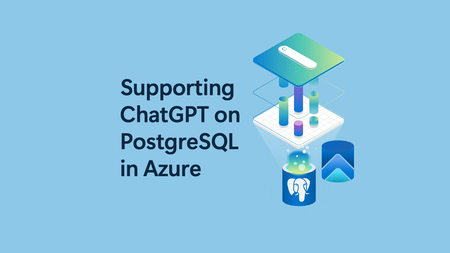
Affan Dar, Vice President of Engineering, PostgreSQL at Microsoft Adam Prout, Partner Architect, PostgreSQL at Microsoft Panagiotis Antonopoulos, Distinguished Engineer, PostgreSQL at Microsoft The OpenAI engineering team recently published a blog post describing how they scaled their databases by 10x over the past year, to support 800 million monthly users. To do so, OpenAI relied on Azure Database for PostgreSQL to support important services like ChatGPT and the Developer API. Collaborating with a customer experiencing rapid user growth has been a remarkable journey. One key observation is that PostgreSQL works out of box for very large-scale points. As many in the public domain have noted, ChatGPT grew to 800M+ users before OpenAI started moving new and shardable workloads to Azure Cosmos DB. Nevertheless, supporting the growth of one of the largest Postgres deployments was a great learning experience for both of our teams. Our OpenAI friends did an incredible job at reacting fast and adjusting their systems to handle the growth. Similarly, the Postgres team at Azure worked to further tune the service to support the increasing OpenAI workload. The changes we made were not limited to OpenAI, hence all our Azure Database for PostgreSQL customers with demanding workloads have benefited. A few of the enhancements and the work that led to these are listed below. Changing the network congestion protocol to reduce replication lag Azure Database for PostgreSQL used the default CUBIC congestion control algorithm for replication traffic to replicas both within and outside the region. Leading up to one of the OpenAI launch events, we observed that several geo-distributed read replicas occasionally experienced replication lag. Replication from the primary server to the read replicas would typically operate without issues; however, at times, the replicas would unexpectedly begin falling behind the primary for reasons that were not immediately clear. This lag would not recover on its own and would grow to a point when, eventually, automation would restart the read replica. Once restarted, the read replica would once again catch up, only to repeat this cycle again within a day or less. After an extensive debugging effort, we traced the root cause to how the TCP congestion control algorithm handled a higher rate of packet drops. These drops were largely a result of high point-to-point traffic between the primary server and its replicas, compounded by the existing TCP window settings. Packet drops across regions are not unexpected; however, the default congestion control algorithm (CUBIC) treats packet loss as a sign of congestion and does an aggressive backoff. In comparison, the Bottleneck Bandwidth and Round-trip propagation time (BBR) congestion control algorithm is less sensitive to packet drops. Switching to BBR, adding SKU specific TCP window settings, and switching to fair queuing network discipline (which can control pacing of outgoing packets at hardware level) resolved this issue. We’ll also note that one of our seasoned PostgreSQL committers provided invaluable insights during this process, helping us pinpoint the issue more effectively. Scaling out with Read replicas PostgreSQL primaries, if configured properly, work amazingly well in supporting a large number of read replicas. In fact, as noted in the OpenAI engineering blog, a single primary has been able to power around 50+ replicas across multiple regions. However, going beyond this increases the chance of impacting the primary. For this reason, we added the cascading replica support to scale out reads even further. But this brings in a number of additional failure modes that need to be handled. The system must carefully orchestrate repairs around lagging and failing intermediary nodes, safely repointing replicas to new intermediary nodes while performing catch up or rewind in a mission critical setup. Furthermore, disaster recovery (DR) scenarios can require a fast rebuild of a replica and as data movement across regions is a costly and time-consuming operation, we developed the ability to create a geo replica from a snapshot of another replica in the same region. This feature avoids the traditional full data copy process, which may take hours or even days depending on the size of the data, by leveraging data for that cluster that already exists in that region. This feature will soon be available for all our customers as well. Scaling out Writes These improvements solved the read replica lag problems and read scale but did not help address the growing write scale for OpenAI. At some point, the balance tipped and it was obvious that the IOPs limits of a single PostgreSQL primary instance will not cut it anymore. As a result OpenAI decided to move new and shardable workloads to Azure Azure Cosmos DB, which is our default recommended NoSQL store for fully elastic workloads. However, some workloads, as noted in the OpenAI blog are much harder to shard. While OpenAI is using Azure Database for PostgreSQL flexible server, several of the write scaling requirements that came up have been baked into our new Azure HorizonDB offering, which entered private preview in November 2025. Some of the architectural innovations are described in the following sections. Azure HorizonDB scalability design To better support more demanding workloads, Azure HorizonDB introduces a new storage layer for Postgres that delivers significant performance and reliability enhancements: More efficient read scale out. Postgres read replicas no longer need to maintain their own copy of the data. They can read pages from the single copy maintained by the storage layer. Lower latency Write-Ahead Logging (WAL) writes and higher throughput page reads via two purpose-built storage services designed for WAL storage and Page storage. Durability and high availability responsibilities are shifted from the Postgres primary to the storage layer, allowing Postgres to dedicate more resources to executing transactions and queries. Postgres failovers are faster and more reliable. To understand how Azure HorizonDB delivers these capabilities, let’s look at its high‑level architecture as shown in Figure 1. It follows a log-centric storage model, where the PostgreSQL writeahead log (WAL) is the sole mechanism used to durably persist changes to storage. PostgreSQL compute nodes never write data pages to storage directly in Azure HorizonDB. Instead, pages and other on-disk structures are treated as derived state and are reconstructed and updated from WAL records by the data storage fleet. Azure HorizonDB storage uses two separate storage services for WAL and data pages. This separation allows each to be designed and optimized for the very different patterns of reads and writes PostgreSQL does against WAL files in contrast to data pages. The WAL server is optimized for very low latency writes to the tail of a sequential WAL stream and the Page server is designed for random reads and writes across potentially many terabytes of pages. These two separate services work together to enable Postgres to handle IO intensive OLTP workloads like OpenAI’s. The WAL server can durably write a transaction across 3 availability zones using a single network hop. The typical PostgreSQL replication setup with a hot standby (Figure 2) requires 4 hops to do the same work. Each hop is a component that can potentially fail or slow down and delay a commit. Azure HorizonDB page service can scale out page reads to many hundreds of thousands of IOPs for each Postgres instance. It does this by sharding the data in Postgres data files across a fleet of page servers. This spreads the reads across many high performance NVMe disks on each page server. 2 - WAL Writes in HorizonDB Another key design principle for Azure HorizonDB was to move durability and high availability related work off PostgreSQL compute allowing it to operate as a stateless compute engine for queries and transactions. This approach gives Postgres more CPU, disk and network to run your application’s business logic. Table 1 summarizes the different tasks that community PostgreSQL has to do, which Azure HorizonDB moves to its storage layer. Work like dirty page writing and checkpointing are no longer done by a Postgres primary. The work for sending WAL files to read replicas is also moved off the primary and into the storage layer – having many read replicas puts no load on the Postgres primary in Azure HorizonDB. Backups are handled by Azure Storage via snapshots, Postgres isn’t involved. Task Resource Savings Postgres Process Moved WAL sending to Postgres replicas Disk IO, Network IO Walsender WAL archiving to blob storage Disk IO, Network IO Archiver WAL filtering CPU, Network IO Shared Storage Specific (*) Dirty Page Writing Disk IO background writer Checkpointing Disk IO checkpointer PostgreSQL WAL recovery Disk IO, CPU startup recovering PostgreSQL read replica redo Disk IO, CPU startup recovering PostgreSQL read replica shared storage Disk IO background, checkpointer Backups Disk IO pg_dump, pg_basebackup, pg_backup_start, pg_backup_stop Full page writes Disk IO Backends doing WAL writing Hot standby feedback Vacuum accuracy walreceiver Table 1 - Summary of work that the Azure HorizonDB storage layer takes over from PostgreSQL The shared storage architecture of Azure HorizonDB is the fundamental building block for delivering exceptional read scalability and elasticity which are critical for many workloads. Users can spin up read replicas instantly without requiring any data copies. Page Servers are able to scale and serve requests from all replicas without any additional storage costs. Since WAL replication is entirely handled by the storage service, the primary’s performance is not impacted as the number of replicas changes. Each read replica can scale independently to serve different workloads, allowing for workload isolation. Finally, this architecture allows Azure HorizonDB to substantially improve the overall experience around high availability (HA). HA replicas can now be added without any data copying or storage costs. Since the data is shared between the replicas and continuously updated by Page Servers, secondary replicas only replay a portion of the WAL and can easily keep up with the primary, reducing failover times. The shared storage also guarantees that there is a single source of truth and the old primary never diverges after a failover. This prevents the need for expensive reconciliation, using pg_rewind, or other techniques and further improves availability. Azure HorizonDB was designed from the ground up with learnings from large scale customers, to meet the requirements of the most demanding workloads. The improved performance, scalability and availability of the Azure HorizonDB architecture make Azure a great destination for Postgres workloads.4.3KViews11likes0CommentsFrom Oracle to Azure: How Quadrant Technologies accelerates migrations
This blog was authored by Manikyam Thukkapuram, Director, Alliances & Engineering at Quadrant Technologies; and Thiwagar Bhalaji, Migration Engineer and DevOps Architect at Quadrant Technologies Over the past 20+ years, Quadrant Technologies has accelerated database modernization for hundreds of organizations. As momentum to the cloud continues to grow, a major focus for our business has been migrating on-premises Oracle databases to Azure. We’ve found that landing customers in Azure Database for PostgreSQL has been the best option both in terms of cost savings and efficiency. Azure Migrate is by far the best way to get them there. With Azure Migrate, we’re able to streamline migrations that traditionally took months, into weeks. As a Microsoft solutions partner, we help customers migrate to Azure and develop Azure-based solutions. We’re known as “the great modernization specialists” because many of our customers come to us with complex legacy footprints, outdated infrastructure, and monolithic applications that can be challenging to move to the cloud. But we excel at untangling these complex environments. And with our Q-Migrator tool, which is a wrapper around Azure Migrate, we’re able to automate and accelerate these kinds of migrations. Manual steps slowed down timelines In general, each migration we lead includes a discovery phase, a compatibility assessment, and the migration execution. In discovery, we identify every server, database, and application in a customer’s environment and map their interactions. Next, we assess each asset’s readiness for Azure and plan for optimal cloud configurations. Finally, we bring the plan to life, integrating applications, moving workloads, and validating performance. Before adopting Azure Migrate, each of these phases involved manual tasks for our team. During our discovery process we manually collected inventory and wrote custom scripts to track server relationships and database dependencies. Our engineers also had to dig through configuration files and use third-party assessment tools for aspects like VM utilization and Oracle schema. When we mapped compatibility, we worked from static data to predict cost estimates and sizing, as opposed to operating from real-time telemetry. By the time we reached the migration phase, fragmented tooling and inconsistent assessments made it difficult to maintain accuracy and efficiency. Hidden dependencies sometimes surfaced late in the process, causing unexpected rework and delays. Streamlining migrations with Azure Migrate To automate and streamline these manual tasks, we developed Q-Migrator, which is our in-house framework built around Azure Migrate. Now we can offer clients an efficient, agentless approach to discovery, assessment, and migration. As part of our on-premises database migration initiatives, we rely on Azure Migrate to seamlessly migrate a wide range of structured databases (including MySQL, Microsoft SQL Server, PostgreSQL, and Oracle) from on-premises environments to Azure IaaS and PaaS. For instance, for an on-premises PostgreSQL migration, we begin by setting up an Azure Migrate appliance in the client’s environment to automatically discover servers, databases, and applications. That generates a complete inventory and dependency map that identifies every relationship between servers and databases. From there, we run an assessment through Azure Migrate to check compatibility, identify blockers, and right-size target environments for Azure Database for PostgreSQL. By integrating Azure Database Migration Service (DMS), we can replicate data continuously until cutover, ensuring near-zero downtime. In addition, Azure DMS provides robust telemetry and analytics for deep visibility into every stage of the process. This unified and automated workflow not only replaces manual steps but also increases reliability and accelerates delivery. Teams benefit from a consolidated dashboard for planning, execution, and performance tracking, driving efficiency throughout the migration lifecycle. 75% faster deployment, 60% cost savings Since implementing Azure Migrate, which now facilitates discovery and assessment for on-premises PostgreSQL workloads, we’ve accelerated deployment by 75% compared to traditional migration methods. We’ve also reduced costs for our clients by up to 60 percent. Automated discovery alone reduces that phase by nearly 40%, and dependency mapping now takes a fraction of the effort. With the integrated dashboard in Azure Migrate we can also track progress across discovery, assessment, and migration in one place. This eliminates the need for multiple third-party tools. These efficiencies allow us to deliver complex migrations on tighter timelines without sacrificing quality or reliability. Rounding out the modernization journey with AKS As “the great modernization specialists,” we’re often asked which is the best database for landing Oracle workloads in the cloud. From our experience, Azure Database for PostgreSQL is ideal for enterprises seeking cost-efficient and secure PostgreSQL deployments. Its managed services reduce operational overhead while maintaining high availability, compliance, and scalability. Plus, seamless integration with Azure AI services allows us to innovate for clients and keep them ahead of the curve. We also recognize that database migration is only the first step for many clients—modernizing the application layer delivers even greater scalability, security, and manageability. When clients come to Quadrant for a broader modernization strategy, we often use Azure Kubernetes Service (AKS) to containerize their applications and break monoliths into microservices. AKS delivers a cloud-native architecture alongside database modernization. This integration supports DevOps practices, simplifies deployments, and allows customers to take full advantage of elastic cloud infrastructure. More innovation to come Overall, Azure Migrate and Azure Database for PostgreSQL, Azure Database for MySQL, and Azure SQL Database have redefined how we deliver database modernization, and our close collaboration with Microsoft has made it possible. By engaging early with Microsoft, we can validate migration architectures and gain insights into best practices for high-performance and secure cloud deployments. Access to Microsoft experts helps us fine-tune our designs, optimize performance, and resolve complex issues quickly. We’re also investing in AI-driven automation using Azure OpenAI in Foundry Models to analyze migration data, optimize queries, and predict performance outcomes. These innovations allow us to deliver more intelligent, adaptive solutions tailored to each customer’s unique environment.339Views2likes0Comments