Outlook Mac
4 Topics
Help: Outlook for Mac missing Teams Integration
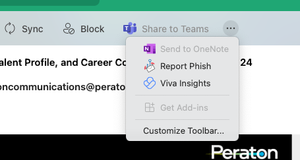
I have Outlook for Mac; I use it for work (I also created other profiles so I use my personal emails here as well). Till recently, it was working just fine. Then yesterday, I tried to create a meeting event with an MS Teams link but the MS Teams toggle button was not there; it was gone. I could not add a Teams link for the meeting. I have admin access to my Mac. I restarted my Mac, it didn't work. I have already uninstalled Outlook and Teams and reinstalled them; didn't work. I have tried to access the "Get Add-ins" button but it's grayed out. I have tried to go into "Outlook > Preferences" but I can't find "Preferences" in the Outlook menu. I have deleted all profiled and just tried with my work profile, still no success. I've spend way too much time on this with no success; any other ideas or suggestions? Thanks in advance.276Views0likes0Comments
Outlook not parsing ics invites with rrule BYMONTHDAY=-1 or BYSETPOS=-1 properly
Current Behavior When an ics event is attached or imported as a file, and the rrule contains either BYMONTHDAY=-1 or BYSETPOS=-1, it is not properly converted to the outlook/exchange meeting type and the ics attachment will read as "not supported calendar message". It is possible to work around this by appending an additional semicolon to any property in the rrule string prior to the BYMONTHDAY=-1 or BYSETPOS=-1. However, the workaround above is actually syntactically invalid. Sending .ics invites that contain an rrule with this workaround that are opened in any application other than outlook would fail to be processed. Reproduction environment MacOS Sequoia 15.3.2 (24D81). definitely doesn't matter. using outlook for mac desktop app, outlook web app Reproduction steps See the attached ics invites - note the only difference is the additional semicolon before BYMONTHDAY in the second invite. Save these as files with the .ics extension, and then open them with outlook. Invalid invite - an event that repeats monthly on the last day of the month starting on May 31st for two months. BEGIN:VCALENDAR VERSION:2.0 CALSCALE:GREGORIAN PRODID:adamgibbons/ics METHOD:REQUEST X-PUBLISHED-TTL:PT1H BEGIN:VEVENT UID:726df22a-cc8d-4276-9be9-236f4af16450 SUMMARY:Reserved by user DTSTAMP:20260413T225217Z DTSTART:20260531T050000Z DTEND:20260531T060000Z SEQUENCE:0 DESCRIPTION:hi LOCATION:hi STATUS:CONFIRMED CATEGORIES: TRANSP:TRANSPARENT X-MICROSOFT-CDO-BUSYSTATUS:FREE ATTENDEE;ROLE="REQ-PARTICIPANT";CN="user":mailto:user@example .com RRULE:FREQ=MONTHLY;INTERVAL=1;COUNT=2;DTSTART=20260531T050000 Z;BYMONTHDAY=-1; END:VEVENT END:VCALENDAR Valid invite - same event but with an additional ; before BYMONTHDAY: BEGIN:VCALENDAR VERSION:2.0 CALSCALE:GREGORIAN PRODID:adamgibbons/ics METHOD:REQUEST X-PUBLISHED-TTL:PT1H BEGIN:VEVENT UID:726df22a-cc8d-4276-9be9-236f4af16450 SUMMARY:Reserved by user DTSTAMP:20260413T225217Z DTSTART:20260531T050000Z DTEND:20260531T060000Z SEQUENCE:0 DESCRIPTION:hi LOCATION:hi STATUS:CONFIRMED CATEGORIES: TRANSP:TRANSPARENT X-MICROSOFT-CDO-BUSYSTATUS:FREE ATTENDEE;ROLE="REQ-PARTICIPANT";CN="user":mailto:user@example .com RRULE:FREQ=MONTHLY;INTERVAL=1;COUNT=2;DTSTART=20260531T050000 Z;;BYMONTHDAY=-1; END:VEVENT END:VCALENDAR237Views0likes2Comments
way to find snoozed emails which have met their snoozed time - Outlook on Mac
I like and use the snooze function a lot. However sometimes a snoozed email meets the snoozed time and i cannot address it.... and it gets lost in my inbox. Is there a way for me to filter for any email that has been snoozed in the past? I know outlook knows as it shows the snooze icon. but i have not found a way to filter for these emails217Views0likes1Comment
Synchronization issue in New Outlook for Mac – ״Failed to refresh subscriptions.״
Hello, I am using Microsoft 365 (Exchange Online) on Mac, running macOS 26.1 (Tahoe). My Outlook client is: Outlook for Mac Version 16.103.3 (25113013), with a Microsoft 365 Subscription license. Since yesterday morning, in the New Outlook interface, my inbox has suddenly appeared empty, and I constantly receive the following error message: “Failed to refresh subscriptions.” It’s important to note: In Legacy Outlook, everything works perfectly. The web version and the Outlook app on my mobile phone also work well. The issue persists regardless of the network I am on (home, office, cellular, etc.). Troubleshooting steps I already tried: • Updating Outlook to the latest version • Removing and re‑adding the account • Clearing cache and preferences • Formatting my Mac and reinstalling everything from scratch Unfortunately, none of these steps has resolved the issue. Is this a known bug, and is there a recommended workaround or an upcoming fix? Appreciate assistance on that issue.199Views0likes4Comments