networking
171 TopicsWhat to Expect from the Copilot & AI Sessions at Microsoft 365 Community Conference
AI isn’t a side conversation at the Microsoft 365 Community Conference—it’s at the center of how work is changing. The Copilot, Agents, & Copilot Services Sessions are designed for anyone who wants to move beyond curiosity and into real-world application. This is an opportunity to learn how Copilot works today and how agents extend it. You will also explore how organizations can govern, scale, and operationalize AI across Microsoft 365. Questions these sessions will help answer: How do we move from experimentation to real value? How do we scale AI responsibly? How do agents fit into the way we already work? What skills do teams need next? Business leaders, IT pros, developers, and community practitioners will join sessions to find practical insights into how AI shows up in your daily work, and what it takes to deploy it responsibly and effectively. There will also be a focus on change management, champion programs, and adoption frameworks, because deploying AI isn’t just a technical decision, it’s a cultural one. From Copilot to Agents: The Shift from Assistance to Action One of the biggest themes across the sessions are the evolution from AI as a helper to AI as an active participant in work. If you’re curious about what “agentic AI” actually means in practice, attending these sessions will make it concrete. Join your peers as you learn how Microsoft 365 Copilot is being extended through agents that reason, act, and automate. Learn about agent orchestration across tools like Copilot Studio, SharePoint, Teams, Planner, and Power Platform. Discover new agent patterns including declarative agents, multi-agent configurations, workflows agents, and computer-use agents. In these sessions you’ll explore how agents can: Take action on your behalf and do more than suggest content. Work across apps, data sources, and workflows. Participate alongside humans as part of the team. Real Adoption Stories (Not Just Demos)! Go beyond feature walkthroughs to focus on how organizations are actually adopting Copilot and agents at scale. In these adoption stories you’ll hear: How Microsoft uses Copilot and agents internally as Customer Zero. What adoption looks like across large enterprises, frontline environments, and regulated industries. Lessons learned from early adopters—what worked, what didn’t, and what they’d do differently. Governance, Trust, and Control Are Front and Center AI adoption only works when people trust it—and trust is built through strong governance. Learn how organizations are balancing innovation with oversight and enabling teams to build and use agents while maintaining enterprise-grade guardrails. A significant portion of the Copilot & AI track is dedicated to: Agent lifecycle management. Security, compliance, and data protection. Preventing oversharing and managing risk. Observability and control using tools like Agent 365, Microsoft Purview, and Copilot Control System. This is especially valuable for IT and security leaders who are being asked to “move fast” without compromising standards. Building with Copilot: No-Code, Low-Code, and Pro-Code Paths No matter where you sit on the technical spectrum, there’s a clear path to learning how to build responsibly and effectively. Not everyone builds the same way and organizations need prompt engineering that delivers results. In these sessions you’ll learn how to choose the right agent type for the job, extending Copilot with enterprise data, and designing agents that are production ready—not just impressive in demos. These sessions are tailored to: Business users and makers getting started with Copilot Studio Low-code developers extending Copilot with workflows, connectors, and prompts Pro developers building advanced agents using APIs, MCP servers, Microsoft Graph, SharePoint Embedded, and Azure AI Copilot in the Flow of Everyday Work Rather than abstract AI concepts, you’ll see end-to-end workflows that demonstrate how Copilot helps people save time, reduce manual work, and focus on higher-value outcomes. The emphasis in these sessions is on practical impact, not hype showing how AI is grounded in real work. These sessions will showcase Copilot and agents embedded into: Meetings, chats, and channels. Task and project management. Content creation and knowledge management. Business processes and frontline operations. Why the Copilot and AI track matters If AI is part of your roadmap, or already part of your day, this track will show you how strategy can meet execution. Join us to explore clear mental models for Copilots and agents, see real examples you can apply to your work, and gain a better understanding of what’s now—and what’s coming next. Each year, #M365Con26 is built around one simple idea: bringing our global community together to learn, grow, innovate, and get hands-on with the technologies shaping the next era of work. This year’s conference delivers our most expansive program yet, including: 200+ sessions, workshops, and AMAs, covering Microsoft 365 Copilot, Teams, SharePoint, OneDrive, Copilot Studio, and more. 100+ Microsoft-led sessions, giving you unprecedented access to the people building the apps and AI capabilities you use every day. A keynote lineup featuring Microsoft leaders including Jeff Teper, Charles Lamanna, Vasu Jakkal, Rohan Kumar, Jaime Teevan, and many more. Deep-dive workshops to elevate your skills with real-world scenarios and hands-on learning. Exclusive attendee parties and networking events where you can connect with peers and icons. You’ll also get the chance to meet hundreds of Microsoft executives, engineers, and product leaders—ask questions, share feedback, and help shape the roadmap of the technologies you rely on. Register now, save $150 with code SAVE150 - https://aka.ms/M365ConRegister81Views0likes0Comments
Network connectivity test TCP Connection results unreliable
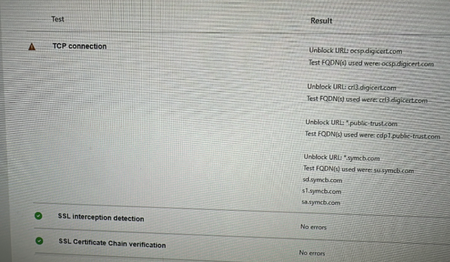
My team has spent the last 2 business days trying to get the https://connectivity.office.com/ TCP connection test to complete successfully to appease the Microsoft Unified Support Team. They don't want to take our MS Teams crash diags until they see SSL Interception Detection and TCP connection tests passing successfully. We can't get TCP connection tests to pass, we get one of the following: Success Attempt #1 Success, Attempt #2 Failure Any number of errors to unblock URLs such as (but not limited to) ocsp.digicert.com,ocspx.digicert.com,ocsp.omniroot.com,su.symcb.com,sr.symcb.com,sd.symcb.com,s1.symcb.com,sa.symcb.com We figured it was something with the corporate network but that's not the case. Last night we had about 50 employees try this test from their home (personal) computers that have no connection to our corporation. The TCP Connection test fails on home (consumer) PCs. What's the story with this TCP Connection check?580Views1like2CommentsMicrosoft 365 Community Conference: A Beacon for Builders, Innovators, and Icons of Intelligent Work
You’re passionate about what you do, and we’re passionate about empowering your potential. Microsoft 365 Community Conference - is your chance to keep up with AI, build game-changing skills, and take your career (and business) even further. With over 200 sessions, workshops, keynotes, and AMAs, you’ll learn directly from the experts and product-makers who are reimagining what’s possible in the workplace. Conference Details Join us in Las Vegas April 21-23. 2026 for the premier Microsoft 365 community event. We want to help you get the most out of the tools you use every day, so we’re bringing back the conference you know and love—with even more opportunities to learn, connect, and level up. Here’s what you can expect: Meet one-on-one with the people who create Microsoft products—ask questions, share feedback, and discover real-world solutions Explore Microsoft’s latest product updates and learn about what’s on the horizon Build and sharpen skills you can use immediately to be more productive, creative, and collaborative with the Microsoft tools you use every day Grow your network, dive deep, and have fun with the best community in tech How to Register Register today and get ready to transform the way you work. Save $150 with our exclusive customer code SAVE150. https://aka.ms/M365ConfWebsite Explore Sessions and Workshops There’s plenty of breadth—and depth—to the learning opportunities at the Microsoft 365 Community Conference. No matter your role or experience level, we've got something for everyone! https://aka.ms/M365ConfSessionsWebPage Meet the Speakers Our lineup of speakers includes some of the brightest minds behind the most powerful Microsoft innovations. You’ll hear from experts like: Jeff Teper | President, Collaborative Apps and Platforms Charles Lamanna | President, Business Apps and Agents Vasu Jakkal | Corporate Vice President, Microsoft Security Business Rohan Kumar | Corporate Vice President, Microsoft Security, Purview & Trust The Microsoft 365 Community Conference is more than an event. It’s the gateway to what’s next for your career, community, team, customers, and business—and for work itself. Claim your front-row seat to the future of work today!377Views0likes0CommentsOutlook is sending duplicated mails
Hello dear Microsoft Community I've got following problem: With one of our clients there is an issue with Outlook/Mailing The mailbox is IMAP If he sends Mails to someone they'll recieve the sent message, for like 20 times. the only suspicous thing is, that we can see 3 duplicates of that mail in the 'sent' folder. but regardless it was recieved alot more than 3 times, either way. Do you have an idea ? I already updatet Microsoft Windows & Microsoft Office 365 made a new profile checked for Add-Ins or antivirus applications I also looked it up on our firewall we also checked the log on the mailserver greetings and im looking forward to recieve some help from YOU218KViews1like6Comments
Windows 11: WiFi disconnected every time computer wakes jup
I have two Windows 11 computers connected by WiFi to the same home network. One of them is disconnected from the network every time it wakes up. I click the Stay Connected box, then Connect, and it connects. The next time it goes to sleep and wakes up, Stay Connected is unchecked, and WiFi is disconnected again. The other computer just stays connected as it should. What's going on here? How can I fix it?179Views0likes1CommentHow to convert from a GoDaddy Office 365 Email Essentials account to a full M365 Business Standard?
I am currently supporting a client who is using a GoDaddy Office 365 Email Essentials account, that they purchased along with their domain registration. They now have need of the full suite of services offered with a Microsoft 365 Business Standard account. However, it's my understanding that the GoDaddy tenants are a specialized product that isn't truly a native Microsoft 365 account. Is this true? If so what would the requirements be to migrate the user's account to a full Microsoft 365 Business Standard account?6.9KViews1like2Comments
Office 365 Business Premium + GoDaddy Hosting
Hi, Does office 365 + godaddy give you office 365 app hosting? I was hoping to have a public sharepoint, delve, and yammer website connected to different subdomains e.g. http://www.mydomain.com, blog.mydomain.com, social.mydomain.com etc. What apps on office 365 are linked to godaddy hosting? Or is it just completely separate hosting that has no link to office 365 apps and just bundles email support? Also what is the discount offered to office 365 subscribers on godaddy? Ideally I would to have Windows unlimited website hosting. Thanks, Jebb2.1KViews0likes2Comments