modern site page
11 TopicsPublished Date Format not set properly on Modern Site Pages in SharePoint online - AU Region
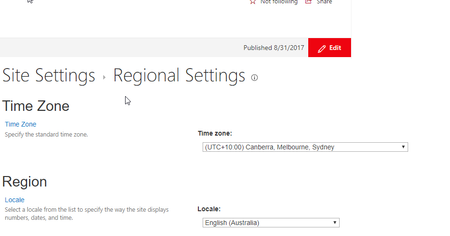
Has anyone looked into an issue with date format of Published date on Modern Site Page? It is somehow setting to US date format even though the regional setting is set to Australia. Have ruled out the user profile setting as it is set to use the option by site administrators. The same issue also occurs in Communication site pages.6.2KViews2likes9CommentsFormatting of Tables in modern pages
I recently noticed that when I add a table to a modern page (using the Text web part and paste from Word) the formatting of the columns doesn't automatically wrap the text any longer. The column widths just grow with the size of the text. This naturally creates a horizontal scroll bar in order to view the entire table contents (not very user friendly at all). I've added tables in the past and haven't observed this behavior before. In the past the text would wrap so that the entire table was visible. Was this change intentional? Is this a bug?59KViews0likes32Comments
Sharepoint SE News Webpart Not Working
We have a fresh, out-of-the box new Sharepoint Subscription Edition modern site setup but the News Webpart is not working. It looks fine in edit mode but reverts to empty, new preview after hitting publish. We found the following strange behavior with the News webpart: Looks fine and shows annoucements/news items fine in edit mode Shows only empty/preview after publishing If you refresh the page, does not help click HOME navigation link the webpart refreshes and displays correctly click HOME navigation link a second time the webpart goes back to empty/preview Every second HOME click the webpart is working If you place TWO News webparts on the same page, the SECOND webpart always displays correctly We have no special code, add-ins, packages or anything else installed. It is a plain-jane modern site with only a few simple, ordinary default configured webparts in the layout. There is also nothing special about the announcement pages. We even tried deleting all the real announcement and made several plain 'test' announcements. Same issue. It seems like there is some late java-script or client-side return/rendering which causes the webpart to think the news content is empty but remains in cache or somewhere so on the subsequent request it renders correctly. In edit mode, this cache, staging or temp data is not used so always works.803Views0likes0CommentsConfigure Search Results in Modern page (Modern Search Center)
Has anyone been able to modify the search results page of Modern Pages which seems to have missing that at present. There is no way to customize the results view, switch to classic view, use custom result sources or redirect to enterprise search center. It always defaults to "/search/sitefiles" location instead of only "/search". Is there a way to hook into the route and default it to global or do any of the above. If the modern search results page is not customizable, is there a way (powershell, csom or configurable) way to redirect to classic SharePoint search center page.46KViews0likes17Comments
Modern Site Page People Web Part
I had planned to use the People web part (see attached) on the modern page to list a contact person. Then I discovered it only provides a name, title, and the circle (with initials or picture). Are there plans to have it link to profiles so one can hover or click on the name to get more information, e.g. email, phone number?Solved37KViews0likes63Comments
List Web Part Expand/Collapse View Broken on Modern Site Page
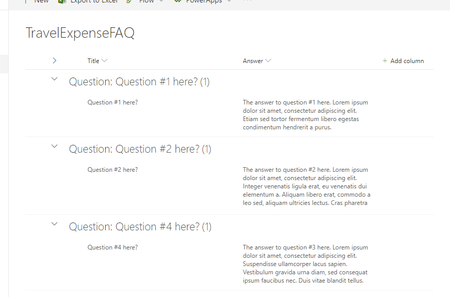
When attempting to display a list view on a SharePoint Online Modern Site Page for FAQ questions and answers the Answer field (multiple lines of text) is not displaying the values. In the examples below all question and answer fields have values and should display. In the actual list itself the same view shows both the Answer and Question values just as expected. Answer Field = Required (List Web Part) When I have the Answer field set as required (no matter if it is Plain, Rich, or Enhanced Rich text) it shows that required info is missing even though all the Answer fields have values in them. Using the List View Web Part I see the following: If I click the heading, "Question: Question #1 here? (1)" in the list view web part I then see the value for the Answer: Answer Field = Not Required (List Web Part) When I have the Answer field set as not required (no matter if it is Plain, Rich, or Enhanced Rich text) it shows no value even though all the Answer fields have values in them. Using the List View Web Part I see the following: If I click the heading, "Question: Question #1 here? (1)" in the list view web part I then see the value for the Answer:7.4KViews0likes5Comments
Can not add Task List and Issue tracking list to a Modern Site Pages as web part
I am not able to add Task List and Issue tracking list as web part in Modern Site pages. Although Document Library and Generic Lists are being added successfully. Am I missing something here? Do I need to activate some site feature or something? Any help will be appreciated. Thanks in Advance !28KViews0likes20Comments
SharePoint 2019 - Embed w/ Anonymous access causes authentication popups.
Hello, everyone. I would like a solution I have to a problem regarding the OOB Embed webpart for SP 2019 Modern Site Pages. Currently, when you have anonymous access turned on, and you go to a page with an embedded video, it will try and get the user to authenticate in order to perform a POST request to _api/SP.Publishing.EmbedService/DataEmbed. The video still loads up as normal, but the authentication prompt is intrusive to the User Experience. Any advise would be helpful. Thanks, ASSolved3.7KViews0likes6CommentsSearching for SharePoint Modern Pages
I was looking at using a sharepoint site as a collaborative "wiki" style best practices/knowledge site (not using the old wiki system, because old sharepoint is on its way out) by encouraging editing. After some fiddling, it doesn't appear that search is very sensible for these pages, nor is there any way to "tag" or attach any useful labels/metadata to them to aid in searching/filtering. Search also doesn't seem to make any sense for them, and looks to only return results where words in either the title or url match(or maybe even some other unseen data). Is there something I am missing here? Or are modern pages really not usefully searchable?4.1KViews0likes5Comments
Webpart file (document library) upload to modern page view
Hi there, Got myself a nice root site with document library's. Got them to subsite's on a classic view sharepoint online site. ( with a webpart, downloaded as a file in sharepoint designer) I see it on the classic site. But is there a way to get the document library from the root site to a subsite? Or is there a way to upload the webpart file in the modern view ? thanxs Gr kloenie1.8KViews0likes2Comments