microsoft sentinel
796 TopicsMicrosoft partners with DataBahn to accelerate enterprise deployments for Microsoft Sentinel
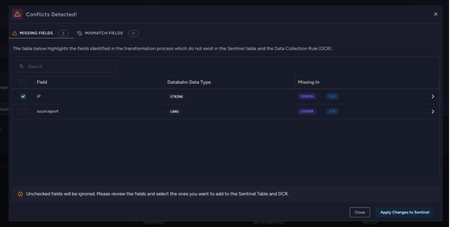
Enterprise security teams are collecting more telemetry than ever across cloud platforms, endpoints, SaaS applications, and on-premises infrastructure. Security teams want broader data coverage and longer retention without losing control of cost and data quality. This post explains the new DataBahn integration with Microsoft Sentinel, why it matters for SIEM operations, and how to think about using a security data pipeline alongside Sentinel for onboarding, normalization, routing, and governance. DataBahn joins Microsoft Sentinel partner ecosystem This integration reflects Microsoft Sentinel’s open partner ecosystem, giving customers choice in the partners they use alongside Microsoft Sentinel to manage their security data pipelines. DataBahn joins a broader set of complementary partners, enabling customers to tailor solutions for their unique security data needs. DataBahn is available through Microsoft Marketplace and is eligible for customers to apply existing Azure Consumption Commitments toward the purchase of DataBahn. Why this matters for security operations teams Security teams are under relentless pressure to ingest more data, move faster through SIEM migrations, and preserve data fidelity for detections and investigations, all while managing costs effectively. The challenge isn’t just ingesting data, but ensuring the right telemetry arrives in a consistent, governed format that analysts and detections can trust. This is where a security data pipeline, alongside Microsoft Sentinel’s native connectors and DCRs, can add value. It helps streamline onboarding of third-party and custom sources, improve normalization consistency, and provide operational visibility across diverse environments as deployments scale. What DataBahn integration is positioned to do with Microsoft Sentinel Security teams want broader coverage and need to ensure third-party data is consistently shaped, routed, and governed at scale. This is where a security data pipeline like DataBahn complements Microsoft Sentinel. Sitting upstream of ingestion, the pipeline layer standardizes onboarding and shaping across sources while providing operational visibility into data flow and pipeline health. Together, the collaboration focuses on reducing onboarding friction, improving normalization consistency, enabling intentional routing, and strengthening governance signals so teams can quickly detect source changes, parser breaks, or data gaps—while staying aligned with Sentinel analytics and detection workflows. This model gives Sentinel customers more choice to move faster, onboard data at scale, and retain control over data routing. Key capabilities Bidirectional data integration The integration enables seamless delivery of telemetry into Sentinel while aligning with Sentinel detection logic and schema expectations. This helps ensure telemetry pipelines remain consistent with: Sentinel detection formats Custom analytics rules Sentinel data models and schemas Automated table and DCR management As detections evolve, pipeline configurations can adapt to maintain detection fidelity and data consistency. Advanced management API DataBahn provides an advanced management API that allows organizations to programmatically configure and manage pipeline integrations with Sentinel. This enables teams to: Automate pipeline configuration Manage operational workflows Integrate pipeline management into broader security or DevOps automation processes Automatic identification of configuration conflicts In complex environments with multiple telemetry sources and routing rules, configuration conflicts can arise across filtering logic, enrichment pipelines, and detection dependencies. The integration helps automatically: Detect conflicts in filtering rules and pipeline logic Identify clashes with detection dependencies Highlight missing configurations or coverage gaps Automated detection of configuration conflicts and pipeline rule dependencies This visibility allows SOC teams to quickly identify issues that could impact detection reliability. Centralized pipeline management The integration enables centralized management of data collection and transformation workflows associated with Sentinel telemetry pipelines. This provides unified visibility and control across telemetry sources while maintaining compatibility with Sentinel analytics and detections. Centralized management simplifies operations across large environments where multiple telemetry pipelines must be maintained. Centralized pipeline management for telemetry sources across the environment Flexible data transformation and customization Security telemetry often arrives in inconsistent formats across vendors and platforms. The platform supports flexible transformation capabilities that allow organizations to: Normalize logs into standard or custom Sentinel table formats Add or derive fields required by Sentinel detections Apply filtering or enrichment rules before ingestion Configuration can be performed through a single-screen workflow, enabling teams to modify schemas and define filtering logic without disrupting downstream analytics. Flexible data transformation to align telemetry with Microsoft Sentinel ASIM schemas The platform also provides schema drift detection and source health monitoring, helping teams maintain reliable telemetry pipelines as environments evolve. Closing Effective security operations depend on how quickly a SOC can onboard new data, scale effectively, and maintain high‑quality investigations. Sentinel provides a cloud‑native, AI-ready foundation to ingest security data from first- and third‑party data sources—while enabling economical, large‑scale retention and deep analytics using open data formats and multiple analytics engines. DataBahn’s partnership with Sentinel is positioned as a pipeline layer that can help teams onboard third-party sources, shape and normalize data, and apply routing and governance patterns before data lands in Sentinel. Learn more DataBahn for Microsoft Sentinel DataBahn Press Release - Databahn Deepens Partnership with Microsoft Sentinel Microsoft Sentinel data lake overview - Microsoft Security | Microsoft Learn Microsoft Sentinel—AI-Ready Platform | Microsoft Security Connect Microsoft Sentinel to the Microsoft Defender portal - Unified security operations | Microsoft Learn Microsoft Sentinel data lake is now generally available | Microsoft Community Hub846Views2likes1CommentMicrosoft Sentinel for SAP Agentless connector GA
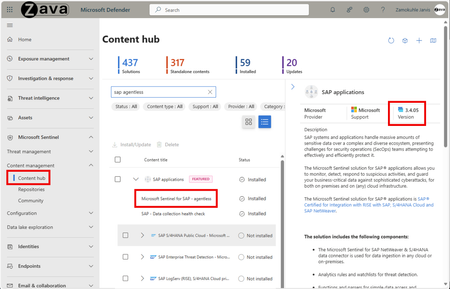
Dear Community, Today is the day: Our new agentless connector for Microsoft Sentinel Solution for SAP applications is Generally Available now! Fully onboarded to SAP’s official Business Accelerator Hub and ready for prime time wherever your SAP systems are waiting – on-premises, hyperscalers, RISE, or GROW – to be protected. Let’s hear from an agentless customer: “With the Microsoft Sentinel Solution for SAP and its new agentless connector, we accelerated deployment across our SAP landscape without the complexity of containerized agents. This streamlined approach elevated our SOC’s visibility into SAP security events, strengthened our compliance posture, and enabled faster, more informed incident response” SOC Specialist, North American aviation company Use the video below to kick off your own agentless deployment today. #Kudos to the amazing mvigilante for showing us around the new connector! But we didn’t stop there! Security is being reengineered for the AI era - moving from static, rule-based controls to platform-driven, machine-speed defence that anticipates threats before they strike. Attackers think in graphs - Microsoft does too. We’re bringing relationship-aware context to Microsoft Security - so defenders and AI can see connections, understand the impact of a potential compromise (blast radius), and act faster across pre-breach and post-breach scenarios including SAP systems - your crown jewels. See it in action in below phishing-compromise which lead to an SAP login bypassing MFA with followed operating-system activities on the SAP host downloading trojan software. Enjoy this clickable experience for more details on the scenario. Shows how a phishing compromise escalated to an SAP MFA bypass, highlighting cross-domain correlation. The Sentinel Solution for SAP has AI-first in mind and directly integrates with our security platform on the Defender portal for enterprise-wide signal correlation, Security Copilot reasoning, and Sentinel Data Lake usage. Your real-time SAP detections operate on the Analytics tier for instant results and threat hunting, while the same SAP logs get mirrored to the lake for cost-efficient long-term storage (up to 12 years). Access that data for compliance reporting or historic analysis through KQL jobs on the lake. No more – yeah, I have the data stored somewhere to tick the audit report check box – but be able to query and use your SAP telemetry in long term storage at scale. Learn more here. Findings from the Agentless Connector preview During our preview we learned that majority of customers immediately profit from the far smoother onboarding experience compared to the Docker-based approach. Deployment efforts and time to first SAP log arrival in Sentinel went from days and weeks to hours. ⚠️ Deprecation notice for containerized data connector agent ⚠️ The containerised SAP data connector will be deprecated on September 14th, 2026. This change aligns with the discontinuation of the SAP RFC SDK, SAP's strategic integration roadmap, and customer demand for simpler integration. Migrate to the new agentless connector for simplified onboarding and compliance with SAP’s roadmap. All new deployments starting October 31, 2025, will only have the new agentless connector option, and existing customers should plan their migration using the guidance on Microsoft Learn. It will be billed at the same price as the containerized agent, ensuring no cost impact for customers. Note📌: To support transition for those of you on the Docker-based data connector, we have enhanced our built-in KQL functions for SAP to work across data sources for hybrid and parallel execution. Follow our agentless migration playlist for a smooth transition. Spotlight on new Features with agentless Inspired by the feedback of early adopters we are shipping two of the most requested new capabilities with GA right away. Customizable polling frequency: Balance threat detection value (1min intervals best value) with utilization of SAP Integration Suite resources based on your needs. ⚠️Warning! Increasing the intervals may result in message processing truncation to avoid SAP CPI saturation. See this blog for more insights. Refer to the max-rows parameter and SAP documentation to make informed decisions. Customizable API endpoint path suffix: Flexible endpoints allow running all your SAP security integration flows from the agentless connector and adherence to your naming strategies. Furthermore, you can add the community extensions like SAP S/4HANA Cloud public edition (GROW), the SAP Table Reader, and more. Displays the simplified onboarding flow for the agentless SAP connector You want more? Here is your chance to share additional feature requests to influence our backlog. We would like to hear from you! Getting Started with Agentless The new agentless connector automatically appears in your environment – make sure to upgrade to the latest version 3.4.05 or higher. Sentinel Content Hub View: Highlights the agentless SAP connector tile in Microsoft Defender portal, ready for one-click deployment and integration with your security platform The deployment experience on Sentinel is fully automatic with a single button click: It creates the Azure Data Collection Endpoint (DCE), Data Collection Rule (DCR), and Microsoft Entra ID app registration assigned with RBAC role "Monitoring Metrics Publisher" on the DCR to allow SAP log ingest. Explore partner add-ons that build on top of agentless The ISV partner ecosystem for the Microsoft Sentinel Solution for SAP is growing to tailor the agentless offering even further. The current cohort has flagship providers like our co-engineering partner SAP SE themselves with their security products SAP LogServ & SAP Enterprise Threat Detection (ETD), and our mutual partners Onapsis and SecurityBridge. Ready to go agentless? ➤ Get started from here ➤ Explore partner add-ons here. ➤ Share feature requests here. Next Steps Once deployed, I recommend to check AryaG’s insightful blog series for details on how to move to production with the built-in SAP content of agentless. Looking to expand protection to SAP Business Technology Platform? Here you go. #Kudos to the amazing Sentinel for SAP team and our incredible community contributors! That's a wrap 🎬. Remember: bringing SAP under the protection of your central SIEM isn't just a checkbox - it's essential for comprehensive security and compliance across your entire IT estate. Cheers, Martin2KViews1like0CommentsEndpoint and EDR Ecosystem Connectors in Microsoft Sentinel
Most SOCs operate in mixed endpoint environments. Even if Microsoft Defender for Endpoint is your primary EDR, you may still run Cisco Secure Endpoint, WithSecure Elements, Knox, or Lookout in specific regions, subsidiaries, mobile fleets, or regulatory enclaves. The goal is not to replace any tool, but to standardize how signals become detections and response actions. This article explains an engineering-first approach: ingestion correctness, schema normalization, entity mapping, incident merging, and cross-platform response orchestration. Think of these connectors as four different lenses on endpoint risk. Two provide classic EDR detections (Cisco, WithSecure). Two provide mobile security and posture signals (Knox, Lookout). The highest-fidelity outcomes come from correlating them with Microsoft signals (Defender for Endpoint device telemetry, Entra ID sign-ins, and threat intelligence). Cisco Secure Endpoint Typical signal types include malware detections, exploit prevention events, retrospective detections, device isolation actions, and file/trajectory context. Cisco telemetry is often hash-centric (SHA256, file reputation) which makes it excellent for IOC matching and cross-EDR correlation. WithSecure Elements WithSecure Elements tends to provide strong behavioral detections and ransomware heuristics, often including process ancestry and behavioral classification. It complements hash-based detections by providing behavior and incident context that can be joined to Defender process events. Samsung Knox Asset Intelligence Knox is posture-heavy. Typical signals include compliance state, encryption status, root/jailbreak indicators, patch level, device model identifiers and policy violations. This data is extremely useful for identity correlation: it helps answer whether a successful sign-in came from a device that should be trusted. Lookout Mobile Threat Defense Lookout focuses on mobile threats such as malicious apps, phishing, risky networks (MITM), device compromise indicators, and risk scores. Lookout signals are critical for identity attack chains because mobile phishing is often the precursor to token theft or credential reuse. 2. Ingestion architecture: from vendor API to Sentinel tables Most third‑party connectors are API-based. In production, treat ingestion as a pipeline with reliability requirements. The standard pattern is vendor API → connector runtime (codeless connector or Azure Function) → DCE → DCR transform → Log Analytics table. Key engineering controls: Secrets and tokens should be stored in Azure Key Vault where supported; rotate and monitor auth failures. Use overlap windows (poll slightly more than the schedule interval) and deduplicate by stable event IDs. Use DCR transforms to normalize fields early (device/user/IP/severity) and to filter obviously low-value noise. Monitor connector health and ingestion lag; do not rely on ‘Connected’ status alone. Ingestion health checks (KQL) // Freshness & lag per connector table (adapt table names to your workspace) let lookback = 24h union isfuzzy=true (<CiscoTable> | extend Source="Cisco"), (<WithSecureTable> | extend Source="WithSecure"), (<KnoxTable> | extend Source="Knox"), (<LookoutTable> | extend Source="Lookout") | where TimeGenerated > ago(lookback) | summarize LastEvent=max(TimeGenerated), Events=count() by Source | extend IngestDelayMin = datetime_diff("minute", now(), LastEvent) | order by IngestDelayMin desc // Schema discovery (run after onboarding and after connector updates) Cisco | take 1 | getschema WithSecureTable | take 1 | getschema Knox | take 1 | getschema Lookout | take 1 | getschema 3. Normalization: make detections vendor-agnostic The most common failure mode in multi-EDR SOCs is writing separate rules per vendor. Instead, build one normalization function that outputs a stable schema. Then write rules once. Recommended canonical fields: Vendor, AlertId, EventTime, SeverityNormalized DeviceName (canonical), AccountUpn (canonical), SourceIP FileHash (when applicable), ThreatName/Category CorrelationKey (stable join key such as DeviceName + FileHash or DeviceName + AlertId) // Example NormalizeEndpoint() pattern. Replace column_ifexists(...) mappings after getschema(). let NormalizeEndpoint = () { union isfuzzy=true ( Cisco | extend Vendor="Cisco" | extend DeviceName=tostring(column_ifexists("hostname","")), AccountUpn=tostring(column_ifexists("user","")), SourceIP=tostring(column_ifexists("ip","")), FileHash=tostring(column_ifexists("sha256","")), ThreatName=tostring(column_ifexists("threat_name","")), SeverityNormalized=tolower(tostring(column_ifexists("severity",""))) ), ( WithSecure | extend Vendor="WithSecure" | extend DeviceName=tostring(column_ifexists("hostname","")), AccountUpn=tostring(column_ifexists("user","")), SourceIP=tostring(column_ifexists("ip","")), FileHash=tostring(column_ifexists("file_hash","")), ThreatName=tostring(column_ifexists("classification","")), SeverityNormalized=tolower(tostring(column_ifexists("risk_level",""))) ), ( Knox | extend Vendor="Knox" | extend DeviceName=tostring(column_ifexists("device_id","")), AccountUpn=tostring(column_ifexists("user","")), SourceIP="", FileHash="", ThreatName=strcat("Device posture: ", tostring(column_ifexists("compliance_state",""))), SeverityNormalized=tolower(tostring(column_ifexists("risk",""))) ), ( Lookout | extend Vendor="Lookout" | extend DeviceName=tostring(column_ifexists("device_id","")), AccountUpn=tostring(column_ifexists("user","")), SourceIP=tostring(column_ifexists("source_ip","")), FileHash="", ThreatName=tostring(column_ifexists("threat_type","")), SeverityNormalized=tolower(tostring(column_ifexists("risk_level",""))) ) | extend CorrelationKey = iff(isnotempty(FileHash), strcat(DeviceName, "|", FileHash), strcat(DeviceName, "|", ThreatName)) | project TimeGenerated, Vendor, DeviceName, AccountUpn, SourceIP, FileHash, ThreatName, SeverityNormalized, CorrelationKey, * } 4. Entity mapping and incident merging Sentinel’s incident experience improves dramatically when alerts include entity mapping. Map Host, Account, IP, and File (hash) where possible. Incident grouping should merge alerts by DeviceName and AccountUpn within a reasonable window (e.g., 6–24 hours) to avoid alert storms. 5. Correlation patterns that raise confidence High-confidence detections come from confirmation across independent sensors. These patterns reduce false positives while catching real compromise chains. 5.1 Multi-vendor confirmation (two EDRs agree) NormalizeEndpoint() | where TimeGenerated > ago(24h) | summarize Vendors=dcount(Vendor), VendorSet=make_set(Vendor, 10) by DeviceName | where Vendors >= 2 5.2 Third-party detection confirmed by Defender process telemetry let tp = NormalizeEndpoint() | where TimeGenerated > ago(6h) | where ThreatName has_any ("powershell","ransom","credential","exploit") | project TPTime=TimeGenerated, DeviceName, AccountUpn, Vendor, ThreatName tp | join kind=inner ( DeviceProcessEvents | where Timestamp > ago(6h) | where ProcessCommandLine has_any ("EncodedCommand","IEX","FromBase64String","rundll32","regsvr32") | project MDETime=Timestamp, DeviceName=tostring(DeviceName), Proc=ProcessCommandLine ) on DeviceName | where MDETime between (TPTime .. TPTime + 30m) | project TPTime, MDETime, DeviceName, Vendor, ThreatName, Proc 5.3 Mobile phishing signal followed by successful sign-in let mobile = NormalizeEndpoint() | where TimeGenerated > ago(24h) | where Vendor == "Lookout" and ThreatName has "phish" | project MTDTime=TimeGenerated, AccountUpn, DeviceName, SourceIP mobile | join kind=inner ( SigninLogs | where TimeGenerated > ago(24h) | where ResultType == 0 | project SigninTime=TimeGenerated, AccountUpn=tostring(UserPrincipalName), IPAddress, AppDisplayName ) on AccountUpn | where SigninTime between (MTDTime .. MTDTime + 30m) | project MTDTime, SigninTime, AccountUpn, DeviceName, SourceIP, IPAddress, AppDisplayName 5.4 Knox posture and high-risk sign-in let noncompliant = NormalizeEndpoint() | where TimeGenerated > ago(7d) | where Vendor=="Knox" and ThreatName has "NonCompliant" | project DeviceName, AccountUpn, KnoxTime=TimeGenerated noncompliant | join kind=inner ( SigninLogs | where TimeGenerated > ago(7d) | where RiskLevelDuringSignIn in ("high","medium") | project SigninTime=TimeGenerated, AccountUpn=tostring(UserPrincipalName), RiskLevelDuringSignIn, IPAddress ) on AccountUpn | where SigninTime between (KnoxTime .. KnoxTime + 2h) | project KnoxTime, SigninTime, AccountUpn, DeviceName, RiskLevelDuringSignIn, IPAddress 6. Response orchestration (SOAR) design Response should be consistent across vendors. Use a scoring model to decide whether to isolate a device, revoke tokens, or enforce Conditional Access. Prefer reversible actions, and log every automation step for audit. 6.1 Risk scoring to gate playbooks let SevScore = (s:string) { case(s=="critical",5,s=="high",4,s=="medium",2,1) } NormalizeEndpoint() | where TimeGenerated > ago(24h) | extend Score = SevScore(SeverityNormalized) | summarize RiskScore=sum(Score), Alerts=count(), Vendors=make_set(Vendor, 10) by DeviceName, AccountUpn | where RiskScore >= 8 | order by RiskScore desc High-severity playbooks typically execute: (1) isolate device via Defender (if onboarded), (2) revoke tokens in Entra ID, (3) trigger Conditional Access block, (4) notify and open ITSM ticket. Medium-severity playbooks usually tag the incident, add watchlist entries, and notify analysts.194Views4likes1CommentWhat’s New in Microsoft Sentinel: March 2026
March brings a set of updates to Microsoft Sentinel focused on helping your SOC automate faster, onboard data with less friction, and detect threats across more of your environment. This month's updates include natural-language playbook generation for more flexible SOAR workflows, streamlined real-time data ingestion with CCF Push, and expanded Kubernetes visibility with a dedicated GKE connector. Together, these innovations help security teams simplify operations, move faster, and strengthen coverage without added complexity. And if you're heading to RSAC 2026, check out how to join us for Microsoft Pre-Day below. What’s new Microsoft Sentinel playbook generator brings natural-language automation to SOC workflows The Microsoft Sentinel playbook generator lets you design and generate fully functional, code-based playbooks by describing what you need in natural language. Instead of relying on rigid templates and limited action libraries, you describe the workflow you want, and the generator produces a Python playbook with documentation and a visual flowchart. This has been a top ask from enterprise customers looking for more flexible automation in their SIEM workflows. The playbook generator works across Microsoft and third-party tools. By defining an Integration Profile with a base URL, authentication method, and credentials, it can create dynamic API calls without predefined connectors. That means you can automate tasks like team notifications, ticket updates, data enrichment, or incident response across your environment, then validate playbooks against real alerts and refine through chat or manual edits. You keep full transparency into the generated code and full control to customize it. Watch a demo and learn more. CCF Push delivers seamless, real-time security data to Microsoft Sentinel (public preview) The Codeless Connector Framework (CCF) Push feature allows you to send security data directly to a Sentinel workspace in real time. Instead of configuring Data Collection Endpoints (DCE), Data Collection Rules (DCR), Entra app registrations, and RBAC assignments, you press "Deploy" and Sentinel sets up all the resources for you. Built on the Log Ingestion API, CCF Push supports high-throughput ingestion, data transformation before ingestion, and direct delivery to system tables to speed up SOC detection and response and to enable more flexible access to critical security telemetry. This opens pathways to advanced scenarios, including data lake integrations and agentic AI use cases. Sentinel solution developers can begin leveraging CCF Push immediately. Partners like Keeper Security, Obsidian Security, and Varonis are already using CCF Push to stream security data into Sentinel. Learn more and check out the getting started guide. Detect threats across GKE clusters in Microsoft Sentinel with a dedicated CCF connector (general availability) A dedicated data connector for Google Kubernetes Engine (GKE) is available in the Microsoft Sentinel content hub, built on the Codeless Connector Framework (CCF). The connector ingests GKE cluster activity, workload behavior, and security events into the GKEAudit Log Analytics table, bringing GKE monitoring in line with how Azure Kubernetes Service (AKS) clusters are monitored in Sentinel today. It includes Data Collection Rule (DCR) support, data lake-only ingestion, and workspace transformation support so you can filter or modify incoming data before it reaches its destination. For security teams running workloads on GKE, this means you can apply Sentinel analytics, workbooks, and hunting queries across your GKE signals alongside the rest of your environment, giving you consistent visibility into Kubernetes threats whether your clusters run on Azure or Google Cloud. Get the GKE data connector Solve hybrid identity challenges with an RSA agent on Microsoft Sentinel data lake and Security Copilot RSA has built an agentic solution that combines RSA ID Plus telemetry with Microsoft Sentinel's data lake and Security Copilot agents. The integration ingests administrative identity telemetry from RSA ID Plus into the Sentinel data lake for cost-effective, long-term retention, then uses Security Copilot agents to assess that data and surface anomalous or risky admin behavior automatically. For security teams managing complex hybrid identity environments, this means identity risk signals from RSA are analyzed alongside your broader Sentinel telemetry without manual correlation. Admin accounts remain one of the highest-value targets for attackers, and having agentic AI continuously assessing identity patterns helps your SOC detect compromised credentials earlier and reduce investigation time. Learn more Join Microsoft Security at RSAC 2026 Pre-Day If you are heading to RSAC™ 2026 in San Francisco, join Microsoft Security for Pre-Day on Sunday, March 22 at the Palace Hotel. Hear from Vasu Jakkal, CVP of Microsoft Security Business, and other Microsoft Security leaders on how AI and autonomous agents are reshaping defense strategy. Product leaders will share what they are focused on for security operations, threat intelligence experts will discuss emerging trends, and Microsoft researchers will highlight the newest areas of security R&D. Register for Microsoft Pre-Day Explore all Microsoft experiences at RSAC 2026 Evaluate your SIEM platform for the agentic era with our strategic buyer's guide Our buyer’s guide from Microsoft Security helps security leaders evaluate what a modern SIEM platform should deliver. The Strategic SIEM Buyer's Guide walks through three essentials: building a unified foundation that is future-proof, accelerating detection and response with AI, and maximizing ROI with faster time to value. Whether you are assessing migration from a legacy on-premises SIEM or benchmarking your current platform, the guide offers practical buyer's tips and capability checklists grounded in real outcomes, including how organizations using Sentinel have achieved a 44% reduction in total cost of ownership and 93% faster deployment times. Learn more Additional resources Sign up for upcoming events: Mar 11: Microsoft Security Day (in-person, Mumbai) Mar 18: Tech brief: Next‑Generation Security Operations with Microsoft Mar 19: Microsoft Security Immersion Event: Shadow Hunter (in-person, Toronto) Mar 23-26: Microsoft Security at RSAC 2026 (in-person, San Francisco) Mar 25: Microsoft Tech Brief: Modernize security operations with a unified platform Apr 2: Master SecOps in the AI Era: Kickstart Your SC-200 Certification Challenge Stay connected Check back each month for the latest innovations, updates, and events to ensure you’re getting the most out of Microsoft Sentinel. We’ll see you in the next edition!1KViews3likes0Comments
Top 5 Microsoft Sentinel Queries for Threat Hunting
Threat hunting in Microsoft Sentinel goes beyond relying on scheduled analytics rules. It’s about proactively asking better questions of your data to uncover stealthy or emerging attacker behavior before it turns into an incident. Effective hunting helps security teams spot activity that may never trigger an alert but still represents meaningful risk. Over time, these proactive hunts strengthen overall detection coverage and improve SOC maturity. In this post, I’ll walk through five high‑value Sentinel hunting queries that security teams can use to uncover suspicious activity across identity, endpoints, and cloud resources. Each example focuses on why the hunt matters and what attacker behavior it can reveal. To make these hunts actionable and measurable, each query is explicitly mapped to MITRE ATT&CK tactics and techniques. This alignment helps teams communicate coverage, prioritize investigations, and evolve successful hunts into repeatable detections. 1. Rare Sign‑In Locations for Privileged Accounts Why it matters Privileged identities are prime targets. A successful sign‑in from an unusual geography may indicate compromised credentials or token theft. What to hunt Look for successful sign‑ins by privileged users from locations they rarely use. // MITRE ATT&CK: T1078 (Valid Accounts), T1078.004 (Cloud Accounts) | Tactic: Initial Access SigninLogs | where ResultType == 0 | where UserPrincipalName has_any ("admin", "svc") | summarize count() by UserPrincipalName, Location | join kind=leftanti ( SigninLogs | where TimeGenerated < ago(30d) | summarize count() by UserPrincipalName, Location ) on UserPrincipalName, Location What to investigate next Conditional Access policies applied MFA enforcement status Correlation with device compliance or impossible travel alerts 2. Multiple Failed Logons Followed by Success Why it matters This pattern often indicates password spraying, brute force activity, or attackers testing credential validity before gaining access. What to hunt // MITRE ATT&CK: T1110 (Brute Force), T1110.003 (Password Spraying), T1110.001 (Password Guessing) | Tactic: Credential Access // Related: T1078 (Valid Accounts) once authentication succeeds SigninLogs | summarize Failed=countif(ResultType != 0), Success=countif(ResultType == 0) by UserPrincipalName, bin(TimeGenerated, 1h) | where Failed > 5 and Success > 0 What to investigate next IP reputation and ASN Whether failures span multiple users (spray behavior) Subsequent mailbox, SharePoint, or Azure activity 3. Unusual Process Execution on Endpoints Why it matters Attackers often use “living off the land” binaries (LOLBins) such as powershell.exe, wmic.exe, or rundll32.exe to evade detection. What to hunt // MITRE ATT&CK: T1059 (Command and Scripting Interpreter), // T1059.001 (PowerShell), T1059.003 (Windows Command Shell) | Tactic: Execution // Related: T1218 (Signed Binary Proxy Execution) when rundll32 and other signed binaries are abused DeviceProcessEvents | where FileName in~ ("powershell.exe", "wmic.exe", "rundll32.exe") | where InitiatingProcessFileName !in~ ("explorer.exe", "services.exe") | project TimeGenerated, DeviceName, FileName, ProcessCommandLine, InitiatingProcessFileName, InitiatingProcessCommandLine What to investigate next Encoded or obfuscated command lines Parent process legitimacy User context and device risk score 4. Newly Created or Modified Service Principals Why it matters Service principals are often abused for persistence or privilege escalation in Azure environments. What to hunt // MITRE ATT&CK: T1098 (Account Manipulation), T1098.001 (Additional Cloud Credentials) | Tactic: Persistence AuditLogs | where OperationName in ("Add service principal", "Update service principal") | project TimeGenerated, InitiatedBy, TargetResources, OperationName What to investigate next Assigned API permissions or directory roles Token usage after creation Correlation with unfamiliar IP addresses 5. Rare Azure Resource Access Patterns Why it matters Attackers exploring your environment often access subscriptions or resource groups they’ve never touched before. What to hunt // MITRE ATT&CK: T1526 (Cloud Service Discovery), T1069.003 (Permission Groups Discovery: Cloud) | Tactic: Discovery AzureActivity | summarize count() by Caller, ResourceGroup | join kind=leftanti ( AzureActivity | where TimeGenerated < ago(30d) | summarize count() by Caller, ResourceGroup ) on Caller, ResourceGroup What to investigate next Role assignments for the caller Whether access aligns with job function Any subsequent configuration changes Summary Table This table summarizes each Sentinel threat hunting query and maps it directly to the corresponding MITRE ATT&CK tactic and technique. By aligning hunts to ATT&CK, security teams can clearly communicate what adversary behaviors are being proactively investigated and identify gaps in coverage. This mapping also makes it easier to prioritize hunts, measure maturity, and transition high‑value hunts into analytics rules over time. Sentinel Hunt MITRE Tactic MITRE Technique Rare privileged sign‑ins Initial Access T1078 – Valid Accounts Failed then successful logons Credential Access T1110 – Brute Force LOLBin execution Execution T1059 / T1218 Service principal changes Persistence T1098.001 Rare resource access Discovery T1526 / T1069.003 Final Thoughts Threat hunting in Microsoft Sentinel is most effective when it’s continuous, hypothesis‑driven, and contextual. These queries are starting points, not finished detections. Tune them based on your environment, enrich them with UEBA insights, and align your hunts to MITRE ATT&CK techniques, as outlined in your existing Sentinel content strategy. If you consistently run hunts like these, you’ll catch suspicious behavior before it triggers an alert or before an attacker reaches their objective.557Views0likes0CommentsUnlocking value with Microsoft Sentinel data lake
As security telemetry explodes and AI‑driven defense becomes the norm, it is critical to centralize and retain massive volumes of data for deep analysis and long‑term insights. Security teams are fundamentally rethinking how they manage, analyze, and act on security data. The Microsoft Sentinel data lake is a game changer for modern security operations, providing the foundation for agentic defense, deeper insights, and graph‑based enrichment. Security teams can centralize signals, simplify data management, and run advanced analytics, without compromising costs or performance. Across industries, organizations are using the Sentinel data lake to unify distributed data, search across years of telemetry, correlate sophisticated threats using graph-powered analytics, and operationalize agentic workflows at scale, turning raw security data into actionable intelligence. In this blog we will highlight some of the ways Sentinel data lake is transforming modern security operations. Unified, cost-effective security data foundation The challenge Many organizations tell us they have been forced to make difficult tradeoffs: high ingestion costs meant selectively choosing which logs to keep, often leaving data that might have been critical during an investigation. This selective logging creates blind spots, fragmented visibility, and unnecessary operational complexity across security operations. As a result, CISOs increasingly view selective logging as a material security risk to their organizations. How Sentinel data lake helps The Sentinel data lake removes these constraints by providing a cost‑effective, security‑optimized foundation for centralizing large volumes of security data. With the data lake, security teams can finally retain the breadth of telemetry they need without the financial penalties traditionally associated with long‑term security data retention. Organizations benefit from: A unified security data foundation designed to simplify investigations Long‑term, cost‑effective retention for up to 12 years Flexible querying across high‑volume data sets 6x data compression in storage, enabling significantly lower retention costs at scale Why it matters By unifying data in a purpose-built security data lake, SOC teams gain reliable, comprehensive visibility without the budget limitations that once forced them to choose between cost and completeness. This stronger foundation not only improves day‑to‑day investigations; it unlocks the advanced analytics and AI‑powered capabilities that future proof SOCs for AI driven defense. With full visibility restored, organizations are better equipped to identify emerging threats, respond with confidence, and modernize their security operations on their own terms. Historical security analysis The challenge SOC teams often struggle with short SIEM retention windows that limit how far back investigators can look. Critical logs age out before teams can fully piece together an attack, making root‑cause analysis slow and incomplete. This challenge grows when incidents span long periods, when new threat indicators emerge, or when organizations need to understand how a compromise evolved over time. Without access to historical telemetry, analysts face significant blind spots that weaken both investigations and hunting efforts. How Sentinel data lake helps The Sentinel data lake solves this by enabling organizations to retain and analyze years of security data at a fraction of the cost of traditional SIEM retention. Teams can use KQL and notebooks to run deep, long‑range investigations, perform advanced anomaly detection, and correlate older events that would have been impossible to recover in the analytics tier. Historical data enables retro analysis when new threat intel emerges. SOC teams can instantly look back to validate whether newly discovered indicators, techniques, or threat actors were already present in their environment. Organizations benefit from: Years of cost‑effective retention that extend far beyond traditional SIEM windows Deep forensic investigations using KQL and notebooks over historical data Improved anomaly detection with long‑range patterns and baselines Faster scoping of incidents with access to full historical context Why it matters By unlocking access to years of searchable telemetry, SOC teams are no longer limited by short retention windows or forced to make compromises that weaken security. They can retrace the full scope of an incident, hunt for slow‑moving threats, and quickly respond to new IOCs, powered by the historical context modern attacks demand. This long‑range visibility strengthens both detection and response, giving organizations the confidence and continuity they need to stay ahead of evolving threats. Graph-powered attack-path visibility and entity correlation The challenge Traditional investigations often rely on reviewing logs in isolation, making it difficult to connect identity activity, endpoint behavior, cloud access, and threat intelligence in a meaningful way. As a result, SOC teams find it difficult to trace attack paths, understand lateral movement, and build complete investigative context. Without a unified view of how entities relate to each other, investigations become slow, fragmented, and are prone to missed signals. How Sentinel data lake helps The Sentinel data lake enables powerful graph‑based correlation across identity, asset, activity, and threat intelligence data. Using graph models, analysts can visually explore how entities connect, identify hidden attack paths, pinpoint exposed routes to sensitive assets, and understand the full blast radius of compromised accounts or devices. This graph‑driven context turns complex telemetry into intuitive visuals that dramatically accelerate both pre‑breach context and incident response. Organizations benefit from: Graph‑powered correlation across identity, asset, activity, and threat intelligence data Visualization of attack paths and lateral movement that logs alone cannot expose Context‑rich investigations supported by relationship‑driven insights Greater cross‑domain visibility that strengthens both detection and response Why it matters With graph‑powered context, SOC teams move beyond event‑by‑event analysis and gain a deep understanding of how their environment behaves as a system. This visibility speeds investigations, strengthens posture before attackers strike, and provides analysts with a clear, intuitive way to uncover relationships that traditional log searches simply can’t reveal. Agentic workflows powered by MCP server The challenge SOC teams are under constant pressure from rising alert volumes, repetitive manual investigative steps, and skill gaps that make consistent triage challenging. Even experienced analysts struggle to reason across large, distributed datasets, and junior analysts often lack the experience needed to understand complex threat scenarios. These challenges slow down response and increase the risk of missed signals. How the Sentinel data lake helps The Sentinel data lake, combined with the Model Context Protocol (MCP), enables AI agents to reason over unified, contextual security data using natural‑language prompts. Analysts can ask questions directly: “Does this user have other suspicious activity?” or “What assets are at risk?”, and agents automatically interpret the request, query the data lake, and return actionable insights. These AI‑powered workflows reduce repetitive effort, strengthen investigative consistency, and help teams operate at a higher level of speed and precision. Organizations benefit from: AI‑assisted investigations that reduce manual effort and accelerate triage Agentic workflows powered by MCP to automate multi‑step reasoning over unified data Natural‑language interactions that make complex queries accessible to all analysts Consistent, high‑quality analysis regardless of analyst experience level Why it matters By introducing agentic, AI‑driven workflows, SOC teams can automate time‑consuming tasks, reduce alert fatigue, and empower every analyst, regardless of seniority, to quickly arrive at high‑quality insights. This shift not only accelerates investigations but also frees teams to focus on high‑value, proactive security work. As organizations continue modernizing their SOC, agentic workflows represent a major step forward in bridging the gap between human expertise and scalable, AI‑powered analysis. The future of security operations starts here The Sentinel data lake is becoming the backbone of modern security operations—unifying security data, expanding investigative reach, and enabling graph‑driven, AI‑powered analysis at scale. By centralizing telemetry on a cost‑effective, AI‑ready foundation, and running advanced analytics on that data, security teams can move beyond fragmented insights to correlate threats with clarity and act faster with confidence. These four use cases are just the beginning. Whether you’re strengthening investigations, advancing threat hunting, operationalizing AI, or preparing your SOC for what’s next, the Sentinel data lake provides the scale, intelligence, and flexibility to reduce complexity and stay ahead of evolving threats. Now is the time to accelerate toward a more resilient, adaptive, and future‑ready security posture. Get started with Microsoft Sentinel data lake today485Views0likes0CommentsIntroducing the next generation of SOC automation: Sentinel playbook generator
Security teams today operate under constant pressure. They are expected to respond faster, automate more, and do so without sacrificing precision. Traditional security orchestration, automation and response (SOAR) approaches have helped, but they still rely heavily on rigid templates, limited action libraries, and workflows stretched across multiple portals. Building and maintaining automation is often slow and constrained at exactly the time organizations need more flexibility. Something needs to change – and with the introduction of AI and coding models the future of automation is going to look very different than it is today. Today, we’re introducing the Microsoft Sentinel playbook generator, a new way to design code-based playbooks using natural language. With the introduction of generative AI and coding models, coding itself is becoming democratized, and we are excited to bring these new capabilities into our experience. This release represents the first milestone in our next‑generation security automation journey. The playbook generator allows users to design and generate fully functional playbooks simply by describing what they need. The tool generates a Python playbook with documentation and a visual flowchart, streamlining workflows from creation to execution for greater efficiency. This approach is highly flexible, allowing users to automate tasks like team notifications, ticket updates, data enrichment, or incident response across Microsoft and third-party tools. By defining an Integration Profile (base URL, authentication, credentials), the playbook generator can create API calls dynamically without needing predefined connectors. The system also identifies missing integrations and guides users to add them from the Automation tab or within the authoring page Users especially value this capability, allowing for more advanced automations. Playbook creation starts by outlining the workflow. The playbook generator asks questions, proposes a plan, then generates code and documentation once approved. Users can validate playbooks with real alerts and refine code anytime through chat instructions or manual edits. This approach combines the speed of natural language with transparent code, enabling engineers to automate efficiently without sacrificing control or flexibility. Preview customers report that the playbook generator speeds up automation development, simplifies automations for teams, and enables flexible workflow customization without reliance on templates. The playbook generator focuses on fast, intuitive, natural‑language‑driven automation creation, supported by a powerful coding foundation. It aligns with how security teams want to work: flexible, integrated, and deeply customizable. We’re excited to see how customers will use this capability to simplify operations, eliminate repetitive work, and automate tasks that previously demanded deep engineering effort. This marks the start of a new chapter, as AI continues to evolve and reshape what’s possible in security automation. How to get started With just a few prerequisites in place, you can begin creating code‑based automations through natural‑language conversations, directly inside the Microsoft Defender portal. Here’s a quick guide to help you move from first steps to your first generated playbook: 1. Make sure the prerequisites are in place Before you open your first chat in the playbook generator, the AI coding agent behind the playbook generator, confirm that your environment is ready: Security Copilot enabled: Your tenant must have a Security Copilot workspace, configured to use a Europe or US-based capacity. Sentinel workspace in the Defender portal: Ensure your Microsoft Sentinel workspace is onboarded to the Microsoft Defender portal. 2. Ensure you have the right permissions To build and deploy generated playbooks, make sure you have the same permissions required to author Automation Rules—the Microsoft Sentinel Contributor role on the relevant workspaces or resource groups. 3. Configure your integration profiles Integration profiles allow the playbook generator to create and execute any dynamic API calls—one of the most powerful capabilities of this new system. Before you create your first playbook: Go to Automation → Integration Profiles in the Defender portal. Create a Graph API Integration Create Integration to the services you want to have in the playbook (Microsoft Graph, ticketing tools, communication systems, third‑party providers, or others). Provide the base URL, authentication method, and required credentials. 4. Create your first generated playbook From the Automation tab: Select Create → Generated Playbook. Give your playbook a name. 3. The embedded Visual Studio Code window opens— Start in plan mode by simply describing what you want your automation to do. Be explicit about: What data to extract What actions to perform Any conditions or branches Example prompt you can use: “Based on the alert, extract the user principal name, check if the account exists in Entra ID, and if it does, disable the account, create a ticket in ServiceNow, and post a message to the security team channel.” The playbook generator will guide the process, ask clarifying questions, propose a plan, and then—once approved—switch to Act mode to generate the full Python playbook, documentation with a visual flow diagram, and tests. Completing your first playbook marks the beginning of a more intuitive, responsive, and intelligent automation experience—one where your expertise and AI work side by side to transform how your SOC operates. This is more than a new tool; it’s a foundation that will continue to evolve, adapt, and empower defenders as security automation enters its next era. Watch a demo here: https://aka.ms/NLSOARDEMO For deeper guidance, advanced scenarios, and end‑to‑end instructions, you can explore the full playbook generator documentation: Generate playbooks using AI in Microsoft Sentinel | Microsoft Learn.5.7KViews8likes4CommentsAccelerate Your UEBA Journey: Introducing the Microsoft Sentinel Behaviors Workbook
In our recent announcement, we introduced the UEBA Behaviors layer - a breakthrough capability that transforms noisy, high-volume security telemetry into clear, human-readable behavioral insights. The Behaviors layer answers the critical question: "Who did what to whom, and why does it matter?" by aggregating and sequencing raw events into normalized, MITRE ATT&CK-mapped behaviors. But understanding what behaviors are is just the beginning. The next question for SOC teams is: "How do I actually use behaviors to get value from day one?" Today, we announce the Microsoft Sentinel Behaviors Workbook (part of the “UEBA essentials solution” in the content hub) - a purpose-built, interactive analytics workbook that helps you extract maximum value from the Behaviors layer across your investigation, hunting, and detection workflows. Whether you're a SOC manager looking for high-level situational awareness, an analyst triaging an incident, or a threat hunter searching for hidden threats, this workbook provides the insights you need, when you need them. And the best thing? You can always make it your own! Why a Workbook? While the behaviors data is incredibly rich, knowing where to start and what questions to ask can present a learning curve. The UEBA Behaviors Workbook solves this by providing pre-built, validated analytics across three core SOC workflows: Overview: High-level metrics and trends for leadership and SOC managers Investigation: Deep-dive timeline analysis for incident response Hunting: Proactive threat discovery with anomaly detection and attack chain analysis Think of the workbook as your guided tour through the Behaviors layer - it surfaces the most actionable insights automatically, while still giving you the flexibility to drill down and customize as needed. Quick Recap: What Are UEBA Behaviors? Before diving into the workbook, let's briefly recap what makes the Behaviors layer unique: Behaviors are neutral, descriptive observations - they explain what happened, not whether it's malicious. They aggregate and sequence raw events from sources like AWSCloudTrail, GCPAuditLog and CommonSecurityLog data into unified, human-readable summaries. Each behavior is enriched with MITRE ATT&CK mappings, entity roles, and natural-language explanations. They bridge the gap between raw logs and alerts, providing an abstraction layer that makes investigation and detection dramatically faster. In essence: behaviors turn "what's in the logs" into "what actually happened in my environment" - without requiring deep expertise in every log schema. The Behaviors Workbook: Three Tabs, Three Workflows The Behaviors Workbook is organized into three tabs; each designed for a specific SOC persona and use case. Let's walk through each one. Tab 1: Overview - Situational Awareness at a Glance Who it's for: SOC managers, leadership, and anyone who needs a quick pulse-check on what's happening in the environment. What it provides: The Overview tab delivers high-level metrics and visualizations including key metrics tiles, timeline trend charts, MITRE coverage heatmaps, and behavior type distribution that help you quickly spot spikes, patterns, or anomalies requiring investigation. Use case example: A SOC manager opens the Overview tab and immediately sees an unusual spike in behaviors concentrated in the Defense Evasion and Persistence tactics. The Behavior Type Distribution reveals a surge in "Failed IAM Identity Provider Configuration Attempts" and "AWS EC2 Security Group Rule Modifications Observed", signaling potential attack preparation that needs immediate triage. Tab 2: Hunting - Proactive Threat Discovery Who it's for: Threat hunters, purple teams, and proactive security analysts. What it does: The Hunting tab empowers hunters to discover emerging threats before they become incidents by surfacing anomalous patterns, rare behaviors, and potential attack chains. Unlike the Investigation tab (which reacts to known incidents), Hunting is about proactive discovery. Key capabilities: Use case example: Rarest Behaviors A threat hunter reviews the "Rarest Behaviors" panel, filtered for the past 7 days. They notice a behavior titled "Inbound remote management session from external address" that has only occurred 5 times in the entire environment. Pivoting to the BehaviorEntities table, they discover all 5 instances involve Palo Alto firewall logs showing the same external IP targeting different internal management interfaces - a clear sign of targeted reconnaissance. Use case example: Attack Chain Detector The Attack Chain Detector highlights an AWS IAM role (arn:aws:iam::123456789012:role/CompromisedRole) appearing across 5 distinct MITRE tactics: Reconnaissance, Persistence, Defense Evasion, Credential Access, and Impact. Reviewing the associated behaviors reveals: This multi-stage pattern - invisible when looking at individual CloudTrail events - is now crystal clear. The hunter initiates an immediate investigation. Use case example: CyberArk Vault Anomaly The workbook shows that the "CyberArk Vault CPM Automatic Detection Operations" behavior had an average of 120 instances per day over the past week, but today it has 1,847 instances - a 15x increase. Drilling into the behaviors reveals that a single service account is performing mass privileged account access operations across multiple safes - potential insider threat or compromised privileged account. This insightful information would have been buried in verbose Vault audit logs, but velocity tracking surfaces it immediately. Tab 3: Investigation - Deep-Dive Analysis for Incident Response Who it's for: SOC analysts, incident responders, and anyone investigating a specific incident or specific entities. What it does: The Investigation tab transforms how analysts respond to incidents by providing comprehensive behavioral context for the entities involved. Instead of manually querying multiple log sources and stitching together timelines, analysts get an automated, pre-correlated view of everything those entities did before, during, and after the incident. How to use it: When investigating an incident, you provide: The entities involved (users, machines, IPs, etc.) The time of incident generation Time range before the first alert (e.g., 24 hours before) Time range after the last alert (e.g., 12 hours after) Use case example: An alert fires for "Suspicious AWS IAM Activity" involving IAM user AdminUser123. The analyst opens the Investigation tab, enters the user identity as the entity, sets the incident time, and configures a 24-hour lookback and 12-hour look-forward window. The analyst immediately sees: Before the incident: Normal behaviors like "AWS EC2 Security Group Information Retrieval" show routine reconnaissance. During the incident: Multiple instances of "Failed IAM Identity Provider Configuration Attempts", indicating the attacker is trying to establish persistence through SAML federation After the incident: "AWS Resource Deletion Monitoring" behaviors showing potential attempted cleanup of evidence. This comprehensive view - which would have taken 30+ minutes of manual querying across CloudTrail, VPC Flow Logs, and IAM logs - is now available in seconds and is easily readable and provides rich context. Real Impact on Your SOC The Behaviors Workbook represents a fundamental shift in how SOCs can operate: Investigation time drops from hours to minutes through automated entity-centric behavioral analysis. Threat hunting becomes accessible to junior analysts through pre-built queries that surface rare behaviors and attack chains. Leadership gains visibility into MITRE ATT&CK coverage and behavior trends without needing to know KQL. Detection engineering is faster because rare behaviors and velocity anomalies are automatically surfaced as high-fidelity signals. The workbook doesn't just give you data - it gives you insights you can act on immediately. Getting Started Prerequisites: A Microsoft Sentinel workspace onboarded to the Microsoft Defender portal. The Behaviors layer enabled for your workspace (Settings → UEBA → Behaviors layer) and at least one supported data source configured (list is always updated in the documentation). The Workbook uses the Log Analytics table names, SentinelBehaviorInfo and SentinelBehaviorEntities. The “Sentinel” prefix isn’t needed when querying behaviors in Advanced Hunting. Installation: Navigate to Microsoft Sentinel → Content Hub. Search for the "UEBA essentials" solution in the gallery. Click Save to add it to your workspace. One of the content items is the UEBA behaviors workbook (you will also find there a Workbook for UEBA and great hunting queries to get you started with UEBA). Open the workbook and select your time range and parameters. Adjust the queries as needed for your use cases. We Want Your Feedback As you start using the workbook, let us know: Which tab do you find most valuable? What additional visualizations or hunting queries would help your workflow? What should be integrated into the portal, and where? Share your thoughts in the comments below or reach out to our team directly. For more details on the Behaviors layer, see our original announcement blog post and https://learn.microsoft.com/en-us/azure/sentinel/entity-behaviors-layer. You will find those links in the “Resources” tab of the Workbook for ease of use.600Views3likes0CommentsDisrupt AWS attacks automatically in Microsoft Sentinel
Attacks move faster than security teams can react. They spread across identities, endpoints, and SaaS apps in minutes, overwhelming analysts with signals and leaving little time to act. By the time an incident is investigated, the attacker has often already moved on escalating impact and business continuity. Organizations need a way to respond and get ahead of these attacks. That’s why we built automatic attack disruption, Microsoft’s AI‑driven self‑defense that stops in‑progress, multi‑domain attacks like ransomware in minutes before they can cause damage. At Ignite, we expanded attack disruption to support critical data sources ingested through Microsoft Sentinel: Amazon Web Services (AWS) and Proofpoint. This enables real-time detection and automatic containment of threats like phishing and identity compromise on top of your log data, fundamentally turning your SIEM into a threat protection solution. Built on the industry’s most comprehensive XDR, Microsoft Defender applies Microsoft’s vast threat intelligence, deep security research, and powerful threat protection capabilities across any security signal so every log source in a customer’s environment benefits from the same high-fidelity detection, investigation, and response. AWS: From Initial Access to real‑time containment As organizations increasingly build and run critical workloads on AWS, the cloud has become one of the most attractive and frequently targeted attack surfaces for modern threat actors. With 45% of all data breaches in 2025 involving cloud‑based assets and 81% of organizations experiencing at least one cloud security incident in the past year, attackers are capitalizing on exposed identities at unprecedented scale. To safeguard customers, attack disruption now disrupts two identity scenarios that most often drive attacker progression. 1. Compromised AWS federated user In this scenario, a compromised Entra ID account is used to access AWS resources by assuming a federated AWS role. Automatic attack disruption will automatically disable the Entra ID user account and revoke the session, preventing the attacker from performing any further actions. Additionally, the federated AWS session will be revoked (via a deny policy) to immediately cut off the attacker’s activity in AWS. 2. Compromised AWS IAM user In this scenario, an AWS IAM account is compromised by the attacker. Attack disruption contains the account by applying a deny policy, which restricts any further activity from the compromised account in AWS. Let’s look at a real-world scenario where attack disruption stops an attack on AWS. In this incident, we can see the activity leading up to the attack in AWS and that it was automatically contained by attack disruption. Replaying the sequence: The first indication is a phishing campaign where emails were deleted after delivery. Following this, a suspicious sign‑in from the compromised user account appears, along with a new network connection, signaling potential account takeover. The attacker then uses the victim’s Entra ID credentials to federate into a privileged AWS account. With signals from Sentinel correlated with XDR, Defender reaches high‑confidence confirmation of compromise. Attack disruption automatically revokes the session token and disables both the compromised Entra ID account and the AWSAdminRole used by the attacker. But the attacker attempts to pivot by leveraging a secondary backdoor AWS account they had created earlier. Defender immediately detects this attempt and disables the backdoor account as well, preventing further lateral movement and neutralizing the intrusion completely. Coming back to the incident, an additional reconnaissance alert appears based on AI‑generated signal from the Security Copilot Dynamic Threat Detection Agent. This agent investigates incidents to reveal hidden or correlated attacker activity, uncovering more alerts, assets, and indicators. It enriches the attack story and accelerates response by providing a dynamically generated “What Happened” explanation that clarifies the suspicious behavior and why the alert was raised. Together, Defender’s AI-powered capabilities combined with Security Copilot agents demonstrate how modern SOC operations evolve from reactive triage to proactive, high‑impact defense. Summary By bringing your AWS data into Sentinel, you not only gain deep visibility and detection coverage, but you also unlock powerful AI-driven capabilities like automatic attack disruption through Microsoft Defender. These signals fuel protection, helping you stay ahead of attackers by accelerating response and reducing impact. Getting started Attack disruption uses telemetry ingested via the AWS S3 connector. See the documentation for setup requirements Read the Ignite 2025 news Discover and deploy content from the Content Hub744Views0likes0Comments