microsoft 365 developer program
68 Topics
Support for user tracking with insertfilefrombase64
We work in the Compliance space, that requires us to track users who made changes to a document. We also have an Add-in that utilizes insertfilefrombase64 method to insert/replace content in our documents. When we use this method, the user is getting tracked as "Unknown" thus failing to track the user who made such changes. Requesting that this be changed and updated to track the user. If the same was done manually, the change is reflected against the user. a relevant bug was raised which was marked as an dev enhancement request by the team. https://github.com/OfficeDev/office-js/issues/5472
Feature Request for Enhanced Outlook Add-in Surfaces
Feature Request for Enhanced Outlook Add-in Surfaces Request Title: Expandable/Pop-out Outlook Add-ins with Inline Compose/Reply Integration Products/Platforms: Microsoft Outlook Add-ins (Office.js) across Classic Outlook for Windows, New Outlook for Windows, Outlook for Mac, and Outlook on the web (OWA) Request Type: New extensibility capabilities / UI host surfaces for Outlook add-ins Priority: High (end-user productivity + adoption + enterprise usability) Background We use an Outlook add-in to integrate additional productivity tools into the email workflow to help users save time, reduce context switching, and improve execution quality. This is a core enablement pattern for enterprise users who spend significant time in Outlook. Today, our add-in runs primarily in the task pane, which has notable limitations in flexibility and available space. The current experience is increasingly cluttered and not user-friendly, especially for workflows that require richer UI, multiple steps, or contextual data. Additionally, the add-in is not seamlessly integrated into the new message compose and reply experience (i.e., the workflow is not inline with the compose/reply window), which limits usability for scenarios that must occur at the moment a user is authoring a message. Problem Statement Current task pane constraints lead to: Limited UI real estate (narrow layout, heavy scrolling, cramped forms, poor readability) No user-friendly expand/enlarge options to fit different workflows and screen sizes Reduced usability during compose/reply, where users need the tool inline with message authoring Lower adoption and productivity because the add-in experience feels disconnected and cumbersome In practice, users need more space and tighter integration at the exact point of work (compose/reply), without leaving Outlook or juggling multiple windows. Requested Features We request Microsoft to support the following add-in UI capabilities, ideally consistently across Classic Windows, New Outlook, and OWA: A) Expandable / Resizable Task Pane Allow users to resize/expand the add-in pane (wider layout; optional full-height behavior) Support a compact vs expanded mode with user preference persistence Outcome: Richer workflows become usable without redesigning into cramped layouts. B) Pop-out Add-in Experience Provide a supported pop-out window for the add-in (while maintaining context to the current item) Ensure pop-out works smoothly with enterprise policies and does not break the add-in lifecycle Outcome: Users can work with complex UI without sacrificing mail reading/authoring space. C) Inline Add-in Integration with Compose and Reply Enable add-in UI to appear inline within the compose/reply window (not just as a separate side pane) Support contextual actions/data entry during authoring (e.g., insert content, validate, attach artifacts, update records) Ensure consistent behavior for new compose and reply experiences Outcome: The tool is available at the moment users need it while writing responses, driving adoption and reducing errors. D) Add-in as a Mail Tab Provide a supported extension point for an add-in to appear as a tab in Mail, similar to “Focused/Other” Tab hosts a larger workspace for add-in workflows (e.g., triage/queue/workbench views) Outcome: A first-class workspace in Mail for workflows that don’t fit the task pane model. Key Enterprise Use Cases Multi-step workflows triggered from emails (triage, intake, approvals, routing) Rich forms and guided actions that are impractical in a narrow pane Compose/reply-time actions: insert approved templates/snippets, validate recipients/content, capture metadata, create/update tasks/records Dedicated mail workbench views via a tab for operational roles Acceptance Criteria Cross-client consistency: Classic Windows, New Outlook, and OWA supported with minimal divergence Next Steps for Microsoft Confirm roadmap/feasibility for: expandable task pane, add-in pop-out, inline compose/reply surface, and mail tab surface Provide recommended implementation model/APIs and opportunities for preview/early access for enterprise validation Screenshots for Reference
Microsoft Graph API Inplace Archival Mailbox
Hi Team, We are using Graph API to fetch in place archival mailbox for office 365. but can not fetch details, there was a document having an older folder name ' ArchiveMsgFolderRoot but this also not working. i have also searched possible solution to get this data but seems there is no support existing for same. It would be great if Graph API can provide support on fetching the same. Thanks1.5KViews7likes2CommentsExpose Revision Display Mode (Inline vs. Balloons) via Office.js
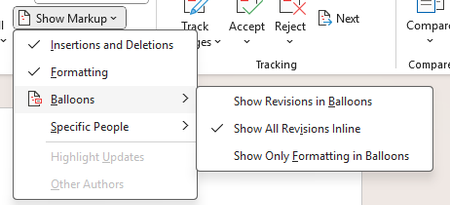
Currently, Office.js does not provide an API to retrieve the revision display mode used by Microsoft Word (inline or balloons) when change tracking is enabled. It would be highly valuable to expose this information through the Word JavaScript API, allowing add-ins to detect how tracked changes are displayed and adapt their behavior accordingly. This would enable more reliable handling of scenarios when change tracking is active. Use Case Add-ins that work with tracked changes need to understand whether revisions are shown inline or in balloons to ensure correct document manipulation and a consistent user experience across platforms (PC, Mac, iOS, and Office on the web).
Identify multiple embedded instance of the same add-in in a file as one
Summary By default, when a file is opened in Excel with a JS add-in installed and then saved, the JS add-in is automatically embedded in the file. In the current design all embedded add-ins will be attempted to load when the file is opened even if the embedded add-ins are the same. As a result, when these files are shared with other users who already have the same JS add-in installed with a different version or deployment method, Excel displays two instances of the same add-in in the tabs, or occasionally shows an error in the task pane if the version it is embedded is an older one. We first became aware of this issue when a user reported seeing our JS add-in appear twice in the ribbon, which led to confusion. Upon inspecting the affected file’s XML web extensions, we identified two versions of the same add-in embedded: one deployed via OMEX and another via exCatalog. After further investigation and filing a ticket with Microsoft Support, it was confirmed that this behavior is by design under the current implementation. Why This Matters While we understand that this behavior is expected by design, it remains problematic for users—it can cause confusion and potential issues with custom functions or with the add-in itself. Also, it is not clear for As of the moment there are no easy workaround for users to remove the duplicate/additional instance of the same JS add-in embedded in the file, this will also need to be done for every file that is suffering from this issue (has multiple instance of the same add-in embedded in the file w/ different version/deployment method). Proposed Change/s Update current design to be able to identify if the embedded adds-in is the same through checking and comparing a unique id so even if they have different deployment/version tags it will not be loaded/attempted to be loaded in the task pane. Alternatives Considered Provide an option in Officejs API to prevent embedding/referencing add-in in a file Benefits Prevents users from seeing the same add-in appear twice in the file Eliminate propagating errors in the task pane from trying to render the same add-in with the old version tag [Alternative considered] Allow users/dev to be able to control which add-in gets embedded in the file134Views8likes2CommentsDeveloper Dashboard Still Showing Old Expired Sandbox After New Sandbox Provisioned
Hi team, I need help with an issue involving the Microsoft 365 Developer Program sandbox. I deleted my old Developer Program profile and rejoined using my Outlook account. I received a new welcome email confirming that a new instant sandbox was provisioned on 10th November 2025, but my Developer Dashboard still shows my old, which expired on 3 November 2025. It has now been 5 days, and the dashboard has not refreshed or linked to the new sandbox tenant. Additional context: My previous sandbox should not have expired, because I was actively using it and did not violate any program terms. The incorrect expiration may have caused this backend sync issue. Here is what I have tried so far: Signing in and out across multiple browsers Using Incognito / Private mode Clearing Microsoft cookies and cache Clicking “Join Now” again Verifying the new welcome email Attempting to sign in directly at admin.microsoft.com Waiting the recommended 24 to 48 hours Contacting Microsoft Support (case 2511101410000272) The issue appears to be that my Developer Dashboard is still linked to the old, expired tenant instead of the newly provisioned sandbox. This looks like a backend synchronization problem that may require a manual re-link by the Microsoft Developer Program team. I would appreciate it if the backend team could help re-link my Developer Program profile to the new sandbox tenant.67Views0likes0CommentsDeveloper Dashboard Still Showing Old Expired Sandbox After New Instant Sandbox Was Provisioned
Hi team, I need help with an issue involving the Microsoft 365 Developer Program sandbox. I deleted my old Developer Program profile and rejoined using my Outlook account (email address removed for privacy reasons). I received a new welcome email confirming that a new instant sandbox was provisioned on 10th November, but my Developer Dashboard still shows my old, expired tenant: email address removed for privacy reasons expired on November. It has now been 5 days, and the dashboard has not refreshed or linked to the new sandbox tenant. Additional context: My previous sandbox should not have expired, because I was actively using it and did not violate any program terms. The incorrect expiration may have caused this backend sync issue. The issue appears to be that my Developer Dashboard is still linked to the old, expired tenant instead of the newly provisioned sandbox. This looks like a backend synchronization problem that may require a manual re-link by the Microsoft Developer Program team. I would appreciate it if the backend team could help re-link my Developer Program profile to the new sandbox tenant. Thank you, Dee21Views0likes0CommentsExpose SHA-256 or SHA-1 for Mail Attachments in Microsoft Graph
Problem Email attachments in Graph don’t include a content hash. To identify or match attachments, developers have to download the entire file first. That wastes bandwidth and time and increases exposure. OneDrive/SharePoint already return hashes, but mail does not, so experiences are inconsistent. Request Add a server-provided content hash to every mail attachment. Prefer SHA-256. If that’s not feasible initially, expose SHA-1 as a minimum to align with existing Drive item hashes. Benefits Faster and cheaper: avoid downloading large files just to tell if you already have them. Deduplication: detect repeated attachments across threads and mailboxes. Security operations: correlate attachments with threat intel by hash and triage suspicious emails without fetching payloads. eDiscovery and compliance: confidently match the same document across mail and files. Consistency: a predictable, uniform approach across Mail and OneDrive/SharePoint.Ability to Assign Custom Properties or Unique IDs to Individual Cells
Summary I'd like to request support for assigning custom metadata — such as unique IDs or arbitrary key-value pairs — directly to individual cells in Excel using the Office.js API. Why This Matters Currently, developers must rely on workarounds like named ranges, hidden metadata sheets, or cell notes to simulate per-cell identifiers. These approaches are either limited, fragile, or not scalable for large applications. Native support for cell-level metadata would unlock powerful use cases: Dynamic form builders Cell-level validation engines Workflow tracking Data lineage and audit trails Integration with external systems via stable cell references Proposed API Concept range.customProperties.add("id", "cell_001"); const id = range.customProperties.getItem("id").value; Or even: range.metadata = { id: "cell_001", status: "approved", validator: "admin" }; Benefits Eliminates reliance on fragile naming conventions Enables scalable, structured metadata management Improves developer experience and app robustness Alternatives Considered Named ranges: limited and global scope Notes/comments: visible to users, not structured Hidden metadata sheets: hard to maintain Custom XML parts: complex and not cell-specific Request Please consider adding support for cell-level metadata or custom properties in a future version of Office.js. Even a lightweight key-value store per cell would be a game-changer.654Views100likes2Comments
Retrieve the existing contents of a cell that invokes a function
Define the problem My Excel add-in has custom functions which call external APIs. These API calls are invoking complex models running in the cloud which can sometimes take minutes to complete and therefore return data to Excel. My users build large workbooks with potentially thousands of these functions. Often the user makes a change in their workbook which triggers all of these calculations again even though there's no change in the input data. An example would be insertion of a row or column. This causes huge pain for the end user. Solution Microsoft to update the Office JS API so that when a function is invoked it can check the contents of the cell that invoked the function. I seem to remember this was possible in the old COM add-ins but it's not possible in the Office JS add-ins. Why does this help My custom functions store both the API request and response in the data card (Excel.EntityCellValue) format. Since I effectively store the original API request in the cell, if the cell gets inadvertently invoked I can check the arguments of the functions (the input data) against the original API request and if nothing has changed then I can return the original API response stored in the cell. This is like cancelling a function but being able to return the original data rather than anything new. Alternatives I can implement caching, e.g. using IndexedDB, but that's not the ideal solution. The ideal is the above.