media
6 Topics
OneDrive Photos Restyle with AI-now rolling out on mobile and web
Photos capture real moments. With AI Restyle in OneDrive, you can reimagine them in fresh new styles-right where your photos already live. Meet AI Restyle Photos capture real moments. With AI Restyle in OneDrive, you can reimagine those moments in expressive new styles-right where your photos already live. With just a tap, transform everyday photos into cinematic posters, hand‑painted artwork, pencil sketches, anime‑inspired scenes, and more. Choose a style, watch a new version appear in seconds, and keep exploring until it feels just right. Through it all, the people, places, and memories you care about stay unmistakably yours-just seen in a fresh new light. What you can do with AI Restyle Create something beautiful instantly. Choose from a rotating set of one‑tap styles designed to match the content of your photo-so it’s easy to get a great result right away. New styles are added regularly, giving you fresh ways to reimagine your photos. Add a personal touch when you want. Include an optional prompt to guide the look-no design skills required. Explore until it feels right. Try multiple restyles, undo or redo changes, and keep experimenting until you find the look you love. Share in just a few taps. Go from viewing to restyling to sharing with your favourite apps-without ever leaving OneDrive Photos. Availability AI Restyle is rolling out on OneDrive for iOS, Android, and web for customers with a Microsoft 365 Premium subscription. Availability may vary by region as rollout continues. What’s next We’re continuing to expand AI-powered photo experiences in OneDrive-bringing AI Restyle to additional platforms and investing in new editing capabilities that help you create with confidence while keeping your photos authentic. Try it today Open OneDrive on iOS, Android, or web, sign in with a Microsoft 365 Premium account, open a photo, and tap on ‘AI Restyle’ to start exploring new styles. Have fun creating something new today! Try it on the OneDrive mobile app. iOS: Download Microsoft OneDrive from the App Store Android: Download Microsoft OneDrive from Google Play We’d love your feedback-use 👍👎 to help us improve AI Restyle. #Microsoft #OneDrive #Photos #iOS #Android #Web #AI1.1KViews1like0Comments
How to control Teams Peer-to-Peer calls
One of my end users reported poor video and audio quality during a call today. Upon investigation and trying a video call with this end user, I observed that audio and video media was being sent peer to peer directly between this end user and my own workstation. Ordinarily this would be fine, however, we are in different physical locations which are linked together by site to site VPN. VPN is not the best medium for real time video traffic. I like the idea of having peer to peer connections for end users who are in the same physical network but I would like for Teams media to NOT cross a site to site VPN link. What is the best way to accomplish this?4.7KViews0likes2Comments
Local Media Optimization - firewall setup for media between SBC and Teams Client
I'm planning to setup LMO in my company's network. SBC is in DMZ so I need to configure internal firewall between internal IP of SBC and clients IPs. Can anyone advise which ports need to be open for each direction to allow media flows for users located in local network?Solved2.1KViews0likes2CommentsAdd Audio-only blocking to Media autoplay blocking in Edge browser
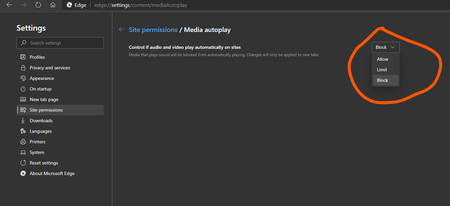
Currently the media Auto-play blocking options (Allow, Limit, Block) only apply to Videos. but what if we want the video to be auto-played, but its audio be muted by default? so I think these options needed to be added to that settings page which also has lots of vacant space left to be filled with useful options. edge://settings/content/mediaAutoplay Block Audio Block Video Block Audio and Video (should also block Auto-Buffering/preloading of media)3KViews5likes6Comments