mfa
152 Topics
Introducing the Entra Helpdesk Portal: A Zero-Trust, Dockerized ITSM Interface for Tier 1 Support
Hello everyone, If you manage identity in Microsoft Entra ID at an enterprise scale, you know the struggle: delegating day-to-day operational tasks (like password resets, session revocations, and MFA management) to Tier 1 and Tier 2 support staff is inherently risky. The native Azure/Entra portal is incredibly powerful, but it’s complex and lacks mandatory ITSM enforcement. Giving a helpdesk technician the "Helpdesk Administrator" role grants them access to a portal where a single misclick can cause a major headache. To solve this, I’ve developed the Entra Helpdesk Portal (Community Edition)—an open-source, containerized application designed to act as an isolated "airlock" between your support team and your Entra ID tenant. Why This Adds Value to Your Tenant Instead of having technicians log into the Azure portal, they log into this clean, Material Design web interface. It leverages a backend Service Principal (using MSAL and the Graph API) to execute commands on their behalf. Strict Zero Trust: Logging in via Microsoft SSO isn’t enough. The app intercepts the token and checks the user’s UPN against a hardcoded ALLOWED_ADMINS whitelist in your Docker environment file. Mandatory ITSM Ticketing: You cannot enforce ticketing in the native Azure Portal. In this app, every write action prompts a modal requiring a valid ticket number (e.g., INC-123456). Local Audit Logging: All actions, along with the actor, timestamp, and ticket number, are written to an immutable local SQLite database (audit.db) inside the container volume. Performance: Heavy Graph API reads are cached in-memory with a Time-To-Live (TTL) and smart invalidation. Searching for users or loading Enterprise Apps takes milliseconds. What Can It Do? Identity Lifecycle: Create users, auto-generate secure 16-character passwords, revoke sign-in sessions, reset passwords, and delete specific MFA methods to force re-registration. Diagnostics: View a user's last 5 sign-in logs, translating Microsoft error codes into plain English. Group Management: Add/remove members to Security and M365 groups. App/SPN Management: Lazy-load raw requiredResourceAccess Graph API payloads to audit app permissions, and instantly rotate client secrets. Universal Restore: Paste the Object ID of any soft-deleted item into the Recycle Bin tab to instantly resurrect it. How Easy Is It to Setup? I wanted this to be universally deployable, so I compiled it as a multi-architecture Docker image (linux/amd64 and linux/arm64). It will run on a massive Windows Server or a simple Raspberry Pi. Setup takes less than 5 minutes: Create an App Registration in Entra ID and grant it the necessary Graph API Application Permissions (e.g., User.ReadWrite.All, AuditLog.Read.All). Create a docker-compose.yml file. Define your feature toggles. You can literally turn off features (like User Deletion) by setting an environment variable to false. version: '3.8' services: helpdesk-portal: image: jahmed22/entra-helpdesk:latest container_name: entra_helpdesk restart: unless-stopped ports: - "8000:8000" environment: # CORE IDENTITY - TENANT_ID=your_tenant_id_here - CLIENT_ID=your_client_id_here - CLIENT_SECRET=your_client_secret_here - BASE_URL=https://entradesk.jahmed.cloud - ALLOWED_ADMINS=email address removed for privacy reasons # CUSTOMIZATION & FEATURE FLAGS - APP_NAME=Entra Help Desk - ENABLE_PASSWORD_RESET=true - ENABLE_MFA_MANAGEMENT=true - ENABLE_USER_DELETION=false - ENABLE_GROUP_MANAGEMENT=true - ENABLE_APP_MANAGEMENT=true volumes: - entra_helpdesk_data:/app/static/uploads - entra_helpdesk_db:/app volumes: entra_helpdesk_data: entra_helpdesk_db: 4.Run docker compose up -d and you are done! I built this to give back to the community and help secure our Tier 1 operations. If you are interested in testing it out in your dev tenants or want to see the full architecture breakdown, you can read the complete documentation on my website here I’d love to hear your thoughts, feedback, or any feature requests you might have!4Views0likes0Comments
'Microsoft App Access Panel' and Conditional Access with SSPR combined registration bug
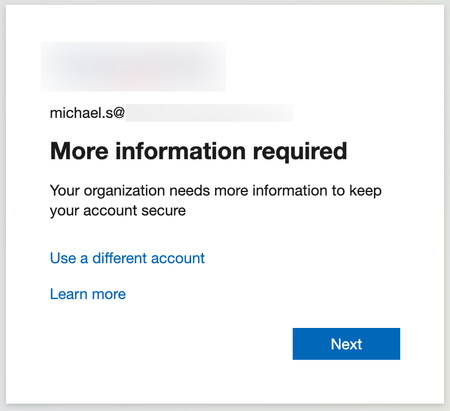
Currently, enabling self-service password reset (SSPR) registration enforcement causes the app 'Microsoft App Access Panel' to be added to the login flow of users who have SSPR enabled. This app is not able to be excluded from Conditional Access (CA) polices and is caught by 'All cloud apps', which breaks secure zero-trust scenarios and CA policy configurations. Best way to demonstrate this is through examples... ----Example 1---- Environment: CA Policy 1 - 'All cloud apps' requiring hybrid/compliant device, but excluding [App] (for all non-guest accounts) CA Policy 2 - [App] requiring MFA only (for contractor accounts, etc) CA Policy 3 - [App] requiring hybrid/compliant device (for internal accounts, etc) SSPR registration enforcement (Password reset > Registration) - set to 'Yes' MFA registration enforcement (Security > Authentication Methods > Registration campaign) - set to 'Enabled' Scenario: A new user requires access to web [App] on an unenrolled device and is assigned an account that falls under CA Policy 1 and 2, however [App] is excluded from 1 and shouldn't apply to this login. When accessing [App] for the first time, users must register SSPR/MFA. They see the below message, click 'Next' and are directed to https://accounts.activedirectory.windowsazure.com/passwordreset/register.aspx: Then they see this screen, which will block the login and try to get the user to download the Company Portal app: While behind the scenes, the login to [App] is being blocked by 'Microsoft App Access Panel' because it is seemingly added to the login flow and caught in CA Policy 1 in Req 2/3: CA Policy 1 shows as not applied on Req 1, CA Policy 2 shows as successful for Req 1/2/3 and CA Policy 3 shows as not applied for Req 1/2/3. Creating a CA policy for the 'Register security information' user action has no effect on this scenario and also shows as not applied on all the related sign-in logs. ----Example 2---- Environment: Same as above, but SSPR registration enforcement - set to 'No' Scenario: Same as above, but when accessing the [App] for the first time, they see the below message instead, click 'Next' and are directed to https://accounts.activedirectory.windowsazure.com/proofup.aspx: Then they are directed to the combined SSPR/MFA registration experience successfully: The 'Microsoft App Access Panel' doesn't show in the sign-in logs and the sign-in is successful after registration. From the two examples, it seems to be a bug with the SSPR registration enforcement and the combined registration experience. ----Workarounds---- 1 - Prevent using 'All cloud apps' with device based CA policies (difficult, requires redesigning/thinking/testing policies, could introduce new gaps, etc) 2 - Turn off SSPR registration enforcement and turn on MFA registration enforcement like in example 2 (easy, but only enforces MS MFA App registration, doesn't seem to re-trigger registration if the MS MFA App is removed, no other methods are supported for registration, and doesn't remind users to update) 3 - Disable SSPR entirely for affected users (medium depending on available security groups, and doesn't allow for affected users to use SSPR) ----Related links---- https://feedback.azure.com/d365community/idea/d5253b08-d076-ed11-a81b-000d3adb7ffd https://feedback.azure.com/d365community/idea/1365df89-c625-ec11-b6e6-000d3a4f0789 Conditional Access Policies, Guest Access and the "Microsoft Invitation Acceptance Portal" - Microsoft Community Hub MS, please either: 1 - Allow 'Microsoft App Access Panel' to be added to CA policies so it can be excluded 2 - Prevent 'Microsoft App Access Panel' from showing up in the CA login flow when SSPR registration enforcement is enabled20KViews2likes15Comments
Disabling PIN-based login on Entra-joined PCs
Hi guys. Yesterday I took two machines off the domain and Entra joined them. The goal was 1) remove their access to domain resources 2) have tenant users login to the machine and get enriched tokens every time. this works as desired. The problem is every user gets prompted to set a pin. these are both shared secondary/tertiary PC's - there is no point to having a 6 digit PIN on them. I thought the new Authentication Methods tools had controls for this, but apparently not. A script was run to change certain related Reg Keys (by my onsite tech) but this had no change on reboot. textreg add "HKEY_LOCAL_MACHINE\SOFTWARE\Policies\Microsoft\PassportForWork" /v Enabled /t REG_DWORD /d 0 /freg add "HKEY_LOCAL_MACHINE\SOFTWARE\Policies\Microsoft\PassportForWork" /v DisablePostLogonProvisioning /t REG_DWORD /d 1 /f HKEY_LOCAL_MACHINE\SOFTWARE\Policies\Microsoft\PassportForWork Enabled key was set to 0, and DisablePostLogonProvisioning was set to 1. These are from various help threads I found here and other resources. Unfortunately, they do not work. Not sure what to do here. I've read there are InTune controls for this - but I don't really have the time to work out WindowsPC ennrollment profiles for 2 machines. The site has InTune, but only for iOS mobile management. Thoughts?2KViews0likes6Comments
MFA catch-22 during onboarding due to registration policy
Hi, We are experiencing a catch-22 scenario during user onboarding related to MFA. New users are required to install the Microsoft Authenticator app via our Company Portal. However, they are prompted to complete MFA registration before they can access or download anything from the Company Portal. Since they do not yet have the Authenticator app installed, they are effectively blocked from completing the MFA setup. From our investigation, it appears that the Multi-Factor Authentication registration policy is enforcing MFA registration for new users. In our scenario, this creates a circular dependency. We have attempted to exclude our office network from MFA using Conditional Access, but this does not resolve the issue because the MFA registration policy is triggered before Conditional Access policies are evaluated. Our questions: Is there a recommended way to handle MFA onboarding in this type of scenario? Can Conditional Access policies be used instead of the MFA registration policy for initial MFA enrollment?293Views0likes4Comments
OTP Code via SMS from non microsoft number
Hi Microsoft Team, Good day! For a few weeks now, many people around me have been receiving their OTP code for MFA via SMS often from unknown senders (non-Microsoft phone number). The sender of the SMS doesn't use an official Microsoft phone number and "Microsoft" is not displayed as the sender. I would like to request assistance on how to verify that these numbers are legitimately from Microsoft. 41 79 998 76 61 and 4915758307532. Many thanks for your help. Kind regards, Rosine2.2KViews0likes5Comments
Fido passkeys blocked by policy
Hi all I'm helping out a customer with deploying physical passkeys and I'm running into a weird error. I've activated the sign in method and selected the two AAGuids for the Authenticator app and I've added the right AAGuid for the brand and model of passkey we are using. We can select the authentication method and enroll the security correctly but when trying to sign in using it we get the error as displayed in the attached picture. When checking the sign in logs i get this error message FIDO sign-in is disabled via policy and the error code is: 135016 I've not been able to track down any policy that would be blocking passkeys. anyone got any ideas?3.1KViews0likes7CommentsGrant Just-in-Time Admin Access with Microsoft Entra PIM
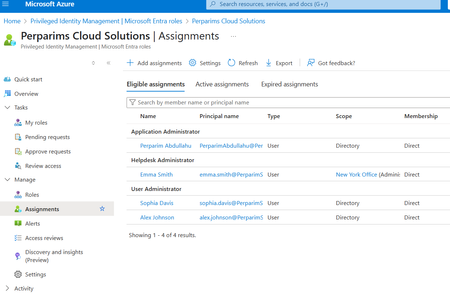
In my lab, I worked with Microsoft Entra Privileged Identity Management (PIM) to grant Just-in-Time admin access. Instead of permanent assignments, users become eligible for roles and must activate them only when needed. Steps I tested: - Configured roles as eligible rather than permanent - Required MFA and approval for role activation - Verified access automatically expired after the time window This approach reduces standing privileges and aligns with Zero Trust by securing privileged access. Curious — does your org still keep permanent Global Admins, or have you moved to JIT with PIM?158Views0likes1Comment
NPS Extension for azure MFA and multiple tenants?
Hi, is it possible to setup one NPS server with the Extension for Azure MFA to authenticate against multiple tenants? The onprem AD has azure ad connector for each domain and the users are in sync with there tenants. Its a RDS setup with one RD Gateway and one NPS server and multiple RD servers. I need email address removed for privacy reasons and email address removed for privacy reasons etc. to authenticate with MFA, but i can only get the users on the tenant thats linked in the NPS Extension for Azure MFA to work. I dont think its possible to setup more than one tenant in one NPS server (Extension for azure MFA). I get this error in the NPS log NPS Extension for Azure MFA: CID:xxxxxxxxxxxxxxx : Access Rejected for user email address removed for privacy reasons with Azure MFA response: AccessDenied and message: Caller tenant:'xxxxxxxxxxxxxxxxxxxxxxx' does not have access permissions to do authentication for the user in tenant:'xxxxxxxxxxxxxxxxxxxxxxxxxxxxxxxx',,,xxxxxxxxxxxxxxxxxxxxxx The ID in the Caller tenant and the user tenant in the error is correct, so something have to work? I cat find a way to allow the Caller tenant to access users in the user tenant.202Views0likes1CommentSecurity Best Practices for Bookings Page's Mailbox Objects in Entra ID
Hi, are there any recommendations / best practices for hardening the user objects that are created in Entra ID when I create a new Microsoft Bookings page? Unlike regular shared mailboxes, the sign-in is enabled by default, I can simply reset the password, sign in via Outlook Web and see the Microsoft Bookings calendar. Bad actors could brute force this sign-in, register the MFA authentication method of their choice and gather data of the customers that used my public bookings page. What is the recommeded way to handle these objects in Entra ID? Conditional Access settings? Azure Monitoring alerts for sign-ins? Defender alerts for when an inbox rule is created? Kind regards, YaseminSolved1.1KViews0likes4Comments"sign-in frequency" every time not working as expected and described.
We have several PIM managed groups in an Entra ID tenant. Members are added as eligible. For the activation of the memberships an Authentication Context is created which is linked to a conditional access policy. The conditional access policy requires MFA with phishing resistant authentication factors, and "sign in frequency" is set to "every time". When activating membership authentication is required. When activating membership to another group (>5min in between activations) one would expect to request an authentication prompt, as described in Microsoft documentation. In Firefox this works as expected, In Edge and Chrome there is no re-authentication required every time, and sometimes even not for the first activation, not even in an in-private session. The device is not joined to this tenant, and the account used to log on is different from the one used to logon to the Entra ID portal. This is a test tenant with only those CA rules configured, no other policies or rules are in place. Anyone experiencing the same, or knowing the cause?1.5KViews2likes3Comments