Internet Explorer
11 TopicsAnyone down for Edge logo options?
So is it me or the new Microsoft Edge log not as fun? You know what would be fun? Options. I would love to see a buried settings options for the type of logo we can have. Hell, I think if they give us the option to swap between the Spartan Logo, Edge logo, and New Edge logo that will be fun. I love options and Windows has always been the better bet for it. Let us have fun with one of the most important apps we use on our computers.1.9KViews1like8Comments
Policy needed: "Go to an intranet site for a one-word entry in the Address bar"
For enterprise a policy like the one in IE called "Go to an intranet site for a one-word entry in the Address bar" is very needed. As an enterprise we have a lot of intranet sites and services using one-word hostnames and abreviations like "mc", "servicedesk" etc. that our users are used to just being able to type in their browser. In Edge that will just launch a search on Google or Bing instead. Teaching the users to type http:// every time is nearly impossible and not very user friendly. We use the policy in IE, but it sadly never came to Edge. It would be great if it could be added to the new Edge (Chromium) admx.Solved20KViews9likes53Comments
Edge Chromium doesn't import ALL favorites from IE
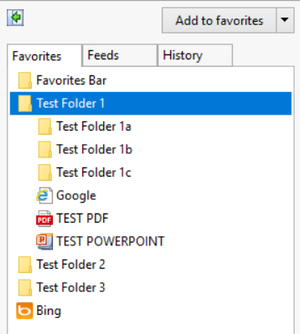
Hello, We are making the migration for our users from IE to Edge Chromium and have the GPO in place "Automatically import another browser's data and settings at first run" to import the Favorites from IE into Edge Chromium. We do this since we manage the favorites, and it's easier for us to drag/drop/change extensions in the Favorites folder of our Mandatory Profiles as the favorites will change from time to time. Alongside the internet shortcuts (.url) are .ppt/.pptx and .pdf files we drop in the favorites for ease of access. We also do this because we disable access to File Explorer for these terminal users. We found that only the .url extensions are copying over into Edge. We also noticed that Edge does not import folders recursively, as we have folders within folders at the root that do not transfer over. I have attached an example of our setup. In IE you can see our three folders, within 'folder 1' I have three subfolders, a .PDF, a .PPTX, and an internet shortcut to Google.com. Next we'll import the browser data from IE After the import, only folders with found content in it are transferred over. Recursive folders are not copied and even 'Test Folder 2' and 'Test Folder 3' were not transferred since they were empty of content. We found that no extension outside of .URL would copy over into Edge. For testing, we successfully added the .pptx and .pdf files manually. The PDF opens in Edge and even though the .pptx does not open, Edge still asks us what we would like to do with it. Is there a way we can transfer all of the contents from IE into Edge Chromium currently with a GPO? Or will this be a feature added in a future release? For enterprise that deny access to File Explorer for security reasons this is one of the few options we've relied on in the past with IE. Thank you. We are using Edge Version 87.0.664.75 64-bit1.8KViews0likes2Comments
MS Teams External Meeting - IE to Edge redirection
Hi, Recently moved to Chromium Edge 80.0.361.54 (Official build) (64-bit), with IE11 remaining as default browser. We only use the browser client for MS Teams. Upon receiving the hyperlink to an External Teams meeting, I click and it opens in IE11 and asks to open in Edge - all fine so far. However, whene clicking the link to re-direct us to Edge, it just loads are Internal Edge channels as doesn't join the meeting. If I copy the hyperlink directly from the invite and paste into Edge, it works fine. Changing default browser is not currently an option (this also fixes the issue though). It also worked fine with legacy Edge browser It appears to be an issue passing the link through from IE to Edge Any ideas?2.2KViews0likes4Comments
Unable to get IE mode working through Intune
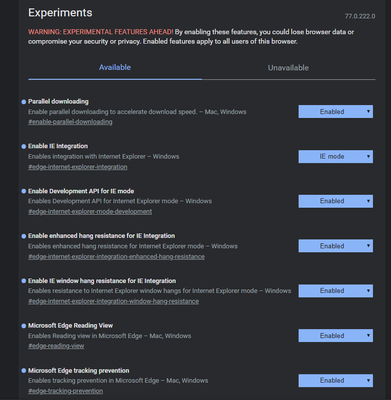
Hello all, I am trying to get IE mode working with Chromium Edge through Intune. I have enabled the "Configure Internet Explorer integration" policy to be in IE Mode (I have also tested open in IE 11 which also does not work) and enabled and set the "Configure the Enterprise Mode Site List" policy. With the latter policy, I have configured using an XML file in a network location, URL location or just list the URLs out. For a test, I have added google.com. No matter what I do, nothing works.2.5KViews2likes2CommentsVery Impressive Edge insider Canary Results in HTML5 Test (Plus other browsers) Comparison
Here is the the score of browsers to see how much of HTML5 technologies and features they support. In order of highest to lowest. Edge insider Canary Version 79.0.286.0 (Official build) canary (64-bit) Highest Score Google Chrome Canary Version 79.0.3924.0 (Official Build) canary (64-bit) FireFox version 71.0a1 (2019-09-26) (64-bit) Edge classic (EdgeHTML) Microsoft EdgeHTML 18.18990 Microsoft Edge 44.18990.1.0 Internet explorer 11 version 11.1.18990 Internet Explorer 11 (latest version) obviously has the worst score, but it's the only browser that can manage to get the perfect 100/100 score from Acid3 test among all these browsers tested. the rest of the browsers can only get 97/100. By the way, Acid3 is an old test. https://html5test.com/ http://acid3.acidtests.org/ Comment down below what you think. I for one am hella impressed by Microsoft Edge insider's score!19KViews3likes11Comments
Inprivate mode seriously needs to have brought back the blue icon in the top left corner
One thing that the new edge is lacking and seriously needs to bring back that internet explorer and the old edge had was that in the top left corner an inprivate icon to indicate you're using inprivate browsing. The current inprivate mode looks too chrome like and is easy to mistake it for chrome. With the blue inprivate icon in the top left corner, it would give edge a sense of uniqueness from chrome and it was in both the old edge and internet explorer, it worked perfectly then and there really is no reason to not bring it back. Looking at a side by side comparison, the browser looked better when it had the blue inprivate icon when you were using inprivate mode3.9KViews16likes7Comments
MS Edge 79.0.309.65 on Windows 7 - Internet Explorer mode: unsupported
Running Windows 7 Professional x64. All updates from Microsoft Update installed, optional or not. As per advice on https://docs.microsoft.com/en-US/deployedge/edge-ie-mode, I made sure both https://support.microsoft.com/help/4507437/windows-7-update-kb4507437 and https://support.microsoft.com/help/4511872/cumulative-security-update-for-internet-explorer updates are installed (they already have been), I also manually installed the latest security rollup for IE 11. And yet, edge://compat/iediagnostic still shows "Internet Explorer mode: unsupported", and shows me the "Windows Update" button. Group policies seem to have been applied, "Group policy settings" are "on" according to the diagnostic page.Solved2.4KViews0likes5Comments
IE mode only for 20H1 insiders?
I asked this in another thread, but I believe this is worth making a new thread over. So I've been seeing reports on other websites that IE mode is now available in dev/canary edge chromium, but if I try it out, it just says I need to update my version of internet explorer. I've also heard that it only works right now with those who are 20H1 insiders. Is that true? Can someone from the development team or someone who is a windows 10 insider shed some light on this confusion?5.5KViews2likes25Comments