integration
355 Topics
Issue connecting Azure Sentinel GitHub app to Sentinel Instance when IP allow list is enabled
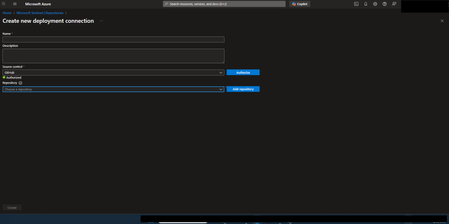
Hi everyone, I’m running into an issue connecting the Azure Sentinel GitHub app to my Sentinel workspace in order to create our CI/CD pipelines for our detection rules, and I’m hoping someone can point me in the right direction. Symptoms: When configuring the GitHub connection in Sentinel, the repository dropdown does not populate. There are no explicit errors, but the connection clearly isn’t completing. If I disable my organization’s IP allow list, everything works as expected and the repos appear immediately. I’ve seen that some GitHub Apps automatically add the IP ranges they require to an organization’s allow list. However, from what I can tell, the Azure Sentinel GitHub app does not seem to have this capability, and requires manual allow listing instead. What I’ve tried / researched: Reviewed Microsoft documentation for Sentinel ↔ GitHub integrations Looked through Azure IP range and Service Tag documentation I’ve seen recommendations to allow list the IP ranges published at //api.github.com/meta, as many GitHub apps rely on these ranges I’ve already tried allow listing multiple ranges from the GitHub meta endpoint, but the issue persists My questions: Does anyone know which IP ranges are used by the Azure Sentinel GitHub app specifically? Is there an official or recommended approach for using this integration in environments with strict IP allow lists? Has anyone successfully configured this integration without fully disabling IP restrictions? Any insight, references, or firsthand experience would be greatly appreciated. Thanks in advance!17Views0likes0CommentsDeploy PostgreSQL on Azure VMs with Azure NetApp Files: Production-Ready Infrastructure as Code
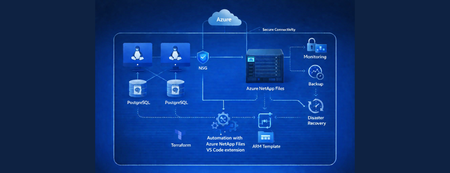
PostgreSQL is a popular open‑source cloud database for modern web applications and AI/ML workloads, and deploying it on Azure VMs with high‑performance storage should be simple. In practice, however, using Azure NetApp Files requires many coordinated steps—from provisioning networking and storage to configuring NFS, installing and initializing PostgreSQL, and maintaining consistent, secure, and high‑performance environments across development, test, and production. To address this complexity, we’ve built production‑ready Infrastructure as Code templates that fully automate the deployment, from infrastructure setup to database initialization, ensuring PostgreSQL runs on high‑performance Azure NetApp Files storage from day one.119Views1like0CommentsUnlocking Advanced Data Analytics & AI with Azure NetApp Files object REST API
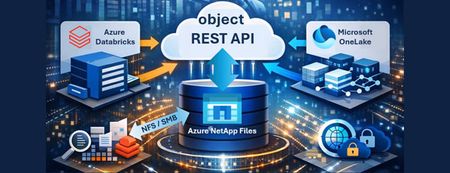
Azure NetApp Files object REST API enables object access to enterprise file data stored on Azure NetApp Files, without copying, moving, or restructuring that data. This capability allows analytics and AI platforms that expect object storage to work directly against existing NFS based datasets, while preserving Azure NetApp Files’ performance, security, and governance characteristics.112Views0likes0CommentsWhat's New with Azure NetApp Files VS Code Extension
The latest update to the Azure NetApp Files (ANF) VS Code Extension introduces powerful enhancements designed to simplify cloud storage management for developers. From multi-tenant support to intuitive right-click mounting and AI-powered commands, this release focuses on improving productivity and streamlining workflows within Visual Studio Code. Explore the new features, learn how they accelerate development, and see why this extension is becoming an essential tool for cloud-native applications.102Views0likes0Comments
Introducing native Service Bus message publishing from Azure API Management (Preview)
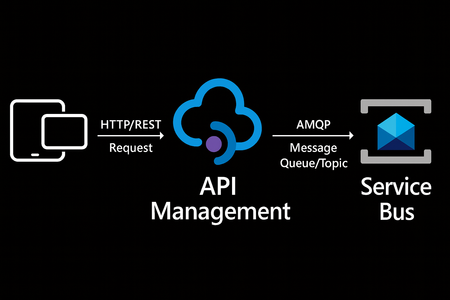
We’re excited to announce a preview capability in Azure API Management (APIM) — you can now send messages directly to Azure Service Bus from your APIs using a built-in policy. This enhancement, currently in public preview, simplifies how you connect your API layer with event-driven and asynchronous systems, helping you build more scalable, resilient, and loosely coupled architectures across your enterprise. Why this matters? Modern applications increasingly rely on asynchronous communication and event-driven designs. With this new integration: Any API hosted in API Management can publish to Service Bus — no SDKs, custom code, or middleware required. Partners, clients, and IoT devices can send data through standard HTTP calls, even if they don’t support AMQP natively. You stay in full control with authentication, throttling, and logging managed centrally in API Management. Your systems scale more smoothly by decoupling front-end requests from backend processing. How it works The new send-service-bus-message policy allows API Management to forward payloads from API calls directly into Service Bus queues or topics. High-level flow A client sends a standard HTTP request to your API endpoint in API Management. The policy executes and sends the payload as a message to Service Bus. Downstream consumers such as Logic Apps, Azure Functions, or microservices process those messages asynchronously. All configurations happen in API Management — no code changes or new infrastructure are required. Getting started You can try it out in minutes: Set up a Service Bus namespace and create a queue or topic. Enable a managed identity (system-assigned or user-assigned) on your API Management instance. Grant the identity the “Service Bus data sender” role in Azure RBAC, scoped to your queue/ topic. Add the policy to your API operation: <send-service-bus-message queue-name="orders"> <payload>@(context.Request.Body.As<string>())</payload> </send-service-bus-message> Once saved, each API call publishes its payload to the Service Bus queue or topic. 📖 Learn more. Common use cases This capability makes it easy to integrate your APIs into event-driven workflows: Order processing – Queue incoming orders for fulfillment or billing. Event notifications – Trigger internal workflows across multiple applications. Telemetry ingestion – Forward IoT or mobile app data to Service Bus for analytics. Partner integrations – Offer REST-based endpoints for external systems while maintaining policy-based control. Each of these scenarios benefits from simplified integration, centralized governance, and improved reliability. Secure and governed by design The integration uses managed identities for secure communication between API Management and Service Bus — no secrets required. You can further apply enterprise-grade controls: Enforce rate limits, quotas, and authorization through APIM policies. Gain API-level logging and tracing for each message sent. Use Service Bus metrics to monitor downstream processing. Together, these tools help you maintain a consistent security posture across your APIs and messaging layer. Build modern, event-driven architectures With this feature, API Management can serve as a bridge to your event-driven backbone. Start small by queuing a single API’s workload, or extend to enterprise-wide event distribution using topics and subscriptions. You’ll reduce architectural complexity while enabling more flexible, scalable, and decoupled application patterns. Learn more: Get the full walkthrough and examples in the documentation 👉 here3.6KViews2likes6CommentsAnnouncing the General Availability (GA) of the Premium v2 tier of Azure API Management
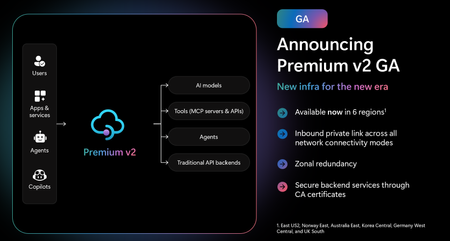
Superior capacity, highest entity limits, unlimited included calls, and the most comprehensive set of features set the Premium v2 tier apart from other API Management tiers. Customers rely on the Premium v2 tier for running enterprise-wide API programs at scale, with high availability, and performance. The Premium v2 tier has a new architecture that eliminates management traffic from the customer VNet, making private networking much more secure and easier to setup. During the creation of a Premium v2 instance, you can choose between VNet injection or VNet integration (introduced in the Standard v2 tier) options. In addition, today we are also adding three new features to Premium v2: Inbound Private Link: You can now enable private endpoint connectivity to restrict inbound access to your Premium v2 instance. It can be enabled along with VNet injection or VNet integration or without a VNet. Availability zone support: Premium v2 now supports availability zones (zone redundancy) to enhance the reliability and resilience of your API gateway. Custom CA certificates: Azure API management v2 gateway can now validate TLS connections with the backend service using custom CA certificates. New and improved VNet injection Using VNet injection in Premium v2 no longer requires configuring routes or service endpoints. Customers can secure their API workloads without impacting API Management dependencies, while Microsoft can secure the infrastructure without interfering with customer API workloads. In short, the new VNet injection implementation enables both parties to manage network security and configuration settings independently and without affecting each other. You can now configure your APIs with complete networking flexibility: force tunnel all outbound traffic to on-premises, send all outbound traffic through an NVA, or add a WAF device to monitor all inbound traffic to your API Management Premium v2—all without constraints. Inbound Private Link Customers can now configure an inbound private endpoint for their API Management Premium v2 instance to allow your API consumers securely access the API Management gateway over Azure Private Link. The private endpoint uses an IP address from an Azure virtual network in which it's hosted. Network traffic between a client on your private network and API Management traverses over the virtual network and a Private Link on the Microsoft backbone network, eliminating exposure from the public internet. Further, you can configure custom DNS settings or an Azure DNS private zone to map the API Management hostname to the endpoint's private IP address. With a private endpoint and Private Link, you can: Create multiple Private Link connections to an API Management instance. Use the private endpoint to send inbound traffic on a secure connection. Apply different API Management policies based on whether traffic comes from the private endpoint. Limit incoming traffic only to private endpoints, preventing data exfiltration. Combine with inbound virtual network injection or outbound virtual network integration to provide end-to-end network isolation of your API Management clients and backend services. More details can be found here Today, only the API Management instance’s Gateway endpoint supports inbound private link connections. Each API management instance can support at most 100 Private Link connections. Availability zones Azure API Management Premium v2 now supports Availability Zones (AZ) redundancy to enhance the reliability and resilience of your API gateway. When deploying an API Management instance in an AZ-enabled region, users can choose to enable zone redundancy. This distributes the service's units, including Gateway, management plane, and developer portal, across multiple, physically separate AZs within that region. Learn how to enable AZs here. CA certificates If the API Management Gateway needs to connect to the backends secured with TLS certificates issued by private certificate authorities (CA), you need to configure custom CA certificates in the API Management instance. Custom CA certificates can be added and managed as Authorization Credentials in the Backend entities. The Backend entity has been extended with new properties allowing customers to specify a list of certificate thumbprints or subject name + issuer thumbprint pairs that Gateway should trust when establishing TLS connection with associated backend endpoint. More details can be found here. Region availability The Premium v2 tier is now generally available in six public regions (Australia East, East US2, Germany West Central, Korea Central, Norway East and UK South) with additional regions coming soon. For pricing information and regional availability, please visit the API Management pricing page. Learn more API Management v2 tiers FAQ API Management v2 tiers documentation API Management overview documentationLogic Apps Aviators Newsletter - January 2026
In this issue: Ace Aviator of the Month News from our product group Community Playbook News from our community Ace Aviator of the Month January's Ace Aviator: Sagar Sharma What's your role and title? What are your responsibilities? I’m a cross-domain Business Solution Architect specializing in delivering new business capabilities to customers. I design end-to-end architectures specially on Azure platforms and also in the Integration domain using azure integration services. My role involves marking architectural decisions, defining standards, ensuring platform reliability, guiding teams, and helping organizations transition from legacy integration systems to modern cloud-native patterns. Can you give us some insights into your day-to-day activities and what a typical day in your role looks like? My day usually blends architecture work with hands-on collaboration. I review integration designs, refine patterns, help teams troubleshoot integration flows, and ensure deployments run smoothly through DevOps pipelines. A good part of my time is spent translating business needs into integration patterns and making sure the overall platform stays secure, scalable, and maintainable. What motivates and inspires you to be an active member of the Aviators/Microsoft community? The community has shaped a big part of my career. Many of my early breakthroughs came from blogs, samples, and talks shared by others. Contributing back feels like closing the loop. I enjoy sharing real-world lessons, learning from peers, and helping others adopt integration patterns with confidence. The energy of the community and the conversations it creates keep me inspired. Looking back, what advice do you wish you had been given earlier that you'd now share with those looking to get into STEM/technology? Focus on core concepts—messaging, APIs, security, and distributed systems—because tools evolve, but fundamentals stay relevant. Share your learning early, even if it feels small. Be curious about the “why” behind patterns. Build side projects, not just follow tutorials. And don’t fear a nonlinear career path—diverse experience is an asset in technology. What has helped you grow professionally? Hands-on customer work, strong mentors, and consistent learning habits have been key. Community involvement—writing, speaking, and collaborating—has pushed me to structure my knowledge and stay current. And working in environments that encourage experimentation has helped me develop faster and with more confidence. If you had a magic wand that could create a feature in Logic Apps, what would it be and why? I’d love to see a unified, out-of-the-box business transaction tracing experience across Logic Apps, Service Bus, APIM, Functions, and downstream services. Something that automatically correlates events, visualizes the full journey of a transaction, and simplifies root-cause analysis. This would make operational troubleshooting dramatically easier in enterprise environments. News from our product group Microsoft BizTalk Server Product Lifecycle Update BizTalk Server 2020 will be the final release, with support extending through 2030. Microsoft encourages a gradual transition to Azure Logic Apps, offering migration tooling, hybrid deployment options, and reuse of existing BizTalk artifacts. Customers can modernize at their own pace while maintaining operational continuity. Data Mapper Test Executor: A New Addition to Logic Apps Standard Test Framework The Data Mapper Test Executor adds native support for testing XSLT and Data Mapper transformations directly within the Logic Apps Standard test framework. It streamlines validation, improves feedback cycles, and integrates with the latest SDK to enable reliable, automated testing of map generation and execution. Announcing General Availability of AI & RAG Connectors in Logic Apps (Standard) Logic Apps Standard AI and RAG connectors are now GA333, enabling native document processing, semantic search, embeddings, and agentic workflows. These capabilities let teams build intelligent, context‑aware automations using their own data, reducing complexity and enhancing decisioning across enterprise integrations. Logic Apps Labs The Logic Apps Labs, which introduces Azure Logic Apps agentic workflows learning path, offering guided modules on building conversational and autonomous agents, extending capabilities with MCP tools, and orchestrating multi‑agent workflows. It serves as a starting point for hands‑on labs covering design, deployment, and advanced patterns for intelligent automation. News from our community Handling Empty SQL Query Results in Azure Logic Apps Post by Anitha Eswaran If a SQL stored procedure returns no rows, you can detect the empty result set in Logic Apps by checking whether the output’s ResultSets object is {}. When empty, the workflow can be cleanly terminated or used to trigger alerts, ensuring predictable behavior and more resilient integrations. Azure Logic Apps MCP Server Post by Laveesh Bansal Our own Laveesh Bansal spent some time creating an Azure Logic Apps MCP Server that enables natural‑language debugging, workflow inspection, and updates without using the portal. It supports both Standard and Consumption apps, integrates with AI clients like Copilot and Claude, and offers tools for local or cloud‑hosted setups, testing, and workflow lifecycle operations. Azure Logic Apps: Change Detection in JSON Objects and Arrays Post by Suraj Somani Logic Apps offers native functions to detect changes in JSON objects and arrays without worrying about field or item order. Using equals() for objects and intersection() for arrays, you can determine when data has truly changed and trigger workflows only when updates occur, improving efficiency and reducing unnecessary processing. Logic Apps Standard: A clever hack to use JSON schemas in your Artifacts folder for JSON message validation (Part 1) Post by Şahin Özdemir Şahin outlines a workaround for using JSON schemas stored in the Artifacts folder to validate messages in Logic Apps Standard. It revisits integration needs from BizTalk migrations and shows how to bring structured validation into modern workflows without relying on Integration Accounts. This is a two part series and you can find part two here. Let's integrate SAP with Microsoft Video by Sebastian Meyer Sebastian has a new video out, and in this episode he and Martin Pankraz break down SAP GROW and RISE for Microsoft integration developers, covering key differences and integration options across IDoc, RFC, BAPI, SOAP, HTTPS, and OData, giving a concise overview of today’s SAP landscape and what it means for building integrations on Azure. Logic Apps Initialize variables action has a max limit of 20 variables Post by Sandro Pereira Logic Apps allows only 20 variables per Initialize variables action, and exceeding it triggers a validation error. This limit applies per action, not per workflow. Using objects, parameters, or Compose actions often reduces the need for many scalars and leads to cleaner, more maintainable workflows. Did you know that? It is a Friday Fact!
Issue when ingesting Defender XDR table in Sentinel
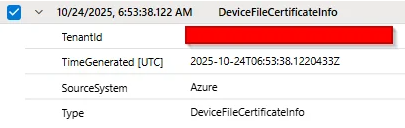
Hello, We are migrating our on-premises SIEM solution to Microsoft Sentinel since we have E5 licences for all our users. The integration between Defender XDR and Sentinel convinced us to make the move. We have a limited budget for Sentinel, and we found out that the Auxiliary/Data Lake feature is sufficient for verbose log sources such as network logs. We would like to retain Defender XDR data for more than 30 days (the default retention period). We implemented the solution described in this blog post: https://jeffreyappel.nl/how-to-store-defender-xdr-data-for-years-in-sentinel-data-lake-without-expensive-ingestion-cost/ However, we are facing an issue with 2 tables: DeviceImageLoadEvents and DeviceFileCertificateInfo. The table forwarded by Defender to Sentinel are empty like this row: We created a support ticket but so far, we haven't received any solution. If anyone has experienced this issue, we would appreciate your feedback. Lucas129Views0likes1Comment
Defender Entity Page w/ Sentinel Events Tab
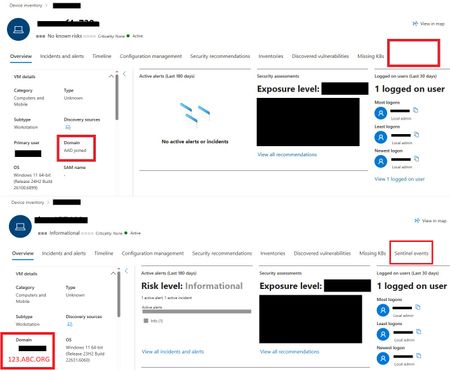
One device is displaying the Sentinel Events Tab, while the other is not. The only difference observed is that one device is Azure AD (AAD) joined and the other is Domain Joined. Could this difference account for the missing Sentinel events data? Any insight would be appreciated!173Views0likes2CommentsStreamline Azure NetApp Files Management—Right from Your IDE
The Azure NetApp Files VS Code Extension is designed to streamline storage provisioning and management directly within the developer’s IDE. Traditional workflows often require extensive portal navigation, manual configuration, and policy management, leading to inefficiencies and context switching. The extension addresses these challenges by enabling AI-powered automation through natural language commands, reducing provisioning time from hours to minutes while minimizing errors and improving compliance. Key capabilities include generating production-ready ARM templates, validating resources, and delivering optimization insights—all without leaving the coding environment.170Views0likes0Comments