IT
5 TopicsClose the Year Strong with Surface for Business Deals
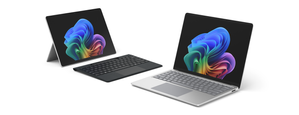
As organizations look to maximize their remaining budget and prepare for 2026, now is the moment to modernize device fleets with Surface for Business. These limited-time Surface promotions make it easier to accelerate refresh cycles, strengthen endpoint security, and equip employees with devices that are AI-ready from day one. Surface for Business devices combine productivity-forward design, leading AI capabilities, and Microsoft security at multiple layers. Whether refreshing a subset of users or upgrading entire departments, organizations can close the year with hardware that helps reduce risk, assists in lowering management overhead, and positions teams for the next wave of AI-driven productivity. Secure by Design Surface for Business devices deliver hardware-based protections aligned with Secured-core PC standards. Hardware-based security, advanced firmware protections, and a growing number of memory-safe drivers help reduce exposure across the stack, providing peace of mind that clears the way for AI innovation. AI-Ready With advanced processors including powerful AI chips on supported models, Surface for Business devices are ready to help employees maximize their skills using AI to drive business forward. From a dedicated Copilot key 1 to Foundry on Windows 2 for developing local agents, these devices provide the foundation for people to achieve their best. Learn more about unlocking AI innovation in our new eBook. Ready to Deploy Surface for Business devices support Windows Autopilot 3 , enabling IT teams to deploy devices directly to employees, preconfigured with corporate profiles and security baselines, without imaging or desk-side setup. Combined with centralized management through Microsoft Intune 4 , organizations can reduce deployment time and help keep endpoints consistent from day one. Make the Most of Year-End Purchasing Opportunities Maximize remaining 2025 budget by exploring end-of-year savings on select Surface for Business devices. Work with your preferred reseller to capitalize on year-end spend, or purchase directly through Microsoft Store in the US 5 to take advantage of available offers that make modernizing your device fleet easier as you prepare for 2026. Resellers can help organizations align device selection, deployment plans, and support needs while optimizing budget utilization. Businesses purchasing through Microsoft Store benefit from fast, free shipping and a 60-day return window on most physical products. 6 Across both channels, Surface for Business offers provide a cost-effective path to refresh devices now rather than deferring upgrades—helping IT leaders complete their roadmap, meet procurement targets, and deliver new value to end users before the new year. Find a reseller [https://www.microsoft.com/surface/business/where-to-buy-microsoft-surface Buy from Microsoft Store US [https://www.microsoft.com/en-us/store/collections/surface-deals-bundles] References Feature availability varies by device and market. See Key Support for details. Some capabilities may require additional subscriptions not included with Windows or Surface devices. Windows Autopilot device preparation depends on specific capabilities available in Windows client and Microsoft Entra ID. It also requires a mobile device management (MDM) service such as Microsoft Intune. These capabilities can be obtained through various editions and subscription programs. Additional licenses required, not included with Surface. Offers and promotions vary by market. Terms apply. Microsoft Store only ships to certain countries; see Shipping options, costs, and delivery times - Microsoft Support for details.228Views1like0Comments 56Views0likes0Comments
Teams Mobile App only showing Calls
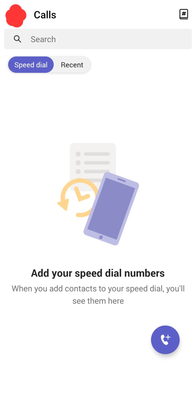
Hi everyone, I thought I'd start this discussion by mentioning we've encountered a bug within the Teams Mobile App whereby Android devices, don't allow you to access anything in the Teams Mobile App other than 'Calls'. You will receive notifications for Teams and Messages, and when selecting them will take you to the correct content. However, if you were to open the Teams Mobile App to send a message, you will see no such option other than the below. Appears to be effecting the following release, others may be affected too. I wanted to post this as I couldn't find anything similar on the community. Additionally, we have logged a case with Microsoft, of which the agent confirmed; "I have received multiple cases regarding the same issue. I have informed it to our backend team." Will keep you posted.15KViews5likes34CommentsMicrosoft Loop IT governance and management controls
NOW ON DEMAND (above). This webinar shares the latest admin capabilities for managing Microsoft Loop. Whether you're new to Loop or looking to validate its readiness for a large enterprise, this session is tailored for you. We'll guide you through Loop's available and newest admin and compliance features, demonstrate how to use Purview for eDiscovery with Loop content, establish good governance, and explore SharePoint admin center functionality for managing Loop workspaces. Additionally, we'll share valuable tips to manage Loop content within your organization. Don't miss this opportunity to unleash Loop to your employees while optimizing Loop manageability. Your co-presenters: Dan Costenaro (Principal Product Manager, Microsoft Loop), Abi Suresh (Senior Product Manager, Microsoft SharePoint), and Akanksha Rakesh (Principal Product Manager, Microsoft SharePoint). Related resources Try Microsoft Loop: https://loop.cloud.microsoft Loop on the Microsoft 365 public roadmap Loop adoption center Get started with Loop ('how to' content on support.microsoft.com) Loop governance capabilities (IT insights on Microsoft Learn) Manage Loop workspace experiences in SharePoint Embedded (IT insights on Microsoft Learn) All Loop blog posts on the Microsoft 365 tech community Ron Pessner’s blog "Microsoft Loop | Live, Five-Part Learning Series" (has the full, playable versions of each part in the series + info about presenters and what's covered in each) Loop on LinkedIn: "Microsoft Loop Community" public group Loop on X: @MicrosoftLoop Full 5-Part Loop Learning playlist on the "Microsoft Community Learning" YouTube channel: (now on demand) Loop videos and helpful links Survey | Loop Learning Series feedback form4.7KViews2likes14CommentsIssue Downloading Windows Server 2019 ISO - Need Assistance
Hello Windows Tech Community, I hope you're all doing well. I'm reaching out today regarding an issue I'm encountering while attempting to download the Windows Server 2019 ISO 64-bit edition from the Evaluation Center. Unfortunately, I've been unable to complete the download, and I keep receiving an error message prompting me to "Check internet connection." I've made several troubleshooting attempts to resolve the issue, but it persists. I would greatly appreciate any guidance or assistance you can provide. Here's a summary of the steps I've taken so far: Checked my internet connection using speedtest.net, which confirmed that my connection is stable and functioning correctly. Cleared my browser cache to ensure it wasn't causing any conflicts during the download process. Disabled browser extensions, particularly those related to download management or security, to rule out any interference. Attempted the download using an alternative browser (I have tried Mozilla Firefox and Microsoft Edge) to determine if the issue was specific to Chrome. Temporarily disabled antivirus and firewall settings on my computer to eliminate any potential blocking of the download. Connected to a different network, including a different Wi-Fi network and a wired connection, to test if the problem was related to my current network configuration. Tried downloading the ISO file from a different device to see if the issue was specific to my computer. Despite these efforts, I haven't been able to successfully complete the download. I'm now at a loss as to what steps to take next. I would greatly appreciate any advice or recommendations you can offer to help me resolve this issue and proceed with the download. Thank you in advance for your time and assistance.2.3KViews0likes2Comments