ISV
71 TopicsManaging Confluent Cloud User Access via Azure portal
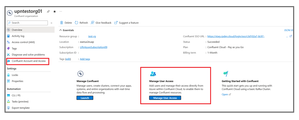
Today, we are excited to announce Confluent Cloud User Access Management via Azure portal for the Confluent organizations created via Azure Native ISV Service. You can now add Azure users and manage their authorization to Confluent cloud right from Azure portal! Background So far, onboarding to the Confluent Cloud with just a few clicks from the Azure portal was made true by the launch of Apache Kafka® on Confluent Cloud™– An Azure Native ISV Service. This integration between Azure and Confluent has helped the customer connect their Azure data plane seamlessly authenticating using Single-Sign On. However, you still need to head to the Confluent Cloud UI (User Interfaces) for authorization – adding users into the Organization, giving them roles and accesses across clusters, environments, etc. This is an additional step for the organization admins to manually add all the user ids and set their eligible permissions for each cluster and environment, making it even more tedious and time-consuming. What is Confluent Cloud Access Management? Confluent now supports advanced controls on managing User Access and Permissions easily via Azure portal. With this, the organization admin can add and manage both users as well as user permissions post the Confluent organization creation while continuing to stay in Azure portal. This helps in bringing down the overall time from creating an organization to actionable Kafka resources on Confluent. A key component of Confluent Access Management is Role-Based Access Control (RBAC). Access Management is now easily available on the Overview page in Azure portal. As of today, Access Management supports the following scenarios: Add a new user into the Confluent Organization. View and manage the users having access to the Confluent Organization. View role permissions for a user. Add one or more role permissions for a user. Remove one or more role permissions for a user. Please note: These permissions are available only to the Subscription Owner or Contributor. Make sure you have the right credentials to make use of this feature. Add Users in a Confluent You can now add new users and view existing users in your Confluent Organization via Azure portal. Simply head to Confluent Account and Access or the Manage User Access tile at the bottom of your resource overview. Fig 1: Overview page showing the Access management blade and the tile. Fig 2: Select and confirm the user addition. View Role permissions for a user In the Confluent Account and Access blade, you’ll see the list of users in your current Confluent organization. Click on the Manage Permissions icon on the right end of the user you would like to see the permissions for. Fig 3: Viewing the user permissions in the portal. Add or Remove Role permissions for a user in Confluent Organization The Manage Permissions blade contains a couple of icons on the top to Add or Remove a role for a given user. While staying on this blade you will have access to all the available roles and the assigned roles in Confluent at the organization level as well as at the environment and cluster levels. Fig 4: Select Add Role to get a new role permission; Remove to delete an existing permission. Resources Try out the Apache Kafka® on Confluent Cloud™– An Azure Native ISV Service offering right away! Every new sign-up gets a free 400$ credit! To learn more, check out the Microsoft Docs Check out the Confluent blog announcing this feature. If you would like to give us feedback on this feature, the overall product or have any suggestions for us to work on, please drop in your suggestions here!! 😊44KViews0likes0CommentsAccelerating ISV partners’ growth through ISV Success
ur guest contributor for this blog is Yvonne Muench, Senior Director, Marketplace & ISV Journey. Today at Microsoft Inspire 2023, we announced general availability of ISV success, the pathway within the Microsoft AI Cloud Partner Program for partners who develop software, or Independent Software Vendors (ISVs). We gathered with our 400,000 partners to celebrate our shared contributions and impact on businesses and industries worldwide. As we continue our journey together, we are thrilled to share a range of new announcements designed to empower partners of all sizes, which include new expanded benefits, multi-year investments, AI for ISVs, and a simplified journey uniting multiple ISV programs into the AI Cloud Partner Program as part of ISV Success. These investments are strategically aimed at helping ISVs meet customer needs, accelerate innovation, facilitate go-to-market strategies, and cultivate a thriving business environment. ISV Success in general availability: an offering for all ISVs Furthering our commitment to ISVs across the globe, we are excited to share that ISV Success, within the Microsoft AI Cloud Partner Program, is now generally available. Whether you’re building your first app, migrating from another cloud provider, or selling your established solutions through Microsoft, we’re defining clear pathways toward your goals. With ISV Success, you gain access up to $126,000 (USD) of benefits, guidance, and resources for a full year to build well-architected apps across our cloud and publish and sell on our commercial marketplace. Sign up today and join the thousands of ISVs already taking advantage of these benefits and resources. Continue reading here32KViews0likes0CommentsUsing Azure AI Document Intelligence and Azure OpenAI to extract structured data from documents
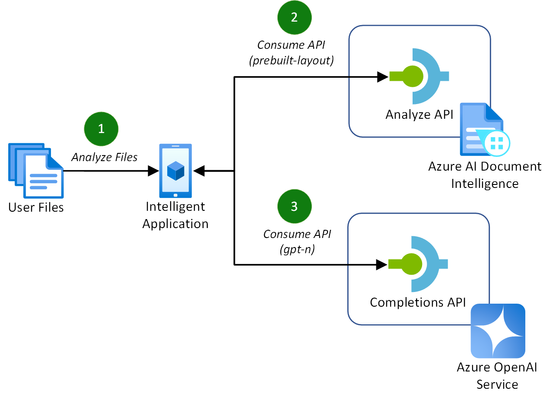
Addressing the challenges of efficient document processing, explore a novel solution to extract structured data from documents using Azure AI Document Intelligence and Azure OpenAI. Context In today’s data-driven landscape, efficient document processing is crucial for most organizations worldwide. Accurate document analysis is essential to provide much needed streamlining of business workflows to enhance productivity. In this article, we’ll explore the key challenges that solution providers face with extracting relevant, structured data from documents. We'll also showcase a novel solution to solve these challenges using Azure AI Document Intelligence and Azure OpenAI. Key challenges of effective document data extraction ISVs and Digital Natives building document data extraction solutions often grapple with the complexities of finding a reliable mechanism to parse their customer’s documents. The key challenges include: Variability in document layout. Documents, such as contracts or invoices, often contain similar data. However, they vary in both layout, structure, and language, including domain jargon. Content in unstructured formats. It is common for pieces of useful information to be stored in unstructured formats, such as handwritten letters or emails. Diversity in file formats. Solutions need to be able to handle a variety of formats that customers provide to them. This includes images, PDFs, Word documents, Excel spreadsheets, emails, and HTML pages. With many Azure AI services to build solutions with, it can be difficult for teams to identify the best approach to resolve these challenges. Benefits of using Azure AI Document Intelligence with Azure OpenAI As solution providers for document data extraction capabilities, the following approach enables these benefits over other approaches: No requirement to train a custom model. Combining these Azure AI services allows you to extract structured data without the need to train a custom model for the various document formats and layouts that your solution may receive. Instead, you tailor natural language prompts to your specific needs. Define your own schema. The capabilities of GPT models enables you to extract data that matches or closely matches a schema that you define. This is a major benefit over alternative approach, particularly when each document’s domain jargon differs. This makes it easier to extract structured data accurately for your downstream processes post-extraction. Out-of-the-box support for multiple file types. This approach supports a variety of document types, including PDFs, Office file types, HTML, and images. This flexibility allows you to extract structure data from a variety of sources without the need for custom logic in your application for each file type. Let’s explore how to extract structured data from documents with both Azure AI Document Intelligence and Azure OpenAI in more detail. Understanding layout analysis to Markdown with Azure AI Document Intelligence Updated in March 2024, the pre-built layout model in Azure AI Document Intelligence gained new capabilities to extract content and structure from Office file types (Word, PowerPoint, and Excel) and HTML, alongside the existing PDF and image capabilities. This introduced the capability for document processing solutions to take any document, such as a contract or invoice, with any layout or file format, and convert it into a structured Markdown output. This has the significant benefit of maintaining the content’s hierarchy when extracted. This is important when we consider the capabilities of the Azure OpenAI GPT models. GPT models are pre-trained on vast amounts of natural language data, which helps them to understand structures and semantic patterns. The simplicity of Markdown’s markup allows GPT models to interpret structures such as headings, lists, and tables, as well as formatting such as links, emphasis (italic/bold), and code blocks. When you combine these capabilities for data extraction with efficient prompting, you can easily and accurately extract relevant data as structured JSON. Combining Azure AI Document Intelligence layout analysis with GPT prompting for data extraction The following diagram illustrates this novel approach, introducing the new Markdown capabilities of Azure AI Document Intelligence’s pre-built layout model with completion requests to Azure OpenAI to extract the data. This approach is achieved in the following way: A customer uploads their files to analyze for data extraction. This could be of any supported file type, including PDF, image, or Word document. The application makes a request to the Azure AI Document Intelligence’s analyze API using the pre-built layout model with the output content format flag set to Markdown. The document data is provided in the request either as a base64 source or a URI. If you are processing many, large documents, it is recommended to use a URI to reduce the memory utilization which will prevent unexpected behavior in your application. You can achieve this approach by uploading your documents to an Azure Blob Storage container and providing a SAS URI to the document. With the Markdown result as context, prompt the Azure OpenAI completions API with specific instruction to extract the structured data you require in a JSON format. With a now structured data response, you can store this data however you require for the needs of your application. For a full code sample demonstrating this capability, check out the using Azure AI Document Intelligence and Azure OpenAI GPT-3.5 Turbo to extract structured data from documents sample on GitHub. Along with the code, this sample includes the necessary infrastructure-as-code Bicep templates to deploy the Azure resources for testing. Conclusion Adopting Azure AI Document Intelligence and Azure OpenAI to extract structured data from documents simplifies the challenges of document processing today. This well-rounded solution offers significant benefits over alternatives, removing the requirement to train custom models and improving overall accuracy of data extraction in most use cases. Consider the following recommendations to maximize the benefits of this approach: Experiment with prompting for data extraction. The provided code sample provides a well-rounded starting point for structure data extraction. Consider experimenting with the prompt and JSON schemas to incorporate domain specific language to capture the nuances in your documents to improve accuracy further. Optimize the document processing workflow. As you scale out this approach to production, consider the host resource requirements for your application to process a large quantity of documents. Optimize this approach by maximizing CPU and memory usage by offloading the loading of documents to Azure AI Document Intelligence using URIs. By adopting this approach, solution providers can streamline their document processing workflows, enhancing productivity for themselves and their customers. Read more on document processing with Azure AI Thank you for taking the time to read this article. We are sharing our insights for ISVs and Startups that enable document processing in their AI-powered solutions, based on real-world challenges we encounter. We invite you to continue your learning through our additional insights in this series. Optimizing Data Extraction Accuracy with Custom Models in Azure AI Document Intelligence Discover how to enhance data extraction accuracy with Azure AI Document Intelligence by tailoring models to your unique document structures. Using Structured Outputs in Azure OpenAI’s GPT-4o for consistent document data processing Discover how to leverage GPT-4o’s Structured Outputs to ensure reliable, schema-compliant document data processing. Evaluating the quality of AI document data extraction with small and large language models Discover our evaluation of the effectiveness of AI models in quality document data extraction using small and large language models (SLMs and LLMs). Further Reading Using Azure AI Document Intelligence and Azure OpenAI GPT-3.5 Turbo to extract structured data from documents | GitHub Explore the solution discussed in this article with this sample using .NET. Azure AI Document Intelligence add new preview features including US 1040 tax forms, 1003 URLA mortgage forms and updates to custom models | Tech Community Read more about the release of the new capabilities of Azure AI Document Intelligence discussed in this article. What's new in Document Intelligence (formerly Form Recognizer) | Microsoft Learn Keep up-to-date with the latest changes to the Azure AI Document Intelligence service. Prompt engineering techniques with Azure OpenAI | Microsoft Learn Discover how to improve your prompting techniques with Azure OpenAI to maximize the accuracy of your document data extraction. Using Azure OpenAI GPT-4 Vision to extract structured JSON data from PDF documents | GitHub Explore another novel approach to document data extraction utilizing only Azure OpenAI's GPT-4 Vision model.31KViews4likes5CommentsNow Generally Available: Apache Airflow™ on Astro - An Azure Native ISV Service
Apache Airflow™ on Astro – an Azure Native ISV Service enables organizations to place Airflow at the core of their data operations, providing ease of use, scalability and enterprise-grade security to help ensure the reliable delivery of mission-critical data pipelines. With the Azure Native ISV Services integration, Astro will be easily available within the Azure portal as a managed service. Instead of managing complex data pipelines, developers will be able to focus on data, code, security and billing across third-party entities. Developers may opt for the pay-as-you-go option based on their usage with billing via the Azure Marketplace.23KViews1like0Comments