graph api
251 Topics
How to create a dependency using Graph API in PowerShell
hi, I used following documentations to create a dependency via Graph API in Powershell: https://learn.microsoft.com/en-us/graph/api/intune-apps-mobileappdependency-list?view=graph-rest-beta https://learn.microsoft.com/en-us/powershell/module/microsoft.graph.beta.devices.corporatemanagement/new-mgbetadeviceappmanagementmobileapprelationship?view=graph-powershell-beta Both ways give me the same error: New-MgBetaDeviceAppMgtMobileAppRelationship : No OData route exists that match template ~/singleton/navigation with http verb POST for request /AppLifecycle_2602/StatelessAppMetadataFEService/deviceAppManagement/mobileAppRelationships. Status: 400 (BadRequest) ErrorCode: No method match route template Seems like these Endpoints do not support POST/PATCH requests at all. Is there any other way to create a dependency using Graph API in PowerShell?61Views0likes1CommentControlling Excel Add-ins and Microsoft Store App Installations
We have a requirement to block users from adding add-ins to Excel and Installing certain application directly which utilize Microsoft Store apps. Below are the two scenarios we need to address. I would appreciate any guidance or recommendations on how to implement these controls. 1) Blocking Excel Add-ins from Microsoft Store Users are currently able to add add-ins such as “Claude by Anthropic in Excel” directly from the Microsoft Store apps. For example, if a user accesses the URL: https://marketplace.microsoft.com/en-us/product/saas/wa200009404?tab=overview they can proceed to add the add-in to Excel. So, We need a method to prevent users from adding Office add-ins from the Microsoft Marketplace or external sources. 2) Blocking Installation of Microsoft Store Apps (e.g., WhatsApp) We are currently blocking Microsoft Store apps on OS level. However, users can still download and install applications such as WhatsApp directly from the vendor website, which utilize Microsoft store apps in backend: https://www.whatsapp.com/download We are considering configuring the Intune policy “Only Private Store is enabled.” However, we noticed that enabling this setting prevents users from accessing certain built-in applications (e.g., Notepad). Is there any other way to block access Microsoft Store apps directly? Thank you in advance for your assistance. Dilan142Views0likes1Comment
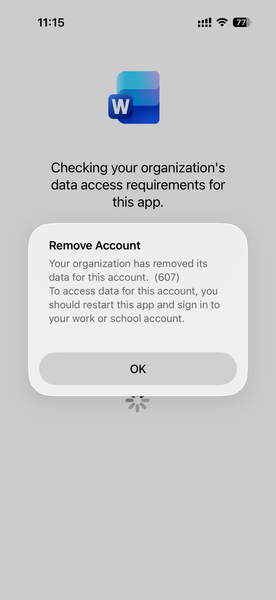
Intune MAM BYOD: Remove Account message for iOS devices
Hello, I am seeing an issue for Intune MAM BYOD(iOS) users. After a user account password reset, it causes Intune to remove the account configured from mobile applications like MS Outlook, Work, OneDrive, etc. Current Intune Configuration: Done - App Protection Policy Done - Conditional access policy --> Grant --> Requires app protection policy (checked) Users had to re-enrol to access his/her data. Here is the screenshot, Thank you,111Views0likes1CommentMicrosoft Graph Command Line Tools Blocked by CA
Hi All I hope you are well. Anyway, I recently turned ON a Conditional Access Policy Template, "Require MDM-enrolled and compliant device to access cloud apps for all users (Preview)" this seems to work fine until our IT Admins try to use the AutoPilot script which gets blocked based on: Microsoft Graph Command Line Tools Any ideas on how to allow AutoPilot / Microsoft Graph Command Line Tools through CA? Info appreciated2.8KViews0likes15Comments
physicalMemoryInBytes always returns 0
I followed the blog below, https://techcommunity.microsoft.com/t5/microsoft-intune/total-physical-memory-attribute-graph-location/m-p/2108126 Here is my API endpoint. https://graph.microsoft.com/beta/deviceManagement/manageddevices('1111-2222-3333-abc4-55aa55bb55')?$select=id,physicalMemoryInBytes Here is the response, {"@odata.context":"https://graph.microsoft.com/beta/$metadata#deviceManagement/managedDevices(id,physicalMemoryInBytes)/$entity","id":"1111-2222-3333-abc4-55aa55bb55","physicalMemoryInBytes":0} The expected response is 32GB (in bytes). Can someone please help?10KViews2likes7Comments
Unable to use TargetedManagedAppConfiguration end point (Broken)
Within Intune, Graph explorer and PowerShell commands the gateway fails to respond, it's been broken for a couple of months, i have opened multiple support tickets and tumbleweed. i cant get or create any App configuration or app protection policies PS error Get-MgDeviceAppManagementTargetedManagedAppConfiguration Get-MgDeviceAppManagementTargetedManagedAppConfiguration_List: Too many retries performed. More than 3 retries encountered while sending the request. (HTTP request failed with status code: GatewayTimeout. Intune Error { "error": { "code": "UnknownError", "message": "{\"Message\":\"{\\r\\n \\\"_version\\\": 3,\\r\\n \\\"Message\\\": \\\"An error has occurred - Operation ID (for customer support): 00000000-0000-0000-0000-000000000000 - Activity ID: 6bf99a96-6889-4b10-a52e-c31e099e9111 - Url: https://proxy.msub06.manage.microsoft.com/TrafficGateway/TrafficRoutingService/MAMAdmin/MAMAdminFEService/deviceAppManagement/targetedManagedAppConfigurations?api-version=5025-07-01&$count=true\\\",\\r\\n \\\"CustomApiErrorPhrase\\\": \\\"\\\",\\r\\n \\\"RetryAfter\\\": null,\\r\\n \\\"ErrorSourceService\\\": \\\"\\\",\\r\\n \\\"HttpHeaders\\\": \\\"{}\\\"\\r\\n}\"}", "innerError": { "date": "2025-12-23T12:42:49", "request-id": "b844d1f6-c583-485c-b33f-9a29d9b44a92", "client-request-id": "6bf99a96-6889-4b10-a52e-c31e099e9111" } } }106Views0likes1Comment
Blocking users using edge add-ons store
Hi all, I am really struggling to find a way to stop users getting to this location: https://microsoftedge.microsoft.com/addons/microsoft-edge-extensions-home and adding addons. I have tried multiple intune policies like blocking the side bar: Any ideas?3.2KViews1like3CommentsMS Graph Device OS Reporting
On the Intune android device view, the OS is listed as ‘Android (fully managed)’ or ‘Android (corporate-owned work profile)’. The MS Graph command get-mgdevicemanagement just has ‘Android’ for the OS attribute. Using MS Graph, does anyone know how or where to get the ‘Android (corporate-owned work profile)’ value that shows in the device view?97Views0likes1Comment