grafana
8 Topics
Ho w to correctly measure Bytes Received/sec &&&&& Bytes Sent/sec
I would like to correctly measure through log analytic and then in Grafana network traffic generated for one or more VMs. For test VMs I have enable Data collection rule and enabled collecting data every 60s for network Interface "Bytes Received/sec" and "Bytes Sent/sec". Inside metric is also enabled. Query that I use in log analytic is : Perf | where TimeGenerated between (datetime(2024-03-19) .. datetime(2024-03-20)) | where Computer == "***********" | where ObjectName == "Network Interface" and CounterName == "Bytes Received/sec" and InstanceName == "Microsoft Hyper-V Network Adapter _2" | summarize BytsSent = sum(CounterValue)/1073741824 by bin(TimeGenerated, 24h),CounterName InsightsMetrics | where TimeGenerated between (datetime(2024-03-19) .. datetime(2024-03-20)) | where Origin == "vm.azm.ms" | where Namespace == "Network" and Name == "ReadBytesPerSecond" | where Computer == "******" | extend NetworkInterface=tostring(todynamic(Tags)["vm.azm.ms/networkDeviceId"]) | summarize AggregatedValue = sum(Val) by bin(TimeGenerated, 1d), Computer, _ResourceId, NetworkInterface Results for Perf is 0,32339 GB/day and for InsightsMetrics is 14.7931 GB/day. If I go to network interface and select metric data for network interface is data that I get return from query in log analytic for Metric same/correct . I have now shorten sample period of data collection rule to 15s, I hope that this will ,give more accurate results. I’m I doing something wrong or I collect data the wrong way. I don’t want to activate inside metric for every VM, I want to activate any data that I’m interesting.461Views0likes1CommentFebruary 2026 Recap: Azure Database for PostgreSQL
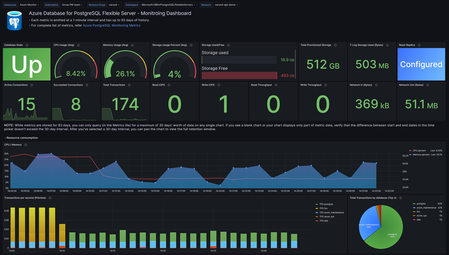
Hello Azure Community, We’re excited to share the February 2026 recap for Azure Database for PostgreSQL, featuring a set of updates focused on speed, simplicity, and better visibility. From Terraform support for Elastic Clusters and a refreshed VM SKU selection experience in the Azure portal to built‑in Grafana dashboards, these improvements make it easier to build, operate, and scale PostgreSQL on Azure. This recap also includes practical GIN index tuning guidance, enhancements to the PostgreSQL VS Code extension, and improved connectivity for azure_pg_admin users. Features Terraform support for Elastic Clusters - Generally Available Dashboards with Grafana - Generally Available Easier way to choose VM SKUs on portal – Generally Available What’s New in the PostgreSQL VS Code Extension Priority Connectivity to azure_pg_admin users Guide on 'gin_pending_list_limit' indexes Terraform support for Elastic Clusters Terraform now supports provisioning and managing Azure Database for PostgreSQL Elastic Clusters, enabling customers to define and operate elastic clusters using infrastructure‑as‑code workflows. With this support, it is now easier to create, scale, and manage multi‑node PostgreSQL clusters through Terraform, making it easier to automate deployments, replicate environments, and integrate elastic clusters into CI/CD pipelines. This improves operational consistency and simplifies management for horizontally scalable PostgreSQL workloads. Learn more about building and scaling with Azure Database for PostgreSQL elastic clusters. Dashboards with Grafana — Now Built-In Grafana dashboards are now natively integrated into the Azure Portal for Azure Database for PostgreSQL. This removes the need to deploy or manage a separate Grafana instance. With just a few clicks, you can visualize key metrics and logs side by side, correlate events by timestamp, and gain deep insights into performance, availability, and query behavior all in one place. Whether you're troubleshooting a spike, monitoring trends, or sharing insights with your team, this built-in experience simplifies day-to-day observability with no added cost or complexity. Try it under Azure Portal > Dashboards with Grafana in your PostgreSQL server view. For more details, see the blog post: Dashboards with Grafana — Now in Azure Portal for PostgreSQL. Easier way to choose VM SKUs on portal We’ve improved the VM SKU selection experience in the Azure portal to make it easier to find and compare the right compute options for your PostgreSQL workload. The updated experience organizes SKUs in a clearer, more scannable view, helping you quickly compare key attributes like vCores and memory without extra clicks. This streamlined approach reduces guesswork and makes selecting the right SKU faster and more intuitive. What’s New in the PostgreSQL VS Code Extension The VS Code extension for PostgreSQL helps developers and database administrators work with PostgreSQL directly from VS Code. It provides capabilities for querying, schema exploration, diagnostics, and Azure PostgreSQL management allowing users to stay within their editor while building and troubleshooting. This release focuses on improving developer productivity and diagnostics. It introduces new visualization capabilities, Copilot-powered experiences, enhanced schema navigation, and deeper Azure PostgreSQL management directly from VS Code. New Features & Enhancements Query Plan Visualization: Graphical execution plans can now be viewed directly in the editor, making it easier to diagnose slow queries without leaving VS Code. AGE Graph Rendering: Support is now available for automatically rendering graph visualizations from Cypher queries, improving the experience of working with graph data in PostgreSQL. Object Explorer Search: A new graphical search experience in Object Explorer allows users to quickly find tables, views, functions, and other objects across large schemas, addressing one of the highest-rated user feedback requests. Azure PostgreSQL Backup Management: Users can now manage Azure Database for PostgreSQL backups directly from the Server Dashboard, including listing backups and configuring retention policies. Server Logs Dashboard: A new Server Dashboard view surfaces Azure Database for PostgreSQL server logs and retention settings for faster diagnostics. Logs can be opened directly in VS Code and analyzed using the built-in GitHub Copilot integration. This release also includes several reliability improvements and bug fixes, including resolving connection pool exhaustion issues, fixing Docker container creation failures when no password is provided, and improving stability around connection profiles and schema-related operations. Priority Connectivity to azure_pg_admin Users Members of the azure_pg_admin role can now use connections from the pg_use_reserved_connections pool. This ensures that an admin always has at least one available connection, even if all standard client connections from the server connection pool are in use. By making sure admin users can log in when the client connection pool is full, this change prevents lockout situations and lets admins handle emergencies without competing for available open connection slots. Guide on 'gin_pending_list_limit' indexes Struggling with slow GIN index inserts in PostgreSQL? This post dives into the often-overlooked gin_pending_list_limit parameter and how it directly impacts insert performance. Learn how GIN’s pending list works, why the right limit matters, and practical guidance on tuning it to strike the perfect balance between write performance and index maintenance overhead. For a deeper dive into gin_pending_list_limit and tuning guidance, see the full blog here. Learning Bytes Create Azure Database for PostgreSQL elastic clusters with terraform: Elastic clusters in Azure Database for PostgreSQL let you scale PostgreSQL horizontally using a managed, multi‑node architecture. With Elastic cluster now generally available, you can provision and manage elastic clusters using infrastructure‑as‑code, making it easier to automate deployments, standardize environments, and integrate PostgreSQL into CI/CD workflows. Elastic clusters are a good fit when you need: Horizontal scale for large or fast‑growing PostgreSQL workloads Multi‑tenant applications or sharded data models Repeatable and automated deployments across environments The following example shows a basic Terraform configuration to create an Azure Database for PostgreSQL flexible server configured as an elastic cluster. resource "azurerm_postgresql_flexible_server" "elastic_cluster" { name = "pg-elastic-cluster" resource_group_name = <rg-name> location = <region> administrator_login = var.admin_username administrator_password = var.admin_password version = "17" sku_name = "GP_Standard_D4ds_v5" storage_mb = 131072 cluster { size = 3 } } Conclusion That’s a wrap for the February 2026 Azure Database for PostgreSQL recap. We’re continuing to focus on making PostgreSQL on Azure easier to build, operate, and scale whether that’s through better automation with Terraform, improved observability, or a smoother day‑to‑day developer and admin experience. Your feedback is important to us, have suggestions, ideas, or questions? We’d love to hear from you: https://aka.ms/pgfeedback.347Views2likes1Comment
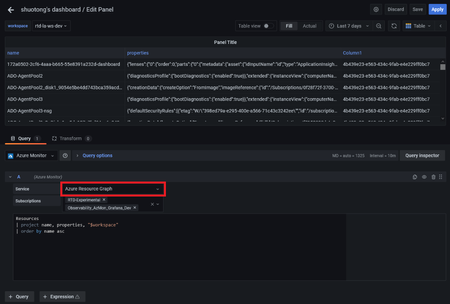
Azure Resource Graph is now supported in Grafana's Azure Monitor data source
Azure Resource Graph (ARG) is a service in Azure that is designed to extend Azure Resource Management by providing efficient and performant resource exploration, with the ability to query at scale across a given set of subscriptions so that you can effectively govern your environment. By querying ARG, you can query resources with complex filtering, iteratively explore resources based on governance requirements, and assess the impact of applying policies in a vast cloud environment. With Grafana 8.0, we are happy to announce that Azure monitor data source now supports querying Azure resource graph. There is no extra configuration needed to use this service. Queries are written in the Kusto Query Language and Azure Resource Graph query results are formatted as table data. If your credentials give you access to multiple subscriptions, then you can select them before entering the query.11KViews2likes6CommentsManaging your data with Azure Managed Gafana integrations with Azure Monitor
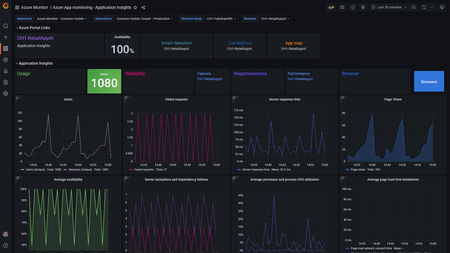
Along with the announcement of Azure Managed Grafana, learn about new Grafana integrations with #Azure Monitor, including the ability to pin Azure Monitor visualizations from Azure Portal to Grafana dashboards and new out-of-the-box Azure Monitor dashboards! https://techcommunity.microsoft.com/t5/azure-observability-blog/enabling-full-stack-observability-with-azure-monitor-and-grafana/ba-p/3287145 How have you been using Azure Managed Grafana to manage your app data and infrastructure? How do you plan to use this new integration?1.1KViews0likes0CommentsManaged Identity support for Azure hosted Grafana and Azure Monitor data source
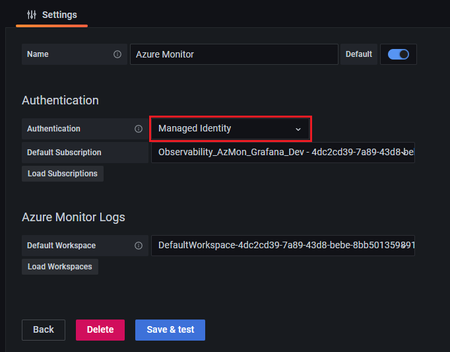
Customers who host Grafana in Azure (e.g., App Service, Azure Virtual Machines) and have managed identity enabled on their VM, will now be able to avail of managed identity based in Grafana. This will simplify the data source configuration and will allow Azure data sources (e.g., Azure Monitor) to be authenticated in Azure services via the managed identity without having to manually configure service identity via App Registration for each data source. To enable this, you will need to set the managed_identity_enabled = true in the grafana server config.3KViews3likes0Comments