features
79 TopicsHow do I disable the Tabs in Taskbar function
After some searching for a solution, it seems I'm unlike most and I prefer to have only the active tab show in the task switcher. Having all my open, active tabs makes it much more difficult to find the app I need. For tabs that I switch to often, I simply turn them into apps. I disliked this feature so much I turned it off in IE, too. I don't see an issue with the feature, but it would be nice if when new features are added, there's a way to turn them off. I've already checked the flags page and it's not in there. It seems baked in, which is... weird. Anyway, if anyone has any suggestions, I'd love to hear them.Solved12KViews0likes4CommentsSS48: don't remove MacOS Mojave support on Edge, even if Google now announced to us that they will
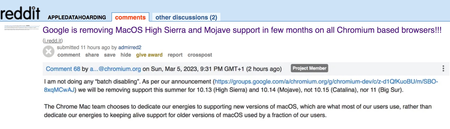
Suggestion (SS): 48 Classification: Browser Compatibility PRIORITY IN MY OPINION: 10 on a scale from 1 (low) to 10 (high) Few hours ago Senior Dev reported us the no interest of keeping MacOS Mojave support on Chrome. In 2 years they are removing the 2 best MacOS ever released, before Apple started to downgrade features in MacOS (and obviously adding some other too), especially related to all backup workflows, that now are more complex, but even to permissions and multiple other things. We reported the new downgrade for external drives implemented in MacOS 12/13 https://old.reddit.com/r/appledatahoarding/comments/11ikj38/next_macos_downgrade_available_with_monterey/, but this is not the point now. We explained already https://bugs.chromium.org/p/chromium/issues/detail?id=1413784&q=sierra%20chrome&can=1 why they should keep support for such MacOS, and later again https://bugs.chromium.org/p/chromium/issues/detail?id=1322548#c68 Now the point is: we are trying our best to revert such decision, like we wrote https://old.reddit.com/r/appledatahoarding/comments/11jufgo/google_chrome_support_will_end_in_few_months_for/, but it's important that other chromium based devs know about such problematic and evaluate to continue support, if this is technically possible. Remember that MacOS 10.14 is not like all other MacOS released by Apple, so removing such MacOS is not like removing Catalina, High Sierra etc. If there are question why MacOS Mojave support is so important, just write directly to us. We already experienced the direct consequence of removing MacOS on Chromium on all browsers and apps few months ago with Sierra. Please keep in mind that this is not just related to Chrome, but even Chromium based browsers, Mac Apps using Electron, and all other Mac Apps too (because if one is starting to remove support, especially big brands, the other will follow much easier*). So be open with your mind and don't write "i'm not using Chrome or Mojave, doesn't matter for me". There is the possibility that Google maybe know about some changes with Xcode, like we wrote https://old.reddit.com/r/appledatahoarding/comments/11jho7y/meanwhile_the_batch_deletion_of_other_2_macos_by/ but probably is not the case. If this is true, then the situation would be much worse, if now Apple really decides to remove multiple MacOS, like we previously reported with out https://old.reddit.com/r/appledatahoarding/comments/114o7zt/remember_2023_will_be_the_most_crucial_year_of/ *Keep in mind that almost 70%+ of all browsers available for MacOS (80+) are Chromium based. ------------ In case you will not doing that and Google will not keep support for Mojave, please provide directly link to download a browser version compatible with up to MacOS Sierra and one up to MacOS Mojave, instead of just download last version. Avoid auto update of the app too. So don't install new incompatible app automatically, which make no sense at all.2.2KViews0likes0CommentsMicrosoft Edge Kids! - Kids mode added to Edge - What an Amazing feature! (●'◡'●)
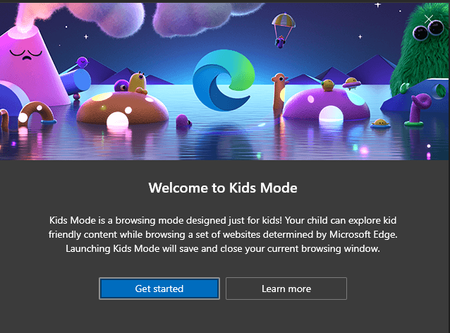
Microsoft Edge version 90.0.800.0 (Official build) canary (64-bit) introducing Kids mode which can be accessed from the browser settings: edge://settings/family you can learn all about it here in this official page a brief description: Kids Mode is a convenient browsing mode inside Microsoft Edge that’s designed for kids. With its kid-friendly features and safety guardrails in place, Kids Mode is a great place for children to safely explore the web. Kids Mode includes features like custom browser themes, kid-friendly content, browsing based on an allow list, Bing SafeSearch set to strict, and a password requirement to exit. Also, Kids Mode doesn't require a child account or profile. Currently, Kids Mode is limited to US English on Windows and MacOS. Kids mode is full screen mode, in order to exit it, kids need to have Windows Pin or Password and you can see, all the appropriate content and links are added to the home page ^^ Bonus content:6.3KViews5likes19CommentsPicture in Picture settings options missing in Edge
Hello, I would like to permanently disable the picture in picture feature for Edge Chromium. I have the most recent update - Version 94.0.992.50 (Official build) (64-bit) and I have searched for instructions but they all say Cookies & Site Permissions and toggle off the picture in picture option but there is no listing for picture in picture. I have also tried searching the settings for picture in picture and the search results come up with zero results. This feature while pleasant and maybe useful to others is annoying to me and I would like to permanently disable it but cannot find the settings to do so. Can anyone please help? Sincerely, Wonder Woman3.1KViews0likes1CommentSS33: smart pip mode - better tiktok integration (or other video social/websites) picture-in-picture
Suggestion (SS): 33 Classification: TIKTOK + PIP / picture-in-picture + audio control PRIORITY IN MY OPINION: 4-6 on a scale from 1 (low) to 10 (high) EDIT: i just found this picture in picture https://link.ws/pipdiscussion1 discussion in the feed too. 1) i don't see this directly is annoying i need to activate it via flags 2) pip doesn't work, even if i activate it goal like 360 chrome (or even better, see 3) or https://link.ws/vivopepip with better video control (sugg.17.) and pip buttons (sugg.18.), but avoid to put it over the downloader... (like the picture) 3) smart player with zoomed features like this on the right 4) remember tiktok specific size 5) keep always on top over all mac apps (i haven't tested this with edge, because i don't see pip) 6) please go to next tiktok automatically 7) allow extension in pip mode, so i can download tiktok videos in pip mode with the overlay button PS: about 6) i already told to them inside my 50+ suggestions to tiktok too, but maybe edge is able to fix it too. i hope auto for both pip mode and normal web browsing. 😎add possibility to add multiple url inside a list of pip mode, so a sort of playlist pip mode. 9) maybe like 8 with collections or bookmarks folders, so you pip mode randomly url 10) add to bookmarks inside pip mode directly, especially if you implement 6) 11) same like 10 for collections 12) maybe a separate history for pipmode visited urls (if 6. is implemented) EDIT: sorry i can activate it via 1 ... there is no button over the video for pip (or below, near the video). if i do that, i see there is no mute option too. 13) we cannot change the size, we can only change position. yes pip is over all mac apps (i see it now after enabling with 1. ) 14) remember to add even the option "keep behind mac app too". so both option should be available. 15) loop mode support for other website here the max size possible 16) better audio control panel, where we see all tabs with audio active and we can choose where to keep audio on or off. for example if 300 tabs are opened, but 20 with audio, in this panel we see only the 20 tabs. 17,18) see above 19) ability to quick copy url link or share the video (in pip mode) 20) screenshot feature integrated in pip mode. 21) loop from x to y https://www.tiktok.com/@buketalican11.12.16/video/6682465643712744709 example from 0 to 0.22 in this video, by skipping the rest 22) continue to loop, even if i launch another website, in this case you have 2 audios, 1 with pip, 1 without. would be cool the loop function for normal browsing too (is possible via extension...) 23) remember the dual mode suggestion: pip and full mode at the same time https://link.ws/edgess25 about 24) it depends how you implement all that. if you do like 360chrome, where each video has separate pip then allow both option "deactivate audio in dock mode" or "keep audio in dock mode" (not available in 360). what i like is that i can pip my videos in the dock. so if you use a player, maybe a way to pip the player in the dock is cool too, with both option "audio on" "audio off". 25) if there is no idea for 23) then a way to switch from pip to full faster, and from full to pip too about 26) i know this get against tiktok policy, but maybe useful for other websites**. a download button. **at the end is not possible to download it at all, since it doesn't work. plus the fact that tiktok download is not directly a feature a browser need to support and extension can do it perfectly. so the point is to add it for other websites, that allow you to download videos without copyright problem... 27) spotify player should be different from video player. so we can have spotify and pip at the same time. 28) 2x click switch size for example with opera max size is then with a 2x click we go to so a small size, which is not related to the full size video - pip mode switch suggestion that i wrote before. in this case the max size could be 1/2 of display, full mode is 1/1 29) right click options would be cool to see suggestions or skip ads or stop auto suggestions with right click3.4KViews0likes3CommentsEdge-to-edge concept for New Edge Canary for Android
I'd like to give a suggestion too: please, set the nav bar as transparent, using the Edge-to-edge concept from Android 10, like you guys already does on iOS (here: codelabs.developers.google.com/codelabs/gesture-navigation#3 , here http://www.youtube.com/watch?v=Nf-fP2u9vjI, and here developer.android.com/training/gestures/gesturenav?hl=pt-br ) Look how this bar is ugly, makes the screen smaller and pollutes the screen as well... Look how it's very better, like the Edge works on iOS and how it should be on Android as well. The little home bar change its color depending from the background. This division of the interface is also ugly. Another suggestion that I'd like to see in the future is the "force dark mode" in sites that don't have support to the changing color API. Various browsers already have it. And, congratulations! The new Edge for Android is incredible 😄 you've gone a good job.835Views1like0CommentsI just want to tell you that i suggested other 50-100 improvements to Edge Devs in the last time
I don't share such things here, because there are a lot of personal information that i don't want to share with the public, maybe soon i will make a summary of the most important points, if you wish that. Or just wait, until Edge implement it. Then you will see it xD Example of topics: bookmarks, search bar, toolbar, settings, edge in small size, using edge with low resolution display setting, smart search, other smart buttons (i already talked about some previously), better tab management, better domain based features, etc. I submitted different problems that i discovered too. So be ready to see another boost for edge. For different suggestions devs are already on working. Good day Ciao1.5KViews1like3CommentsSS47: resize toolbar / search bar
Suggestion (SS): 47 Classification: TOOLBAR PRIORITY IN MY OPINION: 2-3 on a scale from 1 (low) to 10 (high) If we want to move it to the left is not possible (if we don't have 40 extensions for example). instead you should show me in such way where the extension is visible more to the left and after that i see a white space.3.2KViews0likes7Comments