Features
33 Topics
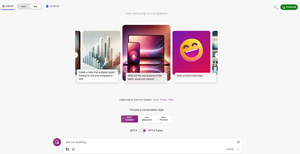
what happened to Notebook mode in Copilot (formerly Bing Chat Enterprise)
Looks like in the latest updates for Bing Chat Enterprise, the Notebook mode that allowed longer prompt sizes got deprecated. How can we realize the same Notebook functionality within the MSFT AI offering? Specifically, longer context window and prompt size offered by the Notebook mode in one shot mode. If I am not wrong, the Notebook mode also had the ability to generate a longer output with more words than the limitation within chatbot mode.
Issues while trying to build a graph connector to Azure SQL in M365 copilot
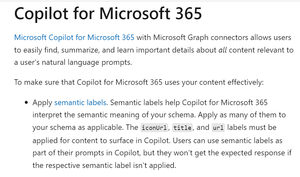
Dear All, I tried to create a Graph Connector to Azure SQL. I wanted to ingest data from Azure SQL and ask questions about it within Copilot for Microsoft 365. The graph connector was created in this Microsoft 365 Admin Centre within the 'Data sources' section in 'Search and Intelligence' menu: https://admin.microsoft.com/#/homepage The Microsoft documentation (https://learn.microsoft.com/en-us/graph/connecting-external-content-experiences#copilot-for-microsoft-365) screenshot below states that in order for the information to surface in Copilot for Microsoft 365, the fields "title," "url," and "iconUrl" need to be filled out during the configuration process. However, during the configuration process, I noticed that the 'iconUrl' field is greyed out. Hence, I am not able surface data from Azure SQL in Copilot for Microsoft 365. On the other hand, Microsoft Search and Sharepoint both displayed the Azure SQL data as I proceeded to configure the connector anyway. Is there any workaround for this? Are there any alternative approaches that I can take to surface the data in Copilot chat? Would appreciate any help regarding the same.Copilot Chat in Office Tools
Hit of the press! Copilot Chat will start to be published in the Office Apps. Copilot Chat will still have no access to Graph. admins can pin it for all users to have a nice experience. have a look on my announcement https://www.linkedin.com/posts/andre-thiemann-bb888646_microsoft365copilot-copilotchat-microsoft365-activity-7341100014070378498-xhxE?utm_source=share&utm_medium=member_ios&rcm=ACoAAAm9dzwB9gBW8cfBuj0IBk3MpR03ArNpnaY
Can't Access Copilot GPT Builder
Hi all, I have a Copilot for Microsoft 365 licence on my work account. Ever since the launch of GPT Builder I could not manage to find it. All the relevant documentation says it should be accessed through the GPT's menu, but there is no such menu on my screen: Has anyone else encountered this issue?
Copilot in Edge - Text Prompt Focus on Open (Suggestion)
Hello, I have been a Copilot user in Edge for a long time and I have encountered the same issue repeatedly. I decided to share it here in case there is a solution for it. Whenever I click on the Copilot icon in the upper right corner of Edge, I often start typing my query without noticing that the cursor is not active in the text box. Then I have to type everything again. Would it be possible to make the text box of the Copilot in Edge automatically focused after the panel opens? I think that would be a reasonable expectation for someone who opens the panel, as they probably want to type something.Solved"Summarize this page" not working on M365 tools
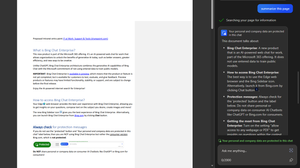
Weeks ago when asking "summarize this page" on a word or powerpoint web page BCE produced a result. Now it looks it is no longer able to access these pages, while working fine on PDFs, sharepoint and standard web pages. Is this a temporary issue or done by intent - meaning this will be offered only to licensed CoPilot users? We would require a clear direction statement for our >7000 users to whom we announced Bing Chat Enterprise as the preferred tool for protected access to Gen AI in the company. Thanks !