fabric
15 TopicsGeneral Availability of Mirroring Azure Database for PostgreSQL in Microsoft Fabric Is Here!
Unlock Real-Time Analytics on Operational Data—Now Enterprise-Ready Few weeks ago at Microsoft Ignite 2025, we announced General Availability (GA) of Mirroring for Azure Database for PostgreSQL flexible server in Microsoft Fabric. This milestone marks a major leap forward in empowering organizations to seamlessly integrate their operational PostgreSQL data into the Microsoft Fabric analytics ecosystem—enabling near real-time analytics, machine learning, and business intelligence without the complexity of traditional ETL pipelines. Why Mirror Operational Databases in Microsoft Fabric? Accelerate Analytics Without ETL Fabric Mirroring eliminates the need for complex, custom ETL pipelines. Data from your operational PostgreSQL databases is continuously replicated into OneLake as Delta tables, making it instantly available for analytics, machine learning, and reporting. This means you can: Run advanced analytics and AI on live data without impacting production workloads. Empower data scientists to experiment and innovate with up-to-date data. Create real-time dashboards and cross-database queries for comprehensive business insights. Unify governance and security under OneLake, reducing risk and operational overhead. Enterprise-Grade Security and Compliance With support for Entra ID, VNETs, and Private Endpoints, organizations can enforce strict access controls and network isolation. Mirroring is designed to meet the needs of highly regulated industries, ensuring data privacy and compliance at every step. High Availability and Reliability The new HA support ensures that mirroring sessions remain resilient to failures, delivering uninterrupted analytics even during server failovers. This is essential for mission-critical applications where downtime is not an option. Cost Efficiency and Simplicity Mirroring is offered at no additional cost, dramatically reducing the total cost of ownership for analytics solutions. By removing ETL complexity, organizations can focus on extracting value from their data rather than managing infrastructure. What’s New in GA? Building on the momentum of our Public Preview, the GA release introduces several enterprise-grade enhancements: Microsoft Entra ID Authentication: Secure, centralized identity management for all mirroring operations. Entra ID authentication streamlines access control and compliance, making it easier for organizations to manage users and roles across their data estate. VNET and Private Endpoint Support: Mirroring now works with PostgreSQL Flexible Servers deployed behind Virtual Networks (VNETs) and Private Endpoints, ensuring secure, private connectivity with no public exposure. This is critical for regulated industries and enterprises with strict security requirements. High Availability (HA) Support: Mirroring is now compatible with HA-enabled servers, delivering business continuity and seamless failover for mission-critical workloads. For PostgreSQL 17+, replication slot failover ensures uninterrupted mirroring even during planned or unplanned outages. Performance and Reliability Enhancements: The replication engine has been optimized for smoother onboarding, improved error handling, and higher throughput—supporting initial snapshot rates up to ~1TB/hour and change data capture (CDC) with minimal latency (as low as 5 seconds under optimal conditions). For a full list of prerequisites and setup guidance, see the official documentation. Microsoft Entra ID Authentication Support for Entra ID database roles includes: Setting up initial replication Managing ongoing Fabric communications Enabling Entra ID authentication on Flexible Server Handling Entra ID roles within your databases Choosing your role type for Mirroring VNET and Private Endpoint Support This feature ensure secure and efficient connectivity for flexible servers within Microsoft Fabric. Connecting to a flexible server without public connectivity enhances security during both initial setup and ongoing operations. Establishing a Virtual Network Gateway on the target VNET facilitates encrypted traffic between networks, while subnet delegation allows specific resources within a subnet to be managed for specialized tasks. The system supports servers restricted by Virtual Network (VNET) and Private Endpoint configurations, enabling robust network isolation and protection from unauthorized access. High Availability (HA) Support Fabric Mirroring supports high availability by enabling seamless failover and enhanced fault tolerance for servers configured with HA. This feature requires PostgreSQL version 17 or later, as replication slot failover is only available in these versions. If you are using an earlier PostgreSQL version, you will need to manually reconfigure mirroring after each failover event to maintain replication. Beyond PostgreSQL: Interoperability Across Azure Databases Fabric Mirroring is not limited to PostgreSQL. The GA release also includes support for other databases like: SQL Server (2016–2025): Native mirroring for on-premises, Azure VMs, and non-Azure clouds, with secure connectivity and analytics-ready Delta tables. Snowflake: Mirroring for managed and Apache Iceberg tables, enabling high-performance analytics and open-format interoperability. Cosmos DB: Continuous change capture and mirroring for globally distributed NoSQL data, supporting real-time personalization, fraud detection, and IoT analytics. This interoperability allows organizations to consolidate data from diverse sources into OneLake, unlocking unified analytics and AI across their entire data estate. By leveraging shortcuts in Microsoft Fabric, customers can reference data stored in different mirrored databases and storage accounts as if it resided in a single location. This means users can build cross-database queries and analytics pipelines without physically moving or duplicating data, avoiding the need for complex ETL processes or data integration solutions. Shortcuts make it possible to seamlessly join, analyze, and visualize data from SQL Server, Snowflake, Cosmos DB, and more within OneLake, streamlining analytics workflows and accelerating time to insight while reducing storage costs and operational overhead. Getting Started Ready to experience the power of Mirroring for Azure Database for PostgreSQL Flexible Server in Microsoft Fabric? Step-by-step tutorial: https://learn.microsoft.com/azure/postgresql/flexible-server/concepts-fabric-mirroring#enable-fabric-mirroring-in-the-azure-portal Role-based access guidance: https://learn.microsoft.com/fabric/mirroring/azure-database-postgresql-tutorial#database-role-for-fabric-mirroring Monitor and troubleshoot: https://learn.microsoft.com/azure/postgresql/flexible-server/concepts-fabric-mirroring#troubleshooting Public documentation: Fabric Mirroring for Azure Database for PostgreSQL Future Enhancements Looking ahead to the next future, our focus will be on delivering a series of post-GA enhancements designed to make Mirroring for Azure Database for PostgreSQL Flexible Server even more robust, versatile, and user-friendly. Key advancements will be in the following areas: automatic replication for newly created database tables when operating in auto-mode, ensuring that your mirrored environments remain up to date with minimal manual intervention. enhanced support for advanced DDL operations, giving users greater flexibility and control when managing schema changes on mirrored databases. expanding compatibility with additional data types—such as JSON, arrays, ranges, and geometry—will open up new scenarios for analytics and data integration, accommodating a wider range of workloads and use cases. support for partitioned tables, TOAST tables, and views will allow organizations to mirror more complex database structures, further streamlining operational analytics. enable the ability to mirror databases hosted on Read Replicas, which will help organizations optimize their high-availability and scaling strategies without compromising data consistency. Collectively, these planned features underscore our commitment to continuous improvement and to meeting the evolving needs of our users as they harness the full power of Microsoft Fabric for unified data analytics and AI. Conclusion The General Availability of Mirroring for Azure Database for PostgreSQL Flexible Server in Microsoft Fabric represents a significant advancement for organizations seeking to unlock real-time analytics, AI, and BI on their operational data—securely, reliably, and without ETL complexity. With new enterprise features, proven customer success, and broad interoperability, now is the perfect time to bring your operational databases into the Microsoft Fabric analytics era. Learn more and get started today: Fabric Mirroring for Azure Database for PostgreSQL331Views1like0CommentsJuly 2025 Recap: Azure Database for PostgreSQL
Hello Azure Community, July delivered a wave of exciting updates to Azure Database for PostgreSQL! From Fabric mirroring support for private networking to cascading read replicas, these new features are all about scaling smarter, performing faster, and building better. This blog covers what’s new, why it matters, and how to get started. Catch Up on POSETTE 2025 In case you missed POSETTE: An Event for Postgres 2025 or couldn't watch all of the sessions live, here's a playlist with the 11 talks all about Azure Database for PostgreSQL. And, if you'd like to dive even deeper, the Ultimate Guide will help you navigate the full catalog of 42 recorded talks published on YouTube. Feature Highlights Upsert and Script activity in ADF and Azure Synapse – Generally Available Power BI Entra authentication support – Generally Available New Regions: Malaysia West & Chile Central Latest Postgres minor versions: 17.5, 16.9, 15.13, 14.18 and 13.21 Cascading Read Replica – Public Preview Private Endpoint and VNet support for Fabric Mirroring - Public Preview Agentic Web with NLWeb and PostgreSQL PostgreSQL for VS Code extension enhancements Improved Maintenance Workflow for Stopped Instances Upsert and Script activity in ADF and Azure Synapse – Generally Available We’re excited to announce the general availability of Upsert method and Script activity in Azure Data Factory and Azure Synapse Analytics for Azure Database for PostgreSQL. These new capabilities bring greater flexibility and performance to your data pipelines: Upsert Method: Easily merge incoming data into existing PostgreSQL tables without writing complex logic reducing overhead and improving efficiency. Script Activity: Run custom SQL scripts as part of your workflows, enabling advanced transformations, procedural logic, and fine-grained control over data operations. Together, these features streamline ETL and ELT processes, making it easier to build scalable, declarative, and robust data integration solutions using PostgreSQL as either a source or sink. Visit our documentation guide for Upsert Method and script activity to know more. Power BI Entra authentication support – Generally Available You can now use Microsoft Entra ID authentication to connect to Azure Database for PostgreSQL from Power BI Desktop. This update simplifies access management, enhances security, and helps you support your organization’s broader Entra-based authentication strategy. To learn more, please refer to our documentation. New Regions: Malaysia West & Chile Central Azure Database for PostgreSQL has now launched in Malaysia West and Chile Central. This expanded regional presence brings lower latency, enhanced performance, and data residency support, making it easier to build fast, reliable, and compliant applications, right where your users are. This continues to be our mission to bring Azure Database for PostgreSQL closer to where you build and run your apps. For the full list of regions visit: Azure Database for PostgreSQL Regions. Latest Postgres minor versions: 17.5, 16.9, 15.13, 14.18 and 13.21 PostgreSQL latest minor versions 17.5, 16.9, 15.13, 14.18 and 13.21 are now supported by Azure Database for PostgreSQL flexible server. These minor version upgrades are automatically performed as part of the monthly planned maintenance in Azure Database for PostgreSQL. This upgrade automation ensures that your databases are always running on the most secure and optimized versions without requiring manual intervention. This release fixes two security vulnerabilities and over 40 bug fixes and improvements. To learn more, please refer PostgreSQL community announcement for more details about the release. Cascading Read Replica – Public Preview Azure Database for PostgreSQL supports cascading read replica in public preview capacity. This feature allows you to scale read-intensive workloads more effectively by creating replicas not only from the primary database but also from existing read replicas, enabling two-level replication chains. With cascading read replicas, you can: Improve performance for read-heavy applications. Distribute read traffic more efficiently. Support complex deployment topologies. Data replication is asynchronous, and each replica can serve as a source for additional replicas. This setup enhances scalability and flexibility for your PostgreSQL deployments. For more details read the cascading read replicas documentation. Private Endpoint and VNET Support for Fabric Mirroring - Public Preview Microsoft Fabric now supports mirroring for Azure Database for PostgreSQL flexible server instances deployed with Virtual Network (VNET) integration or Private Endpoints. This enhancement broadens the scope of Fabric’s real-time data replication capabilities, enabling secure and seamless analytics on transactional data, even within network-isolated environments. Previously, mirroring was only available for flexible server instances with public endpoint access. With this update, organizations can now replicate data from Azure Database for PostgreSQL hosted in secure, private networks, without compromising on data security, compliance, or performance. This is particularly valuable for enterprise customers who rely on VNETs and Private Endpoints for database connectivity from isolated networks. For more details visit fabric mirroring with private networking support blog. Agentic Web with NLWeb and PostgreSQL We’re excited to announce that NLWeb (Natural Language Web), Microsoft’s open project for natural language interfaces on websites now supports PostgreSQL. With this enhancement, developers can leverage PostgreSQL and NLWeb to transform any website into an AI-powered application or Model Context Protocol (MCP) server. This integration allows organizations to utilize a familiar, robust database as the foundation for conversational AI experiences, streamlining deployment and maximizing data security and scalability. For more details, read Agentic web with NLWeb and PostgreSQL blog. PostgreSQL for VS Code extension enhancements PostgreSQL for VS Code extension is rolling out new updates to improve your experience with this extension. We are introducing key connections, authentication, and usability improvements. Here’s what we improved: SSH connections - You can now set up SSH tunneling directly in the Advanced Connection options, making it easier to securely connect to private networks without leaving VS Code. Clearer authentication setup - A new “No Password” option eliminates guesswork when setting up connections that don’t require credentials. Entra ID fixes - Improved default username handling, token refresh, and clearer error feedback for failed connections. Array and character rendering - Unicode and PostgreSQL arrays now display more reliably and consistently. Azure Portal flow - Reuses existing connection profiles to avoid duplicates when launching from the portal. Don’t forget to update to the latest version in the Marketplace to take advantage of these enhancements and visit our GitHub to learn more about this month’s release. Improved Maintenance Workflow for Stopped Instances We’ve improved how scheduled maintenance is handled for stopped or disabled PostgreSQL servers. Maintenance is now applied only when the server is restarted - either manually or through the 7-day auto-restart rather than forcing a restart during the scheduled maintenance window. This change reduces unnecessary disruptions and gives you more control over when updates are applied. You may notice a slightly longer restart time (5–8 minutes) if maintenance is pending. For more information, refer Applying Maintenance on Stopped/Disabled Instances. Azure Postgres Learning Bytes 🎓 Set Up HA Health Status Monitoring Alerts This section will talk about setting up HA health status monitoring alerts using Azure Portal. These alerts can be used to effectively monitor the HA health states for your server. To monitor the health of your High Availability (HA) setup: Navigate to Azure portal and select your Azure Database for PostgreSQL flexible server instance. Create an Alert Rule Go to Monitoring > Alerts > Create Alert Rule Scope: Select your PostgreSQL Flexible Server Condition: Choose the signal from the drop down (CPU percentage, storage percentage etc.) Logic: Define when the alert should trigger Action Group: Specify where the alert should be sent (email, webhook, etc.) Add tags Click on “Review + Create” Verify the Alert Check the Alerts tab in Azure Monitor to confirm the alert has been triggered. For deeper insight into resource health: Go to Azure Portal > Search for Service Health > Select Resource Health. Choose Azure Database for PostgreSQL Flexible Server from the dropdown. Review the health status of your server. For more information, check out the HA Health status monitoring documentation guide. Conclusion That’s a wrap for our July 2025 feature updates! Thanks for being part of our journey to make Azure Database for PostgreSQL better with every release. We’re always working to improve, and your feedback helps us do that. 💬 Got ideas, questions, or suggestions? We’d love to hear from you: https://aka.ms/pgfeedback 📢 Want to stay on top of Azure Database for PostgreSQL updates? Follow us here for the latest announcements, feature releases, and best practices: Azure Database for PostgreSQL Blog Stay tuned for more updates in our next blog!632Views2likes0CommentsSynapse Data Explorer (SDX) to Eventhouse Migration Capability (Preview)
Synapse Data Explorer (SDX), part of Azure Synapse Analytics, is an enterprise analytics service that enables you to explore, analyze, and visualize large volumes of data using the familiar Kusto Query Language (KQL). SDX has been in public preview since 2019. The evolution of Synapse Data Explorer The next generation of SDX offering is evolving to become Eventhouse, part of Real-Time Intelligence in Microsoft Fabric. Eventhouse offers the same powerful features and capabilities as SDX, but with enhanced scalability, performance, and security. Eventhouse is built on the same technology as SDX, and is compatible with all the applications, SDKs, integrations, and tools that work with SDX. For existing customers considering a move to Fabric, we are excited to offer a seamless migration capability. You can now migrate your Data Explorer pools from Synapse workspace to Eventhouse effortlessly. To initiate the migration of your SDX cluster to Eventhouse, simply follow the instructions. http://aka.ms/sdx.migrate488Views0likes0CommentsThe #1 factor in ADX/KQL database performance
The most important thing determining the performance of a KQL query is making sure that the minimum part of the data is scanned. In almost all cases a filter on a datetime column is used to determine what part of the data is relevant for the query results. The filter can be expressed in many ways on the actual table or a joined table. All variations are returning the correct results but the difference in performance can be 50X The different variations are described, and the reasons why are performant, and some are not.2.3KViews0likes3CommentsTimespan/duration values in KQL, Power Query and Power BI
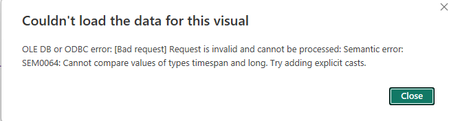
In many scenarios event durations are very important. They can be measured in days or in milliseconds and anything in between. In real time analytics it is especially important. In this article I'll describe how such values are treated in KQL and what happens to them when they are brought into Power Query and eventually to Power BI. Finally, I'll provide my recommendation for treating these values in Power BI.6.3KViews3likes0CommentsCalculating distinct counts in Power BI with data in Kusto
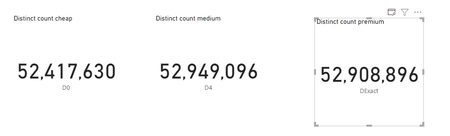
Distinct counts using the dcount KQL function return estimated values. A new setting in Ower BI allows you to control how accurate (and how expensive) these counts will be You can also choose to use the new count_distinct function which return exact numbers but can be very expensive.4.2KViews0likes1Comment
[New blog post] Microsoft Fabric real-time analytics exploration: KQL Database mirroring
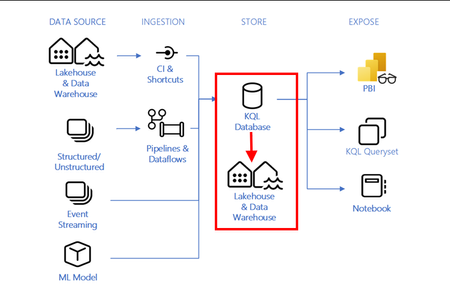
Integrate KQL Database mirroring into Microsoft Fabric Real-Time Analytics. Create a OneLake shortcut for IoT data ingested in a KQL database table and query it in Lakehouse using SQL. This is part seven of a blog post series about Microsoft Fabric RTA for IoT Developers. Read the full story at https://sandervandevelde.wordpress.com/2023/11/27/microsoft-fabric-real-time-analytics-exploration-kql-database-mirroring/. #mvpbuzz1.2KViews0likes0Comments