fabric
191 TopicsThe Context Advantage
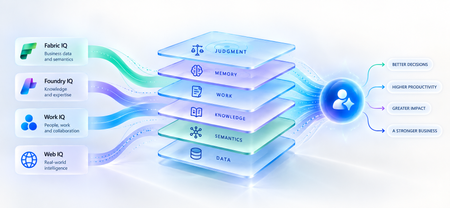
A strange thing happens when enterprises upgrade their AI models. The model gets smarter. The benchmarks improve. The demos become more impressive. And sometimes, the business outcome barely moves. The agent still asks questions the organization answered months ago. It recommends something policy doesn't allow. It treats a strategic customer like any other customer. It proposes an architecture your engineering team rejected six months ago. The problem isn't necessarily intelligence. It is ignorance of the business. That distinction matters because the world's most capable models are becoming available to almost everyone. Your competitors can increasingly access the same frontier intelligence you can. What they cannot access is your customer history, operating knowledge, organizational memory or understanding of how decisions actually get made. Models are becoming shared. Context remains proprietary. And that may be where the next enterprise AI advantage is built. Intelligence Without Context is Surprisingly Ordinary Consider a simple enterprise question: Can we offer this customer a larger discount? A powerful model can reason about discounts. But answering that question properly may require the customer's lifetime value, current contract, payment history, margins and approval thresholds and perhaps a conversation yesterday in which the account executive learned that a competitor had entered the deal. The model isn't missing intelligence. It is missing context. Humans rarely make important decisions from one piece of information. We combine data, experience, relationships, history and situational awareness almost unconsciously. Agents need a version of the same capability. That is why enterprise AI is moving from an era dominated by prompt engineering toward one increasingly shaped by context engineering. Satya Nadella recently described the emerging market simply as “a world of context engineering.” Prompt engineering asks: What should I tell the model? Context engineering asks the larger question: What does the model need to understand before it can act well? That difference becomes critical as AI moves from answering questions to performing work. The Enterprise Context Stack In discussions about enterprise agents, “context” can easily become shorthand for giving a model access to more data. That definition is too narrow. I think about enterprise context as a stack: DATA → SEMANTICS → KNOWLEDGE → WORK → MEMORY → JUDGMENT Data tells the agent what happened: orders, transactions, inventory, claims and customer records. Semantics tells it what that data means to the business: what constitutes a strategic customer, how margin is calculated, which assets belong to which production line. Knowledge tells it what the organization knows: policies, contracts, procedures, research and accumulated expertise. Work tells it what is happening now: who is involved, what has been discussed and which commitments already exist. Memory tells it what happened before: previous interactions, decisions, exceptions and outcomes. And judgment helps determine what should happen next. Memory deserves particular attention because it is context agents can accumulate through experience. Microsoft Foundry now distinguishes between session, user and procedural memory - moving agents beyond remembering a conversation toward remembering preferences and learning how work gets done across repeated interactions. Sometimes the cheapest way to make an agent meaningfully better may not be a bigger model. It may be a better memory. Not every agent needs every layer. But the more consequential its responsibility, the richer, and more carefully governed, its context usually needs to become. This is where context stops being a retrieval problem and starts becoming an enterprise architecture problem. Context Is Becoming Infrastructure This shift is now visible well beyond any one technology platform. Gartner increasingly describes a context layer as an architectural foundation for agentic AI - bringing together semantics, operational state, provenance and other enterprise signals so agents can act reliably. Anthropic, approaching the problem from AI engineering, argues that context should be treated as a finite resource that must be carefully curated rather than simply expanded. Microsoft's recent direction is particularly interesting through this lens. Work IQ, Fabric IQ, Foundry IQ and Web IQ increasingly form a shared intelligence layer across Microsoft's stack. Work IQ provides context about how work happens. Fabric IQ brings business semantics and relationships. Foundry IQ provides reusable enterprise knowledge and agentic retrieval. Web IQ extends that understanding with fresh external intelligence. The architectural implication matters more than the product names. Instead of every new agent rebuilding connectors, retrieval logic, semantic definitions and permissions, context becomes reusable infrastructure from which many agents can reason. Microsoft captured the shift particularly well: As agents become the new application model, context becomes critical infrastructure. Your Data Estate Is Not Automatically Your AI Moat For years, organizations have been told their data is a competitive advantage. Sometimes it is. But possessing data and making that data useful to an agent are very different things. Most enterprises don't suffer from a shortage of information. They suffer from an abundance of it -scattered across databases, documents, emails, meetings, applications and people's heads. The advantage doesn't come from connecting an agent to all of it. It comes from turning information into usable context: preserving business meaning, understanding relationships, distinguishing authoritative knowledge from convenient information, respecting permissions and retrieving what matters when a decision is being made. The enterprise with the most data may not build the best AI. The enterprise that makes its context most usable might. The Context Budget There is a trap on the other side too. If context improves AI, the natural instinct is to give the agent as much as possible. That is the wrong objective. Context consumes attention and compute. Irrelevant information creates noise. Stale information can mislead. Conflicting context can degrade reasoning rather than improve it. The objective should therefore not be maximum context. It should be minimum sufficient context the smallest trusted, relevant and permission-aware set of information required to produce the right outcome. In Beyond Tokens, I introduced the idea of an Intelligence Budget: How much intelligence does this outcome deserve? Enterprise agents increasingly need a companion concept. The Context Budget. How much context does this decision deserve? A scheduling agent may need calendars and preferences. A pricing agent may need customer economics, margins, commitments and approval policies. A clinical agent requires an entirely different level of completeness, provenance and governance. Every unnecessary token of context is cost. Every missing piece of necessary context is risk. Which gives us a useful way to think about enterprise agents: Right Intelligence × Right Context → Right Outcome Spend more intelligence where the outcome warrants it. Provide more context where the decision requires it. Do neither indiscriminately. What An Agent May Know Matters Too! There is another dimension to the Context Budget: permissions. Enterprise context belongs to someone. A system that retrieves the right answer but ignores whether the agent is entitled to see it isn't intelligent. It is a security problem. Enterprise context must therefore remain identity-aware and permission-aware as it moves from source systems into agent reasoning. This becomes especially important as agents gain persistent identities and greater autonomy. What an agent may know is as much a part of its job description as what it may do. Autonomy defines the boundary of action. Context defines the boundary of understanding. From RAG Projects To Context Architecture The first generation of enterprise GenAI often started with RAG: connect documents to a model and retrieve relevant passages. That was an important step. But an agentic enterprise cannot become a collection of hundreds of independent RAG pipelines, each separately rediscovering the organization's customers, products, policies, terminology and permissions. That risks creating another generation of technology fragmentation. The opportunity is to move from agent-specific retrieval toward reusable enterprise context. What knowledge should agents inherit? Which business entities should have common definitions? Which sources are authoritative? Which memories should persist—and which should be forgotten? And perhaps the hardest question: Who owns enterprise context? Today, responsibility is scattered across data teams, application teams, knowledge management, security, business functions and increasingly AI teams. In an agentic enterprise, context may need to be managed as a product, not everyone's side project. The Moat Is Not The Model Imagine two competing organizations using exactly the same frontier model. One connects it to fragmented documents and a handful of applications. The other has strong data foundations, shared business semantics, governed knowledge, connected workflows and organizational memory. They have access to the same AI. They do not have the same intelligence system. The second organization's agents understand customers more deeply, interpret signals more accurately and act with greater awareness of how the organization actually works. And that advantage compounds. Every workflow creates more context. Every interaction adds organizational memory. Every decision creates another signal from which future agents can reason. Models depreciate the moment a better one ships. Context appreciates every day you operate. That may be the most important strategic shift of all. Anyone can rent intelligence. No one can rent your context. Intelligence Is Becoming Abundant. Understanding Isn't. The first wave of enterprise AI taught us how powerful models could be. The next may teach us that models were only one part of the equation. An agent needs intelligence to reason. But it needs context to understand your business. As frontier intelligence becomes more accessible, enterprises may discover that their most defensible AI asset was never the model. It was everything the organization had learned before the model arrived: its data, semantics, knowledge, relationships, history, workflows and judgment. The organizations that turn those assets into trusted, reusable context will give every agent they build an advantage from day one. So perhaps the strategic question is no longer simply: Which model should we use? It is: What does our organization know that our competitors don't and can our AI actually use it? Because in a world where everyone can access intelligence, context may be what makes that intelligence uniquely yours. References Microsoft — FY2026 Q2 Earnings Conference Call Microsoft — FY2026 Q4 Earnings Conference Call Microsoft Learn — What is Foundry IQ? Microsoft Foundry — Foundry IQ: Build Smarter Agents Faster with Unified Knowledge and Serverless Retrieval Microsoft Foundry — What's New in Microsoft Foundry | Build 2026 Gartner — Context Engineering Is the New Prompt Engineering Gartner — Market Overview for AI Context Platforms Gartner — The 3 Core Components of the Context Layer for AI Agents35Views0likes1Comment
Adding Multiple ontologies to a Data Agent??
I was able to add multiple ontologies to a data agent , but now I could add only one ontology to the data agent and multiple agents. Do we have any documentation supporting this? is the feature of adding multiple ontologies stopped if yes why ..do we have any documentation for that ?31Views0likes1Comment
The hardest part of modernizing enterprise BI is NOT the dashboard
For my team, a whole lotta enterprise BI modernization discussions start with the visualization layer, mostly around: Which dashboard should be rebuilt? Should the reports use Direct Lake? Should the organization move to a Lakehouse? How should Power BI capacity be configured? Those are important questions, but there is another one that tends to surface later: Where should the business logic live? In a multi-source environment, the same KPI can be derived from SAP, operational systems, spreadsheets, or application databases. If each report implements the calculation independently, moving the data into a modern platform doesn't automatically create consistent reporting. A more maintainable pattern is to separate the responsibilities: Ingestion: bring source data into the platform with appropriate batch or event-based patterns. Transformation: clean, conform, and standardize data before it reaches reporting. Business layer: define reusable measures and business rules in the semantic model. Security: apply access rules at the appropriate data or semantic layer rather than duplicating them across individual reports. Visualization: keep reports focused on analysis and user experience rather than embedding large amounts of transformation logic. Microsoft Fabric, in that same environment, makes it feasible to bring several of these capabilities into one unified platform, but the architecture still needs clear boundaries between them. I have found this distinction especially important when upgrading reporting environments that have accumulated years of spreadsheet logic and report-specific calculations. For those working on enterprise BI modernization, where do you draw the line between data transformation logic and semantic-model/business logic? And what has worked best for keeping KPI definitions consistent across multiple Power BI reports?28Views0likes0CommentsOn the Next Fabric Engineering Connection
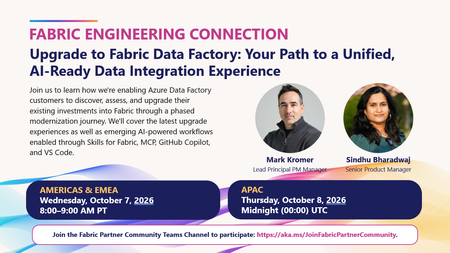
Fresh off European Microsoft Fabric + SQL Community Conference, we're kicking off the next chapter of Fabric Engineering Connection with a session focused on one of the biggest opportunities for partners helping customers modernize their data estates and embrace AI-powered development. 🎤 Upgrade to Fabric Data Factory: Your Path to a Unified, AI-Ready Data Integration Experience Presented by: Mark Kromer — Lead Principal PM Manager Sindhu Bharadwaj — Senior Product Manager Join us to learn how Microsoft is helping Azure Data Factory customers discover, assess, and upgrade their existing investments into Fabric through a phased modernization journey. You'll also get a look at emerging AI-powered experiences that are transforming how developers build and manage data integration solutions, including: ✅ Skills for Fabric ✅ Model Context Protocol (MCP) ✅ GitHub Copilot ✅ VS Code integration Whether you're guiding customers through migration decisions, modernizing integration workloads, or exploring how AI can accelerate developer productivity, this is a session you won't want to miss. 🗓️ Live call times Americas & EMEA: Wednesday, October 7 | 8:00–9:00 AM PT APAC: Thursday, October 8 | 12:00–1:00 AM UTC 🔒 Fabric Engineering Connection is hosted exclusively in the Fabric Partner Community. Microsoft partners can join at https://aka.ms/JoinFabricPartnerCommunity Looking forward to another great discussion and keeping the post‑FabCon momentum going! 🚀🔥39Views0likes0CommentsIn a Day (xIAD) Partner Program - Train the Trainer Events - Azure Data In a Day Workshops
We invite you to attend an upcoming Train the Trainer session for Microsoft Partners to learn more about the Microsoft In a Day (XIAD) Partner Events Programand how to lead workshops that empower customers to use and adopt Microsoft products. Our Train the Trainer events are designed to provide you with the knowledge and tools necessary to deliver successful Microsoft In a Day (XIAD) sessions. *Please note, participation is restricted to individuals representing a Microsoft Partner organization. You must register using your corporate email address that is associated with your Partner ID. Personal emails will not be approved. ✨ Why Attend? Expert Guidance: Learn from experienced trainers and get your questions answered. Comprehensive Resources: Access all the content and support you need to succeed. Learn more at https://aka.ms/attendTTT 📅 Upcoming Events: Dashboard in a Day This is a one-day, hands-on workshop for business analysts, covering the breadth of Power BI capabilities. October 16 - APAC - SGT November 13 - EMEA - CEST December 15 - AMERICAS - CST Fabric Analyst in a Day This is an intermediate-level training designed for Power BI Data Analysts who have at least one year of experience on Power BI but are new to Microsoft Fabric. October 16 - APAC - SGT November 13 - EMEA - CEST December 15 - AMERICAS - CST Real-Time Intelligence in a Day This is an intermediate-level training designed for Power BI developers looking to extract insights and visualize streaming and time sensitive data. October 16 - APAC - SGT November 13 - EMEA - CEST December 15 - AMERICAS - CST Chat with your Data in a Day This is an intermediate-level training designed for Power BI data analysts and developers to help get their models chat-ready and unlock instant insights using natural language. October 16 - APAC - SGT November 13 - EMEA - CEST December 15 - AMERICAS - CST SQL AI App in a Day This is an intermediate-level, one‑day, hands‑on workshop showing SQL Developers and DBAs how to build the database backbone for modern AI apps using Azure SQL. November 6 - AMERICAS - CST November 20 - EMEA - CEST December 18 - APAC - SGT New Offer Type: Planning in a Day This is an intermediate-level, one‑day, hands‑on workshop for Business Analysts, providing foundational training to build and manage planning, forecasting, and budgeting solutions using Microsoft Fabric Planning. November 5 - AMERICAS - CST New Offer Type: SQL Modernization in a Day This is an intermediate-level, one‑day, hands‑on workshop for DBAs and Data professionals, providing foundational training to modernize SQL environments through assessment, migration, optimization, and AI-ready architectures. November 19 - AMERICAS - CST Partner with us! Are you a Microsoft Partner interested in the opportunity to join the program and deliver Microsoft In a Day (XIAD) events? 🔍 Learn more about the program and review partner eligibility criteria: https://aka.ms/xiadpartneropportunity. 📧 Contact the XIAD Program team: xiadevents@microsoft.com 📤 Submit requests to deliver events: https://aka.ms/xIAD/PartnerEvents9.3KViews5likes3CommentsAzure SQL Data Sync Retirement: Migration Insights and Modern Alternatives
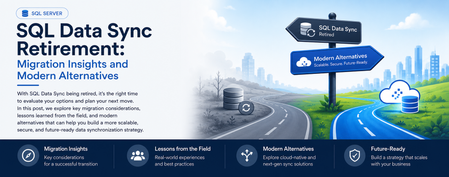
What started as a routine customer discussion quickly evolved into a strategic modernization conversation. A service that had quietly synchronized business-critical data for years was approaching retirement, prompting an important question: What should organizations do next? Every service retirement is an opportunity to reassess architecture, reduce technical debt, and build for the future. When a Retirement Notification Becomes a Business Conversation Recently, while working with a customer, we reviewed their Azure SQL Database architecture and discovered a critical dependency on SQL Data Sync For years, the service had reliably synchronized data across multiple databases, enabling applications, reporting workloads, and distributed business processes. Like many organizations, the customer viewed Data Sync as infrastructure that simply worked in the background. However, the discussion took a different turn when we reviewed Microsoft's retirement announcement: Azure SQL Data Sync will be retired on September 30, 2027. What initially appeared to be a migration challenge quickly became an opportunity to modernize the customer's data movement architecture and align with Microsoft's future investments in data integration, analytics, and cloud-native services. Understanding SQL Data Sync Azure SQL Data Sync was designed to synchronize selected data between Azure SQL Databases and, in some cases, between Azure and on-premises databases. Organizations have commonly used Data Sync for: Hybrid data synchronization Distributed application architectures Globally distributed applications Bi-directional data synchronization While the service has served customers well, organizations should begin evaluating alternative solutions now to ensure sufficient planning, testing, and adoption time before retirement. Because both databases were already in Azure, the discussion quickly moved toward identifying strategic alternatives. Customer's Setup This particular customer had a simple, familiar layout: one Azure SQL Database feeding another, both fully in Azure, connected by SQL Data Sync. No on-premises leg, no complicated topology — just two cloud databases that needed to stay aligned. Their requirements were equally straightforward, and honestly, the kind every team asks for: Reliable, dependable synchronization Low operational overhead — nobody wanted a new system to babysit Something with a real future, not another service on a retirement countdown Room to scale as data volumes grow An Azure-native fit, not a bolt-on third-party tool Because both databases already lived in Azure, the conversation moved quickly toward the platform's own native tooling — starting with the option that ended up being the strongest fit. Option 1: Azure Data Factory (Recommended Strategy) For customers running Azure SQL Database to Azure SQL Database synchronization, Azure Data Factory (ADF) emerged as the strongest strategic recommendation. Why ADF? Azure Data Factory provides: Fully managed Azure-native data movement Enterprise-grade monitoring Flexible orchestration Scalability from development through production environments Long-term Microsoft investment and support The migration pattern we typically recommend looks like: Phase1 :Initial Full Load Before anything can stay in sync, both sides need to start from the same place. Phase 1 is a one-time bulk copy: Azure Data Factory reads everything from the source database and writes it into the target, establishing a clean baseline. Phase2 :Incremental Synchronization Once both databases match, you don't need to keep copying everything — just what's changed. This is where Change Tracking (CT) or Change Data Capture (CDC) comes in: SQL Server-native features that flag which rows were inserted, updated, or deleted since the last run. ADF's incremental pipeline reads only those deltas and applies them downstream, on whatever schedule the business needs — minutes, hours, or daily. Phase 3: Scheduling and Monitoring Once both phases are live, ADF takes over the operational side: scheduling pipeline runs, monitoring their health, retrying failures automatically, and alerting your team when something needs attention. That's a level of visibility SQL Data Sync's built-in sync groups never really offered ADF handles: Scheduling Pipeline execution Monitoring Retry mechanisms Alerting This model often delivers greater visibility and operational control than traditional SQL Data Sync implementations. When You Don't Need Synchronization — You Need a Copy Partway through the engagement, one question reframed the whole discussion: do we actually need two-way synchronization, or do we just need a readable copy of the database somewhere else? That distinction matters more than it sounds, and it points to three other options worth knowing. Option 1: Active Geo-Replication If the goal is disaster recovery, serving read traffic closer to users, or keeping the business running through a regional outage, Active Geo-Replication is usually a better fit than rebuilding sync logic from scratch. It gives you a continuously updated, readable secondary — not a bi-directional sync target. Best fit Disaster recovery scenarios Read-intensive applications Global user distribution Secondary readable databases Less ideal for Complex data transformations Bi-directional updates Option 2: Database Copies and Read Replicas Some organizations do not require continuous synchronization at all. In those cases: Read Replicas Database Copy Good Use Cases Reporting databases Analytics environments Refreshable staging systems Read-only workloads This approach significantly reduces architectural complexity while still meeting many business requirements. Option 3: Microsoft Fabric Mirrored Databases As Microsoft Fabric adoption grows, another interesting alternative is Fabric Mirrored Databases. This option is particularly attractive for organizations already investing in: Microsoft Fabric OneLake Real-time analytics AI and data platform modernization Benefits include: Near real-time data availability Simplified analytics architecture Integration with Fabric workloads Reduced data silos For customers modernizing both operational and analytical platforms, this can be an excellent opportunity to rethink data architecture beyond simple synchronization. Option 4: Azure Functions for Event-Driven Synchronization Not every customer requires a large orchestration platform. For lightweight or application-specific synchronization logic, Azure Functions may offer a more agile approach. Example Use Cases Event-driven updates Custom business rules Microservices architectures Low-volume synchronization requirements The tradeoff is that customers assume additional development and operational responsibilities Lessons Learned from the Customer Engagement This engagement reinforced several important lessons: Don't Wait Until 2027 Although retirement is over a year away, large organizations often require significant planning, testing, governance approvals, and deployment cycles. Starting early reduces risk. There Is No Universal Replacement The right solution depends on: Latency requirements Read versus write workloads Synchronization direction Operational complexity DR requirements Budget limitation Different use cases require different migration paths. 3. Migration Is an Opportunity Rather than simply replacing SQL Data Sync, organizations should evaluate: Data architecture modernization Observability improvements Operational simplification Fabric adoption opportunities Long-term cloud strategy Final Recommendations For most customers currently using Azure SQL Database → Azure SQL Database synchronization: Requirement Recommended Solution Ongoing synchronization Azure Data Factory + CDC/Change Tracking Read-only replica Active Geo-Replication Simple duplication Database Copy or Read Replica Analytics modernization Fabric Mirrored Databases Event-driven custom logic Azure Functions In my customer's use case, Azure Data Factory with incremental changes (CDC) emerged as the preferred strategic path because it was Azure-native, scalable, supported long-term, and aligned with Microsoft's future direction for data movement and integration. Closing Thoughts Technology retirements often create urgency, but they also create opportunity. retirement of SQL Data Sync is not merely a migration project. It is an opportunity to reassess data movement architecture, improve resiliency, reduce technical debt, and embrace modern Azure-native services. If your organization is currently using SQL Data Sync, now is the right time to inventory your sync groups, identify dependencies, and begin evaluating alternative architectures before September 30, 2027. References SQL Data Sync Retirement Migration Guide What is SQL Data Sync for Azure SQL Database? SQL Data Sync retirement: Migrate to alternative solutions✨ FabCon + SQLCon Europe 2026: Partner Know Before You Go Guide is Now Live!
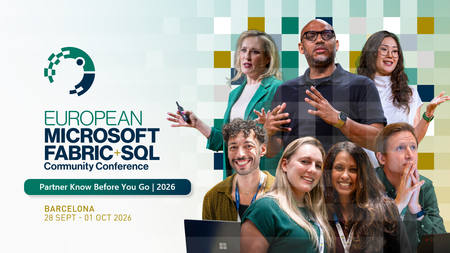
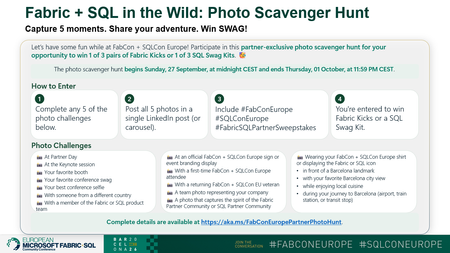
Barcelona is just around the corner, and we're excited to welcome our partner community to the first-ever co-located FabCon + SQLCon Europe experience! To help you make the most of your time onsite, the Partner Know Before You Go Guide is now available. This guide brings together everything partners need to know before arriving, including exclusive partner programming, networking opportunities, important deadlines, and event resources. What You'll Find Inside ✅ Partner Day agenda and key sessions ✅ Partner Happy Hour details ✅ Partner Elevator Pitch Challenge information ✅ Executive Meetings with Fabric & SQL Leadership Team ✅ 1:1 Meetings with the Partner Success Team ✅ AMA Session with the Partner Success Team ✅ Fabric Certification Recognition opportunities ✅ Testimonial Video nominations ✅ Fabric + SQL in the Wild Partner Photo Scavenger Hunt ✅ Cvent Event App guidance and Partner Community information Event Details 📍 Centre de Convencions Internacional de Barcelona (CCIB) 📅 September 28 - October 1, 2026 🌍 Barcelona, Spain Whether you're attending Partner Day, meeting with Microsoft leaders, showcasing your expertise, or connecting with peers from around the world, we've built partner-exclusive experiences to help you learn, connect, and accelerate your Microsoft Fabric business. 📘 Download the Partner Know Before You Go Guide below. ⬇️ We can't wait to see you in Barcelona! #FabConEurope #SQLConEurope #MicrosoftFabric #MicrosoftPartners #DataAndAI #FabCon2026 #PartnerCommunity806Views2likes0Comments2026 FabCon + SQLCon Europe Fabric in the Wild: Photo Scavenger Hunt
📸 Fabric + SQL in the Wild: Photo Scavenger Hunt at FabCon + SQLCon Europe Heading to FabCon + SQLCon Europe in Barcelona? Get ready to explore, connect, and have some fun with the Fabric community! We're excited to launch the Fabric + SQL in the Wild: Photo Scavenger Hunt, an exclusive experience for Microsoft partners attending the event. Whether you're networking at Partner Day, taking in the keynotes, meeting fellow partners, or discovering Barcelona, you'll have the opportunity to capture your adventure and win some exclusive Fabric swag. 🏆 Win Fabric Kicks or a SQL Swag Kit Complete the challenge by sharing photos from any five scavenger hunt moments and you'll be entered for a chance to win 1 of 3 pairs of Fabric Kicks or 1 of 3 SQL Swag Kits. 📷 How It Works ✅ Complete any 5 photo challenges from the hunt ✅ Share all 5 photos in a single LinkedIn post or carousel ✅ Include: #FabConEurope #SQLConEurope #FabricSQLPartnerSweepstakes That's it. You're in! The scavenger hunt is all about celebrating the people, experiences, and energy that make the Microsoft Fabric partner community special. From Partner Day and keynotes to new connections and iconic Barcelona landmarks, we can't wait to see Fabric in the wild through your lens. Drop your photos, showcase your creativity, and share your FabCon + SQLCon story with the community! 🌍 See you in Barcelona. For more information about FabCon + SQLCon Europe, visit aka.ms/fabconeu #FabConEurope #SQLConEurope #FabricSQLPartnerSweepstakes278Views1like0CommentsThis week on the Fabric Engineering Connection
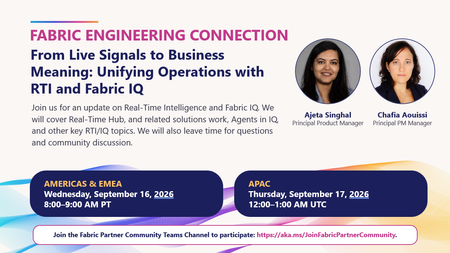
How do you turn live operational signals into actionable business insights? Join us for this week's Fabric Engineering Connection: "From Live Signals to Business Meaning: Unifying Operations with RTI and Fabric IQ" with Ajeta Singhal and Chafia Aouissi. We'll explore the latest across Real-Time Intelligence and Fabric IQ, discuss Real-Time Hub and Agents in IQ, and leave plenty of time for partner questions and discussion. 🗓️ Americas & EMEA: Wednesday, September 16 | 8:00-9:00 AM PT 🗓️ APAC: Thursday, September 17 | 12:00-1:00 AM UTC Bring your questions, learn what's new, and hear directly from the team building these capabilities. Join us in the Fabric Partner Community: https://aka.ms/JoinFabricPartnerCommunity121Views2likes0Comments🚀 Join the FY27 Fabric Engineering Connection Kickoff Call
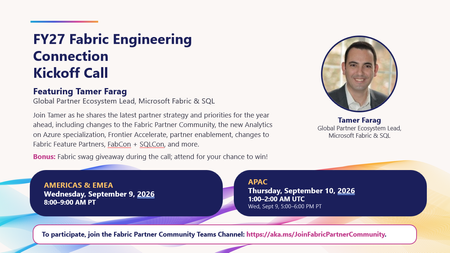
We're excited to kick off FY27 with the first Fabric Engineering Connection call of the year! Join Tamer Farag, Global Partner Ecosystem Lead for Microsoft Fabric & SQL, as he shares the latest strategy, priorities, and opportunities for partners in the year ahead. What we'll cover ✅ Fabric Partner Community updates and upcoming changes ✅ Analytics on Azure Specialization updates ✅ Frontier Accelerate program highlights ✅ Partner enablement plans and resources ✅ Fabric Feature Partner program updates ✅ FabCon and SQLCon insights and opportunities ✅ Open Q&A with the community 🎁 Bonus: Attend live for a chance to win Fabric swag during the call! Event Details Americas & EMEA 📅 Wednesday, September 9, 2026 🕗 8:00 AM – 9:00 AM PT APAC 📅 Thursday, September 10, 2026 🕐 1:00 PM – 2:00 PM UTC (Wednesday, September 9, 5:00 PM – 6:00 PM PT) How to Join To participate, join the Fabric Partner Community Teams channel: 🔗 https://aka.ms/JoinFabricPartnerCommunity Whether you're a long-time community member or just beginning your Microsoft Fabric journey, this is a great opportunity to hear directly from the team, get aligned on FY27 priorities, and connect with fellow partners around the world. We look forward to seeing you there!385Views1like2Comments