fslogix issues
3 Topics
Issue with AVD User Profile – FSLogix Not Recreating
Hi all, We have a user who has repeatedly reported that their settings and favorites are not loading in AVD. To troubleshoot, we deleted the user’s FSLogix profile from our storage account to allow it to recreate automatically. However, the profile is not being recreated. We are operating in a hybrid environment, and the user is part of a group assigned the Storage File Data SMB Share Elevated Contributor role. From the profile logs, we found the following error: FindFile failed for path: \\<redacted>.file.core.windows.net\userprofiles\<redacted>\Profile*.VHD (Account restrictions are preventing this user from signing in. For example: blank passwords aren't allowed, sign-in times are limited, or a policy restriction has been enforced.) What are some likely causes and additional troubleshooting steps we should take?385Views0likes4CommentsAVD with FSLogix - profiles not loading
Setup AVD with FSLogix several months back and profiles had been loading fine. About a month ago, profiles stopped loading and the logs show "Account restrictions are preventing this user from signing in. For example: blank passwords aren't allowed, sign-in times are limited, or a policy restriction has been enforced." This is in regards to connecting to the profile share path. If I manually try to go to that path, I receive the same error. The accounts do have a password, so it shouldn't be anything to do with a blank password. There are no sign-in time restrictions enforced on these accounts. What's left is a "policy restriction", which is kind of vague. Things I've tried: update to latest FSLogix verify permissions on profile storage enabled these in local policy: Computer Configuration > Windows Settings > Security Settings > Local Policies > Security Options ‘Accounts: Limit local account use of blank passwords to console logon only‘ = disabled Computer Configuration > Administrative Templates > System > Credentials Delegation ‘Restrict delegation of credentials to remote servers‘ = disabled I have a ticket open with MS support for 3 weeks now, but thus far they've been completely useless.1.8KViews0likes16Comments
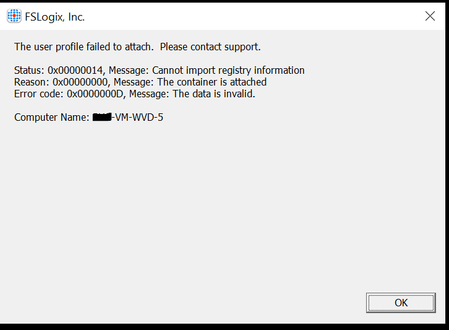
FSLogix error
Hi, i built a WVD hostpool over a month ago and has worked as a test, then after either making some GPO changes or using a maintenance script on the profile disks i am getting the below error However I only get it on certain VM's, when i look in regedit/localuser/fslogix/profiles the profile relating to the trouble user seem to be pointing to the VHDX of another user, I have tried deleting the profile from the VM and the VHD but it still creates with the incorrect details. The GPO i Changed was to not put VHDX's in a container folder so all vhds are in one folder, this was so that the maintenance script could run through all vhds. however that doesnt explain why it would still work on other VM's, can anyone advise1.9KViews0likes1Comment