excel
44806 Topics
Excel repair strips all formulas from large .xlsm after March 2026 security update (KB5002849)
Hi everyone, I'm a master's student at Karolinska Institutet in Stockholm. My thesis is a health economic cost-effectiveness model built entirely in Excel — a gender-neutral static Markov cohort model with 34 worksheets. The file has become completely unusable after what I believe is the March 2026 security update, and I'm running out of options. The file: - .xlsm, ~46.5 MB compressed, ~370 MB uncompressed XML - 34 worksheets, four of which are 73–92 MB each (Markov trace sheets) - ~65,000 formulas, ~33,500 shared formulas - Heavy use of LET, LAMBDA, XLOOKUP, XMATCH, CHOOSECOLS, TAKE, MAP, SWITCH - 771 defined names including ~147 hidden _xlpm.* LET/LAMBDA variable placeholders - Stored on OneDrive via KI SharePoint, 34,000+ AutoSave revisions - Contains VBA (vbaProject.bin) The problem: Every time I open the file — on Excel for Mac or Excel Online — the repair engine triggers and strips ALL formulas from every sheet, replacing them with cached values. The file shrinks from ~46.5 MB to ~26 MB. Clicking "No" on the repair dialog just closes the file. There is no way to bypass the repair. What I've verified: - Extracted the .xlsm as a ZIP and confirmed all formulas (<f> tags) are fully intact in the raw XML - Libr€Office Calc can read the formulas but cannot execute them (Err:508 — no LET/LAMBDA support) - Removed 158 broken named ranges (#REF! and #NAME? entries) from workbook.xml and rebuilt the archive — repair engine still strips all formulas - The issue reproduces on every OneDrive version history copy (up until I largely used LET formulas in my sheets - but there is still 1,5months of changes lost) - The issue reproduces on both Excel for Mac and Excel Online Suspected cause: The March 10, 2026 security update (KB5002849) patched CVE-2026-26108, a heap overflow in Excel's file parsing during loading. The same patch was applied to Office Online Server (KB5002846). I believe the tightened parsing now rejects or flags my file's large XML structures as potentially malicious, triggering the repair engine to strip all formulas. This is consistent with: - The known _xlfn. namespace bug on Excel for Mac (reported by multiple users on Microsoft Q&A since late 2024) - The timing - the file was working before this update flawlessly up until March 16th - The fact that Excel Online is also affected (same server-side patch) My questions to the community: 1. Has anyone else experienced formula stripping on large workbooks after the March 2026 update? 2. Is there a way to bypass the repair engine on Mac, or roll back the specific security patch without downgrading all of Office? 3. Would opening this file on Windows Excel (pre-patch or current) preserve the formulas? If anyone with a Windows PC would be willing to try opening and re-saving this file, I would be incredibly grateful. 4. Is there now effectively a size/complexity ceiling for Excel workbooks that makes models like this unviable? If so - should I be migrating this to another environment (R, Python, etc.) going forward? This file represents six months of thesis work. The formulas are all there in the XML. I just need Excel to stop destroying them on open. Any help, pointers, or similar experiences would be hugely appreciated. Thank you, Florian Boschek24Views0likes1Comment
Look up two parts of a string in a cell
Hello All, I know all about the XLOOKUP() but at times I need a special type of a look up. if I have a cell with the text “Apples and Oranges” how can I write an XLOOKUP to evaluate the “Apples” and then evaluate the “Oranges” parts. for example if I have a list of fruits in a column, then in the next column I have true if the fruit has seeds and false if the fruit does not have seeds. now normally the XLOOKUP will look for the whole string, so if there is no fruit called “Apples and Oranges” it will fail and not return anything. But I do have “Apples” in one cell and it has true for having seeds, AND I do have “Oranges” and it has false for seeds (these are Naval oranges 🤪) so the XLOOKUP will not return false. how can I write an XLOOKUP to return “Apples”, “Oranges”, AND “Apples and Oranges”? I thought of replacing the part after the And but then I’ll lose the fine parts, then I tried splitting the string on “AND” and that did not work at all. I guess you can’t run an XLOOKUP on an array part??? any help will be greatly appreciated!6Views0likes0CommentsNeed a consecutive XLookup
Hello All, OK let me describe what I am trying to do: I need to create a Task List. In this list I will have let’s say 200 tasks, and 50 people to perform these tasks. i need a way to assign the first task to the first person, then the second task to the second person, then the 3rd task to the 3rd person and so on until the first 50 tasks are assigned. then I need to assign the 51st task to the first person, the 52nd to the second person, and the 53rd task to the 3rd person until that batch of tasks and People are matched. but this is not linear, I may want to choose task 52 to person 3 because the 3rd task is related to the 52nd task. i can live without this feature and fine tune the list manually but the main question is how can I look up a name and match it to a task. i hope this makes sense to you, please ask for any clarification and i shall add that bit. thanks in advance… wassimSolved108Views0likes4Comments
Help with summing totals using multiple texts
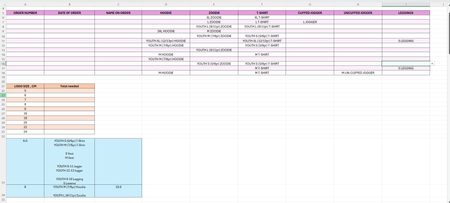
Good evening. I have attached an image of my spreadsheet below which hopefully will help my blurb make a bit more sense! I am producing some uniform for a local club. I have made a spreadsheet to allow me to track the number of garments and sizes ordered (purple table). However from this information in the purple table I need to know how many logos of each size to order (orange table). I know what size logo is required for all the different garments and sizes of garment, as can be seen in the blue table, but this would require me to go through 1 order at a time tallying up what size logos I require. Ideally I would like excel to be able to look at the purple table and tell me how many items there are that require a given size logo. For example, I know that a 'Youth S T-shirt' and a 'S Legging' and 'Youth M Hoodie' all require a 6cm logo. and also that the 'Youth M Hoodie' also requires an 18cm logo. I would therefore like excel to look at the purple table and see that there are 3 x 'Youth S T-shirt', 2 x S Legging and 2 x Youth M Hoodie, therefore 7 items require a 6cm logo, so I would like excel to populate the orange table in the 'total needed' column for 6cm (cell B23) to show '7'. The 'Youth M Hoodie' also requires an 18cm logo and therefore cell B28 should also populate with '1'. I have tried COUNTIF, COUNTIFS, SUMIF, SUMIFS, but none of them have worked. I do not know if I am entered the information into the equation incorrectly or if I am using the wrong function/formula. Can anyone please help! Many thanks.123Views0likes6Comments
How XLOOKUP arguments apply in this case
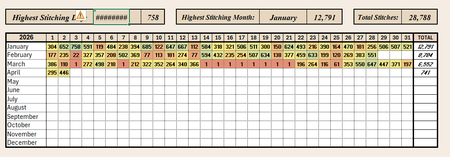
I'm not an Excel newbie, but I have never had cause to use XLOOKUP, INDEX, or MATCH before. I'm not understanding how the xlookup arguments would apply in my case or if index/match would be better. I have an array with months as my row headings and dates as my column headings. The array itself is filled with number of pages read each day. I'm trying to have a cell indicating on which date I did the maximum amount of reading. So I want to start with the max value of my array and return the month (row) and date (column) heading using xlookup. Whether those are in one cell or two, doesn't so much matter - it's a hobby tracker, but no matter how I try and call this, I end up with a value error So for example, I would want this to return January 3rd. Every example I'm finding seems to show how to input Jan 3rd and return the value 758. What am I missing to look this up the other way around? Should I be using index or match instead?103Views0likes4Comments
Filtering an Array based on a list of Criteria
I have an array that tracks every project that every project manager, project engineer, and superintendent is on and I am trying to set up a function to search through a single list of names and return just their projects. The PM, PE, and SUP on the array all have their own columns since there can be 1 of each on a single project. and the list im pulling from is within a single separate column pulling on the names I select. I have had success pulling from one column at a time using a FILTER(ISNUMBER(MATCH)) function but I cant get it to search and return all values from all three columns. Any thought on how to expand the search? Thank you!68Views0likes2Comments
Text to Column
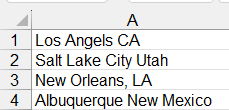
Hello Everyone. I'm trying to split data into 2 columns. The original data is made up of cities and states: Notice that some items have a comma and others don't. Also, the cities states are different lengths. So, I cannot use a space or a comma as a delimiter. I'm trying to figure out how to separate them. I came up with this formula to add a colon so I can use the delimiter to separate them. The problem then becomes the fact that I have to count the number of spaces in each city to add the colon. Then, I have to copy and paste special as values. Also, notice that in New Orleans (for example), it keeps the comma: One more issue, if I get a new report with added cities and states, then I have to re-do the calculations. HELP!!!! Balta142Views0likes4Comments