Excel
43481 Topics
Different functions for each column in a subtotal
ive got a sheet where i want to subtotal using different functions in different columns. i will always have different data every time i want this to execute, so cant hardwire the row range, also each group (based on date) will have different number of rows. Eg, on change of date, sum column B, count column C, max column D. I hope i explained the problem adequately.16Views0likes0Comments
too many decimals places returned with concat from field with only two decimals
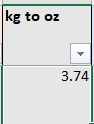
Hello! I'm learning more complicated excel through here and really appreciate all of your expert help. I haven't been able to find the answer to this... I've tried fixed and trunk, and they return with errors. I"m using this: =CONCAT([@[Approx Dimentions]]&CHAR(10)&"Appox Wt (oz): ",[@[kg to oz]]&CHAR(10)&" "&CHAR(10)&[@description]&CHAR(10)&" "&CHAR(10)&[@Origin]) and it returns this (this one doesn't have an origin) Approx Dims (mm): 42 x 42 x 42 Appox Wt (oz): 3.739039972 I want the Wt to be 3.74 as it is in the "kg to oz" column that is set to number with two decimal places, and is also a result of a formula =Q6*35.273962. I have tried to change this to 35.27 and that doesn't do anything. thank you in advance for your help and understanding that I'm newSolved654Views0likes4Comments
Move repeating columns into rows
Hello guys, I have a set of data that looks like this: Name Hours Date Hours Date Hours Date John 3 1-Jan 4 5-Jan Ann 4 4-Jan 2 8-Jan 2 9-Jan Each Hours data cell have a comment in it, and I'm trying to turn it into something like this: Name Hours Date John 3 1-Jan John 4 5-Jan Ann 4 4-Jan Ann 2 8-Jan Ann 2 9-Jan Is there a way for me to do that while retaining all the comments in each Hours data cell? I'm using Excel 2016. Best Regards, JohnSolved104Views1like4Comments
help with formula & functions (no Macros & VBA)
Hey all, I've created a sheet that has the following columns: (A) dates, (B) names, (C) phone numbers, (D) free text & (E) Status (done or closed). The first row (frozen) contains the title of each column. I've opened another sheet (same file) and called it 'Dashboard" . I am looking to create some sort of index where I can type in (search really) for a phone number and it will return the entire rows back with all the information. Same goes to searching for a name and return the entire relevant rows (with the phone number, dates and etc). I've been trying to look for an answer online, and also tried by myself for 2 months .. and for the life of me, came back nothing but frustration. Important to mention that I can't use macros & VBA as my workplace won't allow it due to policy issues. Needless to say, the information is sensitive. Any ideas on how to do it and tackle it in the best way possible? Big thank you in advance!1.8KViews0likes6Comments
Simplifying cost calculation using array instead of IF statement
Hello, I am in the process of calculating the cost of refining precious metals based on user input of specific parameters. For example, if a certain dore intake of Silver has 90% Silver (Ag) content then lookup the specific processes and multiply the cost per oz with the intake ounces. I have attempted to combine IFS and Xlookup for each process separately but the formula looks very unwieldy. I am also enclosing a slightly simpler formula of IFS and sum where the total cost is calculated in one cell (Q12). Here is the link: https://docs.google.com/spreadsheets/d/1hizmF6EwhxOPEeR10bXJsBOKeOtXude8/edit?usp=drive_link&ouid=103354753371375324640&rtpof=true&sd=true I am looking to see if I can have a more dynamic iteration of the formula in Cell Q12 as well as in the calculation of the individual processes in Row 4 , Cols P:V. Thank you. Regards, Shams.Solved61Views0likes5CommentsPictures inserted in cells disappear after closing and reopening a workbook
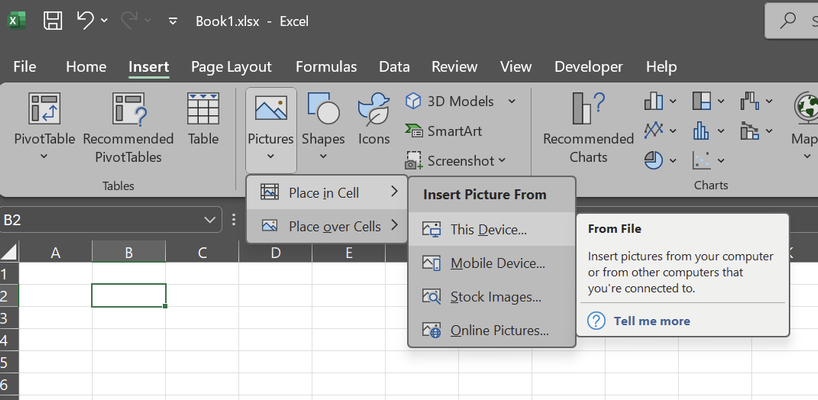
Windows 11 Home, 23H2, 22631.4317 MS Office L T S C Professional Plus 2024, version 2408, Build 17932.20130 Example: After saving, closing and reopening workbook, this is the result: I have tried all of the generic troubleshooting, because I have seen multiple people experiencing this issue - none of them work. 1. Display options for workbook are all checked (for object, show all) 2. Pictures are embedded, not linked to locally stored files - otherwise I wouldn't be able to retain them in online platforms (e.g. opening in Excel from Android, once storing in One-drive). Even if they were linked somehow, original files were never moved. When I upload the very same workbook in One-drive and open through any online platform (via browser - Excel Online, on Android - Excel app / Office 365 app) pictures are showing as intended. Problem occurs only on desktop app. I have already tried to reinstall MS Office, clean install, all updates - problem persists. I do not want any workaround solutions like: - using VBA scripts, - or inserting pictures over cells. as this is a proper bug and shouldn't require advanced skills from casual users. Inserting pictures over cells and embedding them manually - change size to fit into cell, set Move and size with cells is just partial solution - pictures will stay after closing and reopening, but you cannot refer to them properly - e.g. I want to have a result of X LOOKUP to be a cell with Picture inserted into cell (doesn't return a picture in cell if picture is placed above cell - doesn't matter if it is set to Move and size with cells. X LOOKUP with pictures inserted in cells works perfectly until I close and reopen locally on desktop app ( #UNKNOWN! everywhere), but continues to work perfectly in before-mentioned "online" platforms - though I am a bit more advanced user and lot of stuff I do can only be done in desktop app - as soon as I want to make some more advanced actions, I need to go back to desktop and all I get is a bunch of #UNKNOWN! where Pictures inserted into cells are supposed to be. Please solve this bug - it is very frustrating - I have lost straight 12 hours of my life trying to solve it, but I am at my wit's end. Thank you very much for reply.Solved1.3KViews2likes4CommentsWhy can't I post my reply to this thread
Hi, Why can't I post my reply to this thread: Calculate hours using pivot table | Microsoft Community Hub I have tried several times so far to post my reply and at first moment it seems to be accepted because the page displays my replay, but after refreshing the page it "disappears", meaning it no longer exists. Anyone have any ideas? Thnx.75Views0likes3Comments
Chat with Copilot popup on every Excel launch
An ad for Copilot shows up every single time I open Excel. Clicking Not Now closes it, only for it to reopen again when I open Excel later. Is there any way to disable this or remember my selection each time? It is frustrating to have to deal with it all day long. I do not have a Copilot tab in File > Options. Optional connected experiences is already disabled. Microsoft® Excel® for Microsoft 365 MSO (Version 2511 Build 16.0.19426.20218) 64-bit Windows 11 Pro 25H246Views0likes0Comments
Need assistance to correct a formula
I am using the following formula to calculate weekly hours. I want to change it to calculate the hours with the starting on Monday going to Sunday and display the result in column G on the Sunday. For example - calculate totals from Monday Jan 6 to Sunday Jan 12, inclusive. Thanks in advance for your help. =IF(WEEKDAY(B6)=7, IF(SUMIFS(D:D,B:B, ">="&B6-6,B:B, "<="&B6)>0, SUMIFS(D:D,B:B, ">="&B6-6,B:B, "<="&B6), ""), "") A B C D E F G 1 Date Hours Purchases Rate Daily Cost Hrs / wk 2 1-Jan Wed 5 $20.00 $100.00 3 2-Jan Thu 5 $0.00 4 3-Jan Fri $20.00 5 4-Jan Sat $20.00 10.00 6 5-Jan Sun 7 $20.00 $140.00 7 6-Jan Mon $20.00 8 7-Jan Tue $20.00 9 8-Jan Wed $20.00 10 9-Jan Thu $20.00 11 10-Jan Fri $20.00 12 11-Jan Sat $20.00 7.00 13 12-Jan Sun 3 $20.00 $60.0084Views0likes5Comments
Not Allowing Entries to be blank
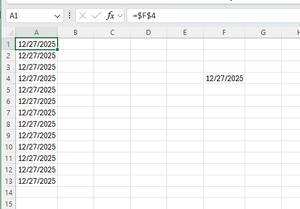
I have a cell that is formatted for a date that will get updated by the user (F4 Below). And then column A is just copying that value all the way down. I want to prevent the information in column A from being deleted accidentally. It will likely be a hidden column, so accidentally deleting it is possible. I tried data validation and rules, and they worked in all cases except if they are deleted. How can I prevent A1 from being deleted, but still have the user be able to update the date in F4 and have A1 update.74Views0likes2Comments