error
3 Topics
Azure VPN issues - RasMan service - Unknown state
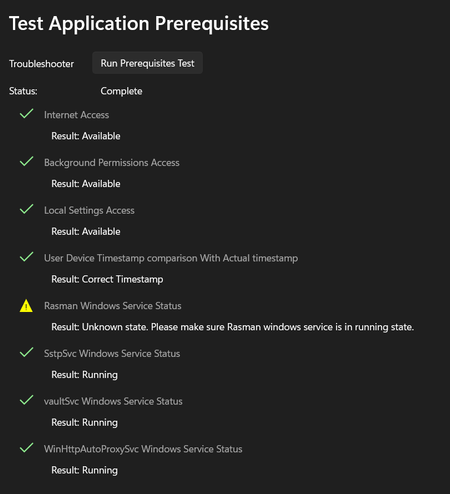
Azure VPN Client stopped working after KB5065813 update – RasMan service Unknown state Environment details: Azure VPN Client version: 4.0.4.0 (Microsoft Store) Windows version: Windows 11 Pro, 23H2 (fully updated) Issue Summary: The Azure VPN Client worked fine from Friday (14 November 2025) until Sunday (16 November 2025). On Sunday, Windows installed updates, and starting Monday morning (17 November 2025), Azure VPN stopped working. When I run the Prerequisites Test in Azure VPN Client, everything passes except: Rasman Windows Service Status Result: Unknown state. Please make sure Rasman windows service is in a running state. However, sRasMan service it's running Registry keys for RasMan exist, and Svchost\netsvcs includes RasMan What changed: I noticed that the update KB5065813 seems to be causing the issue. This KB is installed on my machine, but my colleagues have KB5041655 instead. As part of troubleshooting, I even changed my laptop to a brand-new device with a fresh OS install, and the issue persists after KB5065813 is applied. What I’ve tried: Restarted RasAuto and dependencies Reinstalled Azure VPN Client Installed older versions of Azure VPN Changed my laptop with a brand new one and a fresh OS install Questions: Is KB5065813 confirmed to break Azure VPN Client functionality? Is this related to the October 2025 RasMan vulnerability patch (CVE-2025-59230)? Any official Microsoft steps or scripts to fix this? Screenshots attached for reference.320Views0likes3Comments
Windows Autopilot Error Code 0x800705b4 Preparing device for mobile management
We are implementing a number of Windows Autopilot via Lenovo Thinkbook 15-ITL. These are being deployed to authorised users whether they are at home connected to their home broadband or in the office connect to the Wide Area Network. Despite lots of testing, we randomly see the the error (see attached). If we wipe the device a couple of times, it seems to remedy the issue. I've tried to look online about this about various posts talk about the TPM, which it is not. I've tried to look through the logs from the device - what a minefield of information that means something to someone. Has anyone any ideas? Thanks Martin164KViews0likes24Comments
Intune PKCS Certificate does not get installed on Client
Hi, I am testing the deployment of a user certificate via Device Configuration Policy (Windows 10 - PKCS certificate). Now, the certificate is requested, and in the logs of the CA, I see that the PKCS request was successful. I can also see the requested certificate for the user on the Configuration Profile under "Certificates." Soon, I realize that the report shows an error without an error code, and the certificate is not installed. After waiting for a couple of hours, I notice that Intune reports success, and the certificate is installed. It seems that Intune retrieves the certificate very quickly, within a couple of minutes, but then cannot install it on the client immediately. Instead, it attempts installation again after a couple of hours, where it succeeds. The client remains connected to the network throughout. Is this normal behavior, or am I missing something?2.3KViews0likes1Comment