dataverse
4 TopicsMicrosoft 365 & Power Platform Community call - Community demos
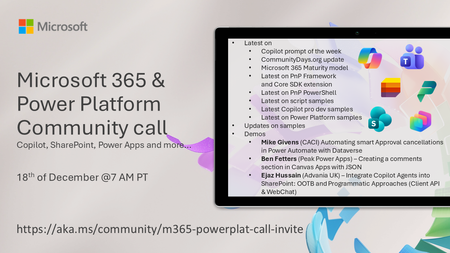
💡 Microsoft 365 & Power Platform Development bi-weekly community call focuses on different use cases and features within the Microsoft 365 and Power Platform - across Microsoft 365 Copilot, Copilot Studio, SharePoint, Power Apps and more. 👏 Looking to catch up on the latest news and updates, including cool community demos, this call is for you! 📅 On 18th of December we'll have following agenda: Copilot prompt of the week CommunityDays.org update Microsoft 365 Maturity Model update Latest on PnP Framework and Core SDK extension Latest on PnP PowerShell Latest on Copilot pro dev samples Latest on Power Platform samples Picture time with the Together Mode! Mike Givens (CACI) Automating smart Approval cancellations in Power Automate with Dataverse Ben Fetters (Peak Power Apps) – Creating a comments section in Canvas Apps with JSON Ejaz Hussain (Advania UK) – Integrate Copilot Agents into SharePoint: OOTB and Programmatic Approaches (Client API & WebChat) 📅 Download recurrent invite from https://aka.ms/community/m365-powerplat-dev-call-invite 📞 & 📺 Join the Microsoft Teams meeting live at https://aka.ms/community/m365-powerplat-dev-call-join 👋 See you in the call! 📖 Resources: Previous community call recordings and demos from the Microsoft Community Learning YouTube channel at https://aka.ms/community/youtube Microsoft 365 & Power Platform samples from Microsoft and community - https://aka.ms/community/samples Microsoft 365 & Power Platform community details - https://aka.ms/community/home 🧡 Sharing is caring!96Views0likes0CommentsMicrosoft Power Platform community call - December 2025
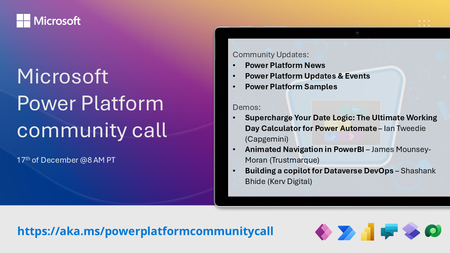
💡 Power Platform monthly community call focuses on different extensibility options for builders, makers and developers within the Power Platform. Typically demos are from our awesome community members who showcase the art of possible within the Power Platform capabilities. 👏 Looking to catch up on the latest news and updates, including cool community demos, this call is for you! 📅 On 17th of December we'll have following agenda: Power Platform Updates & Events Latest on Power Platform samples Supercharge Your Date Logic: The Ultimate Working Day Calculator for Power Automate – Ian Tweedie (Capgemini) Animated Navigation in PowerBI – James Mounsey-Moran (Trustmarque) Building a copilot for Dataverse DevOps – Shashank Bhide (Kerv Digital) 📅 Download recurrent invite from https://aka.ms/powerplatformcommunitycall 📞 & 📺 Join the Microsoft Teams meeting live at https://aka.ms/PowerPlatformMonthlyCall 👋 See you in the call! 📖 Resources: Previous community call recordings and demos from the Microsoft 365 & Power Platform community YouTube channel at https://aka.ms/community/videos Microsoft 365 & Power Platform samples from Microsoft and community - https://aka.ms/community/samples Microsoft 365 & Power Platform community details - https://aka.ms/community/home 💡 You want to do a demo in this call? - Please fill in the following form and we'll get you scheduled - https://aka.ms/community/request/demo121Views0likes0Comments
Lookup for two columns in data verse table
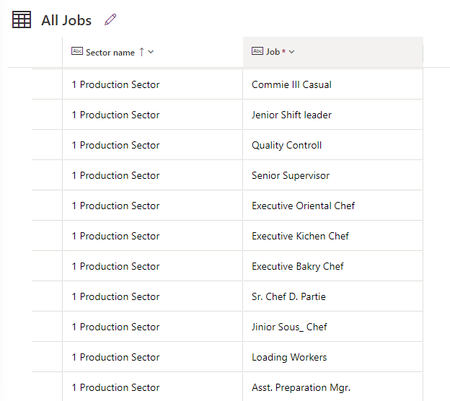
Dears I created a table named "onboarding employee" I made a column name "Sector name " and the type is choices, which are (Production sector, Support sector, ...) I created another table named "All Jobs", this table has two columns "Sector name" and "Job title" and each sector has some job titles like the below photo I created a new field in the "onboarding employee table " named "Job title " My request is when I select a sector from the "sector name field" like the production sector and then when I press on "the Job title field", it shows me only the jobs related to the production sector what can I make this? Thanks in advance
Use dataverse as a source for lookop in Sharepoint Online list
I have a few Sharepoint sites running. They all have listst that need employee info (lookup field). So now I have for every Sharepoint site a seperate list of employees. Every update has to be done over all the seperate employee listst. I recently synchronised the employee data from our SQL server ERP system to Dataverse. So I have one online source (table) where all employee data is stored. Can this be used in lookup fields in Sharepoint Online lists? This way I always have one source of data which is automatically updated. Tried to google it but I only find results explaining the other way around, fromSharepoint to Dataverse. Thanks in advance!3.6KViews1like2Comments