data security
22 TopicsAzure Database Security Newsletter - April 2026
Welcome to the quarterly edition of Azure Database Platform Security Newsletter. In this newsletter we highlight the importance of strong encryption for data security, and call out recent encryption, key management, and auditing enhancements designed to help you strengthen your security posture while simplifying operational management. Data is one of the most critical assets organizations manage, and protecting it is essential to maintaining trust, resilience, and long‑term success. As cyber threats continue to evolve and regulatory expectations increase, strong encryption has become a foundational requirement rather than an optional safeguard. Encryption protects sensitive data across its entire lifecycle. Data is encrypted at rest using Transparent Data Encryption (TDE) to protect stored information, in transit using Transport Layer Security (TLS) to secure data as it moves across your application and server, and in use through Always Encrypted to help ensure data remains protected even from high-privileged users. Together, these capabilities reduce risk and support compliance obligations. Feature highlights 💡 Customer-Managed Keys in Fabric SQL Database Customer-Managed Keys (CMK) are now generally available for Fabric SQL Database, allowing you to use Azure Key Vault keys to encrypt all workspace data, including all SQL Database data. This feature gives organizations greater control over key management and helps meet data governance and encryption requirements. More information on How to encrypt Fabric SQL Database with Customer Managed Keys (Video). Versionless keys for Transparent Data Encryption in Azure SQL Database Azure SQL Database now lets you use versionless key URIs for Transparent Data Encryption (TDE) with customer-managed keys, automatically applying the latest enabled key from Azure Key Vault or Managed HSM. This update simplifies encryption management. Auditing in Fabric SQL Database Auditing for Fabric SQL Database is now generally available. Organizations can track and log database activities, addressing questions about data access for compliance, threat detection, and forensic analysis. Audit logs are stored in One Lake, and access is controlled by Fabric workspace roles and SQL permissions. Best Practices Corner Retain all historical TDE keys and key versions Always keep all historical Transparent Data Encryption (TDE) keys and their versions. Databases and backups remain encrypted with the key version that was active at the time of encryption. Restoring an older database requires access to the exact key version used. Deleting older keys or versions can make database restore impossible and result in permanent data loss. See Everything you need to know about TDE key management for database restore. Apply the Principle of Least Privilege Always grant users, applications, and services the minimum level of access required to perform their database tasks. Avoid broad administrative or owner-level permissions unless absolutely necessary. Regularly review, restrict, and remove excessive or unused privileges to reduce the attack surface and limit the impact of compromised credentials or configuration errors. This control aligns with established security standards such as NIST SP 800‑53 (AC‑6: Least Privilege), CIS Critical Security Controls, ISO/IEC 27002, and OWASP database security guidance. Enable Auditing on Azure SQL and SQL Server Always enable auditing on Azure SQL to record database activities for security monitoring, compliance, and forensic investigation. Auditing provides visibility into database access and changes, helping detect unauthorized or suspicious behavior and supporting incident response and regulatory requirements. See Auditing - Azure SQL Database. Blogs and Video Spotlight 🅱️ In the last three months, we've published blog posts on major releases and features. These updates offer practical insights and highlight the latest in data security and database management. Why ledger verification is non-negotiable How to Enable Microsoft Entra ID for Azure Cosmos DB (NoSQL) Why Developers and DBAs love SQL’s Dynamic Data Masking (Series-Part 1) Announcing Preview of bulkadmin role support for SQL Server on Linux Zero Trust for data: Make Microsoft Entra authentication for SQL your policy baseline Community & Events 👥 The data platform security team will be on-site at several upcoming events. Come and say hi! Previous events SQL Konferenz FABCON 26 - Microsoft Fabric Community Conference - FABCON SQLCON - Microsoft SQL Community Conference - SQLCON Upcoming events SQLBits DataGrillen Call to action 📢 Take 15 minutes this week to validate your database encryption posture: confirm TDE is enabled, review your key management plan (including retaining historical key versions), and ensure TLS is enforced for all connections. If you are using Fabric SQL Database, consider enabling Customer-Managed Keys and turning on Auditing to strengthen governance and investigation readiness. Share this newsletter with your security and DBA partners and align on one concrete improvement you can complete.Data Security Investigations in Microsoft Purview
Search across massive volumes of files using natural language, pinpoint the highest risk content, and connect it to user activity to see the full scope of an incident. Investigate and act in one workflow. Analyze content deeply across files, emails, and AI interactions, uncover hidden or unclassified sensitive data, and contain exposure fast. Proactively identify risks, respond to incidents with clarity, and mitigate impact before it spreads. Christophe Fiessinger, Microsoft Purview Principal Squad Leader, joins Jeremy Chapman to walk through real-world investigation workflows — from scoping and analysis to mitigation and automation — so you can move faster and make more informed security decisions. Pinpoint high-risk files. Locate files hidden among hundreds of confidential documents using contextual search. See how Microsoft Purview Data Security Investigations works. Search thousands of files in seconds. Use natural language queries to uncover relevant sensitive data. Get started with Microsoft Purview Data Security Investigations. Contain data leaks immediately. Purge exposed files while retaining investigation evidence. Take action with Microsoft Purview Data Security Investigations. QUICK LINKS: 00:00 — Keep data safe with DSI 01:26 — Connect dots between data risk & impact 02:47 — Built-in AI 03:47 — Work across the full lifecycle of an incident 04:56 — Create an investigation 06:36 — Deep search and analysis 09:03 — How DSI helps data leaks 10:40 — Contain risk with built-in mitigation 11:32 — Automate using agents 13:23 — Estimator tool 14:57 — Wrap up Link References As a Microsoft Purview admin, just go to https://purview.microsoft.com/dsi Unfamiliar with Microsoft Mechanics? As Microsoft’s official video series for IT, you can watch and share valuable content and demos of current and upcoming tech from the people who build it at Microsoft. Subscribe to our YouTube: https://www.youtube.com/c/MicrosoftMechanicsSeries Talk with other IT Pros, join us on the Microsoft Tech Community: https://techcommunity.microsoft.com/t5/microsoft-mechanics-blog/bg-p/MicrosoftMechanicsBlog Watch or listen from anywhere, subscribe to our podcast: https://microsoftmechanics.libsyn.com/podcast Keep getting this insider knowledge, join us on social: Follow us on Twitter: https://twitter.com/MSFTMechanics Share knowledge on LinkedIn: https://www.linkedin.com/company/microsoft-mechanics/ Enjoy us on Instagram: https://www.instagram.com/msftmechanics/ Loosen up with us on TikTok: https://www.tiktok.com/@msftmechanics Video Transcript: - If you’ve ever had to respond to a major data breach, insider-driven data theft, or even a suspicious leak involving high-value information, you know the hardest part isn’t just detecting the activity, it’s understanding what data was actually taken, how valuable it is, and what risks that creates to your organization. Today we’re going to show you how the now generally available Microsoft Purview Data Security Investigations, or DSI, dramatically accelerates that process using AI to read and analyze and connect the dots fast at massive scale. I’m joined by Christophe Fiessinger from the Microsoft Purview team to demonstrate more. Welcome. - Thanks, Jeremy. Happy to be here. - Thanks so much for joining us today. So most IT teams that I speak to, they’re often using things like SIEMS or incident management tools that connect activity across compromised accounts, devices, and files when they’re responding to things like security events. But these tools, they rarely reveal what’s affected in terms of the files and what’s contained in them. They might show labels, they might show file names or basic metadata like the location or the owner. - Exactly. Beyond labels on metadata, it’s all about context. Metadata gives you the file name, classification might tell you it’s a financial document, and the label might say it’s confidential, but traditional tools can’t really tell you what’s in the content and how much risk it exposes. They just tag the content, they don’t explain it. - So how does DSI then change things? - So DSI on the other end doesn’t just say it’s a confidential financial document. In fact, you might have hundreds of those. Instead, it actually reads and understand each file and the data risks they pose. So of the hundred or so finance documents classified confidential, it can find the one file that carried an existential threat to your company, like the one that contains your entire customer list with the unique credentials that each customer uses to log in your online service. In DSI, that level of insight comes from hybrid vector search and generative AI working together. Hybrid vector search can pick up on semantically similar items, synonyms, or the subtle ways people hide sensitive information while also matching precise text strings like code names or account numbers. In short, it finds the right files by combining context with keyword precision, then generative AI takes over and actually analyzes those files. It performs deep content analysis to uncover sensitive data, security risk, and relationship hidden inside the impacted document. - So it’s removing a ton of manual effort by connecting the dots around the data risk and also its impact. - That’s right. DSI helps you rapidly understand and mitigate the downstream impact. You can start large-scale data investigation and use natural language search to find and narrow in on impact data. From there, you can leverage our powerful built-in AI to deeply analyze content, files, email, team messages, and even review and analyze prompts and responses from AI apps and agents, built-in Microsoft Foundry, Copilot Studio, as well as non-Microsoft agents and apps at scale. DSI is able to establish the context around information and even detect obscure sensitive information that might not have been flagged. It can reason over dozens of major world languages with production-grade quality. And it can directly mitigate identified risk. For example, a specific high value content has been distributed to multiple users. You can purge every instance of those files. With DSI, you can also work on data investigations more efficiently across the full lifecycle of an incident with the rest of your team. As part of Microsoft Purview, you can trigger investigation directly from Data Security Posture Management to dig deeper into data that’s at risk and see how valuable it is. And in Insider Risk Management where you might want to understand larger sets of data being used by risky users or agents. Equally, DSI also provides a useful bridge to your security operations team who can start DSI investigations directly from Microsoft Defender XDR. And because DSI is now integrated with the Microsoft Sentinel graph, data security analysts can connect at-risk information to the activities around it, who accessed it, where it was shared, whether behaviors like compromised sessions or impossible travel were involved, and visually correlate risky content, users, and their activities. It automatically combines unified audit logs, Entra audit logs, and threat intelligence which would otherwise need to be manually correlated. - That’s a really powerful solution. Can you show us an example of an investigation? - Let me show you Data Security Investigations and where to quickly find all your current and future investigations. From the main Data Security Investigations overview, you’ll find everything you need to get started. identifying content, analyzing deeply what’s contained in that content, and mitigating risk, as well as access to all of your previous investigation so you can quickly pick up where you’ve left off and create new investigation from here. You can start an investigation in a few ways. Sometimes proactively using DSI to assess potential data secure risk or other times reactively like when you already know data is leaked and you need to investigate the breach. In this case, I’m going to start this investigation from Data Security Posture Management to get ahead of data risk in our environment. One of the most common types of data leaks is exfiltration of confidential information. Like if an employee moves on to a competitor with trade secrets or a seller wants to bring their client list their new job. Here I can see a recommended objective to prevent exfiltration of risky destinations. Once I click to view objectives, I can see the amount of data exfiltrated, top sources, as well as file types, and I can see an action to create a new investigation using DSI. Here I just need to give it a name, then provide some context about what I’m trying to do in this investigation like, “I’m looking into confidential data that may have been exfiltrated from my organization. I’m specifically looking for confidential and proprietary information about Project Obsidian, the new release we’re working on.” Now I’ll confirm and create the investigation. From here, I can put in the rest of the parameters for deeper search and analysis. In the investigation, I can see a summary about the investigation and from here I can refine the search scope and make change to the date range and people if I want, which will keep things more efficient. And if I need to, I can always add more data sources to the scope. I’ll keep the data source as is and hit add to scope. This grabs the content from the data source and into our investigation. Now I can further analyze the data and I can use a natural language query. And as mentioned DSI will analyze thousands of languages as part of the process. There are a few intelligent search suggestions, but I’m going to do my own search for “information disclosed to customers about project obsidian.” And in just a few seconds I’ll get information assessing exactly what I’m looking for based on my search criteria. It finds over a thousand items with a lot of different languages represented as you can see. On the left, the AI also suggests content categories based on the executed vector search so that it’s easy to organize and make sense of the amount of risk per category. So I’ll filter all those files down to using the obsidian category, and there they are. From here I can select which ones I want to deeply analyze. I’ll choose all of them in this case and hit examine. And here to choose the focus area for the investigation, I can look for credentials, analyze risk, and get mitigation recommendations. I’m going to choose risk in my case so that I can act quickly to contain the risk and hit examine one more time to kick up the process. As it works, I can view its details. This is where AI runs deep content analysis against all the content in these files by looking at the file content itself. This goes beyond common sensitive information types and trainable classifier matches. And depending on the number and size of the files that you have in scope for this, it could take a few moments to run. And you’ll see that it found relevant results each with an assessment, if it’s privileged content, and overall security risk scores and a risk explanation. I can drill into any of these to preview the content in line like this Microsoft 365 Copilot chat message. Moving back, I can also see other risk scores and explanations for credentials on the right-hand columns. - So DSI in this case uncovered a lot of what we call dark data. These are files that were never classified, which is great then for getting ahead of risk, but leaks do eventually happen. And when they do, we need a way to see exactly what got out and how we contain it. - That has happened pretty often, unfortunately. Let me show you a case where credentials were leaked externally as part of a security breach and I had DSI helped. And to show you the integration for SecOps teams with Microsoft Defender XDR, I’ll start from an active incident for data exfiltration in this case. In the incident view, you get the high-level signals, the attack timeline, which users on device were hit, and the file names involved. But we still don’t know what was actually inside those files and what earlier activities might have set up the attack or created additional risk across other files. So from the action menu, I’ll create a DSI investigation right from this open incident to find out more about the content in those files. Here I just need to give it a name, then also paste it in a description and some additional context like I did before for the AI. Then I’ll create the investigation and then it links me directly to an investigation in Microsoft Purview. Like before, I can see a summary and refine the search scope if I want. This time I’m going to fast forward a few steps for scoping the data source and examining the content and just go right to the examination results. Here you can see the subject or title of each item, extracted credentials, including usernames, passwords, and more, credential types including API tokens and MFA, a surrounding snippet or the text around the credential details for context, and the thought process with a summary of the AI reasoning. Next, I also want to show the built-in mitigation. We can actually purge the sensitive files that were forwarded around by email to contain the damage without touching the original copy so we’ll keep the evidence. From the results, I’ll select the items I want, then I’ll choose add to mitigation which will in turn create a list of files and messages containing those credentials. From the list I’ll select purge queue, then view the messages and run the purge where I can choose from a recoverable soft purge or permanent deletion with a hard purge. I’ll keep the default and confirm the purge. Then all the information matching that query will be deleted in minutes. And since these files are part of the investigation, they stay retained for review but are hidden from end users. And safeguards like in-place holds for eDiscovery still work normally so protected files aren’t removed. - Okay, so far we’ve defined all the investigations up front. Is there maybe a way to automate the process using agents? - Absolutely. We’re adding new capabilities to help tackle a major hidden risk, credentials buried in everyday files. While Microsoft Purview DLP protects credentials in real time as files are created or shared, the Data Security Posture Agent powered by Security Copilot helps security teams identify and prioritize credential-related risks across scope data allocations. Here you can see that I’ve already enabled the agent and there’s a few tasks in progress. These can be started manually or run on a schedule. I’ll start a new assignment for this agent and create a credential scanning task. We’ll be adding our task types to this over time. I can give it a name or keep what’s there. Then add some additional context, in this case, to look for credentials and passwords. Then I can view its progress as it completes scanning data locations, access patterns, analyzing risky documents, and generating the report. The agent works autonomously scanning thousands of locations and potentially millions of files. I’m going to move over to a scan I ran earlier to save some time. Once the agent completes its scan, you’ll see a prioritized list of exposed credentials such as passwords, API keys, encryption keys, tokens, and more, each with a risk score and the agent’s reasoning. From there, I can group the results into categories, then filter for the highest risk credentials. For each credential found, I can explore the details of the credential itself plus its surrounding context. - It’s a huge advantage really to run these types of credential scans at scale to catch those risks. But why don’t we switch gears though for the human-led investigations. DSI is using pay-as-you-go billing, which, you know, if people are watching this, they’re probably wondering, how do I keep these investigations in check without breaking the bank? - So cost, as you say, are usage based and billed through Azure. They’re going to vary depending on the size and complexity of your investigation. So we’ve introduced a new estimator tool to help. Before I go there, as a baseline to see the compute unit I’ve been showing until now, I’ll start in the pay-as-you-go dashboard in DSI, and then filter by our last investigation. This one only used about 250 megabyte and 109 DSI compute unit, which is quite conservative. So let’s go back to the DSI overview tab and scroll down to our new estimate cost tool. This lets you input key values like investigation size and gigabytes and the number of vector searches, and it will estimate cost based on what you enter. It shows you the cost breakdown by types for size and AI usage. And the last related control I want to show you is in Azure Cost Management, where like any other Azure services, you can see forecast and accumulated costs. I’ll filter this by my DSI shared view. In this chart, you’ll see the investigation compute and gigabytes by day as well as a forecast. So, voila, you’ve got what what you need to investigate deeply with AI and keep costs in check while staying ahead of incidents. And we’re only getting started. More integration, smarter AI, new mitigation actions, and more agentic workflows are on the way. - Thanks so much for joining us today, Christophe. And if you want to learn more about DSI and try it out for yourself. As a Microsoft Purview admin, just go to purview.microsoft.com/dsi. And keep watching Microsoft Mechanics for the latest updates. We’ll see you again soon.215Views0likes0CommentsPurview Lightning Talks | Presented by the Microsoft Security Community
Purview Lightning Talks Join the Microsoft Security Community for Purview Lightning Talks; quick technical sessions delivered by the community, for the community. You’ll pick up practical Purview gems: must-know Compliance Manager tips, smart data security tricks, real-world scenarios, and actionable governance recommendations all in one energizing event. Hear directly from Purview customers, partners, and community members and walk away with ideas you can put to work right immediately. Register now; full agenda coming soon! When: Thursday, April 30, 2026 | 8:00AM - 9:30AM (PT, Redmond Time) Where: Join Here: https://aka.ms/JOIN-WEBINAR-23-MICROSOFT-PURVIEW To stay informed about future webinars and other events, join our Security Community at https://aka.ms/SecurityCommunity. We hope you will join us! This event may be recorded and shared publicly with others, including Microsoft’s global customers, partners, employees, and service providers. The recording may include your name and any questions you submit to Q&A Fine print: This event is certified fluff-free. There will be no sales pitches, marketing, or recruitment during this compilation of lighting fast sessions proudly presented by members of the Microsoft Security Community.106Views0likes0CommentsAzure Database Security Newsletter - January 2026
Happy New Year and welcome to our first newsletter of 2026! This year, we’re doubling down on something that matters to every one of us: keeping data safe without slowing innovation. Security isn’t just a checkbox—it’s the backbone of everything we build. That’s why our database security strategy is rooted in the Zero Trust model, a simple but powerful idea: never assume, always verify. Here’s what that means in practice: Identity first: Every user and workload proves who they are, every time. Devices matter: Only trusted endpoints get through the door. Networks stay clean: Segmentation and encryption keep traffic locked down. Apps and workloads: Least privilege isn’t optional—it’s standard. Data protected everywhere: Protected at rest, in transit, and under constant watch. Driving all of this is our Security First Initiative (SFI)—a mindset that makes security part of the design, not an afterthought. It’s how we ensure that trust isn’t just a promise; it’s a practice. 2026 is about scaling this vision and making security seamless for everyone. Feature highlights of 2025 Dynamic Data Masking in Cosmos DB Now in public preview, Dynamic Data Masking is a server-side, policy-based security feature that automatically masks sensitive fields at query time for non-privileged users, while leaving the underlying data unchanged. Masking policies are enforced based on user roles and Entra ID identity, supporting privacy and compliance scenarios (PII/PHI) and reducing the need for custom app logic. This enables granular, real-time protection, secure data sharing, and safe testing with anonymized production data. Auditing in Fabric SQL Database Auditing is now in public preview for Fabric SQL Database. This feature allows organizations to track and log database activities—answering critical questions like who accessed what data, when, and how. It supports compliance requirements (HIPAA, SOX), enables robust threat detection, and provides a foundation for forensic investigations. Audit logs are stored in One Lake for easy access, and configuration is governed by both Fabric workspace roles and SQL-level permissions. Customer-Managed Keys in Fabric SQL Database Now in public preview, Customer-Managed Keys (CMK) let you use your own Azure Key Vault keys to encrypt data in Microsoft Fabric workspaces, including all SQL Database data. This provides greater flexibility and control over key rotation, access, and auditing, helping organizations meet data governance and encryption standards. SQL Server 2025 SQL Server 2025 raises the bar for enterprise data protection with a suite of powerful, built-in security enhancements. From eliminating client secrets through managed identity authentication to adopting stronger encryption standards and enforcing stricter connection protocols, this release is designed to help organizations stay ahead of evolving threats. With these updates, SQL Server 2025 simplifies compliance and strengthens data security—right out of the box. Best Practices Corner Don’t use passwords—use Entra instead Modern identity security for Azure SQL means eliminating SQL authentication wherever possible and adopting Microsoft Entra ID–based passwordless authentication. This strengthens security, simplifies identity governance, and aligns with Zero Trust and Microsoft’s Secure Future Initiative principles. Failover Ready? Don’t Forget Your TDE Keys For successful geo-replication setup and failover, all necessary encryption keys for Transparent Data Encryption must be created and available on both primary and secondary servers. It is possible and, in certain cases, required to configure different TDE protectors on replicas, as long as the key material is available on each server. It’s time for TLS 1.2 Legacy TLS 1.0 and 1.1 are no longer secure and are being retired across Azure services. To avoid connection failures and strengthen your security posture, make sure all applications, drivers, and clients connect using TLS 1.2 or higher. Blogs and Video Spotlight Geo-Replication and Transparent Data Encryption Key Management in Azure SQL Database | Microsoft Community Hub Everything you need to know about TDE key management for database restore | Microsoft Community Hub Secure by default: What’s new in SQL Server 2025 security | Microsoft Community Hub Secure by Design: Upcoming CMK and Auditing Features in Fabric SQL Database | Data Exposed Latest progress update on Microsoft’s Secure Future Initiative | Microsoft Security Blog Community & Events The data platform security team will be on-site at several upcoming events. Come and say hi! SQL Konferenz SQLCON - Microsoft SQL Community Conference Call to Action Last year brought some seriously powerful updates—Dynamic Data Masking in Cosmos DB, Auditing in Fabric SQL Database, and Customer Managed Keys that give you full control over your security strategy. These features are built to help you move faster, stay compliant, and protect data without friction. Try them out and see the impact firsthand. If this got you fired up, share it with your team and drop a comment to keep the momentum going. And don’t wait—download SQL Server 2025 today and experience the newest security capabilities in action. Let’s push data security forward together.Purview YouTube Show and Podcast
I am a Microsoft MVP who co-hosts All Things M365 Compliance with Ryan John Murphy from Microsoft. The show focuses on Microsoft 365 compliance, data security, and governance. Our episodes cover: Microsoft Purview features and updates Practical guidance for improving compliance posture Real-world scenarios and expert discussions Recent episodes include: Mastering Records Management in Microsoft Purview: A Practical Guide for AI-Ready Governance Teams Private Channel Messages: Compliance Action Required by 20 Sept 2025 Microsoft Purview DLP: Best Practices for Successful Implementation Shadow AI, Culture Change, and Compliance: Securing the Future with Rafah Knight 📺 Watch on YouTube: All Things M365 Compliance - YouTube 🎧 Listen on your favourite podcast platform: All Things M365 Compliance | Podcast on Spotify If you’re responsible for compliance, governance, or security in Microsoft 365, this is for you. 👉 Subscribe to stay up to date – and let us know in the comments what topics you’d like us to cover in future episodes!93Views1like0CommentsSeptember Calendar IS HERE!
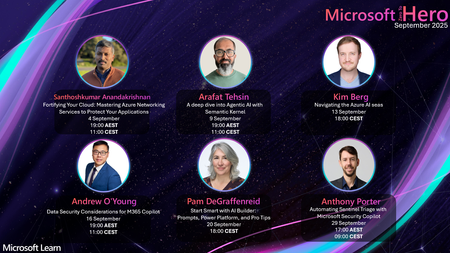
🚀✨ Another month, another exciting calendar from the Microsoft Hero ✨🚀 From 🌍 different time zones, and 🌟 diverse topics, we’re bringing incredible sessions designed for everyone, whether you’re just starting your journey or already an expert in Microsoft and the cloud. This month, we’ve packed the calendar with amazing speakers from across the globe 🌐 who will be sharing their invaluable knowledge and real-world experiences. 🙌 💡 Join our live sessions, learn from inspiring experts, and take a step closer to transforming your career, boosting your skills, and making an impact in your organization. ⏰ Just like last month, we’re covering multiple time zones, from Australia 🇦🇺, to Europe 🇪🇺, to the Americas 🌎, so no matter where you are, there’s a session waiting for you! 👉 Don’t miss out, register today, get ready, and let’s grow together from Zero to Hero! 💪🚀 Santhoshkumar Anandakrishnan https://streamyard.com/watch/3CCPGbvGeEfZ?wt.mc_id=MVP_350258 September 4, 2025 11:00 AM CET September 4, 2025 07:00 PM AEST Arafat Tehsin https://streamyard.com/watch/Nyq7gkQEhXkm?wt.mc_id=MVP_350258 September 9, 2025 11:00 AM CET September 9, 2025 07:00 PM AEST Kim Berg https://streamyard.com/watch/6AyAT6PhD9xv?wt.mc_id=MVP_350258 September 13, 2025 06:00 PM CET Andrew O'Young https://streamyard.com/watch/qTvq25R7dfmu?wt.mc_id=MVP_350258 September 16, 2025 11:00 AM CET September 16, 2025 07:00 PM AEST Pam DeGraffenreid https://streamyard.com/watch/UmwbDn9Gimn8?wt.mc_id=MVP_350258 September 20, 2025 06:00 PM CET Anthony Porter https://streamyard.com/watch/8SFHqmDB3gxH?wt.mc_id=MVP_350258 September 29, 2025 09:00 AM CET September 29, 2025 05:00 PM AEST433Views4likes0CommentsData security for agents and 3rd party AI in Microsoft Purview
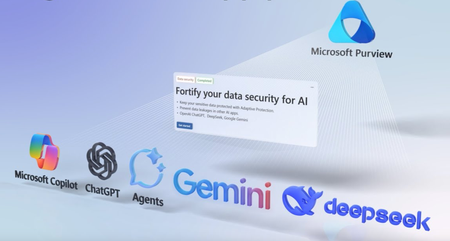
With built-in visibility into how AI apps and agents interact with sensitive data — whether inside Microsoft 365 or across unmanaged consumer tools — you can detect risks early, take decisive action, and enforce the right protections without slowing innovation. See usage trends, investigate prompts and responses, and respond to potential data oversharing or policy violations in real time. From compliance-ready audit logs to adaptive data protection, you’ll have the insights and tools to keep data secure as AI becomes a part of everyday work. Shilpa Ranganathan, Microsoft Purview Principal Group PM, shares how to balance AI innovation with enterprise-grade data governance and security. Move from detection to prevention. Built-in, pre-configured policies you can activate in seconds. Check out DSPM for AI. Monitor risky usage and take action. Block risky users from uploading sensitive data into AI apps. See how to use DSPM for AI. Set instant guardrails. Use DSPM for AI to identify AI agents that may be at risk of data oversharing and take action. Get started. QUICK LINKS: 00:00 — AI app security, governance, & compliance 01:30 — Take Action with DSPM for AI 02:08 — Activity logging 02:32 — Control beyond Microsoft services 03:09 — Use DSPM for AI to monitor data risk 05:06 — ChatGPT Enterprise 05:36 — Set AI Agent guardrails using DSPM for AI 06:44 — Data oversharing 08:30 — Audit logs 09:19 — Wrap up Link References Check out https://aka.ms/SecureGovernAI Unfamiliar with Microsoft Mechanics? As Microsoft’s official video series for IT, you can watch and share valuable content and demos of current and upcoming tech from the people who build it at Microsoft. Subscribe to our YouTube: https://www.youtube.com/c/MicrosoftMechanicsSeries Talk with other IT Pros, join us on the Microsoft Tech Community: https://techcommunity.microsoft.com/t5/microsoft-mechanics-blog/bg-p/MicrosoftMechanicsBlog Watch or listen from anywhere, subscribe to our podcast: https://microsoftmechanics.libsyn.com/podcast Keep getting this insider knowledge, join us on social: Follow us on Twitter: https://twitter.com/MSFTMechanics Share knowledge on LinkedIn: https://www.linkedin.com/company/microsoft-mechanics/ Enjoy us on Instagram: https://www.instagram.com/msftmechanics/ Loosen up with us on TikTok: https://www.tiktok.com/@msftmechanics Video Transcript: -Do you have a good handle on the data security risks introduced by the growing number of GenAI apps inside your organization? Today, 78% of users are bringing their own AI tools, often consumer grade, to use as they work and bypassing the data security protections you’ve set. And now, combined with the increased use of agents, it can be hard to know what data is being used in AI interactions to keep valuable data from leaking outside of your organization. -In the next few minutes, I’ll show you how enterprise grade data security, governance, and compliance can go hand in hand with GenAI adoption inside your organization with Data Security Posture Management for AI in Microsoft Purview. This single solution not only gives you automatic visibility into Microsoft Copilot and custom apps and agents in use inside your organization, but extends visibility into AI interactions happening across different non-Microsoft AI services that may be in use. Risk analytics then help you see at a glance what’s happening with your data with a breakdown of the top unethical AI interactions, sensitive data interactions per AI app, along with how employees are interacting with apps based on their risk profile, either high, medium, or low. And specifically for agents, we also provide dedicated reports to expose the data risks posed by agents in Microsoft 365 Copilot and maker created agents from Copilot Studio. And visibility is just one half of what we give you. You can also take action. -Here, DSPM for AI provides you proactive recommendations to help you take immediate action to enhance your data security and compliance posture right from the service using built-in and pre-configured Microsoft Purview policies. And with all AI interactions audited, not only do you get the visibility I just showed, but the data is automatically captured for data lifecycle management, eDiscovery, and Communication Compliance investigations. In fact, clicking on this one recommendation for compliance controls can help you set up policies in all these areas. -Now, if you’re wondering how activity signals from AI apps and agents flow into DSPM for AI in the first place, the good news is, for the AI apps and agents you build with either Microsoft Copilot services or with Azure AI, even if you haven’t configured a single policy in Microsoft Purview, activity logging is enabled by default, and built-in reports are generated for you out of the gate. As I showed, visibility and control extend beyond Microsoft services as soon as you take proactive action. Directly from DSPM for AI, the fortify data security recommendation, for example, when activated under the covers leverage Microsoft Purview’s built-in classifiers to detect sensitive data and to log interactions from local app traffic over the network, as well as the device level to protect file system interactions on Microsoft Purview onboarded PCs and Macs, and even web-based apps running in Microsoft Edge, to help prevent risky users from leaking sensitive data. -Next, with insights now flowing in, let me walk you through how you can use DSPM for AI every day to monitor your data risks and take action. I’ll start again from reports in the overview to look at GenAI apps that are popular in our organization. Something that is really concerning are the ones in use by my riskiest users who are interacting with popular consumer apps like DeepSeek and Google Gemini. ChatGPT consumer is at the top of the list, and it’s not a managed app for our organization. It’s brought in by users who are either using it for free or with a personal license, but what’s really concerning is that it has the highest number of risky users interacting with it, which could increase our risk of data loss. Now, my first inclination might be to block usage of the app outright. That said, if I scroll back up, instead I can see a proactive recommendation to prevent sensitive data exfiltration in ChatGPT with adaptive protection. -Clicking in, I can see the types of sensitive data shared by users and their prompts. Creating this policy will log the actions of minor-risk users and block high-risk users from typing in or uploading sensitive information into ChatGPT. I can also choose to customize this policy further, but I’ll keep what’s there and confirm. And with the policies activated, now let me show you the result. Here we have a user with an elevated risk level. They’re entering sensitive information into the prompt, and when they submit it, they are blocked. On the other hand, when a user with a lower risk level enters sensitive information and submits their prompt, they’re informed that their actions are being audited. -Next, as an admin, let me show you how this activity was audited. From DSPM for AI in the Activity Explorer, I can see all interactions and any matching sensitive information types. Here’s the activity we just saw, and I can click into it to see more details, including exactly what was shared in the user’s prompt. Now for ChatGPT Enterprise, there’s even more visibility due to the deep API integration with Microsoft Purview. By selecting this recommendation, you can register your ChatGPT Enterprise workspace to discover and govern AI interactions. In fact, this recommendation walks you through the setup process. Then with the interactions logged in Activity Explorer, not only are you able to see what prompts were submitted, but you can also get complete visibility into the generated responses. -Next, with the rapid development of AI agents, let me show you how you can use DSPM for AI to discover and set guardrails around information used with your user-created agents. Clicking on agents takes you to a filtered view. Immediately, I can see indicators of a potential oversharing issue. This is where data access permissions may be too broad and where not enough of my data is labeled with corresponding protections. I can also see the total agent interactions over time, the top five agents open to internet users, with interactions by unauthenticated or anonymous users. This is where people outside of my organization are interacting with agents grounded on my organization’s data, which can be bad. -I can also quickly see a breakdown of sensitive interactions per agent along with the top sensitivity labels referenced to get an idea of the type of data in use and how well protected it is. To find out more, from the Activity Explorer, I can see in this AI interaction, the agent was invoked in Copilot Chat, and I can view the agent’s details and see the prompt and response just like before. Now what I really want to do is to take a closer look at the potential data oversharing issue that was flagged. For that, I’ll return to my dashboard and click into the default assessment. These run every seven days, scanning files containing sensitive data and identifying where those files are located, such as SharePoint sites with overly permissive user access. -And I can dig into the details. I’ll click into the top one for “Obsidian Merger” and I can see label coverage for the data within it. And in the protect tab, there are eight sensitivity labels and five that are referenced by Copilot and agents. Since I want agents to honor data classifications and their related protections, I can configure recommended policies. The most stringent option is to restrict all items, removing the entire site from view of Copilot and agents. Or for more granular controls, I also have a few more options. I can create default sensitivity labels for newly created items, or if I move back to the top-level options, I have the option to “Restrict Access by Label.” The Obsidian Merger information is highly privileged, and even if you’re on the core team working on it, we don’t want agents to reason over the information, so I’ll pick this label option. -From there, I need to extend the list of sensitivity labels and I’ll select Obsidian Merger, then confirm to create the policy. And this will now block the agent from reasoning over the content that includes the Obsidian Merger label. In fact, let’s look at the policy in action. Here you can see the user is asking the Copilot agent to summarize the Project Obsidian M&A doc and even though they are the owner and author of the file, the agent cannot reason over it. It responds, “Unfortunately, I can’t provide detailed information because the content is protected.” -As I mentioned, for both your agents and GenAI apps across Microsoft and non-Microsoft services, all activity is recorded in Audit logs to help conduct investigations whenever needed. In fact, DSPM for AI logged activity flows directly into Microsoft Purview’s best-in-class solutions for insider risk management, letting your security teams detect risky AI prompts as part of their investigations into risky users, communication compliance to aid investigations into non-compliance use in AI interactions, such as a user trying to get sensitive information like an acquisition plan, eDiscovery, where interactions across your Copilots, agents, and AI apps can be collected and reviewed to help conduct investigations and respond to litigations. -So that was an overview of how GenAI adoption can go hand in hand with your enterprise grade data security, governance, and compliance requirements for your organizations, keeping your data protected. To learn more, check out aka.ms/SecureGovernAI. Keep watching Microsoft Mechanics for the latest updates, and thanks for watching.1.8KViews0likes0Comments
Can MS Purview mask data in CE
Hi Can MS Purview enable data masking in Dynamics Customer Engagement / Service, If yes how this can be achieved? if No, Can we expect this feature in near future? Note: We would not enable any mask (Field Security Profile) features directly in CE, would like to happen using MS Purview223Views0likes1CommentPurview AMA March 12 - Ask Questions Below!
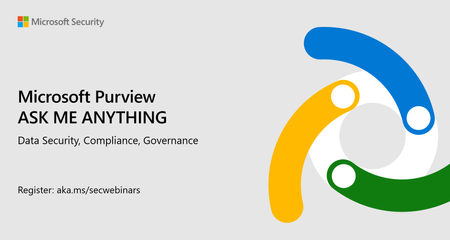
The next Purview AMA covering Data Security, Compliance, and Governance takes place on 12 March at 8am Pacific. Register HERE! Your subject matter experts are: Maxime Bombardier - Purview Data Security and Horizontals Sandeep Shah - Purview Data Governance Peter Oguntoye - Purview Compliance And, if you'd like to get started now, feel free to post your questions as comments below. They may be answered live, or if we don't get to them, they will be answered in-text below (you may also note what you'd prefer!) Thank you for being a part of the Purview community, we can't do exciting events like this without you! Don't forget to register ✏️130Views0likes0Comments