Copy Activity
41 Topics
Oracle 2.0 Upgrade Woes with Self-Hosted Integration Runtime
This past weekend my ADF instance finally got the prompt to upgrade linked services that use the Oracle 1.0 connector, so I thought, "no problem!" and got to work upgrading my self-hosted integration runtime to 5.50.9171.1 Most of my connection use service_name during authentication, so https://learn.microsoft.com/en-us/azure/data-factory/connector-oracle?tabs=data-factory, I should be able to connect using the Easy Connect (Plus) Naming convention. When I do, I encounter this error: Test connection operation failed. Failed to open the Oracle database connection. ORA-50201: Oracle Communication: Failed to connect to server or failed to parse connect string ORA-12650: No common encryption or data integrity algorithm https://docs.oracle.com/error-help/db/ora-12650/ I did some digging on this error code, and the troubleshooting doc suggests that I reach out to my Oracle DBA to update Oracle server settings. Which, I did, but I have zero confidence the DBA will take any action. https://learn.microsoft.com/en-us/azure/data-factory/connector-troubleshoot-oracle Then I happened across this documentation about the upgraded connector. https://learn.microsoft.com/en-us/azure/data-factory/connector-oracle?tabs=data-factory#upgrade-the-oracle-connector Is this for real? ADF won't be able to connect to old versions of Oracle? If so I'm effed because my company is so so legacy and all of our Oracle servers at 11g. I also tried adding additional connection properties in my linked service connection like this, but I have honestly no idea what I'm doing: Encryption client: accepted Encryption types client: AES128, AES192, AES256, 3DES112, 3DES168 Crypto checksum client: accepted Crypto checksum types client: SHA1, SHA256, SHA384, SHA512 But no matter what, the issue persists. :( Am I missing something stupid? Are there ways to handle the encryption type mismatch client-side from the VM that runs the self-hosted integration runtime? I would hate to be in the business of managing an Oracle environment and tsanames.ora files, but I also don't want to re-engineer almost 100 pipelines because of a connector incompatability.Solved7.1KViews3likes16Comments
Auto Create SQL table from Imported CSV in ADF?
Hi All Wondering if its possible to automatically create a sql table from an imported CSV in Data Factory? To make things a little more complicated not all csv's will have the same headings and differing number of headings. If so, can anyone point me in the direction of a how to guide? Case I've been ingesting csv's using a HTTP connector in ADF then storing CSV data into a SQL table (manually created) and then transforming and cleaning said data into a Datastore SQL table that is also manually created. I know I'm a little slow to the party but I've been looking at using parameters and was wondering if I pulled the csv's into blob storage and then transformed from there. Then I'd only need to create one SQL table and if I could automate the entire process in ADF that would save future me a lot of time. I have another issue but I'll post that separate as its a slightly different topic. Thanks for Reading Hope someone can point me in the right direction. JohnSolved6KViews1like1Comment
Copy zip files from SharePoint to Azure Blob using adf
I'm currently trying to get a zip file from a Sharepoint folder to my Azure Blob storage. The SharePoint environment belongs to a partner company. I have a personal login/password to manually access this SPO without any kind of VPN or MFA. I was trying to use Azure Data Factory to get the file daily automaticaly. On Azure Data Factory Documentation, I got the impression that I would need to register an App on Azure AD and then, request the Sharepoint owner to give permission to my registered App so I can access it. Is my understanding is correct? And, if so, is there a easier way of doing it? Specially one that does not require me to request the Sharepoint owner to "add" me to his white list.4.4KViews0likes5Comments
How to handle azure data factory lookup activity with more than 5000 records
Hello Experts, The DataFlow Activity successfully copies data from an Azure Blob Storage .csv file to Dataverse Table Storage. However, an error occurs when performing a Lookup on the Dataverse due to excessive data. This issue is in line with the documentation, which states that the Lookup activity has a limit of 5,000 rows and a maximum size of 4 MB. Also, there is a Workaround mentioned (Micrsofot Documentation): Design a two-level pipeline where the outer pipeline iterates over an inner pipeline, which retrieves data that doesn't exceed the maximum rows or size. How can I do this? Is there a way to define an offset (e.g. only read 1000 rows) Thanks, -Sri3.6KViews0likes1Comment
ADF - data connect from blob to Azure SQL
Hi All, I have a scenario, I have a multiple excel files (4 files) in storage blob and need to upload in SQL in 4 different table (I have 4 tables for staging and 4 tables for master table) . I have created the stored procedure in SQL for those 4 files. Can anyone help me with the ADF process to upload automatically on regular basis. Thanks2.1KViews1like5Comments
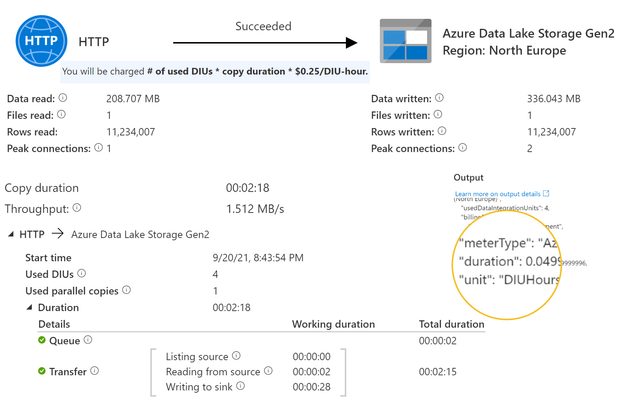
Copy Data Activity Cost Consumption - number of DIU not taken into account?
"You will be charged # of used DIUs * copy duration * $$/DIU-hour". However, looking at the consumption from recent runs it's seems like the number of used DIUs is not taken into account? In this example the duration is 2 minutes and 18 seconds with 4 used DIU. The returned consumption is 0.05, not 0.2 as I would expect (3 minutes * 4 DIU / 60 minutes). What is right? I've experienced this in both adf and synapse.1.8KViews1like0Comments
How to load data from On-prem to Snowflake using ADF in better way
Hi, My use case is as follows: Our data source is an On-prem SQL Server, and it serves as our production database. Currently, we are building reports in Power BI and utilizing Snowflake as our data warehouse. I aim to extract 10 to 15 tables for my Power BI reporting into Snowflake, specifically wanting to construct a SCD Type 1 Pipeline, without the need to retain historical data. To facilitate the data transfer from On-Prem to Snowflake, we are leveraging Azure Data Factory, with blob storage set up in Azure. We already have a Self-hosted runtime in place that connects to Data Factory. Currently, I've employed the For Each loop activity to copy 15 tables from On-prem to Snowflake. The pipeline is scheduled to run daily, and each time it executes, it truncates all 15 tables before loading the data. However, this process is time-consuming due to the volume of data, especially since our On-prem SQL server is a legacy database. My questions are as follows: Is there a more efficient approach within Data Factory for this task? What are the best practices recommended for this type of case study? Dataflow is not functioning with the Self-hosted runtime; how can I activate Dataflow for an On-prem database? I would greatly appreciate any advice on the correct solution for this or pointers to relevant documentation or blogs.1.7KViews0likes0CommentsIncremental updates with overlap (delete last N days of records and load "NOW- M days" from source)
Hi, I am looking into the possibilities of replacing our current legacy ETL setup with Azure dedicated pool and Data Factory. The source will be PostgreSQL, the destination should be Azure dedicated pool. One thing I need help with is whether it is possible and how to perform the following: an "upsert" operation, or in more simple terms, identify the last day of data in the destination (denote here as LastDay) remove last N days of records (the last few days could be stale) from the ETL destination (Azure pool), then query the source for the new data (i.e. newer than "LastDay - N days") and update the records in the destination (I have found this scenario: https://docs.microsoft.com/en-us/azure/data-factory/tutorial-incremental-copy-multiple-tables-powershell regarding incremental update - however, I need that overlap (removal of last N days of possibly stale records) Thank you1.6KViews0likes1Comment
'Cannot connect to SQL Database' error - please help
Hi, Our organisation is new to Azure Data Factory (ADF) and we're facing an intermittent error with our first Pipeline. Being intermittent adds that little bit more complexity to resolving the error. The Pipeline has two activities: 1) Script activity which deletes the contents of the target Azure SQL Server database table that is located within our Azure cloud instance. 2) Copy data activity which simply copies the entire contents from the external (outside of our domain) third-party source SQL View and loads it to our target Azure SQL Server database table. With the source being external to our domain, we have used a Self-Hosted Integration Runtime. The Pipeline executes once per 24 hours at 3am each morning. I have been informed that this timing shouldn't affect/or by affected by any other Azure processes we have. For the first nine days of Pipeline executions, the Pipeline successfully completed its executions. Then for the next nine days it only completed successfully four times. Now it seems to fail every other time. It's the same error message that is received on each failure - the received error message is below (I've replaced our sensitive internal names with Xs). Operation on target scr__Delete stg__XXXXXXXXXX contents failed: Failed to execute script. Exception: ''Type=Microsoft.DataTransfer.Common.Shared.HybridDeliveryException,Message=Cannot connect to SQL Database. Please contact SQL server team for further support. Server: 'XX-azure-sql-server.database.windows.net', Database: 'XX_XXXXXXXXXX_XXXXXXXXXX', User: ''. Check the linked service configuration is correct, and make sure the SQL Database firewall allows the integration runtime to access.,Source=Microsoft.DataTransfer.Connectors.MSSQL,''Type=Microsoft.Data.SqlClient.SqlException,Message=Server provided routing information, but timeout already expired.,Source=Framework Microsoft SqlClient Data Provider,'' To me, if this Pipeline was incorrectly configured then the Pipeline would never have successfully completed, not once. With it being intermittent, but becoming more frequent, suggests it's being caused by something other than its configuration, but I could be wrong - hence requesting help from you. Please can someone advise on what is causing the error and what I can do to verify/resolve the error? Thanks.1.3KViews0likes2CommentsGetting a 403 Error in Copy Activity
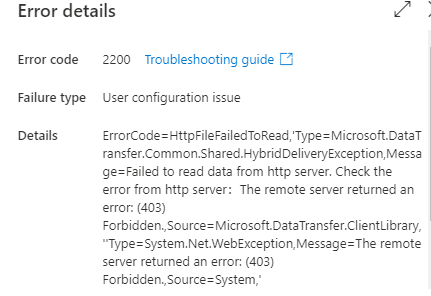
Hello everyone, I am doing a copy activity from sharepoint to blob using this doc: https://docs.microsoft.com/en-us/azure/data-factory/connector-sharepoint-online-list?tabs=data-factory#copy-file-from-sharepoint-online Since the data in sharepoint is not a list, I am using the second flow using web activity and copy activity. However I am getting an error in the copy activity. ErrorCode=HttpFileFailedToRead,'Type=Microsoft.DataTransfer.Common.Shared.HybridDeliveryException,Message=Failed to read data from http server. Check the error from http server:The remote server returned an error: (403) Can anyone guide me why this is happening ? [I followed all the steps in the doc] Thank you1.3KViews0likes0Comments