Copy Activity
41 Topics
Oracle 2.0 Upgrade Woes with Self-Hosted Integration Runtime
This past weekend my ADF instance finally got the prompt to upgrade linked services that use the Oracle 1.0 connector, so I thought, "no problem!" and got to work upgrading my self-hosted integration runtime to 5.50.9171.1 Most of my connection use service_name during authentication, so https://learn.microsoft.com/en-us/azure/data-factory/connector-oracle?tabs=data-factory, I should be able to connect using the Easy Connect (Plus) Naming convention. When I do, I encounter this error: Test connection operation failed. Failed to open the Oracle database connection. ORA-50201: Oracle Communication: Failed to connect to server or failed to parse connect string ORA-12650: No common encryption or data integrity algorithm https://docs.oracle.com/error-help/db/ora-12650/ I did some digging on this error code, and the troubleshooting doc suggests that I reach out to my Oracle DBA to update Oracle server settings. Which, I did, but I have zero confidence the DBA will take any action. https://learn.microsoft.com/en-us/azure/data-factory/connector-troubleshoot-oracle Then I happened across this documentation about the upgraded connector. https://learn.microsoft.com/en-us/azure/data-factory/connector-oracle?tabs=data-factory#upgrade-the-oracle-connector Is this for real? ADF won't be able to connect to old versions of Oracle? If so I'm effed because my company is so so legacy and all of our Oracle servers at 11g. I also tried adding additional connection properties in my linked service connection like this, but I have honestly no idea what I'm doing: Encryption client: accepted Encryption types client: AES128, AES192, AES256, 3DES112, 3DES168 Crypto checksum client: accepted Crypto checksum types client: SHA1, SHA256, SHA384, SHA512 But no matter what, the issue persists. :( Am I missing something stupid? Are there ways to handle the encryption type mismatch client-side from the VM that runs the self-hosted integration runtime? I would hate to be in the business of managing an Oracle environment and tsanames.ora files, but I also don't want to re-engineer almost 100 pipelines because of a connector incompatability.Solved7.1KViews3likes16Comments
User Properties of Activities in ADF: How to add dynamic content in it?
On ADF, I am using a for each loop in which I am using an Execute Pipeline Activity which is getting executed for different iterations as per the values of the items provided to the For-Each Loop. I am stuck on a scenario which requires me to add the Dynamic Content Expression in the User Properties of individual activities of ADF. Specific to my case, I want to add the Dynamic Content Expression in the User Properties of Execute Pipeline Activity so that I get to individual runs of these activities on Azure Monitor with a specific label attached to it through its User Properties. The necessity to add the Dynamic Content Expression in the User Properties is due to the reason that each execution in respective iterations of these activities corresponds to a particular Step from a set of Steps configured for the Data Load Job as a whole, which has been orchestrated through ADF. To identify the association with the respective Job-Step, I require to add Dynamic Content Expression in its User Properties. Any sort of response regarding this is highly appreciated. Thank You!29Views1like0Comments
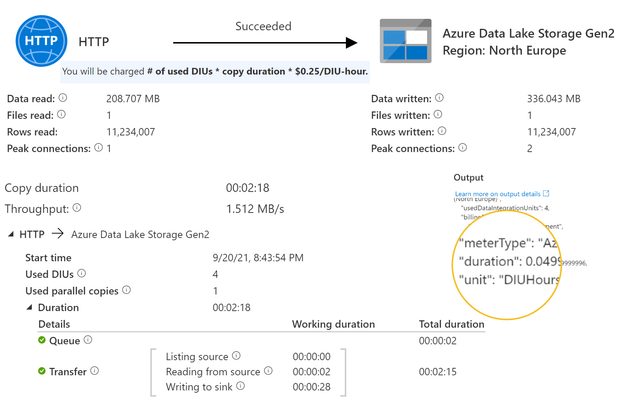
Copy Data Activity Cost Consumption - number of DIU not taken into account?
"You will be charged # of used DIUs * copy duration * $$/DIU-hour". However, looking at the consumption from recent runs it's seems like the number of used DIUs is not taken into account? In this example the duration is 2 minutes and 18 seconds with 4 used DIU. The returned consumption is 0.05, not 0.2 as I would expect (3 minutes * 4 DIU / 60 minutes). What is right? I've experienced this in both adf and synapse.1.8KViews1like0Comments
Auto Create SQL table from Imported CSV in ADF?
Hi All Wondering if its possible to automatically create a sql table from an imported CSV in Data Factory? To make things a little more complicated not all csv's will have the same headings and differing number of headings. If so, can anyone point me in the direction of a how to guide? Case I've been ingesting csv's using a HTTP connector in ADF then storing CSV data into a SQL table (manually created) and then transforming and cleaning said data into a Datastore SQL table that is also manually created. I know I'm a little slow to the party but I've been looking at using parameters and was wondering if I pulled the csv's into blob storage and then transformed from there. Then I'd only need to create one SQL table and if I could automate the entire process in ADF that would save future me a lot of time. I have another issue but I'll post that separate as its a slightly different topic. Thanks for Reading Hope someone can point me in the right direction. JohnSolved6KViews1like1Comment
ADF - data connect from blob to Azure SQL
Hi All, I have a scenario, I have a multiple excel files (4 files) in storage blob and need to upload in SQL in 4 different table (I have 4 tables for staging and 4 tables for master table) . I have created the stored procedure in SQL for those 4 files. Can anyone help me with the ADF process to upload automatically on regular basis. Thanks2.1KViews1like5Comments