conversations
550 Topics
Does editing a chat group name affect all participants?
I have a number of chats open with various combinations of team members. Since Teams insists on using full names and not "goes by" names, I've edited the chat names for myself to make it easier to locate the appropriate chat on the fly. For example, a co-worker named Albert J. Swingleton goes by Jack, so I changed the name of the chat with Jack and Jill to "Jack & Jill" instead of the default "Albert and Jillian". This is great for me, but if it changed the way that the chat is named for Jack and Jill too, that's a major issue, because now they can't tell by looking at it that I'm a participant.11KViews2likes3Comments
Open an Existing Group Chat via URL or Deep Link
I am attempting to open an existing Group Chat via a URL or Deep Link. I've read info about creating a chat via a URL but not navigating to an existing Chat. We plan to reuse an existing group chat room and would like to provide users a URL via an email to join or simply view the discussion from the existing Group Chat. Can this be done? How do i determine or construct the URL of the Group Chat Room?33KViews1like9CommentsAbility to take Personal Notes on Interactions in TEAMS
I have a lot of situations where I would like to take and keep personal notes associated to a specific TEAMS interactions. I don't want to have to keep my notes in a separate place like OneNote or Outlook. Requests Don't make the notes public for all of the participants (possibility to add a private tab to the interaction window in TEAMS Access the notes directly through the window in TEAMS for the Chat, phone call, or meeting23KViews13likes16Comments
Add Group Chat As A Channel
Hi all, I am wondering if there is a way to make a channel in a team that behaves the same as a group chat. I understand the advantages and disadvantages of conversations vs chats. Basically I like having conversation for work related things, the threads are good for organizations etc. At the same time I would prefer having a channel for general chit chat that behaves like a group chat (with the reply behavior of a chat and the general flow of a chat.) Yes I could just make a group chat that has the same members as my team but it is less comfortable to continuously go between the Teams tab and the Chats tab, and also inviting members to both the Group and the Chat can be annoying when there are many of them. Is there a way to do this that I missed?139KViews27likes43Comments
Reaction's notification in the activity feed
We should not have to go to the activity feed to read the notification of a reaction we read in a conversation in the chat section. It feels like it has to be read twice to remove the notification of that reaction (in the chat section and the activity feed).13KViews13likes7Comments
Teams (Desktop app) - need more noticeable notifications on Teams Desktop App
At work, I have had skype as our primary messaging app for considerable years. But now, my team is moving towards using Teams group. I have Teams desktop application installed alongside Skype. In using the Teams app, I am facing a major problem of NOT noticing chat/team/group messages. The taskbar icon just has a static message counter on it. If someone messages me while I have stepped out, I won't notice the static taskbar icon and will miss it until a new message arrives or as late as the next day. It is not all noticeable. Quick replies are expected of an instant messaging app (I know it is much more than an IM app) I have never faced such an issue with Skype as the highlight on the skype taskbar icon keeps blinking until I read all the messages. There is a feature to use windows based notifications but windows notifications are not that great. Is anyone else facing such issues? Any solution is really appreciated.5.7KViews1like5CommentsAnnouncement Playback Service chat ¡HEPL!
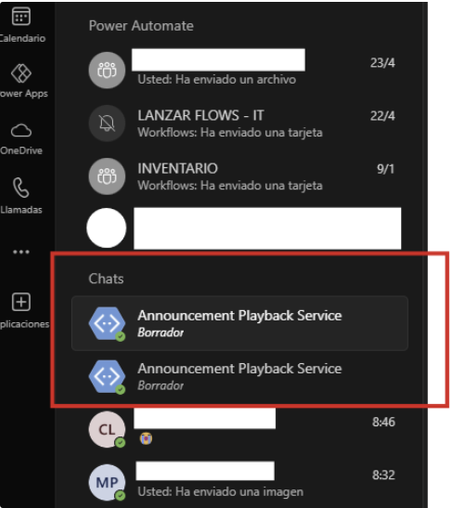
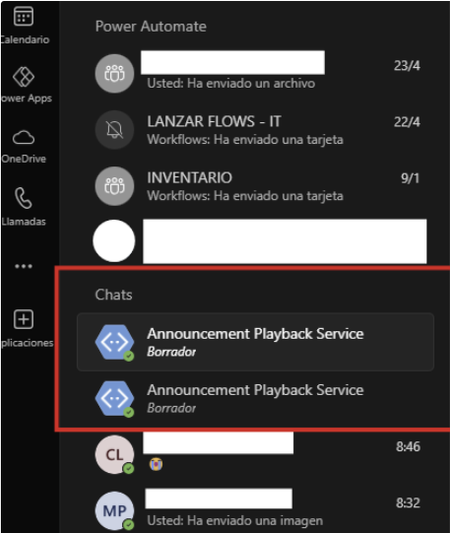
Hello, for a few weeks now, one or two chats with the same name "Announcement Playback Service" have been appearing in my recent chats without explanation. Since the new chat update, they have remained permanently static in recent chats. I can't remove them, delete them, move them, or hide them. They're very annoying. I want to remove them. Does anyone know how? I've attached photos. (desktop and web versions) is the same problem When trying to move them from container: When I hit "Discard" nothing happens:9.3KViews0likes4CommentsAnnouncement Playback Service chat ¡HEPL!
Hello, for a few weeks now, one or two chats with the same name "Announcement Playback Service" have been appearing in my recent chats without explanation. Since the new chat update, they have remained permanently static in recent chats. I can't remove them, delete them, move them, or hide them. They're very annoying. I want to remove them. Does anyone know how? I've attached photos. (desktop and web versions) is the same problem When trying to move them from container: When I hit "Discard" nothing happens:583Views0likes0Comments