ChatGPT
41 TopicsAI-900: Microsoft Azure AI Fundamentals Study Guide
This comprehensive study guide provides a thorough overview of the topics covered in the Microsoft Azure AI Fundamentals (AI-900) exam, including Artificial Intelligence workloads, fundamental principles of machine learning, computer vision and natural language processing workloads. Learn about the exam's intended audience, how to earn the certification, and the skills measured as of April 2022. Discover the important considerations for responsible AI, the capabilities of Azure Machine Learning Studio and more. Get ready to demonstrate your knowledge of AI and ML concepts and related Microsoft Azure services with this helpful study guide.39KViews11likes3CommentsChatGPT — Let’s chat with Artificial Intelligence Assistant
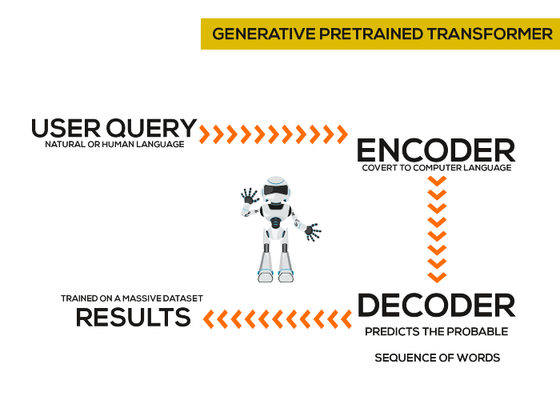
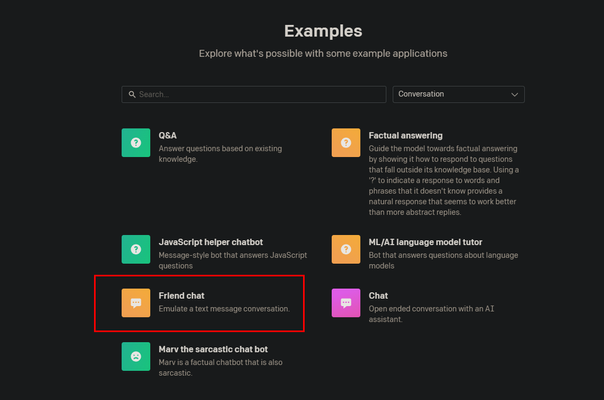
ChatGPT is a one of text based digital intelligence assistant developed by OpenAI which is trained to optimize language models for dialog through artificial intelligence. Why they named as GPT instead of ChatBOT : GPT stands for Generative Pre-Trained Transformer, it means they programmed to work together with AI and the capable of understanding natural human language and generating impressively detailed information like a human being reply. GPT captured the human language and convert it to computer language, again decoder decodes the computer language and dividing it to several sequences. Each sequence predicts the probable through trained AI mechanism which is trained on a massive dataset. Also, this AI trained to reward in several process, Rewards algorithm is designed to learns through trial and error to maximize the rewards. Let’s Start with ChatGPT : To start with ChatGPT visit https://openai.com/ (https://openai.com) and https://chat.openai.com/chat Before you start talking with ChatGPT, you must create a login using your email address or Google SSO. When you login to the ChatGPT you will be able to see the examples, Capabilities and Limitations of ChatGPT AI Here I am getting a sample text to ask sorry from my girlfriend, Let’s do that Click on New Thread and Type what you need to interact with Awesome! here we go with the results I got, Here I am going to try a translation with ChatGPT, I have translated the below sentence from English to Sinhala Sentence: I Love you Let’s check ChatGPT have enough knowledge on computer programing language, Will try to create a C# console line application to display Hellow World. See What I have asked What ChatGPT have provided Awesome results, like a lecturer or developer replies. Hope everyone immediately starts exploring with ChatGPT AI and help them to develop more with your requirements. Happy Chat !!25KViews1like0CommentsEffortlessly Generate Text: Creating a ChatGPT Workflow with MS Forms, Outlook, and Power Automate.
Are you tired of spending hours on repetitive tasks? Want to streamline your workflow and increase productivity? Look no further than ChatGPT, MS Forms, Outlook, and Power Automate! In this article, we'll show you step-by-step how to create a ChatGPT text workflow, enabling you to effortlessly generate text and boost your efficiency. Don't miss out on this revolutionizing your workflow - read on to find out more!22KViews0likes0Comments
Cannot see the new Bing-AI button in Edge Dev
Hello, I have recently installed Edge Dev 111.0.1660.6 and later updated to 111.0.1660.9. I did this because I wanted to try out the new Bing AI features, but the button that should be in the top right corner doesn't show up for me. I already passed the waitlist and can use the Bing-Chat features, but somehow I can't access the "AI Sidebar." Can anyone here help me fix this? Thank you in advance!21KViews2likes11CommentsEnhancing Your Power Apps with AI: Create a Custom Connector with ChatGPT's API
As organizations strive to create more personalized and engaging experiences for their users, the use of AI-powered solutions has become increasingly popular. With the rise of low-code platforms such as Power Apps, developers and citizen developers alike can easily build and deploy custom apps that leverage AI capabilities. One such AI solution is ChatGPT, a state-of-the-art natural language processing model developed by OpenAI. In this blog, I'll show you how to create a custom connector using ChatGPT's API and integrate it into your Power Apps. With this custom connector, you can leverage ChatGPT's state-of-the-art natural language processing technology to enhance your app's functionality and deliver a seamless user experience. So, let's dive in and see how you can bring the power of ChatGPT to your Power Apps!19KViews2likes0CommentsHow to Build an AI-Powered Developer Newsletter with Power Platform and ChatGPT3
Build a developer newsletter with Power Platform and ChatGPT3 to help developers stay up to date with the latest trends in technology. This solution will do the heavy lifting by taking advantage of the power of ChatGPT3 and Power Platform. You can generate a newsletter by following the steps outlined in this guide such as signing up for the OpenAI API, creating an adaptive card, and building a solution in Power Automate. Once the solution is established, you can run it and adjust the trigger to get the desired results. Use ChatGPT3 to generate a newsletter from the text input from Teams, and use Power Automate to send an email to the desired recipients.17KViews5likes10CommentsAzure OpenAI Services in teaching and education
With the advent of Large language models(LLMs) like GPT-3, we see a transformation in education. In this article, I present my views on the future of education considering these developments. The views presented here are based on my teaching - but are a personal perspective. Today, there is a lot of excitement and speculation about GPT-3, and it is natural to ask how intelligent GPT-3 is and whether it approaches human-level intelligence. But in many ways, that's the wrong question to ask. Instead, exploring the idea of how we can build ChatGPT-like functionality using our own data is more interesting. When framed this way, we focus on the pragmatic and ignore the esoteric. If the industry adopts the 'co-pilot first approach.', educators must follow this trend to keep up with the new job roles. This will need a complete rethinking of many of the current ideas on education and the adoption of some new ideas that I proposed in this article. The conversation changes from: 'chatGPT is used for exam cheating or not' to: How can I empower my students to take up jobs of the future if the co-pilot first mode of work becomes a default?'16KViews4likes4CommentsMake your own private ChatGPT
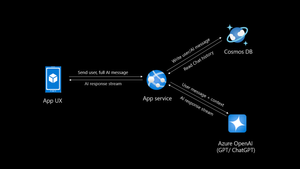
Introduction Creating your own private ChatGPT allows you to leverage AI capabilities while ensuring data privacy and security. This guide walks you through building a secure, customized chatbot using tools like Azure OpenAI, Cosmos DB and Azure App service. Why Build a Private ChatGPT? With the rise of AI-driven applications, organizations, people often face challenges related to data privacy, customization, and integration. Building a private ChatGPT addresses these concerns by: Maintaining Data Privacy: Keep sensitive information within your infrastructure. Customizing Responses: Tailor the chatbot’s behavior and language to suit your requirements. Ensuring Security: Leverage enterprise-grade security protocols. Avoiding Data Sharing: Prevent your data from being used to train external models. If organizations do not take these measures their data may go into future model training and can leak your sensitive data to public. Eg: Chatgpt collects personal data mentioned in their privacy policy Prerequisites Before you begin, ensure you have: Access to Azure OpenAI Service. A development environment set up with Python. Basic knowledge of FastAPI and MongoDB. An Azure account with necessary permissions. If you do not have Azure subscription, try Azure for students for FREE. Step 1: Set Up Azure OpenAI Log in to the Azure Portal and create an Azure OpenAI resource. Deploy a model, such as GPT-4o (multimodal), and note down the endpoint and API key. Note there is also an option of keyless authentication. Configure permissions to control access. Step 2: Use Chatgpt like app sample You can select any repository to be as base template for your app, in this I will be using the third option AOAIchat. It is developed by me. GitHub - mckaywrigley/chatbot-ui: AI chat for any model. Azure-Samples/azure-search-openai-demo: A sample app for the Retrieval-Augmented Generation pattern running in Azure, using Azure AI Search for retrieval and Azure OpenAI large language models to power ChatGPT-style and Q&A experiences. sourabhkv/AOAIchat: Azure OpenAI chat This architecture diagram represents a typical flow for a private ChatGPT application with the following components: App UX (User Interface): This is the front-end application (mobile, web, or desktop) where users interact with the chatbot. It sends the user's input (prompt) and displays the AI's responses. App Service: Acts as the backend application, handling user requests and coordinating with other services. Functions: Receives user inputs and prepares them for processing by the Azure OpenAI service. Streams AI responses back to the App UX. Reads from and writes to Cosmos DB to manage chat history. Azure OpenAI Service: This is the core AI service, processing the user input and generating responses using models like GPT-4o. The App Service sends the user input (along with context) to this service and receives the AI-generated responses. Cosmos DB: A NoSQL database used to store and manage chat history. Operations: Writes user messages and AI-generated responses for future reference or analysis. Reads chat history to provide context for AI responses, enabling more intelligent and contextual conversations. Data Flow: User inputs are sent from the App UX to the App Service. The App Service forwards the input (with additional context, if needed) to Azure OpenAI. Azure OpenAI generates a response, which is streamed back to the App UX via the App Service. The App Service writes user inputs and AI responses to Cosmos DB for persistence. This architecture ensures scalability, secure data handling, and the ability to provide contextual responses by integrating database and AI services. What can you do with my template? AOAIchat supports personal, enterprise chat enabled by RAG People can enable RAG mode if they want to search within their database, else it behaves like normal ChatGPT. It supports multimodality, (supports image, text input) also depends on model deployed in Azure AI foundry. Step 3: Deploy to Azure Deploy a Cosmos DB account in nearest region Deploy Azure OpenAI model (gpt-4o, gpt-4o-mini recommended) Deploy Azure App service, try using container I would recommend B1plan to your nearest region, select docker registry sourabhkv/aoaichatdb:0.1 startup command uvicorn app:app --host 0.0.0.0 --port 80 After app service starts, put all environment variables The application requires the following environment variables to be set for proper configuration: Environment Variable Description AZURE_OPENAI_ENDPOINT The endpoint for Azure OpenAI API. AZURE_OPENAI_API_KEY API key for accessing Azure OpenAI. DEPLOYMENT_NAME Azure OpenAI deployment name. API_VERSION API version for Azure OpenAI. MAX_TOKENS Maximum tokens for API responses. MONGO_DETAILS MongoDB connection string. AZURE_OPENAI_ENDPOINT=<your_azure_openai_endpoint> AZURE_OPENAI_API_KEY=<your_azure_openai_api_key> DEPLOYMENT_NAME=<your_deployment_name> API_VERSION=<your_api_version> MAX_TOKENS=<max_tokens> MONGO_DETAILS=<your_mongo_connection_string> Optional feature: implement authentication to secure access. Within app service select Authentication and select service providers. I went with Entra based authentication with single tenant. There is option of multi-tenant, personal accounts as well. Restart App service and within 2 minutes your private ChatGPT is ready. Pricing Pricing may depend on the plan you have deployed resources and region. Check Azure calculator for price estimation. My estimate for pricing I deployed all my resources in Sweden central Cosmos DB config - Cosmos DB for MongoDB (RU) serverless config with single write master, 2 GB transactional storage, 2 backup plan (FREE) ~ 0.75$ Azure OpenAI service - plan S0, model gpt-4o-mini global deployment, Input 20000 tokens, Output 10000 tokens ~ 9.00$ App service plan - OS Linux, Tier B1, instance count 1 ~13.14$ Total monthly cost = 22.89$ This price may vary in future, in region I calculated my configuration in Azure calculator Governance Azure OpenAI provides content filters to block any kind of input that violates responsible AI practices. Categories include Hate and Fairness Sexual Violence Self-harm User Prompt Attacks (direct and indirect) The content filtering system detects and takes action on specific categories of potentially harmful content in both input prompts and output completions. Azure OpenAI Service includes default safety settings applied to all models set as medium. Content filters can be modified to different level depending on use case. It supports RAG, I have provided detailed solution for it in my GitHub. Practical implementation GE Aerospace, in partnership with Microsoft and Accenture, has launched a company-wide generative AI platform, leveraging Microsoft Azure and Azure OpenAI Service. This solution aims to transform asset tracking and compliance in aviation, enabling quick access to maintenance records and reducing manual processing time from days to minutes. It supports informed decision-making by providing insights into aircraft leasing, compliance gaps, and asset health. For enterprises implementing private ChatGPT solutions, this illustrates the potential of generative AI for streamlining document-intensive processes while ensuring data security and compliance through cloud-based infrastructure like Azure. GE Aerospace Launches Company-wide Generative AI Platform for Employees | GE Aerospace News Build your own private ChatGPT style app with enterprise-ready architecture - By Microsoft Mechanics How to make private ChatGPT for FREE? It can be FREE if all of the setup is running locally on your hardware. Cosmos DB <-> MongoDB. Azure OpenAI <-> Ollama / LM studio Refer this NOTE : I have used gpt-4o, gpt-4o-mini these values are hardcoded in webpage, if you are using other models, you might have to change them in index.html. App Service <-> Local machine Register for Github models to access API for FREE. Note: GitHub models have rate limit for different models. Useful links sourabhkv/AOAIchat: Azure OpenAI chat What is RAG? Get started with Azure OpenAI API Chat with Azure OpenAI models using your own data14KViews1like1Comment