business intelligence
109 Topics
SQL Server issue but don't know what - please help!
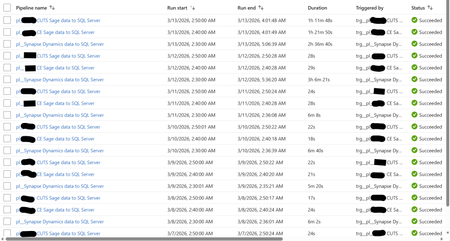
Hi, I'm facing a SQL Server focused issue that I don't understand why it's occurring and would like your help to identify and resolve, please. I will provide an in-depth breakdown of the scenario. Two years ago, I created a Azure Data Factory (ADF) Pipeline to take data from Azure Synapse to Azure SQL Server, and two other Pipelines to take data from an On-Premises Sage server to the same Azure SQL Server. These Pipelines were working perfectly up until two days ago (11/03/26) when the Pipelines still always complete successfully but the duration have increased greatly. The below screenshot shows the log of these three Pipeline for the past week. Note how prior to the 12/03/26 the Synapse Pipeline took about 6 minutes to complete and the two Sage Pipelines took around 25 seconds. Also note how on the 12/03/26 the Synapse Pipeline took over 3 hours but the two Sage Pipelines continued with their normal 25 seconds. Notice today (13/03/26) the Synapse Pipeline was still slow but now the two Sage Pipelines are taking over an hour. I'll note here that the Pipelines still complete successfully (so the config must be correct as it has been for two years). Each Pipeline contains a single (for Sage) or several (for Synapse) 'Copy data' objects. The objects have their source configuration to simply extract from the source (so either Synapse or Sage) and then the sink configuration has a 'Pre-Copy script' which simply Truncates the target SQL Server table, before loading to the SQL Server table. The screenshot below is one example - each Pre-Copy script is populated the same but just with the tables being different. When I look at the log for the Pipelines, I see a common theme for each and that is the 'Pre-Copy script' (the Truncate) is consuming 99% of the time. The screenshot below shows this common theme. So at this point, I ask the question why, after two years of all working well and completing very quickly, are the Pipelines taking so long to complete? This also seems to be an intermittent problem as I have performed several manual executions which will take a long while, then revert back to the quick several minutes again (so good), then revert once more to taking a long while again. It is intermittent. See the screenshot below. Notice how the same Pipeline have different durations. It's intermittent. The reason why I think it is a SQL Server focused issue for the following reasons: 1) Synapse - Performing simple commands (Select Top) returns data within seconds. 2) SQL Server - Performing simple commands (Select Top) usually takes seconds but during the past two days is often taking half hour. 3) SQL Server - When amending a SQL View it would take a split second to complete. During the past two days, it goes over ten minutes and still doesn't complete (I was amending the View for testing purposes). 4) SQL Server - When looking at the Views node under a database, during the past two days, it intermittently doesn't show the View. Sometimes, it will work if I log out and then back into SQL Server. 5) Power BI - Refreshing a Power BI report, whether from the Power BI Service or Desktop, call SQL Server Views. These SQL Server Views read from several SQL Server tables. These report refreshes are failing due to an IDbCommand interface error. These Power BI report data refreshes simply read from a SQL Server table via a SQL View. They don't reference or consider at all the any ADF Pipelines. The Pipelines execute between 2am and 3am each morning. The Power BI report refresh their data around 12pm to 5pm. As SQL Server seems to be problematic at the point of the 'Pre-Copy script', which is one of the end to end process, and then problematic at the very other end where Power BI reports consumes SQL Views - leads me to believe the issue is with SQL Server. I am a report developer and not an ADF expert. I've built the ADF process on the side. I haven't changed any development/configuration/etc... between this all working and failing. Our I.T. department have advised they have made no changes to contribute to this issue. Please can someone advise on what's happening here and why this issue has arose when for two years all was fine? Thanks.4Views0likes0Comments🚀 FabCon + SQLCon Partner Social Sprint
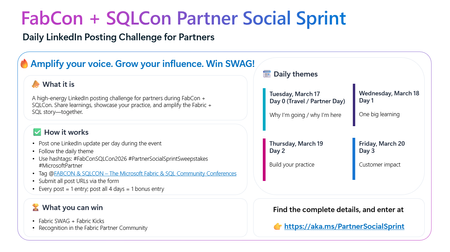
A 4‑Day LinkedIn Challenge for Partners Attending FabCon + SQLCon in Atlanta If you’re joining us in Atlanta this March for FabCon + SQLCon 2026, we’ve got a new way for you to amplify your impact: the Partner Social Sprint — a daily LinkedIn challenge designed to spotlight partner voices, share real‑world insights, and have some fun along the way. Whether you’re presenting, staffing a booth, or attending sessions, this is your chance to tell your story and connect with the global Microsoft Fabric & SQL community. 🔥 What Is the Partner Social Sprint? A 4‑day LinkedIn posting challenge running during FabCon + SQLCon 2026 in Atlanta. Each day has a theme, and every post earns you entries to win exclusive Fabric SWAG, including the fan‑favorite Fabric Kicks. 🗓 Daily Themes (Conference Week) Tuesday, March 17 – Day 0 (Travel / Partner Day) Why I’m going / why I’m here Wednesday, March 18 – Day 1 One big learning Thursday, March 19 – Day 2 Build your practice Friday, March 20 – Day 3 Customer impact ✅ How It Works If you’re a partner attending FabCon + SQLCon in Atlanta: Post once per day on LinkedIn during the event, following the daily theme. Use the hashtags: #FabConSQLCon26 #PartnerSocialSprintSweepstakes #MicrosoftPartner Tag the FabCon & SQLCon – The Microsoft Fabric & SQL Community Conferences LinkedIn page. Submit all your LinkedIn post URLs via the entry form. 👉 Each post = 1 entry, and if you post all 4 days, you’ll get 1 bonus entry. 🏆 What You Can Win Fabric SWAG Fabric Kicks Recognition in the Fabric Partner Community and across our channels 🌐 Who Should Join? Microsoft partners attending FabCon + SQLCon in Atlanta Partner sellers, architects, engineers, and community champions who want to: Share key learnings in real time Highlight their Fabric & SQL practices Showcase customer success and impact 👉 Ready to Sprint With Us? Get all the details and submit your posts here: https://aka.ms/PartnerSocialSprint Let’s light up LinkedIn with the stories, insights, and innovation coming out of FabCon + SQLCon. We can’t wait to see your posts from Atlanta!139Views1like0Comments🚀 This Week on the Fabric Engineering Connection!
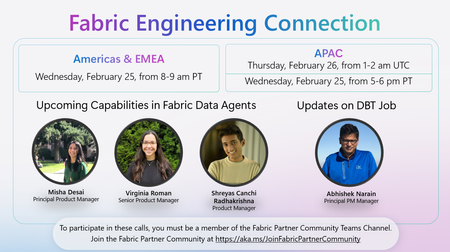
Excited to share what’s ahead for this week’s Fabric Engineering Connection sessions — your weekly opportunity to hear directly from the Microsoft Fabric engineering teams and stay ahead of what’s coming next in the platform. 🎙️ Featured Topics & Speakers: 🔧 Updates on DBT Job Abhishek Narain, Principal PM Manager 🤖 Upcoming Capabilities in Fabric Data Agents Misha Desai, Principal Product Manager Virginia Roman, Senior Product Manager Shreyas Canchi Radhakrishna, Product Manager 🌍 Americas & EMEA 📅 Wednesday, February 25 ⏰ 8:00–9:00 AM PT 🌏 APAC 📅 Thursday, February 26 ⏰ 1:00–2:00 AM UTC (Also available Wednesday, February 25, 5:00–6:00 PM PT) Whether you're deep in deployment, scaling customer workloads, or exploring new Fabric capabilities, these sessions are packed with insights to help you accelerate your practice. 👉 Not yet part of the Fabric Partner Community? Join here: https://lnkd.in/g_PRdfjt Let’s keep learning, building, and shaping the future of Fabric—together. 💡37Views1like0Comments✨ FabCon + SQLCon 2026: Partner Know Before You Go Now Live!
Heading to FabCon + SQLCon 2026 in Atlanta? We’ve put together your full Partner Know Before You Go Guide — everything you need to navigate the week, maximize value, and make the most of all partner‑exclusive opportunities. 🚀 Here’s what you’ll find inside: 📅 Partner Day (Mar 17) — A full day of partner‑only learning, strategy, and networking. - SOLD OUT! 🍻 Partner Happy Hour — Connect with other partners and the Microsoft team. 🎤 AMA with the Fabric Partner Success Team — Bring your biggest questions around Data & AI priorities, partner opportunities, funding, enablement, and certifications. 🤝 1:1 Meetings — Book time with Fabric LT or the Partner Success Team to accelerate your strategy and unlock customer wins. 🎤 Partner Elevator Pitch Search — Submit your 2‑min pitch to be featured live on stage! 🔥 Partner Social Media Sprint — Daily LinkedIn challenge + chances to win Fabric SWAG. 🎓 Certification Spotlight — Get recognized during Arun’s keynote for hitting 100+ Fabric certs. 🎥 Testimonial Videos — Share your Fabric customer stories with global visibility. 📱 Whova Event App — Build your schedule, access slides, network, and join the partner community inside the app. 📘The full KBYG guide is attached below.1.1KViews4likes0CommentsJoin the Fabric Partner Community for this Week's Fabric Engineering Connection Calls
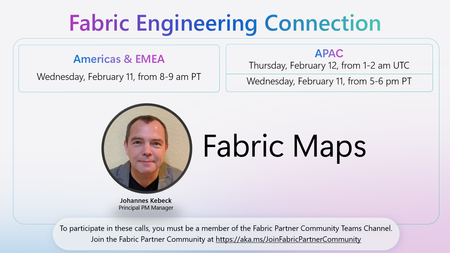
🚀 Excited to share this week’s Fabric Engineering Connection lineup for our Microsoft Fabric partner community! We’ll be joined by Johannes Kebeck, Principal PM Manager, to dive into Fabric Maps — and how partners can bring location intelligence and rich geospatial experiences into their Fabric solutions. 📍 Fabric Engineering Connection – This Week 🌎 Americas & EMEA 📅 Wednesday, February 11 ⏰ 8:00–9:00 am PT 🌏 APAC 📅 Thursday, February 12 ⏰ 1:00–2:00 am UTC (Wednesday, February 11, 5:00–6:00 pm PT) These weekly calls are a chance for partners to: ✅ Hear directly from Fabric engineering ✅ See what’s new and what’s coming ✅ Ask questions and share feedback To participate in these calls, you must be a member of the Fabric Partner Community Teams channel. 👉 Join here: https://aka.ms/JoinFabricPartnerCommunity53Views1like0Comments🎤 Save the Date: AMA with the Microsoft Fabric Leadership Team!
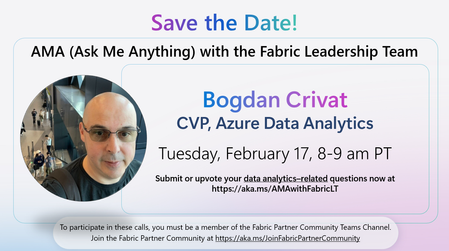
We’re excited to announce an upcoming Ask Me Anything (AMA) session with the Fabric Leadership Team—a unique opportunity for partners to engage directly with the leaders shaping the future of Microsoft Fabric! 🔹 Featured Leader Bogdan Crivat, Corporate Vice President, Azure Data Analytics 🗓️ Date & Time Tuesday, February 17 8:00–9:00 AM PT 💬 Ask Your Questions Have topics you want the leadership team to address? Submit or upvote your data analytics–related questions now: 👉 https://aka.ms/AMAwithFabricLT 👥 Who Can Join? This AMA is exclusive to members of the Fabric Partner Community. If you're not yet a member, join here to participate in future calls: 👉 https://aka.ms/JoinFabricPartnerCommunity89Views2likes0CommentsJoin the Fabric Partner Community for this Week's Fabric Engineering Connection calls!
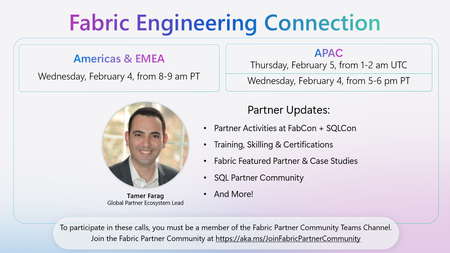
The Fabric partner ecosystem is buzzing right now — and 2026 is already raising the bar. 🚀 On this week's Fabric Engineering Connection call, Tamer Farag will share what’s next for partners across skilling, demos, FabCon + SQLCon Atlanta, and more. Highlights include: 🎓 More skilling momentum (DP‑600/DP‑700 vouchers, new Partner Project Ready workshops, and a new “Chat with your Data in a Day” xIAD workshop). 🔦 Fabric Certification Spotlight: partners who reach 100+ Fabric certifications will be recognized live in Arun’s keynote at FabCon + SQLCon. 🤝 New ways to tell your story and win with customers through Fabric Demo eXperiences, Fabric Featured Partners + case studies, and FabCon experiences (Partner Elevator Pitch Search, 1:1 + executive meetings, testimonial videos, the Partner Social Sprint, and more). If you’re a Microsoft partner investing in Fabric, we’d love for you to join our next Fabric Engineering Connection call: 📅 Americas/EMEA – Wednesday, Feb 4, 8–9 AM PT 📅 APAC – Thursday, Feb 5, 1–2 AM UTC (Wednesday, Feb 4, 5–6 PM PT) To join, you must be a member of the Fabric Partner Community in Teams: https://aka.ms/JoinFabricPartnerCommunity71Views2likes0Comments
SQL Timestamp Incremental Load Issue
An incremental load is implemented based on timestamp, using a view to update a fact table. • The fact table contains multiple KPIs coming from different source tables. • Two main KPI tables are included directly in the view and drive the incremental logic (their timestamps change). • Additional KPIs come from other source tables, which are LEFT JOINed to the view. During an incremental run: • Main source tables are updated → timestamp changes • Other source tables are NOT updated → timestamp unchanged • Because of the LEFT JOIN, missing values from these tables are returned as NULL • These NULLs overwrite existing values in the fact table Example Fact table (before load) id app_number score 1 333 5 Source tables • source1, source2 → timestamps updated (drive incremental load) • source3 → timestamp unchanged Stored procedure logic MERGE fact_table tgt USING ( SELECT app_number, ISNULL(score, 0) AS score FROM vw_main_kpis v LEFT JOIN source3 s3 ON v.app_number = s3.app_number ) src ON tgt.app_number = src.app_number WHEN MATCHED THEN UPDATE SET tgt.score = src.score; Result (incorrect) id app_number score 1 333 0 Existing data is lost.183Views0likes2CommentsQuarterly AMA with Amir Netz – Microsoft Fabric Partners, Don’t Miss Out!
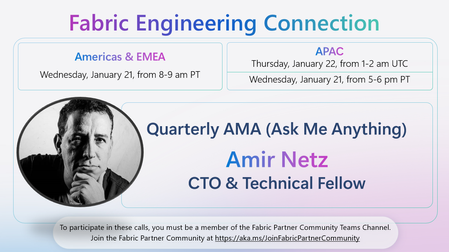
🌟 Microsoft Partners—don’t miss your chance to connect directly with Amir Netz, CTO & Technical Fellow, at our exclusive Quarterly AMA (Ask Me Anything) session! The Fabric Engineering Connection is your gateway to insider insights, direct access to product leaders, and the latest updates on Microsoft Fabric. As a valued partner, you’ll have the opportunity to ask questions, share feedback, and learn about new features and strategies that can help you drive success for your clients and your business. This session is designed to empower partners with actionable knowledge and networking opportunities. 📅 Save the date: Americas & EMEA: Wednesday, January 21, 8–9 am PT APAC: Thursday, January 22, 1–2 am UTC / Americas & EMEA: Wednesday, January 21, 5–6 pm PT 🔗 Not a member yet? Join the Fabric Partner Community to participate: https://aka.ms/JoinFabricPartnerCommunity. Let’s build the future of data together!52Views2likes0CommentsJoin the Fabric Partner Community for this Week's Fabric Engineering Connection calls!
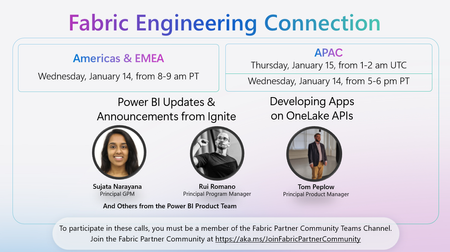
🚀 Upcoming Fabric Engineering Connection Call – Americas & EMEA & APAC! Join us on Wednesday, January 14, 8–9 am PT (Americas & EMEA) and Thursday, January 15, 1–2 am UTC (APAC) for a special session featuring the latest Power BI Updates & Announcements from Ignite with Sujata Narayana, Rui Romano, and other members of the Power BI Product Team. Plus, hear from Tom Peplow on Developing Apps on OneLake APIs. 🔗 To participate, make sure you’re a member of the Fabric Partner Community Teams Channel. If you haven’t joined yet, sign up here: https://lnkd.in/g_PRdfjt Don’t miss this opportunity to learn, connect, and stay up to date with the latest in Microsoft Fabric and Power BI!60Views0likes0Comments