best practices
1694 Topics
MCP Apps on Azure Functions: Quick Start with TypeScript
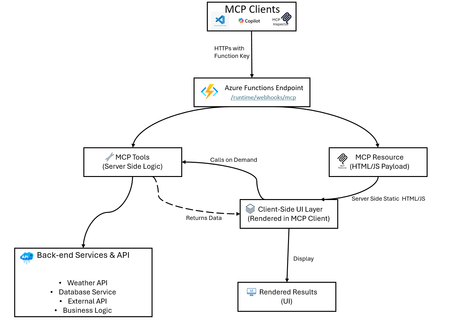
Azure Functions makes hosting MCP apps simple: build locally, create a secure endpoint, and deploy fast with azd. What Are MCP Apps? MCP (Model Context Protocol) apps add new features to AI assistants and clients: MCP Tools: Remote functions that clients call to perform actions (for example, fetch data, update records, call APIs) MCP Resources: Static or dynamic content that clients can read and reference (for example, documents, formatted data, UI payloads) Two-way Communication: Tools return structured data and resources serve formatted responses, enabling rich interactions When you host MCP apps on Azure Functions, you get serverless hosting with security, autoscaling, and easy deployment. MCP App Hosting as a Feature With this pattern, you can host MCP apps that include: MCP tools (server logic): Handle client requests, call backend services, return structured data MCP resources (UI payloads such as app widgets): Serve interactive HTML, JSON documents, or formatted content Secure HTTPS access: Built-in authentication using Azure Functions keys Easy deployment with Bicep and azd: Infrastructure as Code for reliable deployments Local development: Test and debug locally before deploying Auto-scaling: Azure Functions handles scaling, retries, and monitoring automatically The Weather app in this repo is an example of this feature, not the only use case. Architecture Overview Example: The classic Weather App The sample implementation includes: A GetWeather MCP tool that fetches weather by location (calls Open-Meteo geocoding and forecast APIs) A Weather Widget MCP resource that serves interactive HTML/JS code (runs in the client; fetches data via GetWeather tool) A TypeScript service layer that abstracts API calls and data transformation (runs on the server) Bidirectional communication: client-side UI calls server-side tools, receives data, renders locally Local and remote testing flow for MCP clients (via MCP Inspector, VS Code, or custom clients) How UI Rendering Works in MCP Apps In the Weather App example: Azure Functions serves getWeatherWidget as a resource → returns weather-app.ts compiled to HTML/JS Client renders the Weather Widget UI User interacts with the widget or requests are made internally The widget calls the getWeather tool → server processes and returns weather data The widget renders the weather data on the client side This architecture keeps the UI responsive locally while using server-side logic and data on demand. Quick Start Checkout repository: https://github.com/Azure-Samples/remote-mcp-functions-typescript Run locally: npm install npm run build func start Local endpoint: http://0.0.0.0:7071/runtime/webhooks/mcp Deploy to Azure: azd provision azd deploy Remote endpoint: https://.azurewebsites.net/runtime/webhooks/mcp TypeScript MCP Tools Snippet (Get Weather service) app.mcpTool("getWeather", { toolName: "GetWeather", description: "Returns current weather for a location via Open-Meteo.", toolProperties: { location: arg.string().describe("City name to check weather for") }, handler: getWeather, }); Resource Trigger Snippet (Weather App Hook) app.mcpResource("getWeatherWidget", { uri: "ui://weather/index.html", resourceName: "Weather Widget", description: "Interactive weather display for MCP Apps", mimeType: "text/html;profile=mcp-app", handler: getWeatherWidget, }); GitHub Links (Full Source) TypeScript sample repo: https://github.com/Azure-Samples/remote-mcp-functions-typescript Weather tool implementation: https://github.com/Azure-Samples/remote-mcp-functions-typescript/blob/main/src/functions/weatherMcpApp.ts Weather service implementation: https://github.com/Azure-Samples/remote-mcp-functions-typescript/blob/main/src/functions/weatherService.ts Weather widget app implementation: https://github.com/Azure-Samples/remote-mcp-functions-typescript/blob/main/src/app/src/weather-app.ts .NET sample: https://github.com/Azure-Samples/remote-mcp-functions-dotnet Python sample: https://github.com/Azure-Samples/remote-mcp-functions-python MCP Inspector: https://github.com/modelcontextprotocol/inspector Final Takeaway Use Azure Functions as the MCP app hosting feature, then plug in your own domain logic. The Weather app here's the reference sample showing how quickly you can go from local development to a secure remote MCP endpoint.73Views0likes0CommentsAccelerate Agent Development: Hacks for Building with Microsoft Sentinel data lake
As a Senior Product Manager | Developer Architect on the App Assure team working to bring Microsoft Sentinel and Security Copilot solutions to market, I interact with many ISVs building agents on Microsoft Sentinel data lake for the first time. I’ve written this article to walk you through one possible approach for agent development – the process I use when building sample agents internally at Microsoft. If you have questions about this, or other methods for building your agent, App Assure offers guidance through our Sentinel Advisory Service. Throughout this post, I include screenshots and examples from Gigamon’s Security Posture Insight Agent. This article assumes you have: An existing SaaS or security product with accessible telemetry. A small ISV team (2–3 engineers + 1 PM). Focus on a single high value scenario for the first agent. The Composite Application Model (What You Are Building) When I begin designing an agent, I think end-to-end, from data ingestion requirements through agentic logic, following the Composite application model. The Composite Application Model consists of five layers: Data Sources – Your product’s raw security, audit, or operational data. Ingestion – Getting that data into Microsoft Sentinel. Sentinel data lake & Microsoft Graph – Normalization, storage, and correlation. Agent – Reasoning logic that queries data and produces outcomes. End User – Security Copilot or SaaS experiences that invoke the agent. This separation allows for evolving data ingestion and agent logic simultaneously. It also helps avoid downstream surprises that require going back and rearchitecting the entire solution. Optional Prerequisite You are enrolled in the ISV Success Program, so you can earn Azure Credits to provision Security Compute Units (SCUs) for Security Copilot Agents. Phase 1: Data Ingestion Design & Implementation Choose Your Ingestion Strategy The first choice I face when designing an agent is how the data is going to flow into my Sentinel workspace. Below I document two primary methods for ingestion. Option A: Codeless Connector Framework (CCF) This is the best option for ISVs with REST APIs. To build a CCF solution, reference our documentation for getting started. Option B: CCF Push (Public Preview) In this instance, an ISV pushes events directly to Sentinel via a CCF Push connector. Our MS Learn documentation is a great place to get started using this method. Additional Note: In the event you find that CCF does not support your needs, reach out to App Assure so we can capture your requirements for future consideration. Azure Functions remains an option if you’ve documented your CCF feature needs. Phase 2: Onboard to Microsoft Sentinel data lake Once my data is flowing into Sentinel, I onboard a single Sentinel workspace to data lake. This is a one-time action and cannot be repeated for additional workspaces. Onboarding Steps Go to the Defender portal. Follow the Sentinel Data lake onboarding instructions. Validate that tables are visible in the lake. See Running KQL Queries in data lake for additional information. Phase 3: Build and Test the Agent in Microsoft Foundry Once my data is successfully ingested into data lake, I begin the agent development process. There are multiple ways to build agents depending on your needs and tooling preferences. For this example, I chose Microsoft Foundry because it fit my needs for real-time logging, cost efficiency, and greater control. 1. Create a Microsoft Foundry Instance Foundry is used as a tool for your development environment. Reference our QuickStart guide for setting up your Foundry instance. Required Permissions: Security Reader (Entra or Subscription) Azure AI Developer at the resource group After setup, click Create Agent. 2. Design the Agent A strong first agent: Solves one narrow security problem. Has deterministic outputs. Uses explicit instructions, not vague prompts. Example agent responsibilities: To query Sentinel data lake (Sentinel data exploration tool). To summarize recent incidents. To correlate ISVs specific signals with Sentinel alerts and other ISV tables (Sentinel data exploration tool). 3. Implement Agent Instructions Well-designed agent instructions should include: Role definition ("You are a security investigation agent…"). Data sources it can access. Step by step reasoning rules. Output format expectations. Sample Instructions can be found here: Agent Instructions 4. Configure the Microsoft Model Context Protocol (MCP) tooling for your agent For your agent to query, summarize and correlate all the data your connector has sent to data lake, take the following steps: Select Tools, and under Catalog, type Sentinel, and then select Microsoft Sentinel Data Exploration. For more information about the data exploration tool collection in MCP server, see our documentation. I always test repeatedly with real data until outputs are consistent. For more information on testing and validating the agent, please reference our documentation. Phase 4: Migrate the Agent to Security Copilot Once the agent works in Foundry, I migrate it to Security Copilot. To do this: Copy the full instruction set from Foundry Provision a SCU for your Security Copilot workspace. For instructions, please reference this documentation. Make note of this process as you will be charged per hour per SCU Once you are done testing you will need to deprovision the capacity to prevent additional charges Open Security Copilot and use Create From Scratch Agent Builder as outlined here. Add Sentinel data exploration MCP tools (these are the same instructions from the Foundry agent in the previous step). For more information on linking the Sentinel MCP tools, please refer to this article. Paste and adapt instructions. At this stage, I always validate the following: Agent Permissions – I have confirmed the agent has the necessary permissions to interact with the MCP tool and read data from your data lake instance. Agent Performance – I have confirmed a successful interaction with measured latency and benchmark results. This step intentionally avoids reimplementation. I am reusing proven logic. Phase 5: Execute, Validate, and Publish After setting up my agent, I navigate to the Agents tab to manually trigger the agent. For more information on testing an agent you can refer to this article. Now that the agent has been executed successfully, I download the agent Manifest file from the environment so that it can be packaged. Click View code on the Agent under the Build tab as outlined in this documentation. Publishing to the Microsoft Security Store If I were publishing my agent to the Microsoft Security Store, these are the steps I would follow: Finalize ingestion reliability. Document required permissions. Define supported scenarios clearly. Package agent instructions and guidance (by following these instructions). Summary Based on my experience developing Security Copilot agents on Microsoft Sentinel data lake, this playbook provides a practical, repeatable framework for ISVs to accelerate their agent development and delivery while maintaining high standards of quality. This foundation enables rapid iteration—future agents can often be built in days, not weeks, by reusing the same ingestion and data lake setup. When starting on your own agent development journey, keep the following in mind: To limit initial scope. To reuse Microsoft managed infrastructure. To separate ingestion from intelligence. What Success Looks Like At the end of this development process, you will have the following: A Microsoft Sentinel data connector live in Content Hub (or in process) that provides a data ingestion path. Data visible in data lake. A tested agent running in Security Copilot. Clear documentation for customers. A key success factor I look for is clarity over completeness. A focused agent is far more likely to be adopted. Need help? If you have any issues as you work to develop your agent, please reach out to the App Assure team for support via our Sentinel Advisory Service . Or if you have any other tips, please comment below, I’d love to hear your feedback.142Views0likes0CommentsMicrosoft Defender for Cloud Customer Newsletter
What's new in Defender for Cloud? Kubernetes gated deployment is now generally available for AKS automatic clusters. Use help to deploy the Defender for Containers sensor to use this feature. More information can be found here. Grouped recommendations are converted into individual ones to list each finding separately. While grouped recommendations are still available, new individual recommendations are now marked as preview and are not yet part of the Secure Score. This new format will allow for better prioritization, actionable context and better governance and tracking. For more details, please refer to this documentation. Check out other updates from last month here! Check out monthly news for the rest of the MTP suite here! Blogs of the month In March, our team published the following blog posts we would like to share: Defending Container Runtime from Malware with Defender for Containers Modern Database Protection: From Visibility to Threat Detection with Defender for Cloud New innovations in Microsoft Defender to strengthen multi-cloud, containers, and AI model security Defending the AI Era: New Microsoft Capabilities to Protect AI Defender for Cloud in the field Revisit the malware automated remediation announcement since this feature is now in GA! Automated remediation for malware in storage Visit our YouTube page GitHub Community Check out the new Module 28 in the MDC Lab: Defending Container Runtime from Malware with Microsoft Defender for Containers Defending Container Runtime from Malware Visit our GitHub page Customer journey Discover how other organizations successfully use Microsoft Defender for Cloud to protect their cloud workloads. This month we are featuring ManpowerGroup, a global workforce solutions leader, deployed Microsoft 365 E5, and Microsoft Security to modernize and future-proof their cyber security platform. ManpowerGroup leverages Entra ID, Defender for Endpoint, Defender for Identity, Defender for O365, Defender for Cloud, Microsoft Security Copilot and Purview to transform itself as an AI Frontier Firm. Join our community! We offer several customer connection programs within our private communities. By signing up, you can help us shape our products through activities such as reviewing product roadmaps, participating in co-design, previewing features, and staying up-to-date with announcements. Sign up at aka.ms/JoinCCP. We greatly value your input on the types of content that enhance your understanding of our security products. Your insights are crucial in guiding the development of our future public content. We aim to deliver material that not only educates but also resonates with your daily security challenges. Whether it’s through in-depth live webinars, real-world case studies, comprehensive best practice guides through blogs, or the latest product updates, we want to ensure our content meets your needs. Please submit your feedback on which of these formats do you find most beneficial and are there any specific topics you’re interested in https://aka.ms/PublicContentFeedback. Note: If you want to stay current with Defender for Cloud and receive updates in your inbox, please consider subscribing to our monthly newsletter: https://aka.ms/MDCNewsSubscribeAgents League: Meet the Winners
Agents League brought together developers from around the world to build AI agents using Microsoft's developer tools. With 100+ submissions across three tracks, choosing winners was genuinely difficult. Today, we're proud to announce the category champions. 🎨 Creative Apps Winner: CodeSonify View project CodeSonify turns source code into music. As a genuinely thoughtful system, its functions become ascending melodies, loops create rhythmic patterns, conditionals trigger chord changes, and bugs produce dissonant sounds. It supports 7 programming languages and 5 musical styles, with each language mapped to its own key signature and code complexity directly driving the tempo. What makes CodeSonify stand out is the depth of execution. CodeSonify team delivered three integrated experiences: a web app with real-time visualization and one-click MIDI export, an MCP server exposing 5 tools inside GitHub Copilot in VS Code Agent Mode, and a diff sonification engine that lets you hear a code review. A clean refactor sounds harmonious. A messy one sounds chaotic. The team even built the MIDI generator from scratch in pure TypeScript with zero external dependencies. Built entirely with GitHub Copilot assistance, this is one of those projects that makes you think about code differently. 🧠 Reasoning Agents Winner: CertPrep Multi-Agent System View project CertPrep Multi-Agent System team built a production-grade 8-agent system for personalized Microsoft certification exam preparation, supporting 9 exam families including AI-102, AZ-204, AZ-305, and more. Each agent has a distinct responsibility: profiling the learner, generating a week-by-week study schedule, curating learning paths, tracking readiness, running mock assessments, and issuing a GO / CONDITIONAL GO / NOT YET booking recommendation. The engineering behind the scene here is impressive. A 3-tier LLM fallback chain ensures the system runs reliably even without Azure credentials, with the full pipeline completing in under 1 second in mock mode. A 17-rule guardrail pipeline validates every agent boundary. Study time allocation uses the Largest Remainder algorithm to guarantee no domain is silently zeroed out. 342 automated tests back it all up. This is what thoughtful multi-agent architecture looks like in practice. 💼 Enterprise Agents Winner: Whatever AI Assistant (WAIA) View project WAIA is a production-ready multi-agent system for Microsoft 365 Copilot Chat and Microsoft Teams. A workflow agent routes queries to specialized HR, IT, or Fallback agents, transparently to the user, handling both RAG-pattern Q&A and action automation — including IT ticket submission via a SharePoint list. Technically, it's a showcase of what serious enterprise agent development looks like: a custom MCP server secured with OAuth Identity Passthrough, streaming responses via the OpenAI Responses API, Adaptive Cards for human-in-the-loop approval flows, a debug mode accessible directly from Teams or Copilot, and full OpenTelemetry integration visible in the Foundry portal. Franck also shipped end-to-end automated Bicep deployment so the solution can land in any Azure environment. It's polished, thoroughly documented, and built to be replicated. Thank you To every developer who submitted and shipped projects during Agents League: thank you 💜 Your creativity and innovation brought Agents League to life! 👉 Browse all submissions on GitHubExpanding the Reach of AI-enabled Cloud PCs for Frontier Firms
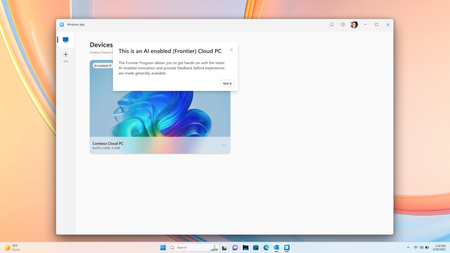
Co-Authored by Lakshmi Rayasam Over the past several months, we’ve been focused on a clear goal: making AI-enabled Cloud PCs easier to adopt, easier to deploy, and available to more customers—wherever they are. Following the momentum from Ignite, releasing Improved Search & Click to Do, we’ve continued to evolve the AI-enabled Cloud PC experience in Frontier Preview, prioritizing scale, accessibility, and product market fit. The latest set of enhancements removes deployment blockers and expands where—and how—customers can get started. We’ve also added a new refreshing AI-enabled end-user experience explaining the value of Frontier while users hover over the AI-enabled (Frontier) tag. Note: Future availability of these features is dependent on the results of this Frontier Preview and is subject to change Removing the need for Windows Insiders AI‑enabled Cloud PCs now work with standard Windows 11 retail builds, eliminating the need for Windows Insider participation. This change alone unlocks broader enterprise deployment scenarios and removes a major barrier for production use. AI-enabled Cloud PCs are just one toggle away as IT admins can join our Frontier Program and enable AI-enabled Cloud PCs via a newly introduced policy setting within the Devices – Onboarding: Windows 365 > User Settings blade, and further filter access based on Microsoft Entra ID group access. Note: After enrolling the latest Windows 11 25H2 (OS Build 26200.7840 or higher) you must reboot your Cloud PC. Expanded regional availability To meet customers where they operate, we’ve expanded AI‑enabled Cloud PCs to additional Azure regions:‑ Japan East Germany West Central South Central US Canada Central This expansion improves latency, supports data residency needs, and enables more global customers to participate in the Frontier Preview. 128GB disk support for Windows 365 Enterprise We’ve added support for 128GB disk size Windows 365 Enterprise licenses, offering greater flexibility for customers who don’t require larger footprints while still enabling AI‑driven workflows. These right‑sized deployments and makes it easier to scale across broader user populations. Together, these updates directly address the most common Ignite feedback and are expected to unlock large‑scale deployments, including enterprise pilots transitioning into sustained usage. What Comes Next Following the March rollout, our CY26 focus shifts to closing parity gaps using cloud‑based models, in close partnership with Windows platform teams. Initial work centers on enabling Text Actions for Click‑to‑Do via a cloud models within Frontier Preview—one of the most requested capabilities from customers.‑‑‑ In parallel, we’ll continue investing in foundational improvements that increase perceived feature depth and usage signals, including cost optimization, reliability enhancements, and productivity scenarios that compound value across the Cloud PC experience.230Views1like2CommentsAzure Default Outbound Access Changes: Guidance for Windows 365 ANC Customers
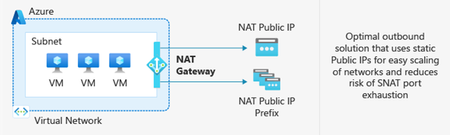
Editor’s note, March 27, 2026: An earlier version of this post listed Azure Load Balancer (SLB) as a supported outbound access method option for Windows 365 ANC. This has been updated. SLB is not a supported outbound access method for ANC. After March 31, 2026, newly created Azure Virtual Networks (VNets) will no longer have default outbound internet access enabled by default. Windows 365 customers choosing Azure Network Connection as a deployment option must configure outbound connectivity explicitly when setting up new VNets. This post explains what’s changing, who’s impacted, and the recommended actions, including Azure Private Subnets and Microsoft Hosted Network. What is Default Outbound Access (DOA)? Default Outbound Access is Azure’s legacy behavior that allowed all resources in a virtual network to reach the public internet without configuring a specific internet egress path. This allowed telemetry, Windows activation, and other service dependencies to reach external endpoints even when no explicit outbound connectivity method was configured. What’s changing? After March 31, 2026, as detailed in Azure’s communications, Azure will no longer enable DOA by default for new virtual networks, instead the VNet will be configured for Private Subnet option, allowing you to designate subnets without internet access for improved isolation and compliance. These changes encourage more intentional, secure network configurations while offering flexibility for different workload needs. Disabling Private Subnet option will allow administrators to restore DOA capabilities to the VNet, although Microsoft strongly recommends using Azure NAT Gateway. Impact on Windows 365 Azure Network Connection Customers For Windows 365 Azure Network Connection (ANC) deployments using virtual networks created after March 31, 2026, new VNets will default to private subnets. Outbound internet access must be explicitly configured for the VNet; otherwise, Cloud PC provisioning will fail. Existing virtual networks are not affected and will continue using their current internet access configuration. Note on Microsoft-hosted network: For Microsoft-hosted network deployments, which is the Microsoft recommended deployment model for Windows 365, Microsoft fully provides and manages the underlying connectivity in Azure on your behalf. There is no impact or change needed for those deployments. What You Should Do To prepare for Azure’s Default Outbound Access changes and ensure your Windows 365 ANC deployments remain secure and functional: Recommendations Transition to Microsoft-hosted network (MHN) if possible. MHN provides secure, cost-effective connectivity with outbound internet access by default, reducing operational overhead and ensuring compliance with Azure’s updated standards. Update deployment plans to ensure either an explicit NAT, such as a NAT Gateway or Default Outbound access (not recommended) is enabled by disabling the Private Subnet option. Test connectivity to ensure all services dependent on outbound access continue to function as expected, and that the ANC does not enter a failed state. Supported Outbound Access Methods To maintain connectivity, choose one of these supported methods: NAT Gateway (recommended) Note: Direct RDP Shortpath (UDP over STUN) cannot be established through a NAT Gateway because its symmetric NAT policy prevents direct UDP connectivity over public networks. Azure Firewall or third-party Network Virtual Appliance (NVA). Note, it is not recommended to route RDP or other long-lived connections through Azure Firewall or any other network virtual appliance which allows for automatic scale-in. A direct method such as NAT Gateway should be used. Unsupported Outbound Access Methods Azure Standard Load Balancer Azure’s Standard Load Balancer is not supported as an outbound access method for ANC. Instead, using NAT Gateway is recommended. More information about the pros and cons for each method can be found at Default Outbound Access. Resources: Azure updates | Microsoft Azure Default Outbound Access in Azure Transition to an explicit method of public connectivity | Microsoft Learn Deploy Microsoft Hosted Network (MHN) QuickStart: Create a NAT Gateway Optimizing RDP Connectivity for Windows 365 | Microsoft Community Hub Quick FAQ Does this affect existing VNets? No. Only new VNets created after March 31, 2026, are affected. Existing VNets will continue to operate as normal. Do Microsoft Hosted Network deployments require changes? No. MHN already includes managed egress. What if I do nothing on a new VNet? ANC checks will fail because the VNet does not have internet access. Configure NAT Gateway or another supported method. What are the required endpoints? Please see here for a list of the endpoints required. Why might peer-to-peer connectivity using STUN-based UDP hole punching not work when using NAT Gateway? NAT Gateway uses a type of network address translation that does not support STUN (Simple Traversal Underneath NAT) based connections. This will prevent STUN-based UDP hole punching, commonly used for establishing peer-to-peer connections, from working as expected. If your application relies on reliable UDP connectivity between peers, STUN may revert to TURN (Traversal Using Relays around NAT) in some instances. TURN relays traffic between endpoints, ensuring consistent connectivity even when direct peer-to-peer paths are blocked. This helps maintain smooth real-time experiences for your users. How do I configure Azure Firewall? For additional security you can configure Azure Firewall using these instructions https://learn.microsoft.com/en-us/azure/firewall/protect-azure-virtual-desktop?context=/azure/virtual-desktop/context/context. It is strongly recommended that a direct method of access is used for RDP and other long-lived connections such as VPN or Secure Web Gateway tunnels. This is due to devices such as Azure firewall scaling in when load is low which can disrupt connectivity. Wrap-up Azure’s change reinforces intentional networking for better security. By planning explicit egress (or choosing MHN), Windows 365 ANC customers can stay compliant and keep Cloud PCs reliably connected.2.1KViews0likes1CommentUnit Testing Helm Charts with Terratest: A Pattern Guide for Type-Safe Validation
Helm charts are the de facto standard for packaging Kubernetes applications. But here's a question worth asking: how do you know your chart actually produces the manifests you expect, across every environment, before it reaches a cluster? If you're like most teams, the answer is some combination of helm template eyeball checks, catching issues in staging, or hoping for the best. That's slow, error-prone, and doesn't scale. In this post, we'll walk through a better way: a render-and-assert approach to unit testing Helm charts using Terratest and Go. The result? Type-safe, automated tests that run locally in seconds with no cluster required. The Problem Let's start with why this matters. Helm charts are templates that produce YAML, and templates have logic: conditionals, loops, value overrides per environment. That logic can break silently: A values-prod.yaml override points to the wrong container registry A security context gets removed during a refactor and nobody notices An ingress host is correct in dev but wrong in production HPA scaling bounds are accidentally swapped between environments Label selectors drift out of alignment with pod templates, causing orphaned ReplicaSets These aren't hypothetical scenarios. They're real bugs that slip through helm lint and code review because those tools don't understand what your chart should produce. They only check whether the YAML is syntactically valid. These bugs surface at deploy time, or worse, in production. So how do we catch them earlier? The Approach: Render and Assert The idea is straightforward. Instead of deploying to a cluster to see if things work, we render the chart locally and validate the output programmatically. Here's the three-step model: Render: Terratest calls helm template with your base values.yaml + an environment-specific values-<env>.yaml override Unmarshal: The rendered YAML is deserialized into real Kubernetes API structs (appsV1.Deployment, coreV1.ConfigMap, networkingV1.Ingress, etc.) Assert: Testify assertions validate every field that matters, including names, labels, security context, probes, resource limits, ingress routing, and more No cluster. No mocks. No flaky integration tests. Just fast, deterministic validation of your chart's output. Here's what that looks like in practice: // Arrange options := &helm.Options{ ValuesFiles: s.valuesFiles, } output := helm.RenderTemplate(s.T(), options, s.chartPath, s.releaseName, s.templates) // Act var deployment appsV1.Deployment helm.UnmarshalK8SYaml(s.T(), output, &deployment) // Assert: security context is hardened secCtx := deployment.Spec.Template.Spec.Containers[0].SecurityContext require.Equal(s.T(), int64(1000), *secCtx.RunAsUser) require.True(s.T(), *secCtx.RunAsNonRoot) require.True(s.T(), *secCtx.ReadOnlyRootFilesystem) require.False(s.T(), *secCtx.AllowPrivilegeEscalation) Notice something important here: because you're working with real Go structs, the compiler catches schema errors. If you typo a field path like secCtx.RunAsUsr, the code won't compile. With YAML-based assertion tools, that same typo would fail silently at runtime. This type safety is a big deal when you're validating complex resources like Deployments. What to Test: 16 Patterns Across 6 Categories That covers the how. But what should you actually assert? Through applying this approach across multiple charts, we've identified 16 test patterns that consistently catch real bugs. They fall into six categories: Category What Gets Validated Identity & Labels Resource names, 5 standard Helm/K8s labels, selector alignment Configuration Environment-specific configmap data, env var injection Container Image registry per env, ports, resource requests/limits Security Non-root user, read-only FS, dropped capabilities, AppArmor, seccomp, SA token automount Reliability Startup/liveness/readiness probes, volume mounts Networking & Scaling Ingress hosts/TLS per env, service port wiring, HPA bounds per env You don't need all 16 on day one. Start with resource name and label validation, since those apply to every resource and catch the most common _helpers.tpl bugs. Then add security and environment-specific patterns as your coverage grows. Now, let's look at how to structure these tests to handle the trickiest part: multiple environments. Multi-Environment Testing One of the most common Helm chart bugs is environment drift, where values that are correct in dev are wrong in production. A single test suite that only validates one set of values will miss these entirely. The solution is to maintain separate test suites per environment: tests/unit/my-chart/ ├── dev/ ← Asserts against values.yaml + values-dev.yaml ├── test/ ← Asserts against values.yaml + values-test.yaml └── prod/ ← Asserts against values.yaml + values-prod.yaml Each environment's tests assert the merged result of values.yaml + values-<env>.yaml. So when your values-prod.yaml overrides the container registry to prod.azurecr.io, the prod tests verify exactly that, while the dev tests verify dev.azurecr.io. This structure catches a class of bugs that no other approach does: "it works in dev" issues where an environment-specific override has a typo, a missing field, or an outdated value. But environment-specific configuration isn't the only thing worth testing per commit. Let's talk about security. Security as Code Security controls in Kubernetes manifests are notoriously easy to weaken by accident. Someone refactors a deployment template, removes a securityContext block they think is unused, and suddenly your containers are running as root in production. No linter catches this. No code reviewer is going to diff every field of a rendered manifest. With this approach, you encode your security posture directly into your test suite. Every deployment test should validate: Container runs as non-root (UID 1000) Root filesystem is read-only All Linux capabilities are dropped Privilege escalation is blocked AppArmor profile is set to runtime/default Seccomp profile is set to RuntimeDefault Service account token automount is disabled If someone removes a security control during a refactor, the test fails immediately, not after a security review weeks later. Security becomes a CI gate, not a review checklist. With patterns and environments covered, the next question is: how do you wire this into your CI/CD pipeline? CI/CD Integration with Azure DevOps These tests integrate naturally into Azure DevOps pipelines. Since they're just Go tests that call helm template under the hood, all you need is a Helm CLI and a Go runtime on your build agent. A typical multi-stage pipeline looks like: stages: - stage: Build # Package the Helm chart - stage: Dev # Lint + test against values-dev.yaml - stage: Test # Lint + test against values-test.yaml - stage: Production # Lint + test against values-prod.yaml Each stage uses a shared template that installs Helm and Go, extracts the packaged chart, runs helm lint, and executes the Go tests with gotestsum. Environment gates ensure production tests pass before deployment proceeds. Here's the key part of a reusable test template: - script: | export PATH=$PATH:/usr/local/go/bin:$(go env GOPATH)/bin go install gotest.tools/gotestsum@latest cd $(Pipeline.Workspace)/helm.artifact/tests/unit gotestsum --format testname --junitfile $(Agent.TempDirectory)/test-results.xml \ -- ./${{ parameters.helmTestPath }}/... -count=1 -timeout 50m displayName: 'Test helm chart' env: HELM_RELEASE_NAME: ${{ parameters.helmReleaseName }} HELM_VALUES_FILE_OVERRIDE: ${{ parameters.helmValuesFileOverride }} - task: PublishTestResults@2 displayName: 'Publish test results' inputs: testResultsFormat: 'JUnit' testResultsFiles: '$(Agent.TempDirectory)/test-results.xml' condition: always() The PublishTestResults@2 task makes pass/fail results visible on the build's Tests tab, showing individual test names, durations, and failure details. The condition: always() ensures results are published even when tests fail, so you always have visibility. At this point you might be wondering: why Go and Terratest? Why not a simpler YAML-based tool? Why Terratest + Go Instead of helm-unittest? helm-unittest is a popular YAML-based alternative, and it's a fair question. Both tools are valid. Here's why we landed on Terratest: Terratest + Go helm-unittest (YAML) Type safety Renders into real K8s API structs; compiler catches schema errors String matching on raw YAML; typos in field paths fail silently Language features Loops, conditionals, shared setup, table-driven tests Limited to YAML assertion DSL Debugging Standard Go debugger, stack traces YAML diff output only Ecosystem alignment Same language as Terraform tests, one testing stack Separate tool, YAML-only The type safety argument is the strongest. When you unmarshal into appsV1.Deployment, the Go compiler guarantees your assertions reference real fields. With helm-unittest, a YAML path like spec.template.spec.containers[0].securityContest (note the typo) would silently pass because it matches nothing, rather than failing loudly. That said, if your team has no Go experience and needs the lowest adoption barrier, helm-unittest is a reasonable starting point. For teams already using Go or Terraform, Terratest is the stronger long-term choice. Getting Started Ready to try this? Here's a minimal project structure to get you going: your-repo/ ├── charts/ │ └── your-chart/ │ ├── Chart.yaml │ ├── values.yaml │ ├── values-dev.yaml │ ├── values-test.yaml │ ├── values-prod.yaml │ └── templates/ ├── tests/ │ └── unit/ │ ├── go.mod │ └── your-chart/ │ ├── dev/ │ ├── test/ │ └── prod/ └── Makefile Prerequisites: Go 1.22+, Helm 3.14+ You'll need three Go module dependencies: github.com/gruntwork-io/terratest v0.46.16 github.com/stretchr/testify v1.8.4 k8s.io/api v0.28.4 Initialize your test module, write your first test using the patterns above, and run: cd tests/unit HELM_RELEASE_NAME=your-chart \ HELM_VALUES_FILE_OVERRIDE=values-dev.yaml \ go test -v ./your-chart/dev/... -timeout 30m Start with a ConfigMap test. It's the simplest resource type and lets you validate the full render-unmarshal-assert flow before tackling Deployments. Once that passes, work your way through the pattern categories, adding security and environment-specific assertions as you go. Wrapping Up Unit testing Helm charts with Terratest gives you something that helm lint and manual review can't: Type-safe validation: The compiler catches schema errors, not production Environment-specific coverage: Each environment's values are tested independently Security as code: Security controls are verified on every commit, not in periodic reviews Fast feedback: Tests run in seconds with no cluster required CI/CD integration: JUnit results published natively to Azure DevOps The patterns we've covered here are the ones that have caught the most real bugs for us. Start small with resource names and labels, and expand from there. The investment is modest, and the first time a test catches a broken values-prod.yaml override before it reaches production, it'll pay for itself. We'd Love Your Feedback We'd love to hear how this approach works for your team: Which patterns were most useful for your charts? What resource types or patterns are missing? How did the adoption experience go? Drop a comment below. Happy to dig into any of these topics further!201Views0likes0CommentsDemystifying GitHub Copilot Security Controls: easing concerns for organizational adoption
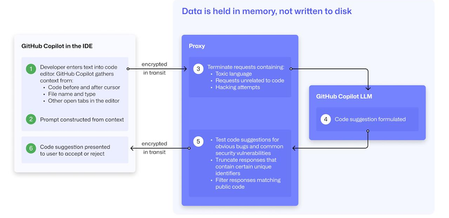
At a recent developer conference, I delivered a session on Legacy Code Rescue using GitHub Copilot App Modernization. Throughout the day, conversations with developers revealed a clear divide: some have fully embraced Agentic AI in their daily coding, while others remain cautious. Often, this hesitation isn't due to reluctance but stems from organizational concerns around security and regulatory compliance. Having witnessed similar patterns during past technology shifts, I understand how these barriers can slow adoption. In this blog, I'll demystify the most common security concerns about GitHub Copilot and explain how its built-in features address them, empowering organizations to confidently modernize their development workflows. GitHub Copilot Model Training A common question I received at the conference was whether GitHub uses your code as training data for GitHub Copilot. I always direct customers to the GitHub Copilot Trust Center for clarity, but the answer is straightforward: “No. GitHub uses neither Copilot Business nor Enterprise data to train the GitHub model.” Notice this restriction also applies to third-party models as well (e.g. Anthropic, Google). GitHub Copilot Intellectual Property indemnification policy A frequent concern I hear is, since GitHub Copilot’s underlying models are trained on sources that include public code, it might simply “copy and paste” code from those sources. Let’s clarify how this actually works: Does GitHub Copilot “copy/paste”? “The AI models that create Copilot’s suggestions may be trained on public code, but do not contain any code. When they generate a suggestion, they are not “copying and pasting” from any codebase.” To provide an additional layer of protection, GitHub Copilot includes a “duplicate detection filter”. This feature helps prevent suggestions that closely match public code from being surfaced. (Note: This duplicate detection currently does not apply to the Copilot coding agent.) More importantly, customers are protected by an Intellectual Property indemnification policy. This means that if you receive an unmodified suggestion from GitHub Copilot and face a copyright claim as a result, Microsoft will defend you in court. GitHub Copilot Data Retention Another frequent question I hear concerns GitHub Copilot’s data retention policies. For organizations on GitHub Copilot Business and Enterprise plans, retention practices depend on how and where the service is accessed from: Access through IDE for Chat and Code Completions: Prompts and Suggestions: Not retained. User Engagement Data: Kept for two years. Feedback Data: Stored for as long as needed for its intended purpose. Other GitHub Copilot access and use: Prompts and Suggestions: Retained for 28 days. User Engagement Data: Kept for two years. Feedback Data: Stored for as long as needed for its intended purpose. For Copilot Coding Agent, session logs are retained for the life of the account in order to provide the service. Excluding content from GitHub Copilot To prevent GitHub Copilot from indexing sensitive files, you can configure content exclusions at the repository or organization level. In VS Code, use the .copilotignore file to exclude files client-side. Note that files listed in .gitignore are not indexed by default but may still be referenced if open or explicitly referenced (unless they’re excluded through .copilotignore or content exclusions). The life cycle of a GitHub Copilot code suggestion Here are the key protections at each stage of the life cycle of a GitHub Copilot code suggestion: In the IDE: Content exclusions prevent files, folders, or patterns from being included. GitHub proxy (pre-model safety): Prompts go through a GitHub proxy hosted in Microsoft Azure for pre-inference checks: screening for toxic or inappropriate language, relevance, and hacking attempts/jailbreak-style prompts before reaching the model. Model response: With the public code filter enabled, some suggestions are suppressed. The vulnerability protection feature blocks insecure coding patterns like hardcoded credentials or SQL injections in real time. Disable access to GitHub Copilot Free Due to the varying policies associated with GitHub Copilot Free, it is crucial for organizations to ensure it is disabled both in the IDE and on GitHub.com. Since not all IDEs currently offer a built-in option to disable Copilot Free, the most reliable method to prevent both accidental and intentional access is to implement firewall rule changes, as outlined in the official documentation. Agent Mode Allow List Accidental file system deletion by Agentic AI assistants can happen. With GitHub Copilot agent mode, the "Terminal auto approve” setting in VS Code can be used to prevent this. This setting can be managed centrally using a VS Code policy. MCP registry Organizations often want to restrict access to allow only trusted MCP servers. GitHub now offers an MCP registry feature for this purpose. This feature isn’t available in all IDEs and clients yet, but it's being developed. Compliance Certifications The GitHub Copilot Trust Center page lists GitHub Copilot's broad compliance credentials, surpassing many competitors in financial, security, privacy, cloud, and industry coverage. SOC 1 Type 2: Assurance over internal controls for financial reporting. SOC 2 Type 2: In-depth report covering Security, Availability, Processing Integrity, Confidentiality, and Privacy over time. SOC 3: General-use version of SOC 2 with broad executive-level assurance. ISO/IEC 27001:2013: Certification for a formal Information Security Management System (ISMS), based on risk management controls. CSA STAR Level 2: Includes a third-party attestation combining ISO 27001 or SOC 2 with additional cloud control matrix (CCM) requirements. TISAX: Trusted Information Security Assessment Exchange, covering automotive-sector security standards. In summary, while the adoption of AI tools like GitHub Copilot in software development can raise important questions around security, privacy, and compliance, it’s clear that existing safeguards in place help address these concerns. By understanding the safeguards, configurable controls, and robust compliance certifications offered, organizations and developers alike can feel more confident in embracing GitHub Copilot to accelerate innovation while maintaining trust and peace of mind.