bug
149 Topics
MS Edge - Sidebar and copilot not working on Linux Ubuntu v24 LTS
Sidebar not syncing or accepting new app additions (+). Copilot button is dead/inactive. Sidebar settings are well configured. Using the latest version of the Ubuntu OS and MS Edge. Functionality appears to be absent as product was released without full functionality....Lame!26KViews44likes58Comments
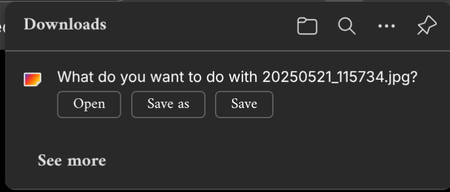
Latest Stable Linux build of Edge crashes when I download something.
When I download something from the internet and When I click save as the browser crashes, using RPM linux build on Fedora and using the latest stable version at the time of writing this discussion version Version 143.0.3650.139 (Official build) (64-bit)148Views1like1Comment
When using touch mode, clicking the "extension" button on the toolbar causes Edge to crash
Version 146.0.3844.0 (Official build) dev (64-bit) When using touch mode, clicking the extensions button on the toolbar causes Edge to freeze for two to three seconds before crashing. Accessing edge://extensions/ displays normal functionality, I can open extension detail pages and configure settings without issue. Reinstalling Edge or uninstalling all extensions resolves the problem. Disabling touch mode restores normal behaviour.27Views0likes1CommentiPhone Edge 144 "Send to devices" - "No Device found"
About a week ago, when Edge was on version 143, everything worked as expected. After updating to version 144, the “Send to devices” feature no longer detects any Windows computers on the same network. No settings were changed on my end — the only change was updating Edge to the latest version on both iPhone and Windows. Any ideas?Solved338Views5likes3Comments
Edge 144 Creates Multiple GNOME Menu Icons
Starting in Edge 144, there are now 2 icons displaying in the GNOME applications menu. com.microsoft.Edge.desktop microsoft-edge.desktop Both of these files are installed as part of the RPM; the first has "NoDisplay=true" at the bottom, but that doesn't seem to work as intended. I think this value needs to be in the first section, under "[Desktop Entry]", in order for it to work properly.Solved91Views1like1Comment
[Wayland] PWAs no longer appear as separate app windows — all group under main Edge icon
Hi, Since around 2025-09-07 to 2025-09-10, I’ve noticed that on GNOME (Wayland) all installed PWAs (even across different profiles) now appear grouped under the main Edge browser icon in the GNOME Shell dash/taskbar. Previously, each PWA would open in its own window group with its own icon. This is still the behavior in Chromium/Brave/Chrome, and can be restored there by editing the PWA’s .desktop file to set: StartupWMClass=<same value as Icon> However, Edge now seems to ignore StartupWMClass completely on Wayland, breaking workspace separation and making task switching hard. Environment: Ubuntu 25.04 GNOME 48.0 / Mutter (Wayland) Kernel 6.14.0-29 Intel Iris Xe GPU Edge (latest stable, observed post 2025-09-13) Repro steps: Install any PWA (e.g. Outlook, Teams, Spotify) from Edge Launch it (from any profile) Observe that it appears grouped under the main Edge browser icon Expected: PWA shows under its own icon and window group like in Chromium-based browsers Actual: All PWAs are bundled into the main Edge window group Editing StartupWMClass in the .desktop file no longer helps This regression makes PWAs much harder to manage on Wayland. Please route to the Linux/Wayland team if possible. Thanks!1.9KViews10likes17Comments
Video Super Resolution Missing Options in Setting
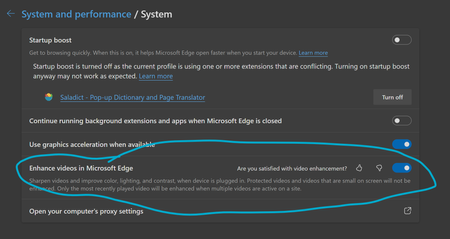
Enhance videos in Microsoft Edge (Flag: #edge-video-super-resolution) is missing critical options in setting, making it impossible to function properly. In Version 136.0.3240.29 (Official build) beta (64-bit), as well as the previous beta build, it is missing the option to choose from three methods of video enhancement, as shown in screenshot. Here is the setting from latest beta build: This is how it is supposed to look: Thus, beta build defaults to Microsoft Super Resolution and I can't find a way to use graphics driver enhancement like RTX Super Resolution, which is critical to my experience. Also, HDR is no longer supported when video enhancement is enabled, which I believe is a limitation of Microsoft Super Resolution.Solved11KViews23likes25CommentsBug: Empty bar at bottom of screen on Android 14 Honor 70 / MagicOS 8.0
After updating Microsoft Edge to version 142.0.3595.66 on Android 14 with MagicOS 8.0 on an Honor 70 smartphone, a permanent empty strip appears at the bottom of the screen when using gesture navigation. This issue was not present in previous versions, such as 141.0.3537.99. Disabling the "Edge-to-edge Everywhere" or "Edge-to-edge Tablet" flags does not resolve the problem. It seems to be related to the new edge-to-edge design introduced in the latest update. Please fix this issue or add an option to disable the bottom padding. Thank you.289Views0likes2Comments